
Are you feeling trapped with your current web hosting company? Maybe you’re dealing with slow loading speeds, frequent downtimes, or customer service that leaves much to be desired.
If you’re nodding your head, you’re not alone. Many people like you have outgrown their hosting providers or are simply ready for a change. Switching to a new web hosting company might seem daunting, but it doesn’t have to be.
Imagine a future where your website runs smoothly, your visitors are happy, and your online presence thrives. In this guide, you’ll discover a straightforward path to changing web hosting companies without any hassle. Ready to unlock the potential of your website? Let’s dive in!
Choosing The Right Hosting Provider
First, know what your website needs. How much space does your site need? A small blog needs less space. Big online stores need more. Traffic is also important. How many visitors do you expect? More visitors need better hosting. Security is key. Choose a host that protects your data. Backups are also important. Your host should save your data often. Support matters too. Good hosts offer help anytime. They answer questions fast. Think about these needs before choosing a host.
Next, compare hosts by features and pricing. Look at storage limits. Some hosts offer more space. Others might limit you. Check bandwidth. More bandwidth means more visitors can come. Uptime is important. Most hosts promise 99% uptime. This means your site stays online. Price matters too. Some hosts cost more. Some are cheaper. Read reviews. People share their experiences online. Consider contracts. Some hosts need long-term deals. Others are month-to-month. Compare these things to pick the best host.
Preparing For The Transfer
Always create a backup of your website. This is very important. It keeps your data safe. Use tools like FTP or cPanel. Download all files and databases. Store them safely on your computer. You might need them later. This step protects your work.
Collect all important details. Know your domain name and current hosting details. Keep login info ready. You will need it for the transfer. Make sure to have nameservers and DNS records. This helps in setting up the new host. Keep everything organized. It makes the process smooth.
Setting Up With The New Host
Begin by creating a new account on the hosting site. Use your email and a strong password. Write your password in a safe place. Next, set up your profile information. Include your name and address. Add a phone number if needed. This helps the host contact you. Check all details twice. Make sure everything is correct.
Access the new host’s control panel. Look for server settings. You might see options like PHP, MySQL, or DNS. Choose the settings that match your website needs. Adjust these settings carefully. Ask for help if you feel unsure. The host support team can guide you. They are there to help. Configuring correctly ensures your site runs well.

Credit: www.hostpapa.com
Transferring Your Website
Start by collecting all your website files. Download them from your current hosting. Use FTP software for this task. FileZilla is a good choice. Keep everything organized. Create a folder on your computer. Store all files there. Upload these files to your new hosting. Again, use FTP. Make sure everything uploads correctly. Check for missing files. Double-check all folders. Your site needs all its parts. Missing files cause errors. Errors mean broken site. Be thorough. Be careful.
Export your database from the old host. Use tools like phpMyAdmin. Save the database file. Ensure you have the complete file. Import this file to your new host. Again, use phpMyAdmin. Check for errors during import. Fix any issues quickly. Database holds your site’s data. It’s crucial. Double-check everything. Ensure all tables are intact. Missing data can cause problems. Problems disrupt your site. A smooth transfer is important. Take your time. Do it right.
Updating Domain Settings
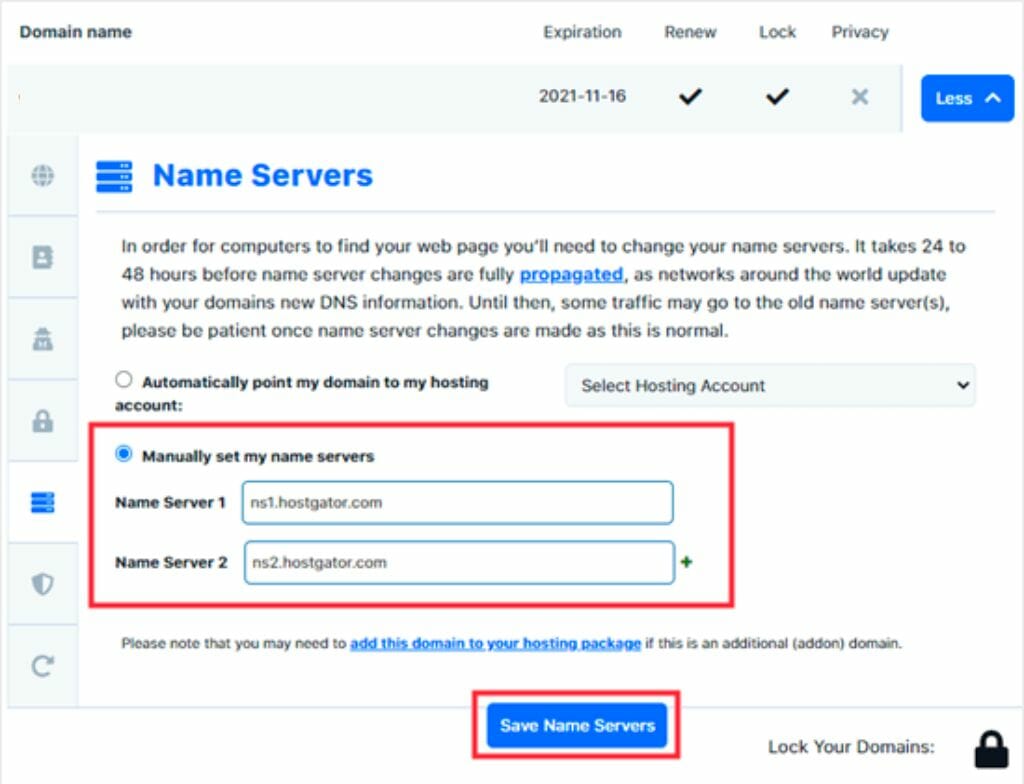
First, log into your domain registrar account. Find the DNS settings tab. Look for the current records. You need to update these with your new host’s details. Usually, you need to change the A record and CNAME record. These point your domain to the new server. Save the changes after updating. Wait for a few hours for the changes to take effect.
After changing DNS, check if the domain points correctly. Use online tools to test domain propagation. These tools show where your domain points worldwide. Sometimes, it might take up to 48 hours. Be patient and check again later if needed. Once the domain points to the new host, your site will be live. Congratulations, you have changed your web host successfully!
Ensuring Website Functionality
Links are like roads on your website. Make sure all links work. Click each link to check. Broken links can confuse visitors. They might leave your site. Check important pages first. Pages such as Home, Contact, and Products. These pages matter the most. Fix any broken links quickly. Use tools to help find broken links. Tools can save time.
Website speed is very important. Slow sites can lose visitors. Test your site’s speed regularly. Use online tools for testing. Faster sites keep visitors happy. Check loading times for images. Large images slow the site. Optimize images for speed. Monitor server response time. Quick responses improve user experience.
Finalizing The Transition
Switching web hosting companies involves careful planning and execution. Ensure smooth website migration by backing up data and updating DNS settings. Verify functionality on the new host to finalize the transition effectively.
Reviewing Site Security
Security is vital for your website. Check for strong passwords and updated software. Install a firewall to protect data. Ensure SSL certificates are valid. Monitor for suspicious activity regularly. Backup files often to keep them safe. Use antivirus tools to scan for threats.
Optimizing Speed And Performance
Speed matters for user experience. Compress images to load faster. Reduce server requests for better performance. Minimize script usage to avoid delays. Use a content delivery network (CDN) to speed up access. Regularly check site speed with online tools. Aim for quick loading times to keep visitors happy.
Credit: diggitymarketing.com
Post-transfer Tasks
Switching web hosting companies involves crucial post-transfer tasks. Update domain settings to point to the new server. Check website functionality to ensure everything works smoothly.
Updating Email Settings
Check your email settings after moving your website. Make sure your email is working. Change the server details in your email settings. Update the incoming and outgoing server information. This helps your email run smoothly. Test your email by sending a message. Ensure it reaches the recipient. Look for any errors and fix them quickly.
Notifying Users And Stakeholders
Inform all users about the change. Send a simple email to your users. Share the new web hosting details. Assure them everything is secure. Keep the message clear and short. Explain why the change happened. Thank them for their support. This builds trust and keeps everyone informed.

Credit: firstsiteguide.com
Frequently Asked Questions
Can I Change My Web Hosting Company?
Yes, you can change your web hosting company anytime. Start by choosing a new host, then transfer your files and domain. Ensure minimal downtime by planning the transition carefully. Check compatibility and backup data to avoid issues. Consult support if needed for a smooth migration process.
How To Transfer Web Hosting From One Company To Another?
To transfer web hosting, back up your website files and databases. Choose a new hosting provider and migrate your data. Update DNS settings to point to the new server. Test your site for functionality. Finally, cancel the old hosting plan once everything is running smoothly on the new host.
Can I Move My Website From Godaddy To Another Host?
Yes, you can move your website from GoDaddy to another host. Backup your files, transfer your domain, and update DNS settings. Most hosting providers offer migration support to simplify the process.
Can I Transfer My Domain To Another Host?
Yes, you can transfer your domain to another host. Ensure your domain is unlocked and obtain the transfer code. Follow the new host’s instructions for a smooth transfer process. This helps in managing domain and hosting services under one provider.
Conclusion
Changing web hosting companies can feel challenging. But it’s manageable with the right steps. Plan carefully. Backup your data. Choose a reliable new host. Make the switch smoothly. Keep your website’s needs in mind. Check for customer support. Test your website after moving.
Ensure everything works correctly. Be proactive to avoid issues. Stay informed about hosting options. This ensures your website runs efficiently. With patience and care, your hosting change will succeed. Enjoy your refreshed online presence.


