
Are you ready to unlock the secrets of the online world and take control of your digital presence? Imagine having your very own web host, a space where you can manage websites, host applications, and even start your own hosting business.
Whether you’re a tech enthusiast, a budding entrepreneur, or simply curious about how things work behind the scenes, this guide is for you. We’ll walk you through the essentials of creating a web host, breaking down complex concepts into simple steps.
By the end of this article, you’ll not only have the knowledge but also the confidence to create and manage a web host like a pro. Ready to dive in? Let’s get started!
Choosing The Right Hardware
Start with a powerful CPU. It helps run tasks smoothly. RAM is important too. More RAM means better performance. Choose a fast and reliable hard drive. SSDs work better than regular drives. They are faster and last longer. Look for a server with a good cooling system. This keeps the hardware safe.
Storage is crucial. Pick a server with enough space. Cloud storage can be an option. It offers flexibility and scalability. RAID systems help protect data. They make copies and keep data safe. Choose the right RAID level for your needs.
Ensure a stable and fast internet connection. This is vital for hosting. Bandwidth matters. More bandwidth lets you handle more traffic. Choose a host with a strong network card. This improves speed and reliability. Don’t forget security. Firewalls are important to protect your data.
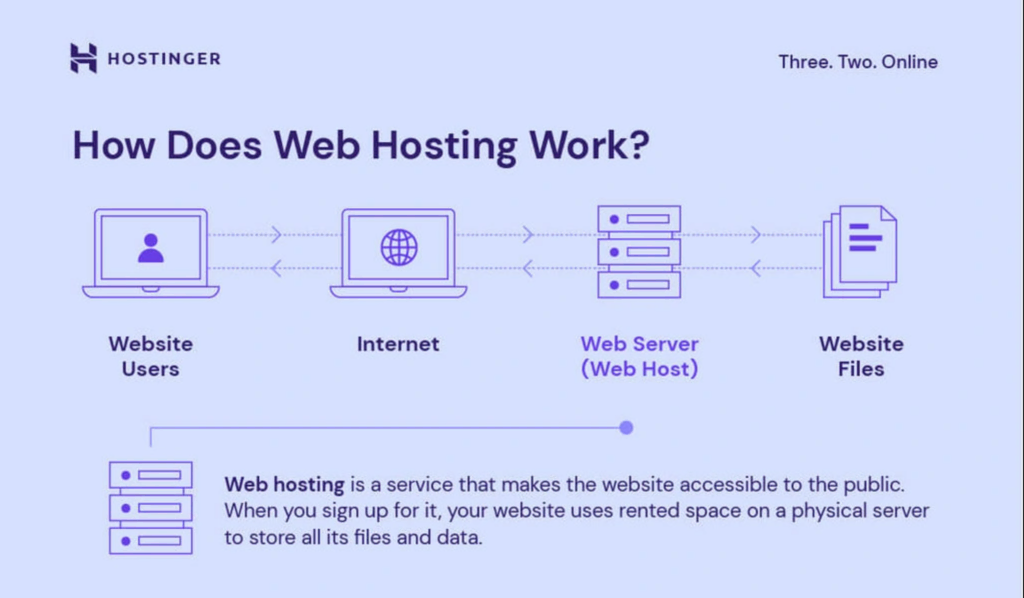
Credit: www.hostinger.com
Software Selection
Picking the right operating system is crucial. Windows and Linux are popular. Linux is often free and open-source. This makes it a favorite for many. Windows is user-friendly and familiar. Both have pros and cons. Linux is great for servers. Windows works well with many apps. Choose what fits your needs best.
A web server handles requests. Apache and Nginx are top choices. Apache is known for its stability. Nginx is fast and uses less memory. Apache is easy to set up. Nginx is good for static content. Both are open-source. Pick one based on your site’s needs.
Databases store site data. MySQL and PostgreSQL are common options. MySQL is easy and reliable. PostgreSQL offers advanced features. Both are open-source. MySQL is popular for web apps. PostgreSQL is great for complex queries. Choose based on the complexity of your data.
Setting Up The Server
Installing a web server needs patience. First, choose a reliable server software. Many prefer Apache or Nginx. Both are popular. Download the software from their official sites. Follow the installation steps carefully. Once installed, check if it runs. A simple command can test this. Type in your server’s IP in a browser. If it shows a page, it’s working.
After installation, configure your server. Open the configuration file. It’s often named “httpd.conf” or “nginx.conf”. Look for the document root setting. Set it to the folder with your web files. Don’t forget to save changes. Restart the server to see effects. Testing your changes ensures everything works.
Security is very important. Use a strong firewall to protect the server. This blocks harmful traffic. Also, enable SSL certificates. They secure data between users and the server. Always update your server software. This fixes security holes. Regular backups are crucial. They help recover data if needed.
Domain Management
A good domain name is important. It is your website’s address. Choose a name that is easy to remember. Visit a domain registrar to buy your domain. Make sure it’s available. Some popular registrars are GoDaddy and Namecheap. Once you pay, it’s yours for a year. You can renew it before it expires.
DNS settings connect your domain to your site. They tell browsers where to find your website. Change DNS settings in your registrar’s panel. Enter the correct IP address of your server. This process might take some hours. Check if your website works after changes.
Subdomains are part of your main domain. They look like this: subdomain.example.com. Use subdomains for different site parts. For instance, blog.example.com for a blog. Set up subdomains in your DNS settings. Follow similar steps as DNS configuration. Ensure each subdomain points to the right server location.
Hosting Control Panels
Web hosting requires control panels to manage servers efficiently. These panels simplify tasks like domain management, email setup, and file transfers. User-friendly interfaces make it easy for anyone to create and maintain websites without technical expertise.
Cpanel Features
cPanel is very popular for hosting websites. It offers easy tools to manage websites. Users can set up email accounts with a few clicks. It also helps with domain management. Backup tools are available. They protect data and files. Security tools help keep websites safe. cPanel is used by many people worldwide. Its features make website hosting simple.
Alternative Control Panels
Many alternatives to cPanel exist. Plesk is one option. It works well for Windows servers. Another choice is DirectAdmin. It offers a simple interface. Webmin is free and open-source. Each panel has unique features. Users can find one that suits their needs. Exploring these options is important.
User Interface Customization
Control panels allow customization of the user interface. Themes change how things look. Users can select their favorite colors. Icons can be customized too. This makes control panels more personal. Easy navigation is crucial. Customization helps achieve this goal. Everyone likes a panel that feels just right.

Credit: www.youtube.com
Monitoring And Maintenance
Creating a web host requires regular monitoring and maintenance. Check server performance and ensure optimal uptime. Regular updates help keep systems secure and efficient.
Performance Monitoring Tools
Good tools keep your website fast. Performance monitoring tools check how your site works. They find any slow parts. Tools like Google Analytics help. They show how long your page takes to load. Faster sites keep people happy. Slow sites make visitors leave.
Regular Updates
Updating software is important. Regular updates keep your web host safe. They fix problems and bugs. Old software can be risky. New updates protect your data. They also add new features. Always check for new updates. Set reminders if needed. This keeps your site secure.
Backup Solutions
Backups save your data. Backup solutions store a copy of your website. If something breaks, you can restore it. Use tools like Cloud Backup. They keep your data safe in the cloud. Always have a backup plan. It helps in emergencies. Never lose important files.
Scaling And Upgrading
Understand your website’s growth potential. Evaluate current traffic and future visitor trends. Consider the storage space you need. Look at the performance requirements for your site. Plan for possible expansion.
Enhance your web hosting by adding more resources. Increase bandwidth to handle more users. Add extra RAM for better speed. Consider more CPU power for complex tasks. Ensure your site stays fast and reliable.
Cloud hosting offers flexible solutions. Host your site on multiple servers. Improve uptime and reliability. Pay only for the resources you use. Scale up or down easily with cloud services.
Customer Support
Support Channels are crucial for web hosting. They help solve issues fast. Many hosts offer email and chat support. These channels are easy to use. Phone support is also common. It can be quicker than email. Always check the support hours. Some hosts provide support 24/7. This is helpful for urgent problems.
Troubleshooting Guides are handy tools. They help users fix common issues. These guides are often found on the host’s website. They are easy to follow. Steps are clear and simple. Video guides can be more helpful. They show the process step-by-step. Guides save time for both users and support staff.
Feedback Collection improves services. Hosts ask users for their opinions. Feedback helps in finding weak spots. Surveys are a common tool. They ask users about their experience. Good feedback leads to better services. Always share honest thoughts. It helps hosts grow and improve.

Credit: www.youtube.com
Frequently Asked Questions
Can I Create My Own Web Hosting?
Yes, you can create your own web hosting. Set up a server, install web hosting software, and configure it. Ensure a reliable internet connection and security measures. This approach requires technical knowledge and management skills. It can be cost-effective for small projects or personal use.
Can I Host My Website For Free?
Yes, you can host your website for free. Free hosting platforms like WordPress. com and Wix offer basic services. These options often include limited features and may display ads. Upgrading to paid plans provides more control and customization options.
How Do I Host My Website?
Choose a web hosting provider and register a domain. Set up your website on the hosting platform. Upload your website files using FTP or a website builder. Configure DNS settings to link your domain with your hosting. Test your website to ensure it’s live and functioning properly.
Is Google Web Hosting Free?
Google offers free hosting for small websites using Google Sites. For larger projects, Google Cloud provides paid hosting services. Pricing varies based on resources and services required. Google Sites is ideal for simple websites and basic needs, while Google Cloud suits advanced requirements.
Conclusion
Creating a web host is simpler than you might think. Start small. Focus on reliability and speed. These are crucial for success. Ensure your server is secure. Protect your users’ data. Regular updates keep things running smoothly. Don’t forget customer support.
It’s vital for resolving issues quickly. With dedication and care, your web host will thrive. Offer competitive pricing. Attract more users with affordability. Keep learning and adapting. The tech world changes fast. Stay ahead of the curve. Your web host can grow and succeed.
Just take it one step at a time.


