
Have you ever stared at a stunning PSD design and wondered how you could turn it into a dynamic, fully functional WordPress theme? If you’re looking to bridge the gap between beautiful design and practical functionality, you’re in the right place.
Converting a PSD file into a custom WordPress theme might seem daunting at first, but with the right guidance, you can transform your static design into a living, breathing website. Imagine the satisfaction of seeing your unique design come to life, engaging visitors, and enhancing your online presence.
You’ll discover the step-by-step process to do just that, making it easy for you to follow along and achieve the results you desire. Ready to dive in and unlock the potential of your PSD designs? Let’s get started!
Preparation Steps
Start by collecting all the needed tools. You will need Photoshop to open PSD files. Next, get a code editor like Sublime Text or Visual Studio Code. These editors help to write and edit code easily. A local server like XAMPP or MAMP is also important. It lets you test the website on your computer. Lastly, install WordPress on your local server. This helps to see changes live.
Look at your PSD design closely. Notice the color schemes, fonts, and layout. Try to understand the design’s flow. This helps in making the theme look the same. Take notes of important parts. For example, note the header size and footer details. Knowing the design well makes coding easier and faster.
Credit: www.fiverr.com
Setting Up The Environment
Begin by installing WordPress on your computer. Use tools like XAMPP or WAMP. These tools create a local server. WordPress needs a server to run. Install the software, then download WordPress. Place WordPress files in the server’s root directory. Open your browser and type localhost to start the setup. Follow the steps to install WordPress. Now your local WordPress is ready.
Choose a code editor you like. Visual Studio Code is popular. It helps with coding. You also need a tool to convert PSD files. Photoshop is good for this. Use it to export images and styles. Install a browser like Chrome. This will help test the theme. Use browser tools to check and debug code. These tools make development easier.
Html And Css Conversion
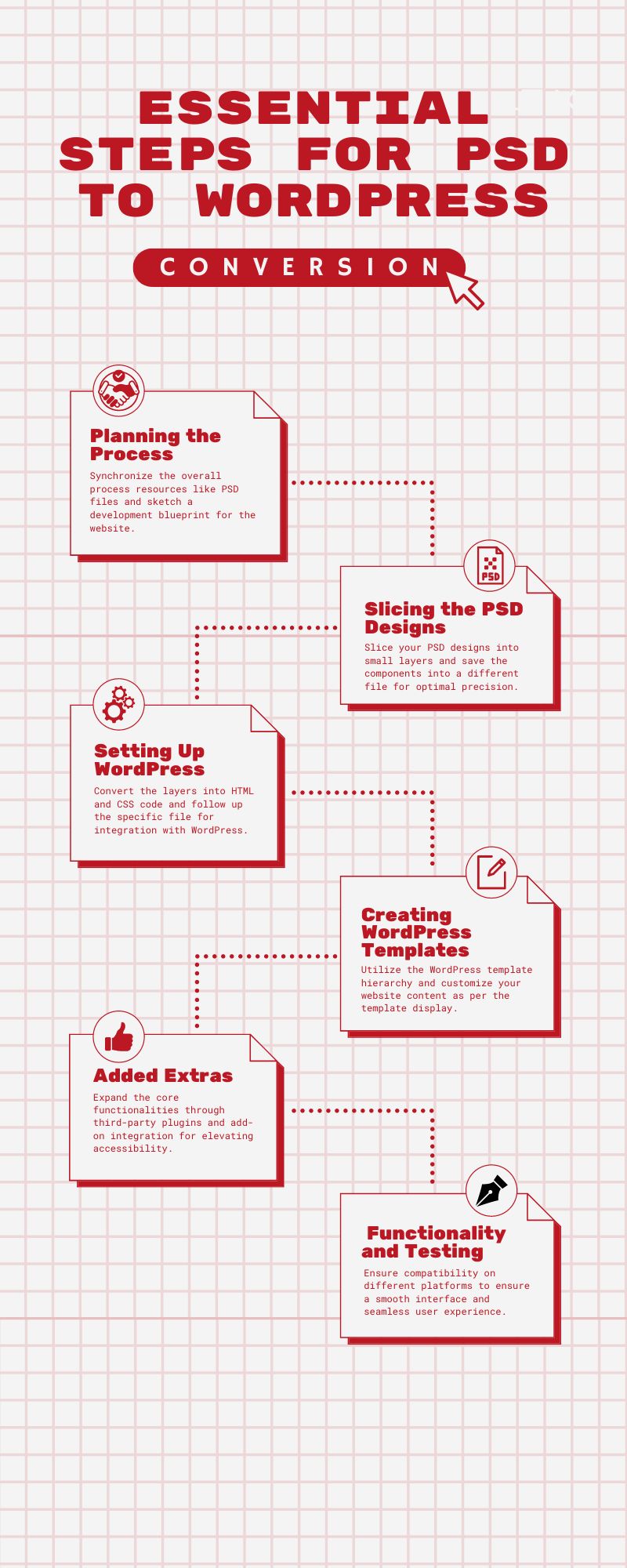
Start by slicing the PSD file into smaller images. Use tools like Photoshop. These images will be used in the theme. Ensure each element is saved separately. This helps in easy coding. Name your files clearly. Make sure the images are of high quality. This will give the theme a clean look.
Create an HTML file. This will be the base. Use simple tags like , . Structure your code well. This makes it easy to style later. Organize the content logically. Use comments to note important parts.
Use CSS to style your HTML. Link a CSS file to your HTML. Change colors, fonts, and sizes. Make it look like the original PSD. Use classes and ids for specific styling. Keep your CSS clean. This makes future changes simple.

Credit: getdevdone.com
Integrating Html With WordPress
Transforming a PSD design into a custom WordPress theme involves integrating HTML code with WordPress. Start by slicing the PSD file into HTML elements. Then, convert HTML to a dynamic WordPress theme using PHP. This process helps maintain design integrity while enabling WordPress functionalities.
Create WordPress Theme Files
Start by creating basic theme files. These files include style.css, index.php, and functions.php. The style.css file is essential. It holds your theme’s design information. Index.php is the main template file. It’s where the content will show up. Functions.php allows customization. You can add special features here. Together, these files make a simple WordPress theme.
Integrate Header And Footer
Separate your HTML header and footer. Save them as header.php and footer.php. Use get_header() and get_footer() in your other files. This includes these sections automatically. It keeps your code neat. It also makes updates easier. Just change one file, and the whole site updates. Headers and footers are like the bookends of your site. They hold everything together.
Setup The Loop For Dynamic Content
The Loop is a key part of WordPress. It displays posts dynamically. Use if ( have_posts() ) and while ( have_posts() ) functions. These help to fetch and display your posts. Each post is wrapped in the_post(). This function sets up post data. Use the_title() and the_content() to show post titles and content. The Loop is powerful. It brings your WordPress site to life.
Adding Theme Features
Transforming a PSD into a custom WordPress theme involves integrating unique design elements. This process requires converting visual designs into functional code, ensuring the theme is responsive and customizable. Attention to detail is key for maintaining the original design’s aesthetics.
Implement Custom Menus
Custom menus make navigation easy. They help users find pages fast. To implement, use WordPress functions. Add these to your theme’s functions.php file. This registers menus. Then, add menu locations in your theme. You can place them in the header or footer. Let users add links easily. Custom menus improve site organization. They enhance user experience.
Add Widget Areas
Widget areas allow flexible content. You can add them to sidebars or footers. Widgets show useful info like recent posts. Add widget areas by modifying your theme files. Use WordPress functions to register new widget areas. This helps users customize their site. Widgets make sites dynamic. They keep content fresh and engaging.
Customize Theme Options
Theme options let users personalize their site. Use WordPress Customizer for this. Users can change colors, fonts, and layouts. Add options to your theme using functions.php. This makes customization easy. Users enjoy making sites their own. Simple options enhance user satisfaction. They make themes versatile.
Testing And Debugging
Transforming a PSD into a custom WordPress theme involves careful testing and debugging. Ensure each element functions smoothly and resolves any errors that arise. This guarantees a seamless, user-friendly experience for visitors navigating the site.
Check Cross-browser Compatibility
Websites must work on all browsers. Test on Chrome, Firefox, and Safari. Different browsers can show pages differently. Ensure they look the same. Use tools to help with testing. Fix issues if found. This makes the site user-friendly.
Ensure Responsive Design
Websites should fit all screens. This includes phones, tablets, and desktops. Check how the site looks on each. Adjust images and text if needed. Use CSS media queries. They help change the site for different devices. This keeps users happy.
Debug Code Errors
Errors can break a site. Use tools to find bugs. Web browsers have developer tools. They help spot errors. Look for red warnings in the console. Fix these to keep the site working. Test again after fixing. This ensures everything runs smoothly.
Finalizing And Launching
Transforming a PSD file into a custom WordPress theme involves finalizing design elements and launching the theme. This process ensures the website looks professional and functions smoothly, aligning with the original design intent.
Optimize For Performance
Speed is key. A fast site keeps visitors happy. Compress images and files. Use lightweight plugins. Minimize CSS and JavaScript. Choose a reliable hosting provider. This ensures quick loading times. Test your site’s speed using online tools. Make adjustments as needed for best results.
Prepare For Deployment
Backup everything. Safeguard your work. Check each function of the theme. Ensure every feature works smoothly. Fix any bugs or errors. Set up a staging site. Test it before going live. This prevents surprises later. A smooth deployment avoids many problems.
Launch The Theme Live
Ready to go live? Double-check everything. Ensure all links work. Test on different devices. Your site must look good everywhere. Inform users about the launch. Use social media and newsletters. Celebrate your hard work. A successful launch is rewarding.
Credit: www.htmlpanda.com
Frequently Asked Questions
What Is A Psd File?
A PSD file is Adobe Photoshop’s native format. It’s used for storing layered images for design projects. Designers use PSD files to create visual elements, such as layouts and graphics. These files are perfect for designing websites before converting them to WordPress themes.
Why Convert Psd To WordPress Theme?
Converting PSD to a WordPress theme offers flexibility. It allows custom design implementation and better site management. WordPress themes are user-friendly and SEO-optimized. They support plugins and can be easily updated, making them a popular choice for web development.
Can I Convert Psd To WordPress Myself?
Yes, you can convert PSD to WordPress yourself with the right skills. You need knowledge of HTML, CSS, and PHP. Familiarity with WordPress theme development is essential. Numerous online tutorials and resources can guide you through the process effectively.
How Long Does Conversion Process Take?
The conversion process duration varies. It depends on the complexity of the design and your skill level. A simple design may take a few days, while complex ones could take weeks. Efficient planning and execution can streamline the process.
Conclusion
Creating a custom WordPress theme from PSD files is easy. Follow each step carefully. Your website will look unique and professional. You have learned the basics of conversion. Practice makes the process smoother. Keep exploring new techniques. Enhance your skills over time.
Always remember to test your theme. Ensure it functions well on different devices. Your site should be user-friendly and responsive. A custom theme adds personal touch. It reflects your brand identity. Feel confident in your ability to create stunning websites.
Start your journey today. Build something amazing with WordPress.


