
Imagine transforming your WordPress site into a unique masterpiece that truly reflects your brand or personal style. Sounds exciting, right?
Creating a custom theme for WordPress might seem like a daunting task, but with the right guidance, you can do it yourself. Picture this: a video that walks you through the process, step-by-step, making it all seem surprisingly simple. This guide is designed to help you unlock the power of customization, empowering you to craft a website that stands out from the crowd.
You won’t just learn how to build a theme; you’ll discover how to create an online presence that’s as unique as your fingerprint. Dive in and see how easy it can be to elevate your WordPress site with your very own custom theme!
Choosing A Design Concept
Understanding your audience is key. Ask what they like. Colors and styles matter. Young people like bright colors. Older people might prefer soft tones. Make a list of what they love. Their needs should guide your theme choice.
Explore popular themes for ideas. Check out websites for inspiration. Look at current design trends. Minimalist designs are in demand. Bright colors and fun fonts stand out. Combine trends to create something new. Make sure your theme is unique.
Setting Up Development Environment
Creating a custom WordPress theme video requires setting up a development environment. Start by installing WordPress locally. Next, use a code editor like Visual Studio Code. This helps in writing and editing your theme files.
Installing WordPress Locally
Start by installing WordPress on your computer. Use Local by Flywheel or XAMPP. These tools help you run WordPress without a live server. First, download and set up the software. Next, configure WordPress using your local database. Create a new site. Choose a name. Set the PHP version. Now, WordPress is ready for development.
Essential Plugins And Tools
Install important plugins for theme development. Use Advanced Custom Fields for custom fields. WP Debugging helps find errors. Install Theme Check to ensure theme standards. Use Query Monitor for database queries. These tools help create a good theme. Plugins make development easier. They provide essential features. They save time.
Creating A Child Theme
WordPress themes help you design your website. A parent theme is the main theme. It has all the features and designs. A child theme uses the parent theme. It allows you to change styles without losing updates. This keeps your site fresh and safe.
- Create a new folder in your theme directory.
- Name it after your child theme.
- Add a style.css file to the folder.
- Inside the file, write a comment block with theme info.
- Include the parent theme’s stylesheet.
- Add a functions.php file for extra features.
- Activate the child theme in your WordPress dashboard.
Customizing Theme Files
Style.css is important for your theme’s look. Change colors and fonts here. Make sure to back up your file first. This prevents losing work. Open the file in a text editor. Search for colors or fonts you want to change. Edit them to your liking. Save changes and refresh your site. See new styles instantly. Be careful with code. Small mistakes can break the design. Testing changes is always a good idea.
Functions.php adds special features to your theme. You can add widgets, menus, or scripts. Open it in a text editor. Write code to add new functions. Always copy the original file first. This helps if you need to undo changes. Try small edits first. Test each change to make sure it works. If something breaks, use your backup file. This restores your site quickly. Avoid big changes if you’re not sure. Ask for help if needed.
Designing The Layout
HTML is the building block of websites. It creates the structure. Use tags to add elements. Div tags are like boxes. CSS styles these boxes. Colors, fonts, and spacing are controlled by CSS. This makes the site look nice. Adjust margins and padding for layout. Use flexbox or grid for alignment. They make organizing easy. Change styles by editing the style sheet. HTML and CSS work together. They make a strong team.
JavaScript adds action. It makes pages interactive. Buttons can change colors. Images can move. Add scripts for effects. Use functions to organize code. They perform tasks. Variables store data. JavaScript listens for user actions. It responds quickly. Events trigger actions. Clicks or keypresses are events. JavaScript can modify HTML elements. It can add or remove classes. This changes appearance. JavaScript brings life to web pages.
Incorporating Video Elements
Selecting the correct video format is crucial for your website. MP4 is a popular choice. It is compatible with most devices. WebM is another option. It offers excellent compression and quality. Both formats are great for web use. Ensure the format you choose is supported by browsers. This ensures a smooth viewing experience for users.
Video players need embedding in your WordPress theme. Use the HTML5 video tag for simple integration. You can style the player with CSS. This makes the player match your theme. Adjust colors, borders, and size. This gives a unique look to your site. Ensure controls are user-friendly. Accessible controls improve user experience.
Testing And Debugging
Browsers show websites in different ways. Test your theme on Chrome, Firefox, and Safari. Each browser has its quirks. A theme must work well on all. Some features may break on older browsers. Ensure that your theme does not rely on features that are not supported. Use tools like BrowserStack or CrossBrowserTesting to check. Fix any issues that arise. This will make sure your theme reaches more users.
The theme should look good on all devices. Check the theme on phones, tablets, and desktops. Use responsive design tools to test. Make sure text and images fit the screen. Buttons should be easy to tap on mobile. Adjust the layout if needed. Use media queries to make changes. This ensures that all users have a great experience.
Credit: www.wpzoom.com
Optimizing For Performance
Creating a custom WordPress theme video boosts site performance. Tailor the design to fit specific needs. Enhance speed by optimizing images and scripts.
Minifying Css And Javascript
Minifying CSS and JavaScript helps speed up websites. Smaller files load faster. Remove unnecessary spaces and comments. This reduces file size. Use tools like CSSNano for CSS. Terser can minify JavaScript. These tools are easy to use. They make code cleaner and quicker. Fast websites improve user experience. Better speed can boost site ranking. Search engines love fast sites.
Optimizing Video Loading Times
Videos can slow down pages. Use lazy loading to delay video load. Videos load only when users scroll. This saves bandwidth. It speeds up page load. Convert videos to lighter formats. WebM and MP4 are good choices. These formats reduce file size. Compress videos before uploading. Smaller files load faster. Fast video loading keeps users happy. They stay longer on pages.
Launching The Custom Theme
Discover the steps to creating a custom WordPress theme through an engaging video tutorial. Learn how to personalize your website’s design effectively. Gain insights into theme development and make your WordPress site truly unique.
Migrating From Development To Live
Moving your WordPress theme from development to live is important. First, ensure all plugins are up-to-date. This prevents errors. Next, check your theme’s compatibility with the latest WordPress version. Also, make sure all custom features work as planned.
Create a backup of your site. This keeps your data safe. Use tools like Duplicator or UpdraftPlus. These tools help you copy your site easily.
Finally, test your site on different devices. Check it on phones and tablets. This ensures a great user experience.
Final Checks Before Going Live
Before going live, run a speed test. Use tools like GTmetrix or Pingdom. A fast site improves user satisfaction.
Ensure all links work correctly. Broken links frustrate users. Use a tool like Broken Link Checker. This tool finds issues quickly.
Lastly, review your content. Make sure everything is easy to read. Simple language helps everyone understand.
Credit: dilip-parmar.in
Updating And Maintenance
Keep your WordPress theme updated for safety. Updates fix bugs and add new features. These updates are very important. They protect your site from hackers. Check for updates often. At least once a month. Always use the latest version.
Security is crucial. Install security plugins. They help block attacks. Keep backups of your site. Backups save your work if something goes wrong. Use strong passwords. Change them regularly. Never use simple words. Protect your admin area with two-step verification.
Always look for ways to make your theme better. Ask users for feedback. They can tell you what they like. And what they don’t like. Make small changes over time. Test new ideas on a test site. Not your main site. This avoids problems.
Check your site speed. A fast site is good for users. And search engines. Use tools to measure speed. Improve images and code if needed. Keep learning about WordPress. New things come out all the time. Stay updated with news and tips.
Credit: smashballoon.com
Frequently Asked Questions
What Is A Custom Theme In WordPress?
A custom theme in WordPress is a personalized design template. It allows you to tailor the appearance and functionality of your website. By creating a custom theme, you can ensure your site aligns with your brand identity. This process involves modifying code or using theme builders.
How Do I Start Creating A WordPress Theme?
To start creating a WordPress theme, set up a local development environment. Use tools like XAMPP or MAMP. Then, familiarize yourself with WordPress coding standards and template hierarchy. Begin by creating a basic HTML structure and gradually integrate WordPress functions and styles.
What Tools Are Best For Theme Creation?
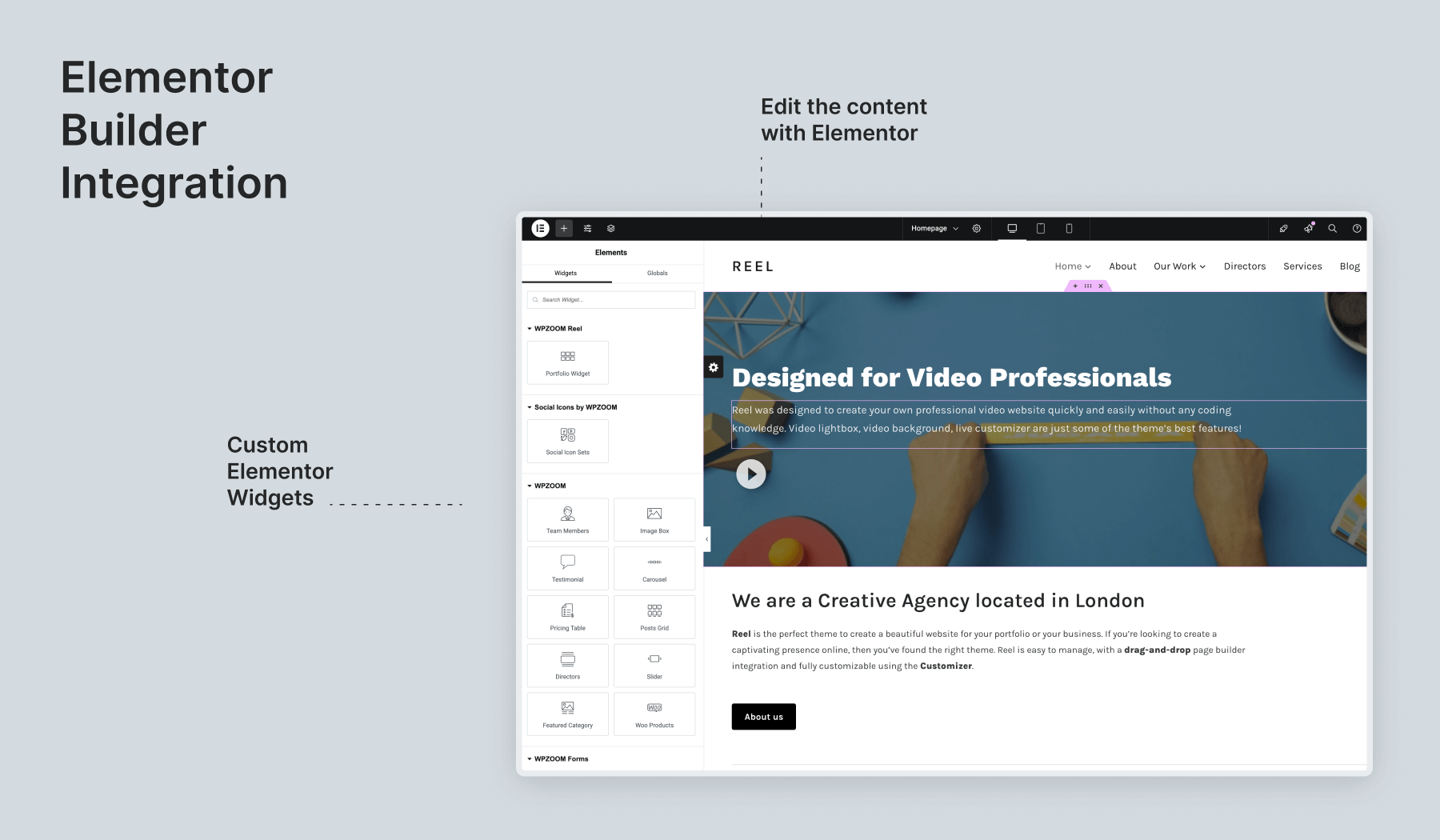
Tools like WordPress Theme Builder, Elementor, and Divi are excellent for theme creation. They offer drag-and-drop functionality and customization options. These tools help streamline the process, even for beginners. Advanced users may prefer coding directly using PHP, CSS, and HTML.
Can I Use Videos In My WordPress Theme?
Yes, you can incorporate videos into your WordPress theme. Videos can enhance user engagement and communicate your message effectively. Use plugins or embed codes to add videos. Ensure they are optimized for fast loading and are responsive across devices.
Conclusion
Creating a custom WordPress theme video is easier than you think. Follow simple steps to design your unique website look. Use tools like WordPress, CSS, and PHP. These tools help to customize layouts and colors. Make sure your theme matches your brand’s style.
Test your theme to ensure it works well on different devices. Keep experimenting with features to refine your design. Learning to create themes can boost your web skills. Start today and give your site a fresh appearance. Your creativity is the key to a personal touch in web design.


