
Are you frustrated with the tiny or oversized font on your WordPress site? The font size plays a crucial role in making your content readable and visually appealing.
Imagine visitors landing on your site and squinting to read tiny text or scrolling past because the font is too big. You don’t want that, right? Changing the theme font size in WordPress can seem daunting, especially if you’re not a tech guru.
But don’t worry; you’re not alone. Many WordPress users face this challenge, and the good news is that it’s easier to tackle than you might think. In this guide, you’ll discover simple steps to adjust your theme’s font size, ensuring your website looks perfect and keeps visitors engaged. Ready to transform your site’s readability? Let’s dive in!
Accessing The WordPress Dashboard
To change the font size, first log into your WordPress account. Use your username and password. Once logged in, find the Dashboard on the left side. This is where you control your website. Click on “Appearance” to see more options. Next, click on “Customize”. This opens a new page. Here, you can change the font size. Look for “Typography” or “Fonts” settings. Make changes as needed. Save your changes by clicking “Publish” or “Save”. Always preview changes before saving. This ensures everything looks good.

Credit: colibriwp.com
Navigating To Appearance Settings
Start by logging into your WordPress dashboard. Locate the Appearance option on the left-hand menu. Click on it to reveal more options. Choose Customize to enter the theme settings. This section allows you to change many things. Find the Typography option. This is where you adjust font settings. Sometimes, it may be under a different name. Look around if you don’t see it.
Click on Typography to open font settings. You will see font size options. Choose the size you prefer. Make sure you like how it looks. Preview changes before saving them. Remember to click Publish to save your changes. Your website will now have the new font size. Easy, right?
Using The Customizer For Font Size
Easily adjust the font size in WordPress by using the Customizer. This tool allows you to change theme font size without coding. Enhance readability and style with simple steps.
Locating The Typography Section
First, open your WordPress dashboard. Find the Appearance section. Click on Customize. This opens the Customizer. Look for the Typography section. It might be under different names. Some themes call it Fonts. Others might use Text settings. It’s easy to find. Just look around.
Adjusting Font Size Settings
Once in the Typography section, options are visible. Font size settings are important. Look for Font Size sliders or boxes. Adjust numbers to change size. Make text bigger or smaller. Changes show live on your site. Click Save when happy. This keeps your new settings. Your site’s text looks great now.
Editing Css For Custom Font Sizes
Begin by opening your WordPress dashboard. Navigate to the Appearance menu. Click on Customize. Look for the Additional CSS option. This is where you can add new CSS rules. It’s important to type the rules correctly. Otherwise, changes won’t appear. Save your work by clicking Publish.
Use CSS to change font sizes. Find the element you want to adjust. Common elements include h1, h2, and p. Type a rule like this: h1 { font-size: 20px; }. This rule changes the font size. Always use the correct units like px or em. Make sure to preview changes. Adjust until it looks right.
Installing A Plugin For Font Control
To change font size, install a plugin. Start by choosing the right plugin. Many plugins offer font control. Look for plugins with good reviews. Make sure they are updated regularly. Popular choices include Easy Google Fonts and Advanced Editor Tools.
Choosing The Right Plugin
Some plugins are easy to use. Others offer more options. Choose one that fits your needs. Check if it works with your theme. Compatibility is important. You can read user reviews for guidance. Reviews will help you understand plugin features.
Configuring Plugin Settings
After installation, configure the settings. Open the plugin menu. Look for font options. Adjust sizes as needed. Some plugins have sliders. Sliders make it easy to change font size. Save changes to apply them. Preview your site to see the new sizes.
Testing And Previewing Changes
WordPress allows easy theme font size changes. Testing changes helps you find the perfect look. Previewing lets you see how it looks. Preview before saving. Adjust font sizes as needed. Check every page. Ensure readability for all ages. Consistency is key across your site. Different pages need a similar font size. This makes your site look neat. Happy readers are more likely to return. Changes can be undone if needed. Always check mobile view. Mobile users are important. A clear font helps them. Testing and previewing are steps you should not skip.
Saving And Publishing Your Changes
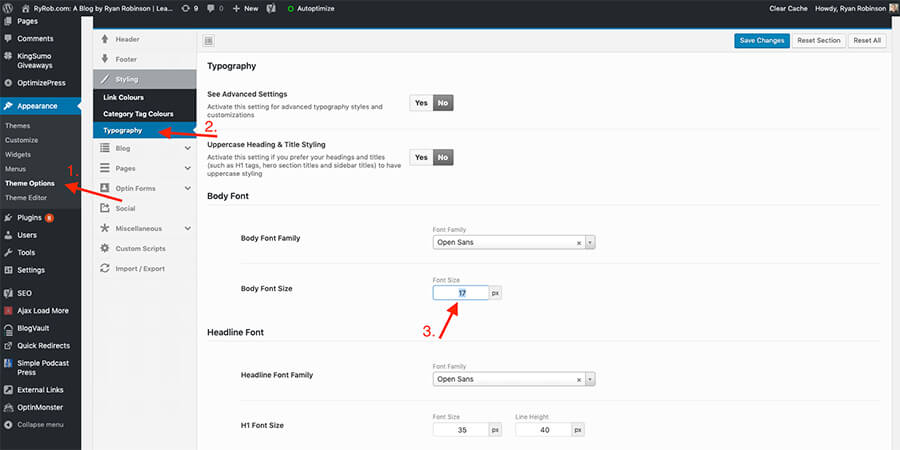
After adjusting the font size, it’s crucial to save your changes. Click on the “Save Changes” button. This ensures your settings are stored. Look for the “Publish” button next. This will make your changes live on the site.
Check your site to see the changes. Sometimes, refreshing the page helps. If changes aren’t visible, clear your browser cache. This often solves visibility issues.
Remember, saving and publishing are different steps. Saving stores settings; publishing makes them public. If you skip publishing, changes won’t show online.
Credit: www.ryrob.com
Troubleshooting Common Issues
Adjusting font size in WordPress themes can enhance your site’s readability. Navigate to the Appearance section, select Customize, then Typography to find font settings. Experiment with sizes to achieve the desired look without affecting other design elements.
Dealing With Theme Restrictions
Some themes do not allow changing font size easily. This can be frustrating. Check your theme options first. Look for typography settings. If unavailable, you might need custom CSS. Use a child theme for changes. This keeps your changes safe. Updates won’t erase them. Understand your theme’s limits. They can vary greatly. You might need a plugin. Plugins help adjust font sizes. Popular ones are Easy Google Fonts or TinyMCE.
Ensuring Compatibility With Mobile
Fonts must look good on all devices. Mobile screens are small. Large fonts can be hard to read. Test your site on different screens. Use responsive design methods. Media queries in CSS can help. They adjust fonts for mobile. Keep font sizes consistent. This improves user experience. Users will stay longer. They can read content easily.

Credit: cyberchimps.com
Frequently Asked Questions
How Do I Adjust Font Size In WordPress Theme?
To adjust font size in a WordPress theme, go to Appearance, then Customize. Look for Typography or Fonts section. Here, you can change font size for headings and body text. Save changes to update your site. If options are limited, consider using a custom CSS plugin.
Can I Change Font Size Without Coding?
Yes, you can change font size without coding by using the WordPress Customizer. Navigate to Appearance, then Customize. Look for Typography settings. This allows you to adjust font size easily. If your theme doesn’t support this, consider using a plugin like Elementor for more control.
What Plugin Helps With Font Size Changes?
Elementor is a popular plugin for changing font size in WordPress. It offers a user-friendly interface to customize fonts and sizes. Another option is the Customizer plugin, which enhances theme customization features. Both plugins allow font adjustments without coding knowledge.
Are All WordPress Themes Font-size Adjustable?
Not all WordPress themes have adjustable font sizes. Some themes offer built-in typography settings, while others require custom CSS. If your theme lacks font-size options, consider using a plugin. Ensure your theme supports the changes you want before installing any plugin.
Conclusion
Changing the theme font size in WordPress is a simple task. It enhances readability and improves your site’s appearance. Follow the steps carefully to adjust the font size. Use the WordPress customizer for ease. Try different sizes to find what suits your site best.
Remember, balanced fonts improve user experience. Keep experimenting until you’re satisfied with your site’s look. Regular updates to your site’s design can attract more visitors. Stay creative with your theme design. Make your website visually appealing and user-friendly. Enjoy customizing your WordPress site.


