
Are you tired of your WordPress theme’s default font and yearning for a fresh look? Changing the font can make a huge difference in how your website feels to visitors.
It can enhance readability, reflect your brand’s personality, and even improve user engagement. Imagine your website standing out with a unique font that captures attention and keeps visitors browsing longer. You’ll discover simple steps to change the font of your WordPress theme without any technical headaches.
Ready to transform your site’s appearance and create a more inviting experience for your audience? Let’s dive in!
Choosing The Right Font
Fonts can be fun. Some are serious. Others are playful. Think about how you want your site to feel. Match the font to that feeling. Consider the type of content you have. Different fonts fit different messages.
Readability is key. Fonts should be easy to read. Big letters help. Avoid very small text. Choose fonts with clear shapes. Accessibility means everyone can read. Some fonts are hard for some people. Think about all your readers.
Many fonts are popular. Arial is clean. Times New Roman is classic. Comic Sans is fun. Google Fonts has many choices. Choose what fits your site best. Try a few options to see what looks good.
Accessing WordPress Dashboard
Start by opening your browser. Type in your website address. Add /wp-admin at the end. Enter your username and password. Click the Login button. Now, you are inside the WordPress dashboard.
Find the sidebar on the left. Look for the Appearance option. Click it to open more choices. Select Customize from the list. This opens the theme settings. Choose Typography to change fonts. Pick a font style you like. Save your changes. Refresh your page to see the new look.
Using Theme Customizer
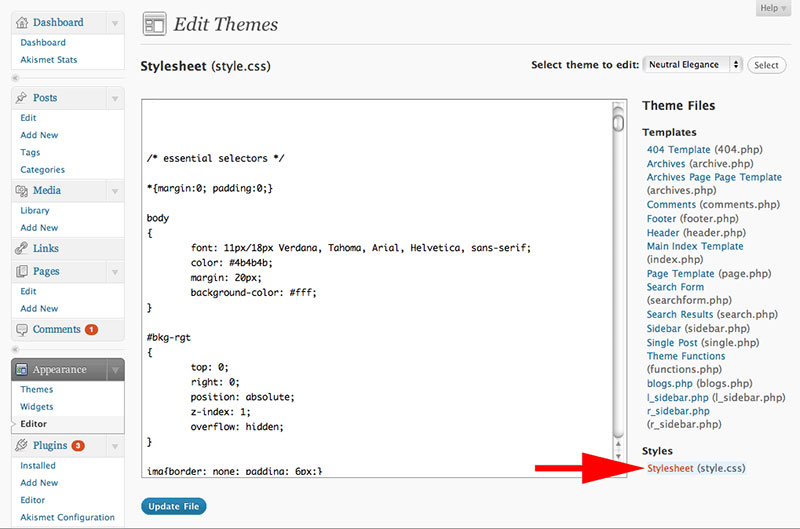
First, find the Customize Option in the WordPress dashboard. It is usually under the “Appearance” menu. Click on it to open the Theme Customizer. This is where you can make changes to your site’s look.
Next, go to the Typography Settings section. Here, you can see all the font settings. You can choose different fonts for headings and body text. Make sure to pick a font that is easy to read.
Finally, change the Font Family and Size. You can select a new font from the list. You can also adjust the size of the text. Bigger fonts are easier for everyone to read. Don’t forget to save your changes before you exit. This will update your site’s font style.
Credit: wpdatatables.com
Editing Theme’s Css
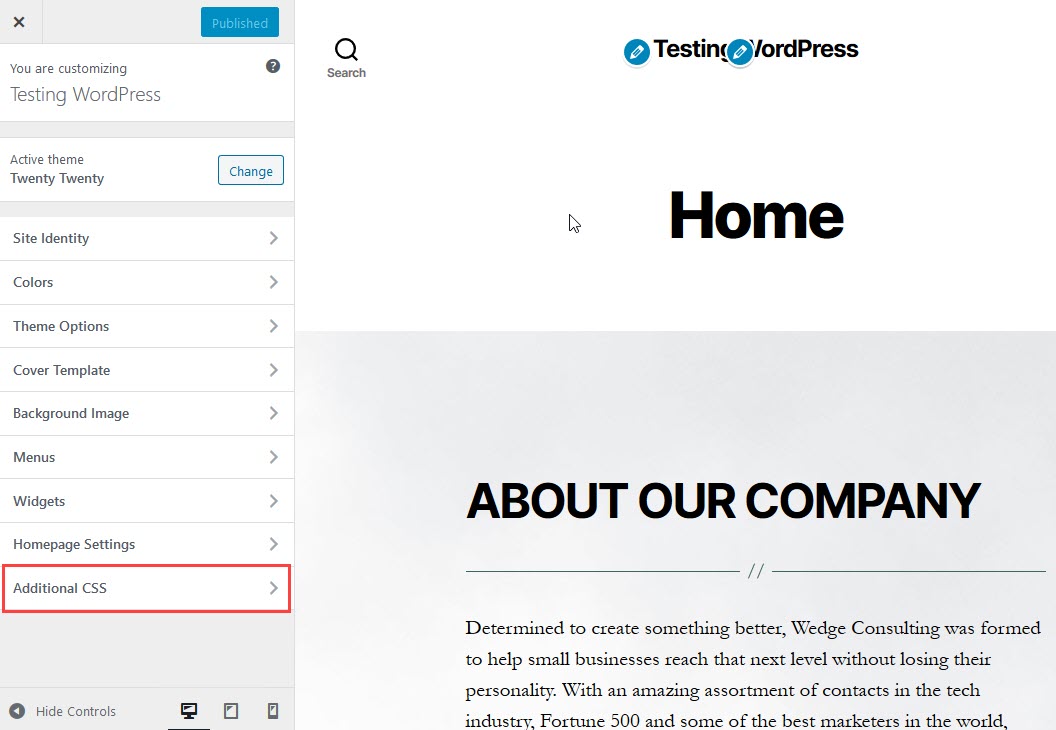
To change the font, first, open your WordPress dashboard. Click on Appearance and then Customize. Look for the Additional CSS option. This is where you can add new styles. It is a simple way to change your theme without touching core files.
You need a font URL. Websites like Google Fonts provide these URLs. Copy the font link and paste it in the Additional CSS. Add CSS rules for fonts. For example, use font-family to set your chosen font. Make sure to target the right elements like body or h1.
After adding the code, click on Save and Publish. This will apply the changes. Preview your site to see the new font. If it looks good, you are done. If not, you can go back and edit. Change font sizes or styles as needed.
Installing Font Plugins
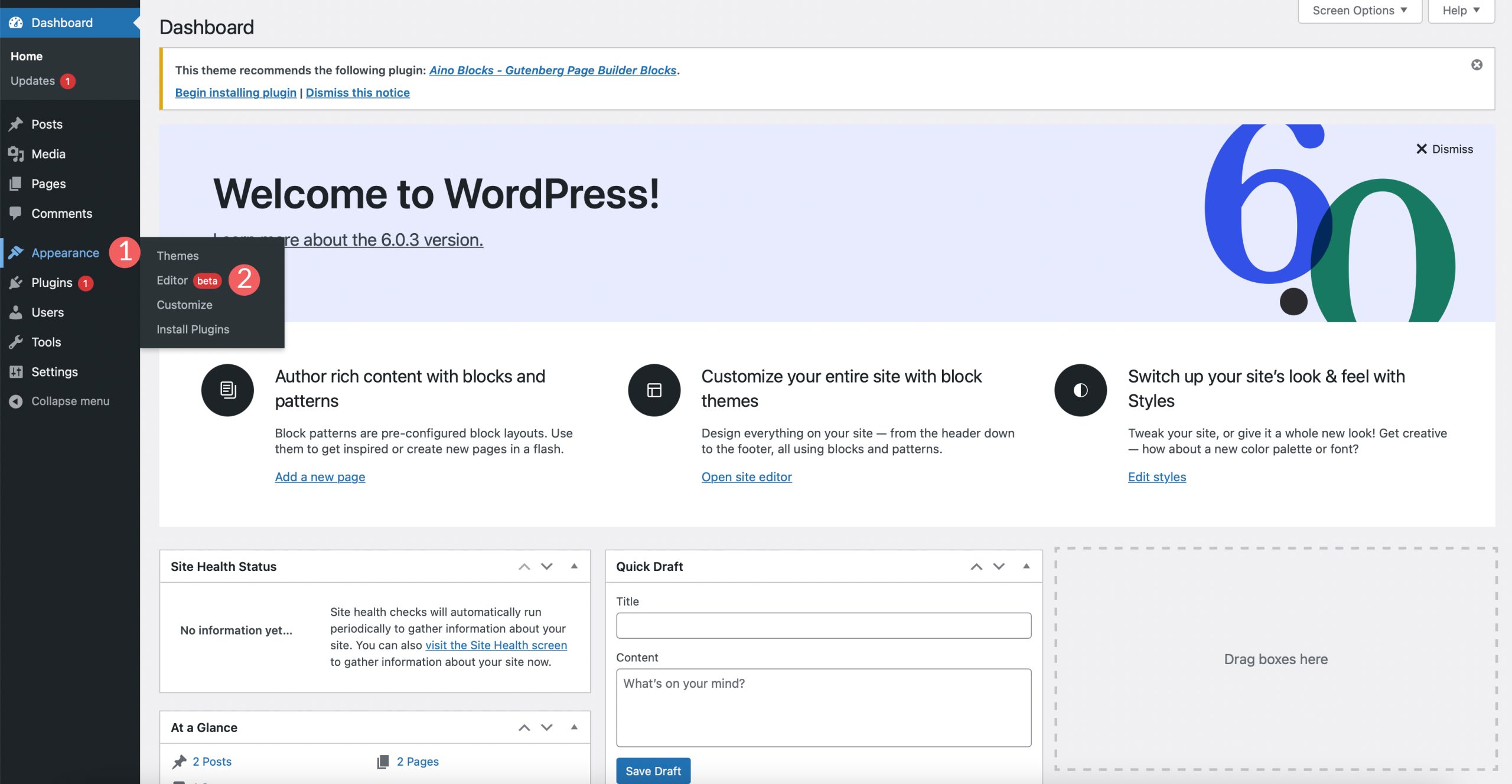
Start by opening your WordPress dashboard. Use the search bar to find font plugins. Look for plugins with good reviews. Ratings help in choosing the best plugin. Pay attention to plugin descriptions. Some offer extra features. Choose a plugin that suits your needs.
Click on the plugin you like. Press the install button. Wait for the installation to finish. Then, click activate. Activation makes the plugin ready to use. Now, the plugin is part of your WordPress site.
Find the plugin settings in your dashboard. Open settings to change fonts. Choose the font style you like. Some plugins allow color changes too. Save your settings to apply changes. Check your site to see the new fonts.
Credit: www.elegantthemes.com
Testing Font Changes
Check Across Different Devices to see if the new font looks good. Use a phone and a tablet. Try a computer too. The font should be clear and easy to read on all screens. If it looks strange, you might need to adjust it.
Ensure Compatibility with Browsers like Chrome, Firefox, and Safari. Open your site in each browser. Make sure the font stays the same. Some fonts may not work in all browsers. Test to avoid surprises later.
Troubleshooting Common Issues
Changing the font of a WordPress theme often involves accessing the theme’s customizer or editing CSS files. Start by navigating to the WordPress dashboard, select Appearance, then Customize. Locate the Typography or Additional CSS section to apply your desired font changes.
Resolve Font Display Problems
Fonts may not show correctly on WordPress themes. This is a common issue. Check the theme settings first. Make sure the font is selected. Clear the browser cache. This helps in loading new fonts. Fonts can be stored in the cache. Try reloading the page. If the problem persists, check for plugin conflicts. Plugins can cause issues with font display.
Address Plugin Conflicts
Plugins may clash with theme fonts. Disable plugins one by one. This helps find the problem plugin. Update all plugins regularly. Updates fix bugs and improve compatibility. Use a plugin conflict tester. This tool helps spot conflicts. Choose plugins wisely. Make sure they are compatible with your theme. Always check the reviews and ratings. Good plugins have high ratings.
Credit: www.inmotionhosting.com
Frequently Asked Questions
How Do I Change My WordPress Theme Font?
To change your WordPress theme font, navigate to the “Customize” section in your WordPress dashboard. Select “Typography” or “Fonts” and choose your preferred font from the available options. If your theme doesn’t support this, consider using a plugin like “Easy Google Fonts” for more customization options.
Can I Use Custom Fonts In WordPress?
Yes, you can use custom fonts in WordPress. Use plugins like “Use Any Font” or “Custom Fonts” to upload and apply your preferred fonts. Alternatively, you can manually add custom fonts via CSS if you’re comfortable with coding.
Are Google Fonts Compatible With WordPress?
Yes, Google Fonts are compatible with WordPress. You can easily integrate them using plugins like “Easy Google Fonts. ” This allows you to choose from a wide range of fonts and apply them to your theme without coding.
What Plugins Help Change WordPress Fonts?
Plugins like “Easy Google Fonts” and “Use Any Font” help change fonts in WordPress. They offer easy integration of various fonts, including Google Fonts and custom fonts. These plugins are user-friendly and require no coding skills to implement.
Conclusion
Changing your WordPress theme’s font is simple and effective. It customizes your site’s look. Enhance readability and create a unique style. Start by accessing the WordPress dashboard. Choose a theme that allows font changes. Use plugins if needed. Experiment with different fonts.
Ensure they match your brand’s personality. Check mobile responsiveness. Test different devices. Make sure your text is clear. This process boosts user engagement. Visitors enjoy a well-designed site. A small change can make a big difference. Keep your content fresh and visually appealing.
Enjoy your newly styled WordPress site!


