
Are you ready to take your WordPress site to the next level? Creating your own WordPress theme might sound like a daunting task, but it’s easier than you think.
Imagine having complete control over your website’s look and feel, tailored exactly to your vision. No more settling for generic templates or limited customization options. By crafting your own theme, you can stand out and make your website truly unique.
In this guide, we’ll break down the process into simple, manageable steps. Whether you’re a seasoned developer or a curious beginner, you’ll find the insights and tips you need to create a theme that reflects your style and meets your site’s specific needs. Dive in to discover how you can transform your ideas into a custom WordPress theme, and unlock the full creative potential of your website.
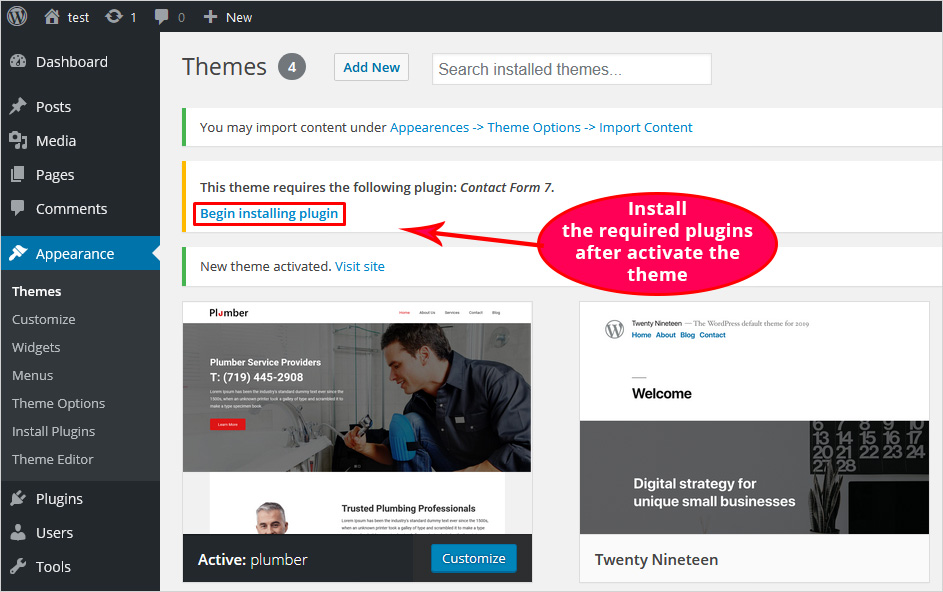
Credit: blog.templatetoaster.com
Choosing The Right Tools
Starting with the right software is key. Text editors are vital for coding. Popular options include Sublime Text and Visual Studio Code. They help write clean code easily.
Image editing tools like GIMP or Photoshop help design visuals. These tools make your theme look nice and professional. Browsers like Google Chrome or Firefox are needed for testing. They help you see how your theme looks online.
Setting up a local server is essential. XAMPP or WAMP are good choices. They create a server on your computer. This lets you test your theme locally.
A version control system like Git is useful too. It tracks changes in your code. It helps keep your work organized and safe.

Credit: www.greengeeks.com
Understanding WordPress Theme Structure
Creating your own WordPress theme involves understanding its structure. This includes templates, stylesheets, and functions. Start by learning how these components interact to create a cohesive design. Understanding these basics helps in crafting a theme that is both functional and visually appealing.
Key Components
WordPress themes have important parts. These parts help build your site. The style.css file gives your theme a look. It has the design rules. The index.php file shows the main content. It is the heart of your theme. The functions.php file adds extra features. It can do many things. The header.php file sets the top part. This is where the logo goes. The footer.php file shows the bottom part. Here is where links and info go.
File Hierarchy
WordPress themes have a special file order. This order helps the theme work. The style.css file is often on top. It has theme info and design. The index.php file is next. It displays the content. Under these, many files come. Files like header.php and footer.php. They set up the top and bottom. The functions.php file is also important. It can be anywhere in the list. This order keeps the theme organized.
Starting With A Basic Theme
Begin by making a new folder. Name it after your theme. Add important files inside. These include style.css and index.php. The style.css file holds your theme’s details. It also includes styles for your website. The index.php file is where the main content displays. Both files are needed for a theme to work. Create a simple functions.php file next. This file adds features to your theme. Now, you have the basic structure ready.
Use style.css to add colors and fonts. Keep styles simple at first. Use easy-to-read fonts. Add colors that match your brand. A good style makes websites look neat. Use CSS to add padding and margins. These create space around elements. Don’t forget to test your styles. Check if everything looks good on all devices. A well-styled site is important.
Incorporating Custom Features
Crafting a WordPress theme with custom features enhances the website’s functionality and appearance. Start by identifying essential elements like layout, colors, and typography. Integrating plugins and widgets provides unique capabilities, tailoring the theme to specific needs.
Using WordPress Functions
Building a custom WordPress theme is fun. Start with WordPress functions. These functions help you add special features. Use get_header() to call the header. Add get_footer() for the footer. Want a sidebar? Call get_sidebar(). Use wp_enqueue_script() to add scripts. Stylesheets? Use wp_enqueue_style(). Functions help your theme work well. They make it easy to manage content. You can add custom menus. Use register_nav_menu() for this. Functions are like magic keys. They unlock the theme’s potential. With practice, you’ll get better. Your theme will look great!
Integrating Widgets And Menus
Widgets and menus make your theme lively. They add useful features. Widgets go in the sidebar or footer. Menus help users find pages easily. Add widgets with register_sidebar(). Create custom menus with register_nav_menus(). Place widgets in specific areas. Use dynamic_sidebar() to display them. For menus, use wp_nav_menu(). This function shows the menu where you want. Widgets and menus improve user experience. They make navigation smooth. Users will enjoy your theme. It’s important to test everything. Ensure all features work properly. Your theme should be user-friendly.
Designing The Layout
Responsive designs make websites look good on all devices. Use CSS to control layout and style. It helps in adjusting the website on different screens. Use media queries in CSS for responsive designs. These queries apply different styles for different screen sizes. Mobile screens need special care.
JavaScript adds interactive features. It can change elements on the page without reloading. Use JavaScript for menus that expand or slideshows. Make sure everything works smoothly. Test on phones and tablets. Responsive designs are important for user experience.
CSS and JavaScript are key tools for WordPress themes. CSS handles the design part. It sets colors, fonts, and positions. JavaScript brings life with animations and effects. Combine them for dynamic websites. Think about easy navigation and user-friendly interfaces.
Keep code clean and organized. Use comments to explain sections. Test your design often. Check on different browsers. This ensures everything looks nice and functions well.

Credit: www.youtube.com
Testing And Debugging
Creating your own WordPress theme involves meticulous testing and debugging to ensure functionality. Identify errors by using debugging tools and testing on multiple devices. This process ensures your theme runs smoothly and provides a seamless user experience.
Ensuring Browser Compatibility
Different browsers show websites in different ways. It is important to check your theme on Chrome, Firefox, Safari, and Edge. This ensures users have a smooth experience. Use tools like BrowserStack or CrossBrowserTesting. They help you see how your theme looks on each browser. Always keep your code simple and clean. This helps with compatibility. Use standard HTML and CSS. Avoid fancy tricks that may not work everywhere.
Fixing Common Errors
Errors can make your theme behave badly. Check for missing files or broken links. These are common mistakes. Use the browser’s console to find errors. It shows you what is wrong. Always test your theme with different content. This ensures it works well. Validate your HTML and CSS using W3C tools. They help you find mistakes. Fixing errors makes your theme better.
Optimizing For Performance
Reduce file size for faster loading. Remove spaces and comments from code. Use tools like UglifyJS or CSSNano. Smaller files mean quicker downloads. Users get content faster. Boosts site speed and improves user experience.
Faster sites keep users happy. Compress images to reduce size. Lazy load images to delay loading. Use browser caching to store data locally. This speeds up repeat visits. Optimize server settings for better performance.
Preparing For Launch
Creating your own WordPress theme involves understanding the basics of HTML, CSS, and PHP. Start by setting up a local development environment. Customize your theme using templates and stylesheets to fit your vision.
Conducting Final Checks
Ensure all theme files are in place. Check if images display correctly. Verify that links work and go to the right pages. Look for broken elements on the site. Test your theme on different browsers. Make sure the theme looks the same everywhere. Use a mobile device to check if it is responsive. Fix any issues that you find before launching.
Deploying Your Theme
First, back up your current site. Install your new theme in WordPress. Go to the Themes section and activate it. Check your site again after activation. Make sure everything looks good. If something breaks, check your code. Fix any problems before announcing the new theme. Tell your users about the update. Share on social media or email. Enjoy your new and improved WordPress site!
Frequently Asked Questions
What Tools Do I Need For Theme Development?
To create a WordPress theme, you’ll need a code editor, FTP client, and graphic design software. A local development environment like XAMPP or MAMP is also helpful. These tools assist in coding, testing, and designing your theme efficiently. Familiarity with HTML, CSS, PHP, and WordPress functions is essential.
How Do I Start Creating My Theme?
Begin by setting up a local development environment. Create a new theme folder in your WordPress installation. Design a basic layout in HTML/CSS. Convert it into PHP using WordPress functions. Follow the WordPress theme hierarchy for file structure. Test your theme thoroughly before deploying.
What Files Are Essential In A WordPress Theme?
A WordPress theme requires several key files. The most essential are style. css, index. php, header. php, footer. php, and functions. php. Each file serves a specific purpose in the theme structure. These files help in styling, layout, and adding functionality to your theme.
How Can I Customize My Theme Design?
Customize your theme design using CSS for styling and PHP for dynamic content. Add custom templates for pages and posts. Use WordPress hooks and filters to modify theme behavior. Experiment with fonts, colors, and layouts to match your vision. Regular testing ensures your customizations work smoothly.
Conclusion
Creating your own WordPress theme can be rewarding. This process helps customize your site uniquely. Start with a clear design plan. Use basic coding skills to build functionality. Test your theme thoroughly for bugs. Ensure it’s responsive and mobile-friendly. Regular updates keep it fresh and secure.
Seek feedback from users. Incorporate improvements based on their suggestions. Remember, patience is key. With practice, your skills will improve. Enjoy the creative journey of theme design. Your personalized theme will enhance your WordPress experience. Happy designing!


