
Are you ready to bring your web application to life in the cloud? Hosting your application in Azure can seem daunting at first, but it doesn’t have to be.
Imagine having a reliable, scalable platform that supports your business needs and grows with you. By choosing Azure, you’re tapping into a powerhouse of resources that can transform your digital presence. In this guide, you’ll discover the steps to effortlessly host your web application using Azure’s robust infrastructure.
Whether you’re a seasoned developer or just starting out, this process is designed to be straightforward and efficient. Ready to dive in and unlock the potential of Azure for your web application? Let’s get started!
Azure Web Hosting Basics
Azure offers many benefits for web hosting. It provides a scalable environment. This means your website can grow. You only pay for what you use. Security is another strong point. Azure has built-in security features. These keep your data safe. You also get global reach. Your site can be accessed from anywhere. Azure is also easy to use. The interface is simple and friendly. Support is available 24/7. This means help is always there when needed.
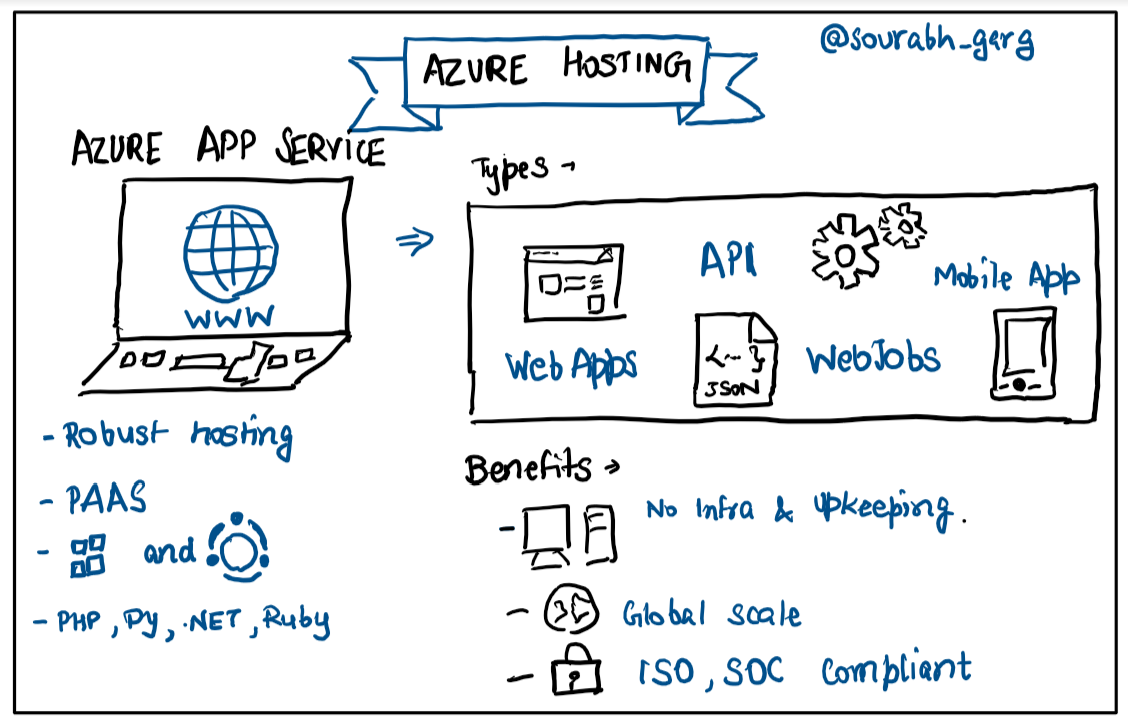
Azure hosting includes several key parts. Virtual Machines are one part. They run your applications. App Services provide a platform for apps. These services make deployment simple. Azure Storage holds your data. It’s reliable and secure. Azure SQL Database is for storing data in tables. It is fast and easy to use. Load Balancers distribute traffic. This keeps your site running smoothly. You can trust Azure for hosting your web applications.
Credit: faun.pub
Setting Up Your Azure Account
Visit the Azure website to start. Find the sign-up button. Click it. Enter your email and create a password. Follow the instructions. You might need a credit card for verification. Azure offers a free tier for beginners. Explore its features without spending money.
Azure has different subscription plans. Choose one based on your needs. The Pay-As-You-Go plan is flexible. You pay for only what you use. There are also enterprise plans. These are for big companies. Read about each plan carefully. Pick the one that fits your project.
Preparing Your Web Application
Ensure your code works with Azure. Check the framework version. Make sure it is up-to-date. Azure supports many frameworks. For example, .NET, Node.js, and Python. Choose the right version for your app. Test your app locally. Fix any errors. This saves time later.
List all your app’s dependencies. These are the libraries and tools it needs. Check if Azure supports them. It is important for smooth operation. Update any outdated dependencies. Use tools like npm or pip. Ensure all dependencies are included. This ensures your app runs without issues.

Credit: build5nines.com
Choosing The Right Azure Service
Azure App Service is simple to use. It helps host web apps easily. This service supports many languages. For example, .NET, Java, and Python. It handles auto-scaling and load balancing. It’s great for small apps. With a few clicks, your app goes live. It also offers built-in security. Safety is important.
Azure Virtual Machines give more control. You set up a custom server. This is good for bigger projects. You can choose the operating system. Windows or Linux, your choice. More control but needs more work. It is a solid choice for flexibility.
Azure Kubernetes Service manages containers. Containers help run apps smoothly. It’s perfect for large-scale apps. It automates many tasks. This includes scaling and updates. Good for complex needs. But it’s more complex to manage. Best for expert users.
Deploying Your Web Application
Azure Portal is a user-friendly tool. It lets you deploy web apps easily. Start by logging into your Azure account. Navigate to “App Services”. Click “Create”. Fill in the required fields. Choose your preferred operating system. Set up your app configuration. Review your settings carefully. Click “Review + Create” to finalize. Azure Portal provides a simple interface. It guides you through each step. It is perfect for beginners. Follow the prompts for a seamless experience.
Azure Command Line Interface (CLI) is powerful. It offers flexibility for deployment. Open your terminal to start. Install Azure CLI if needed. Use commands to log in. Type az login and follow instructions. Create a resource group with az group create. Deploy your app using az webapp create. Specify your app name and settings. Command line tools give precise control. They are ideal for advanced users. They allow for automated processes. Learn basic commands for efficiency. Practice regularly to improve skills.
Configuring Application Settings
Environment variables are like secret codes for apps. They help apps run better. With Azure, set these codes easily. This makes the app work in many places. Securing passwords and keys is very important. Keep them safe using environment variables. This way, bad people can’t see them. If you need to change settings, just update the environment variables. No need to change the whole app. It’s fast and simple. This makes your app stay secure and flexible.
Scaling means making your app bigger or smaller. Azure helps your app grow or shrink. This helps when many people use your app. Auto-scaling is a tool that adjusts your app size automatically. It makes sure the app runs smoothly. You can also choose to scale manually. This means you decide when to make changes. Azure lets you control this easily. Ensure your app is always ready for users.
Monitoring And Maintenance
Ensuring a web application runs smoothly in Azure involves regular monitoring and maintenance. Checking performance metrics helps identify issues early. Routine updates keep the application secure and efficient.
Azure Monitoring Tools
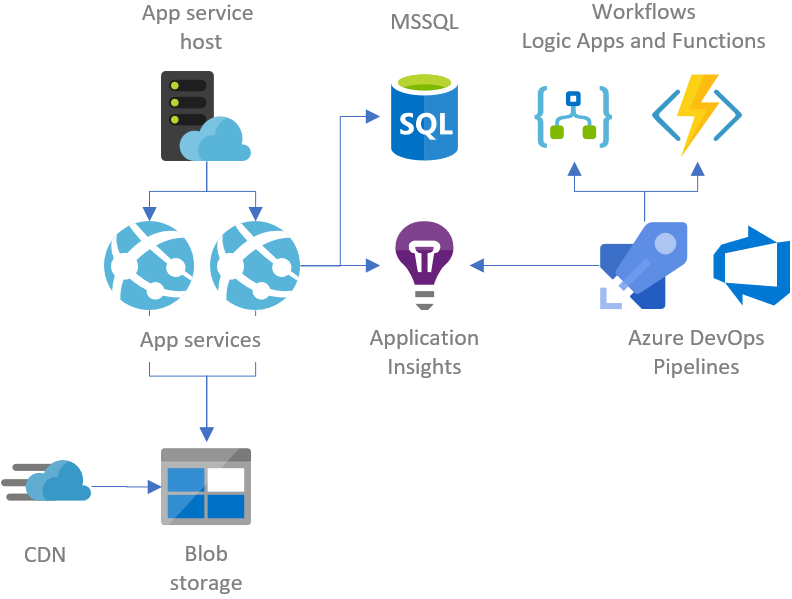
Azure offers many tools for monitoring your web app. Azure Monitor is a popular choice. It helps track app performance. Alerts can be set for any issues. Log Analytics provides deep data insights. Azure Application Insights is another tool. It tracks user activity and detects errors. These tools help keep your app running smoothly.
Regular Updates And Backups
Keeping your app updated is important. Updates fix bugs and add features. Regular backups are crucial too. They protect your data from loss. Azure Backup is a great service for this. It automates the backup process. Always ensure your backup is up to date. This keeps your app secure and reliable.
Credit: gunnarpeipman.com
Security Best Practices
Use strong passwords for all accounts. Limit access to sensitive data. Only trusted users should have access. Multi-factor authentication helps secure accounts. Regularly update user permissions. Remove access for inactive users. Monitor access logs for suspicious activity.
Encrypt data both in transit and at rest. Use SSL/TLS for secure connections. Azure Storage offers encryption options. Protect your data with advanced encryption methods. Always ensure encryption keys are safely stored. Regularly audit encryption settings. Update encryption practices as technology evolves.
Cost Management In Azure
Azure helps you plan costs. Use the Azure Pricing Calculator. It shows you different prices. You can compare options easily. Select the services you need. Watch the costs change. This tool helps you avoid surprises. Plan ahead. Stay within budget.
Use only what you need. Azure lets you stop and start services. This saves money. Use Azure Advisor. It gives tips for saving. Turn off unused services. Choose the right size for your needs. Pay for what you use. Keep things simple. Save money.
Frequently Asked Questions
Can Azure Be Used To Host A Website?
Yes, Azure can host websites. It offers various services like Azure App Service and Virtual Machines. Azure provides scalability and flexibility for web hosting needs. Its global infrastructure ensures high availability and performance. Azure also supports multiple programming languages and frameworks.
How To Onboard An Application In Azure?
To onboard an application in Azure, first create an Azure account. Set up resources using Azure Portal or CLI. Configure necessary services like databases and storage. Deploy your application using Azure DevOps or other tools. Monitor performance and scale resources as needed.
How Do I Host An Html Website On Azure?
Host your HTML website on Azure by creating a storage account. Upload files using Azure Storage Explorer. Enable static website hosting in the Azure portal. Configure your domain and access your website through the provided URL. Azure’s reliable infrastructure ensures smooth website operation and security.
How Do I Host A .net Application In Azure?
Host a. NET app in Azure by creating a Web App service. Deploy using Azure DevOps or Visual Studio. Configure your app settings, scale, and monitor performance through the Azure portal. Use Azure SQL Database for data storage and manage resources effectively for optimal performance.
Conclusion
Hosting a web application on Azure is straightforward. Azure provides flexible tools. You can scale your app quickly. Security features keep your data safe. Start small, then expand as needed. Azure’s support ensures smooth operations. Follow steps carefully to avoid errors.
Test your application thoroughly before going live. Use Azure’s resources wisely. Monitor performance regularly. This helps improve user experience. Remember to update your app often. Stay ahead in the tech world. Azure offers a strong platform for growth. Ready to host your web application?
Azure awaits your next move.


