
Imagine having a WordPress site that loads faster, performs better, and keeps visitors engaged longer. Sounds great, right?
Well, achieving this could be easier than you think. Compressing your WordPress theme files is a straightforward yet powerful way to enhance your site’s speed and efficiency. But how do you do it without getting tangled in technical jargon or risking your website’s design?
In this guide, you’ll discover simple techniques to compress your theme files without hassle. You’ll learn why file compression is crucial for your site’s performance and how it can help you stay ahead in the competitive digital landscape. Ready to give your WordPress site the boost it deserves? Let’s dive in!

Credit: www.wpzoom.com
Importance Of Compressing Theme Files
Compressing theme files makes your website load faster. A fast website keeps visitors happy. They won’t leave quickly. Faster sites also rank better on search engines. This means more people can find you. Smaller files save storage space on your server. This can reduce hosting costs. Compressing files can be easy and safe. Many tools help you do it. They won’t harm your site. Always make a backup before compressing. This keeps your data safe. If something goes wrong, you can restore it. Keep your site fast and secure. Compress your theme files regularly.
Credit: kriesi.at
Benefits Of Compression
Compression makes your site faster. Files get smaller. Smaller files load quickly. Visitors see pages fast. No waiting. Speed keeps them happy.
Users love fast sites. They find what they need fast. No frustration. No delays. Easy navigation keeps them coming back. Happy users mean more visits.
Search engines love speedy sites. Faster sites rank higher. Higher rankings mean more visibility. More people find your site. Better SEO brings more traffic. Traffic helps your site grow.
Identifying Files For Compression
CSS and JavaScript files are key for a website’s look and feel. They can be very large. Large files make the site slow. Compressing them helps. Use tools like Minify or Uglify. They can make files smaller. This means pages load faster. Always keep a backup of the original files. This way, you won’t lose any data. Compression can improve user experience. A fast website is a happy website.
Images take up a lot of space. They can make a site slow. Use tools like TinyPNG or ImageOptim. These tools make images smaller. Smaller images load faster. They use less data. Always check image quality after compressing. It should still look good. Use the right format. JPEG is good for photos. PNG is best for graphics.
HTML files are the structure of your site. They can be optimized too. Use tools like HTMLMinifier. This tool makes the files smaller. It removes extra spaces and lines. Smaller files load faster. Keep a copy of the original file. Just in case you need it later. A clean HTML file is easy to read. It helps in site maintenance.
Tools For Compressing Files
Online tools make file compression easy. They work directly in your browser. TinyPNG and Compress JPEG are popular choices. These tools reduce image sizes without losing quality. Online tools are often free. They save time and space on your server. Always check your file before and after compression.
Plugins simplify file compression on WordPress sites. WP Smush and EWWW Image Optimizer are great plugins. They automatically compress images as you upload them. These plugins help keep your site fast. You can find them in the WordPress plugin directory. Always keep your plugins updated for best results.
Manual methods give you full control. Use software like GIMP or Photoshop for images. WinRAR and 7-Zip help with other files. This method takes more time but can be more precise. Always back up your files before starting. Check file quality after compression to ensure satisfaction.
Step-by-step Compression Guide
Always make a backup of your theme files first. This ensures you don’t lose important data. Use a reliable plugin or tool. Store your backup in a safe place. This step protects your work from mistakes.
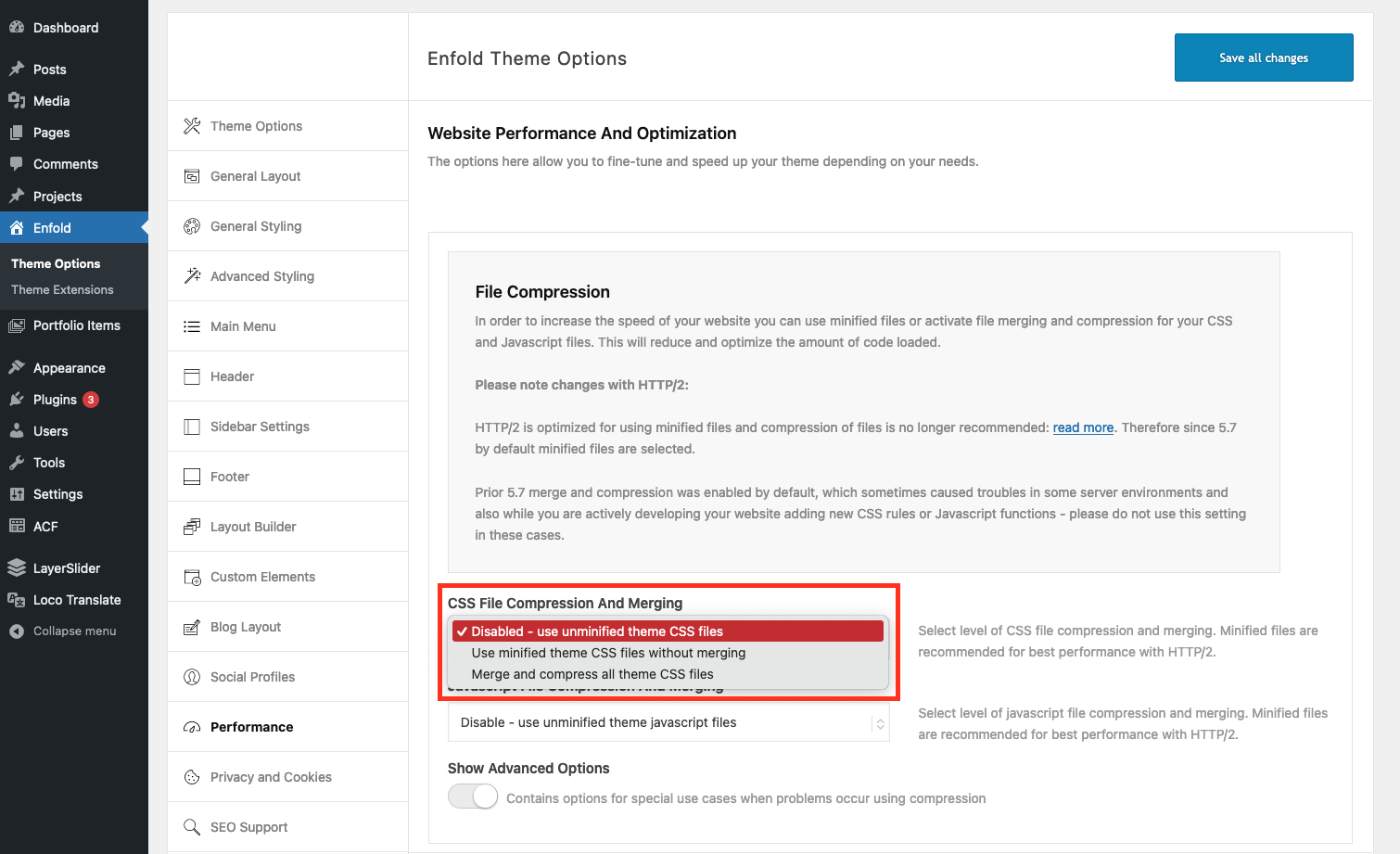
Select a compression method suitable for your theme. Gzip is popular for compressing files. You may also consider other methods like Brotli. Each method offers unique benefits. Choose one that fits your needs.
Apply the chosen method to your theme files. Check if the compression works properly. Test your website to ensure it loads correctly. Monitor site speed after changes. Adjust settings if necessary for better results.
Common Mistakes To Avoid
Avoid overly compressing images within theme files as it can reduce quality. Ensure essential files aren’t mistakenly deleted. Test your website after compression to confirm functionality remains intact.
Over-compression Issues
Over-compression can make files too small. This might break the theme. Important styles might disappear. Images may look blurry. This can hurt your site’s look. Always test after compressing. Ensure everything still works well. Less is sometimes more. Keep important details in place.
Ignoring File Backups
File backups are like a safety net. Changes can go wrong. Backups save your work. They help you recover lost files. Always save a copy before you start. It’s wise and safe. Mistakes happen to everyone. Preparedness is key.
Neglecting Performance Testing
Testing makes sure your site runs well. After compressing, check how fast it loads. Test on different devices. See how it looks on phones and tablets. A slow site can lose visitors. Speed is important for happy users.
Maintaining Compressed Files
Updating theme files is important. Old files can cause problems. New versions fix bugs. They also add features. Check updates often. Keep files fresh. Avoid issues with regular updates.
Site speed matters. Fast sites are better for users. They help with search rankings. Check load time often. Use tools to test speed. See how compression helps. Fix slow pages quickly. Keep the site running smoothly.
Compression strategies change. Try new methods when needed. Look for better tools. Check if files are still small and efficient. Adjust settings for best results. Compression keeps sites fast. Review strategies regularly.
Credit: www.a2hosting.com
Frequently Asked Questions
How To Compress WordPress Theme Files?
Compress WordPress theme files using plugins like WP Optimize or manual methods. Plugins automate compression and optimize files efficiently. Manual compression involves reducing image sizes and minifying CSS and JavaScript files. Backup your theme before compressing to prevent data loss.
Regular compression improves site speed and performance.
Can Compression Affect Theme Functionality?
Compression might affect functionality if done incorrectly. Ensure plugins used are compatible with your theme version. Test your site after compression to check for errors or issues. Proper compression techniques maintain functionality while enhancing site speed. Always backup your theme before attempting any compression techniques.
Which Plugins Help Compress Theme Files?
Popular plugins for compressing theme files include WP Optimize, Smush, and Autoptimize. These plugins automate the compression process, making it easy for users to optimize their sites. They help reduce file sizes and improve site speed. Choose a plugin compatible with your theme for optimal results.
Why Compress WordPress Theme Files?
Compressing theme files reduces file sizes, improving site speed and performance. Faster loading times enhance user experience and boost search engine rankings. Compression also saves server resources, making your site more efficient. Regularly compressing theme files ensures your site remains optimized and competitive.
Conclusion
Compressing WordPress theme files boosts website speed effectively. Faster sites offer better user experiences. This process is straightforward and improves performance. Reduced file sizes save server space. They also enhance loading times. Visitors stay longer when pages load quickly. Keep your themes updated regularly.
Updates often include optimizations. Always backup files before compressing. This prevents data loss. Use trusted tools for compression. They ensure safe and efficient file handling. Implement these strategies to optimize your site. Enjoy smoother and more responsive browsing. Your website deserves the best performance possible.


