
Imagine having the power to craft a unique online presence that perfectly reflects your brand or personal style. Building a WordPress theme from scratch might sound challenging, but it’s a skill that can set you apart in the digital landscape.
Whether you’re a budding web designer or someone who’s simply curious about the behind-the-scenes magic of website creation, this guide is tailored for you. With the rise of video tutorials, learning how to build a WordPress theme through YouTube is not only accessible but incredibly engaging.
This article will walk you through the process, offering step-by-step insights and expert tips to ensure you get the most out of your YouTube learning experience. Dive in and discover how you can turn your creative ideas into a functional, captivating WordPress theme. You’re about to unlock a world of potential and innovation—let’s get started!

Credit: themeforest.net
Getting Started With WordPress Themes
WordPress themes change how your site looks. They are like clothes for your website. Each theme has its own style and layout. A theme can make your site look simple or fancy. Choose a theme that fits your site’s purpose.
You will need a few tools to build a theme. First, use a text editor like Notepad++ or Sublime Text. These editors help you write code. Next, use FTP software like FileZilla. This helps you upload files to the server. Finally, have a web browser ready to test your theme. These tools make theme building easier.
Setting Up Your Development Environment
Download WordPress from its official site. Get a tool like XAMPP or MAMP. These tools help create a local server. Install your chosen tool. Open the tool and start Apache and MySQL. Create a database using phpMyAdmin. Remember your database name. Unzip WordPress files into the server’s root folder. Open wp-config.php. Enter database name, username, and password. Save changes. Open your browser. Go to localhost/your-folder-name. Follow WordPress setup steps. Now, WordPress is installed locally.
Open XAMPP or MAMP. Start Apache and MySQL services. Check their status. Services must be running. Open your browser. Type localhost in the address bar. You should see the server dashboard. Configure server settings here. Adjust PHP settings for better performance. Increase memory limit if needed. Change upload size limit. Restart Apache service after changes. Your server is now ready for WordPress.
Creating A Basic Theme Structure
A WordPress theme needs certain files. These files help the theme work. style.css is very important. It controls how the site looks. Another key file is index.php. It helps show content on the site.
Folders hold these files. The theme folder is the main one. Inside, you find other folders. Like images and scripts. Each folder has a job. They keep things neat and tidy.
Every theme needs information. This info helps users know what the theme does. Use style.css for this. Write details at the top. Include the theme name. Also, add the author name. Don’t forget the theme version.
Adding this info is simple. It helps users understand the theme. It also helps manage updates. Keeping info clear is very helpful.
Credit: www.inkthemes.com
Designing Your Theme
Choosing a layout is the first step. Think about what you want to show. Some people like a simple layout. Others want more details. Consider how many columns you need. One column is clean. Two columns can fit more. Make sure it matches your content.
Next, select the right color schemes and fonts. Colors can show mood. Blue feels calm. Red feels exciting. Pick colors that fit your message. Fonts also matter. Simple fonts are easy to read. Fancy fonts can be hard. Choose one that is clear.
Remember, both colors and fonts should match your brand. They make your theme special. With the right choices, your theme will look great.
Developing Theme Templates
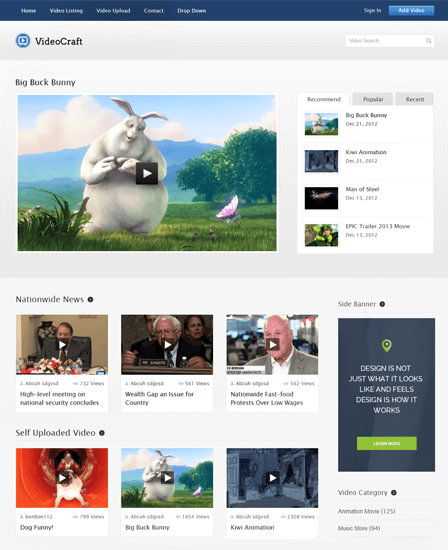
Headers and footers are essential for any WordPress theme. They hold the logo and menu. The footer often has links and contact info. Start with a clean design. Make sure the header is easy to see. Use clear fonts. Add a logo that stands out. In the footer, keep things simple. Add links to important pages. Use colors that match the theme. These parts make your website look nice and organized.
The main content area is where most information goes. It should be clear and easy to read. Use short paragraphs. Break up text with images. Images make the content more interesting. Use headings to separate sections. This helps readers find info quickly. Choose colors that are easy on the eyes. Make sure everything fits well on the page. This keeps the site user-friendly.

Credit: www.youtube.com
Integrating WordPress Features
WordPress themes can have widgets and sidebars. They make themes more useful. You can add a sidebar in the theme files. Use the register_sidebar function. This function helps place widgets. Widgets can show recent posts or comments. Sidebars are areas for widgets. They can be on the left or right. Sidebars make your site look good. They also help users find things fast.
The navigation menu helps visitors move around your site. You can change it to fit your needs. Use the register_nav_menus function. This lets you add custom menus. You can name your menus. Use names like “Main” or “Footer”. Add menu items like Home or About. This makes your site easy to use. A good menu keeps visitors happy. It helps them find what they want.
Enhancing Theme Functionality
WordPress Hooks are powerful tools. They let themes do more. Hooks connect functions to events. They make changes easy. Use them to add features. Customize your theme without editing core files. Hooks are actions and filters. Actions run functions at specific points. Filters change data before it shows. Hooks make your theme flexible. They improve your site’s performance. Learn how they work. Use them wisely.
Implementing Custom Post Types
Custom Post Types make your site unique. They add different content types. You can create posts for anything. Use them for products, reviews, or events. They organize your content better. WordPress has default post types. Examples are posts and pages. Custom types give more options. They help users find content easily. Use code to create them. Add labels and menu options. Make your site stand out. Custom types are a great tool.
Testing And Debugging
Creating a WordPress theme involves testing and debugging to ensure seamless functionality. Explore YouTube tutorials to gain practical insights and solve common issues efficiently. This process enhances your theme’s performance and user experience.
Checking For Compatibility
A theme must work on all devices. Check how it looks on mobile, tablet, and desktop. Browsers can show pages differently. Test on Chrome, Firefox, and Safari. Make sure it works well on all of them. Update your browser to the latest version. Also, check for WordPress updates. An old version might not support new themes.
Debugging Common Errors
Errors can stop a theme from working. Look for error messages in the dashboard. They often tell what went wrong. Fix one error at a time. Try using debugging tools. These tools can find hidden problems. Double-check your code for any typos. A small mistake can cause big issues. Always save a backup before making changes. This helps in case something breaks.
Publishing Your Theme
Discover how to create and publish a WordPress theme with YouTube tutorials. Learn step-by-step design tips and code integration. Perfect for beginners aiming to enhance their website with a custom look.
Preparing For Distribution
Ensure your theme is free from errors. Test on different devices. It must look good on phones and computers. Organize your files. Clean and simple code is best. Add a readme file. Explain how to use the theme. Include a license file. This tells users what they can do with the theme.
Submitting To The WordPress Repository
Create an account on WordPress.org. Follow their guidelines for themes. Upload your theme files. Fill out the theme information. Write a short description. Include tags that describe your theme. Click submit. Wait for review. It might take a few days. Once approved, your theme is live. People can download it now.
Promoting Your Theme On Youtube
Make videos that catch the eye. Tell a story with your theme. Show the theme’s best features. Keep the video fun and interesting. Use bright colors and nice music. Explain things clearly. Kids should understand your words. Use simple language. Make the video easy to follow. Show how your theme works step by step. Keep sentences short. Speak slowly and clearly.
Use keywords in your video title. Add keywords to your video description. Use keywords that people search for. Make sure to include your theme name. Add tags that relate to your theme. Use clear and simple words. Write short sentences. Choose words that kids know. Make your video easy to find. Let your theme stand out. Help people find your video easily.
Frequently Asked Questions
How Do I Start Building A WordPress Theme?
Begin by understanding WordPress theme hierarchy and structure. Use a local development environment for testing. Familiarize yourself with HTML, CSS, PHP, and JavaScript. Download starter themes or frameworks like Underscores to simplify the process. Customize the design and functionality according to your requirements.
Ensure your theme is responsive and SEO-friendly.
What Tools Are Needed For WordPress Theme Development?
Use a code editor like Visual Studio Code or Sublime Text for writing code. Install XAMPP or MAMP for a local server environment. Utilize Chrome Developer Tools for debugging. GitHub is useful for version control. WordPress Codex provides essential documentation.
These tools help streamline your development process.
How Can I Make My WordPress Theme Responsive?
Use CSS media queries to adjust styles for different screen sizes. Implement flexible grid layouts using CSS frameworks like Bootstrap. Test your theme on various devices and browsers. Employ responsive images and scalable typography. Ensure navigation and other elements are touch-friendly.
This enhances user experience across all devices.
Can I Monetize My WordPress Theme?
Yes, monetize your theme by selling it on marketplaces like ThemeForest. Offer premium versions with additional features. Provide customization services or support packages. Use affiliate links within your theme for passive income. Ensure your theme is high-quality and regularly updated.
This attracts more customers and boosts sales.
Conclusion
Creating a WordPress theme can be a rewarding journey. Start with a clear idea. Plan your design carefully. Use tools like YouTube tutorials for guidance. Break tasks into small steps. Tackle each one with patience. Coding skills enhance your theme, but aren’t mandatory.
Experiment with colors and layouts. Keep user experience in mind. Test your theme thoroughly. Make adjustments as needed. Share your creation proudly on WordPress. Enjoy the satisfaction of building something unique. Remember, practice leads to perfection. With time, your skills will grow.
Dive into the WordPress world and let your creativity shine.


