
Have you ever wondered how your favorite websites are accessible anytime, anywhere? The magic happens behind the scenes through a process called web hosting.
Whether you’re planning to launch your own website or simply curious about the digital world, understanding web hosting is essential. Imagine your website as a book in a library; web hosting is the shelf where it’s stored, ensuring readers can find it anytime they need.
You’ll discover the simple yet fascinating mechanics of how web hosting works, making the internet the dynamic and connected space we all rely on. Stick around to demystify the process and learn how you can choose the best web hosting solution for your needs.
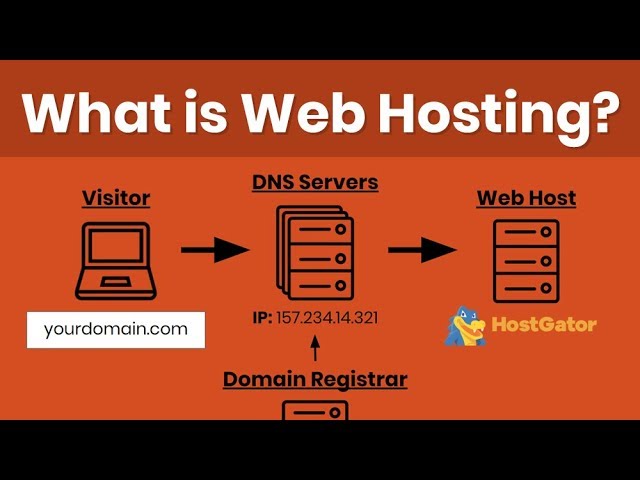
Credit: m.youtube.com
Types Of Web Hosting
Shared hosting is popular and cost-effective. Multiple websites use the same server resources. This means they share memory and processing power. It’s a good choice for small websites. It is easy to set up and manage. But, if one site is busy, others can slow down. Security is less compared to other hosting types.
VPS hosting offers a private space on a shared server. Each website has its own resources. This makes it more reliable than shared hosting. It’s good for websites that need more power. VPS is more expensive than shared hosting. It offers better control and flexibility.
Dedicated hosting means having an entire server for one website. This hosting is for large websites with high traffic. It’s more secure and customizable. The cost is higher than other hosting types. Best choice for businesses needing full control over their server.
Cloud hosting uses many servers to host websites. It offers scalability and reliability. If one server fails, others take over. It’s great for growing websites. Costs vary based on usage. It can handle sudden traffic spikes easily.
Managed hosting handles the technical stuff for you. It includes security, updates, and backups. This is good for those lacking tech skills. It’s more costly than unmanaged hosting. Managed hosting lets users focus on their websites, not the server.
Choosing A Web Hosting Provider
Start by knowing your website’s requirements. Is it a blog or a store? Each type needs different resources. A store might need more storage and bandwidth. Blogs might need less. Consider future growth too.
Look at the features each provider offers. Some give free domains or email accounts. Pricing varies a lot. Compare plans to find the best value. Cheap is not always better. Balance cost with quality.
Reviews can show real experiences from users. Read both positive and negative ones. Testimonials on a provider’s site might be biased. Check other sources for a balanced view.
Good support is vital. Problems can happen anytime. Check if support is available 24/7. Fast responses are important. See if they offer live chat or phone support.
Setting Up A Website
Choosing a domain name is the first step. It should be easy to remember. Register this name with a domain registrar. This makes the name yours. Pay a fee to keep the domain. Be sure to renew it on time. Registration is necessary to start a website.
DNS settings help the internet find your website. Set the DNS to point to your web host. This connects your domain to your site. DNS settings are like an address book. They tell browsers where to go. Without proper DNS settings, your site won’t show up.
Website software is needed to run your site. Choose software like WordPress or Joomla. Install it on your web server. Follow simple steps to complete the installation. This software helps manage your site. You can add pages and posts easily. Make sure the software is updated.

Credit: www.godaddy.com
Managing Web Hosting
The control panel is like your dashboard. It helps you manage your website. You can add new pages or remove old ones. It also lets you set up emails and see how your site is doing. Always keep your passwords safe.
Servers need to work well for your site. Always check if the server is running fast. Slow servers can make visitors leave. Use tools to see how your server performs. Fix any issues quickly.
Security is very important. Always update your software. This stops hackers. Use strong passwords. This keeps your site safe. Back up your data often. It helps if something goes wrong.
Troubleshooting Common Issues
Downtime makes websites unavailable. Check server logs for errors. Verify your network connection. Restart the server if needed. Contact support for help. Ensure backup systems are active. Regular monitoring helps prevent issues. Use reliable hosting services. Quick action reduces impact on users.
Configuration errors can break sites. Check settings for mistakes. Use guides for correct configurations. Consult experts when unsure. Test changes before applying. Back up files before editing. Ensure permissions are set correctly. Small errors cause big problems.
Security breaches risk data. Update software regularly. Use strong passwords. Monitor for suspicious activity. Enable firewalls for protection. Train staff on security practices. Encrypt sensitive information. Regular audits prevent vulnerabilities. Respond quickly to threats. Secure your site today.

Credit: www.geeksforgeeks.org
Future Trends In Web Hosting
Green hosting is growing fast. It uses less energy. This helps the earth. Many companies choose green hosting. They want to reduce carbon footprints. Solar and wind power help. Green data centers are popular. They save energy. Customers prefer eco-friendly services. Green hosting is the future.
Cloud technology is changing hosting. It offers flexible plans. Easy to scale up or down. Users pay for what they use. It is simple to set up. Cloud hosting makes websites faster. It is secure. Many businesses move to the cloud. It is the next big thing.
Security features are more advanced now. Hosting providers offer strong protection. This keeps data safe. Firewalls and encryption help. Regular updates are important. Users feel secure. They trust these services. Strong security is needed for online safety.
Frequently Asked Questions
How Does The Web Hosting Work?
Web hosting stores website files on a server. It makes your site accessible on the internet. Users access your site through a domain name. Hosting providers maintain servers, ensuring performance and security. Choose a plan based on your site’s needs for optimal performance.
How To Web Hosting Step By Step?
Choose a reliable web hosting provider. Register a domain name. Select a hosting plan. Set up your account. Install a content management system like WordPress. Upload your website files. Configure your settings and optimize for performance. Regularly update and maintain your website.
How Much Do I Pay To Host A Website?
Website hosting costs vary, ranging from $3 to $300 monthly. The price depends on the hosting type and features. Shared hosting is cheaper, while dedicated servers cost more. Consider your website needs and budget to choose the right plan.
Can I Host My Website Myself?
Yes, you can host your website yourself using a personal server. Ensure you have reliable hardware, software, and internet connection. Self-hosting demands technical skills for setup, security, and maintenance. Consider professional hosting services for convenience and better performance.
Conclusion
Understanding web hosting is key to building a strong online presence. It begins with choosing the right hosting type for your needs. Shared hosting offers affordability. VPS hosting provides more control. Dedicated hosting delivers maximum resources. Always consider bandwidth, storage, and support.
Security features are crucial for protection. Reliable hosting enhances your website’s performance. It ensures visitors have a smooth experience. Regular backups prevent data loss. Keep your hosting plan updated. This helps manage increased traffic and usage. A successful website relies on effective hosting.
Make informed choices and watch your site thrive.


