
Are you ready to unleash your creativity and take control of your website’s design? Building a WordPress theme from scratch is the perfect way to do just that.
Imagine having a unique website that reflects your personal style and meets all your specific needs. It might sound daunting, but with the right guidance, you can achieve it. In this first part of our series, we’ll break down the process into simple, manageable steps.
You’ll discover how satisfying it is to transform your ideas into a fully functional theme. Stick with us, and you’ll soon be on your way to mastering WordPress theme development. Let’s get started and unlock your potential!
Credit: www.developerdrive.com
Understanding WordPress Themes
A WordPress theme is like a costume for a website. It changes how the site looks. It also affects how the site behaves. Themes use templates and stylesheets. These help create the design. WordPress themes can have different layouts. Some themes are simple. Others are more complex. Each theme has its own unique features. This makes every website look different. Themes can be downloaded or created from scratch.
Custom themes help make your site special. They match your style and needs. A custom theme gives you control. You decide how your site looks and works. This is very important for businesses. A unique look makes a good impression. Custom themes also improve user experience. They load faster and work better. Custom themes can fit any device. This means they are responsive. A custom theme can grow with your business. It can add new features easily.
Credit: tonjoo.com
Setting Up The Development Environment
Building a WordPress theme needs specific tools. First, a good text editor is important. Examples are Visual Studio Code or Sublime Text. They help you write code easily. Next, you need a version control system. Git is popular. It saves your code changes. It also allows you to share your work. Lastly, a local server is needed. XAMPP or MAMP can be used. They create a server on your computer.
To start, download WordPress from its official website. Then, unzip the files. Copy them to the local server folder. This folder is usually called htdocs or www. Next, open the server application. Turn on Apache and MySQL. These help WordPress run. After that, open a browser. Type localhost/wordpress. This starts the WordPress setup. Follow the steps to install. Use a simple username and password.
Basics Of Html, Css, And Php
HTML helps build the foundation of a website. Every theme starts with HTML. It gives the structure. Think of it like a skeleton. The main parts are `
CSS makes websites pretty. It adds colors, fonts, and layout. CSS works with HTML. It changes how things look. Want a blue header? Use CSS. Make text bold? CSS can do it. It is like the paint on a house.
PHP is like the brain of a website. It makes things dynamic. With PHP, websites can change. PHP helps WordPress work. It connects to databases. It fetches data and shows it. PHP is smart. It can make themes interactive.
Creating The Theme Folder
Start by making a new folder for your theme. You can name it anything. Choose a name that is unique and easy to remember. Use lowercase letters and no spaces. You can use dashes or underscores. This helps avoid errors later.
A good name helps others know your theme. Think of a name related to your theme’s purpose. For example, “blog-theme” for a blogging site. Save the folder in the wp-content/themes directory. This is where WordPress looks for themes.
Your theme needs some important files. Start with style.css. This file tells WordPress about your theme. Add index.php next. It is the main file for your theme. Create a folder named assets too. Store images and scripts here. This keeps your theme organized.
Developing The Basic Theme Template
Start with creating the index.php file. This file helps display your website content. Keep it simple. Add basic HTML structure. Use PHP tags to connect with WordPress. Next, create the style.css file. This handles the look of your theme. Add your theme’s name at the top. Describe your theme shortly. Use CSS rules to style your website. Make sure it’s clear and neat. These two files are your theme’s backbone.
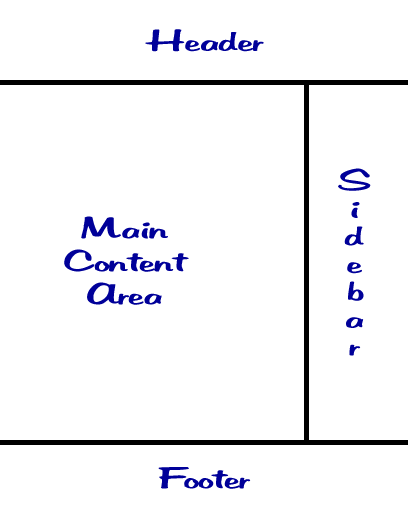
Headers and footers are important. They show on every page. Create a header.php file. Add your site title and navigation menu. These help users move around. Next, create footer.php. Add copyright information here. Footer can also have links. Use HTML to structure these files. Use PHP to include them in index.php. This makes your site complete.

Credit: www.youtube.com
Adding WordPress Template Tags
Template tags make themes work with WordPress. They are bits of PHP code. These tags help show dynamic content. Examples include the_title() and the_content(). They pull data from your WordPress database. This makes your theme show current posts.
Use template tags to create dynamic pages. This means content updates by itself. get_header() and get_footer() are useful tags. They add the header and footer to each page. This saves time and keeps the site looking good. Dynamic content makes your site more engaging. Visitors see fresh updates every time.
Testing Your Theme
Testing your theme involves checking its functionality and design on various devices. Ensure your theme is responsive and loads quickly. This step is crucial to identify and fix any bugs before making it live.
Activating The Theme
Activate the theme to see how it looks. Go to the WordPress dashboard. Find the “Appearance” tab. Click on “Themes”. You will see a list of themes. Find your theme. Click “Activate”. Check your website. Make sure everything appears correctly. Images should be clear. Text must be readable. Navigation links should work smoothly.
Look for any errors. Fix them quickly. If something does not work, it needs debugging. Don’t worry. Problems are normal. Take it step by step. You’ll learn a lot through fixing issues.
Debugging Common Issues
Errors might pop up. Common issues include missing styles or broken links. Check the theme files. Look for mistakes. Fix them one by one. Use the WordPress error log. It helps identify problems. Check the console for errors. It shows what needs fixing. Update files if needed. Refresh the site to see changes.
Sometimes plugins cause issues. Disable them to see if things improve. If the theme still has problems, ask for help. Online forums are useful. Developers there might know solutions. Remember, patience is key. Keep testing until the theme works perfectly.
Frequently Asked Questions
What Tools Do I Need For WordPress Theme Development?
To build a WordPress theme, you’ll need a code editor, a local server environment like XAMPP or MAMP, and WordPress installed locally. Familiarity with HTML, CSS, PHP, and JavaScript is essential. These tools help in structuring, styling, and adding functionality to your theme.
How Do I Start Creating A Theme?
Start by setting up a local development environment. Create a new theme folder in WordPress’s themes directory. Begin with essential files like style. css and index. php. Define your theme’s details in style. css. Use index. php for your theme’s structure.
This establishes the foundation for further development.
What Are The Key Files In A WordPress Theme?
Essential files include style. css, index. php, and functions. php. Style. css defines your theme’s design and metadata. Index. php structures your site’s main content. Functions. php allows you to add custom features and functions. These files are crucial for a functional and styled WordPress theme.
How Can I Customize My Theme’s Design?
Customize design using CSS in style. css and templates like header. php and footer. php. Modify CSS for styling changes and use PHP for dynamic content. Templates control layout and content areas. This allows you to create a unique appearance and user experience for your WordPress site.
Conclusion
Building a WordPress theme from scratch is rewarding. This guide starts your journey. You learn basic tools and setup. Understanding these steps is crucial. It helps in creating unique designs. Practice regularly to improve your skills. Experiment with different styles.
Gain confidence with each project. Soon, you’ll craft themes effortlessly. Your creativity will shine through. Stay curious and keep learning. Part Two will explore more advanced techniques. Ready to dive deeper? Your WordPress adventure continues with more insights. Keep coding and discovering.
Success is within reach.


