
Have you ever wondered how you can turn your design skills into a profitable business? Building WordPress themes to sell is a fantastic way to do just that.
Imagine creating a unique, eye-catching theme that not only stands out in the marketplace but also generates a steady income. In 2019, the demand for innovative WordPress themes is higher than ever. With millions of websites relying on WordPress, your opportunity to tap into this market is huge.
You might think this sounds complex, but it’s not as daunting as it seems. Whether you’re a seasoned developer or a creative designer looking to expand your skills, this guide will walk you through every step of the process. From understanding the basics to mastering the intricacies of theme development, you’ll learn how to create themes that sell. Ready to dive into the world of WordPress theme development and turn your creativity into cash? Let’s explore how you can start building and selling WordPress themes like a pro.
Market Research
Know your audience well. Are they beginners or experts? Understanding their needs is key. Create themes that solve their problems. Ask questions. What do they want in a theme? How much are they willing to pay? This helps in making the right theme.
Look at other theme sellers. What do they offer? Check their pricing and features. Are their customers happy? Read reviews and comments. Learn from their mistakes. Find your unique angle. Make your theme stand out.
Stay updated with trends. Minimalist designs are popular. People love fast and simple themes. Mobile-friendly themes are in demand. Follow design blogs and forums. Learn what users like. Adapt quickly to changes.
Essential Tools
Creating WordPress themes needs specific software. WordPress is a must. Use PHP to write code. You need MySQL to manage databases. For designing, try Adobe Photoshop. It helps make theme images. Sublime Text is great for coding. It’s fast and easy to use. FTP software like FileZilla uploads files to servers.
Design is key in theme building. Use free images from sites like Unsplash. Icons can be found on Font Awesome. Color palettes are available on Coolors. Fonts are important, use Google Fonts. Mockup tools like Sketch can help. These tools make design easier and prettier.
Development tools make coding easier. Git helps manage your code versions. Browser Dev Tools are useful for testing themes. Use Node.js for building tasks. Webpack bundles your code neatly. Gulp automates tasks like minifying files. These tools save time and effort.
Design Principles
Users want easy navigation. Buttons should be clear and simple. Menus must be easy to find. Pages need to load fast. Loading speed matters a lot. Users leave if it takes too long. Test the theme on different devices. Make sure it works on all.
Many people use phones and tablets. Themes must fit all screen sizes. Responsive design is key. This means the theme changes to fit the device. Flexibility is important. Check how it looks on small and big screens. Adjust as needed. Keep the layout simple and clean.
Colors and fonts create mood. Choose colors that match. Fonts need to be easy to read. Use white space well. White space helps focus on content. Images should be high quality. They should not slow the site. Balance is key in design.
Credit: www.wpexplorer.com
Theme Development
First, install a local server like XAMPP or MAMP. These tools help you build and test your themes on your computer. Download and install WordPress in the local server’s directory. Use a text editor like Atom or Visual Studio Code. These tools help you write your code. Always keep your tools updated for best performance.
A WordPress theme needs several files. Create a folder with a unique name for your theme. Include files like style.css, index.php, and functions.php. Each file has a special role. Style.css is for design. Index.php is the main template file. Functions.php adds new features. Follow this structure for a successful theme.
Follow WordPress coding standards for clean and readable code. Use proper indentation and spacing. Comment your code clearly. This helps others understand your work. Use meaningful names for functions and variables. Always test your theme. Make sure it works well before selling.
Customization Options
Theme Customizer allows easy changes. You can tweak colors, fonts, and layouts. Users love simple and quick updates. Make the theme user-friendly. Offer a variety of choices. Let them personalize their site.
Custom Widgets add unique features. Widgets display content like recent posts or social media feeds. They make your theme stand out. Build widgets that are easy to use. Users can drag and drop them on their site. This makes customization fun and easy.
Shortcodes simplify adding features. A shortcode is a small code piece. Use it to insert galleries, buttons, or forms. Make shortcodes flexible and useful. Users can add them anywhere on their site. This enhances the theme’s functionality.

Credit: afthemes.com
Testing And Debugging
Building a WordPress theme to sell requires thorough testing and debugging. Check for broken links and fix any coding errors. Ensure the theme works on different devices and browsers for a smooth user experience.
Cross-browser Compatibility
Ensure your theme works on all popular browsers. Test on Chrome, Firefox, Safari, and Edge. Check on mobile and desktop. Use online tools for easy testing. Don’t forget older browser versions. They matter too. Ensure your theme looks the same everywhere. Consistency is key.
Performance Optimization
Fast themes sell better. Use clean code and optimized images. Compress files for quick loading. Minimize CSS and JavaScript. Fewer HTTP requests mean faster sites. Use caching for speed boosts. Test your theme’s speed. Fast themes make users happy.
Security Checks
Security is crucial. Protect users with strong code. Avoid unsafe functions. Regular updates fix security issues. Scan for vulnerabilities often. Use trusted plugins. Ensure data is safe. Always back up your theme. Stay informed on security trends.
Documentation And Support
User guides help people understand your theme. Write clear steps. Use simple words. Add pictures to explain hard ideas. Keep sentences short. This makes reading easy. Users feel confident using your theme.
Support channels are important. They help users solve problems. Email is a good choice. Live chat is quick. A forum lets users share tips. Choose the best option. Make sure to respond fast. Users feel happy with quick support.
Feedback helps improve your theme. Ask users for opinions. Use simple surveys. Ask clear questions. Listen to what users say. Use their feedback to make changes. This makes your theme better. Users feel heard and valued.
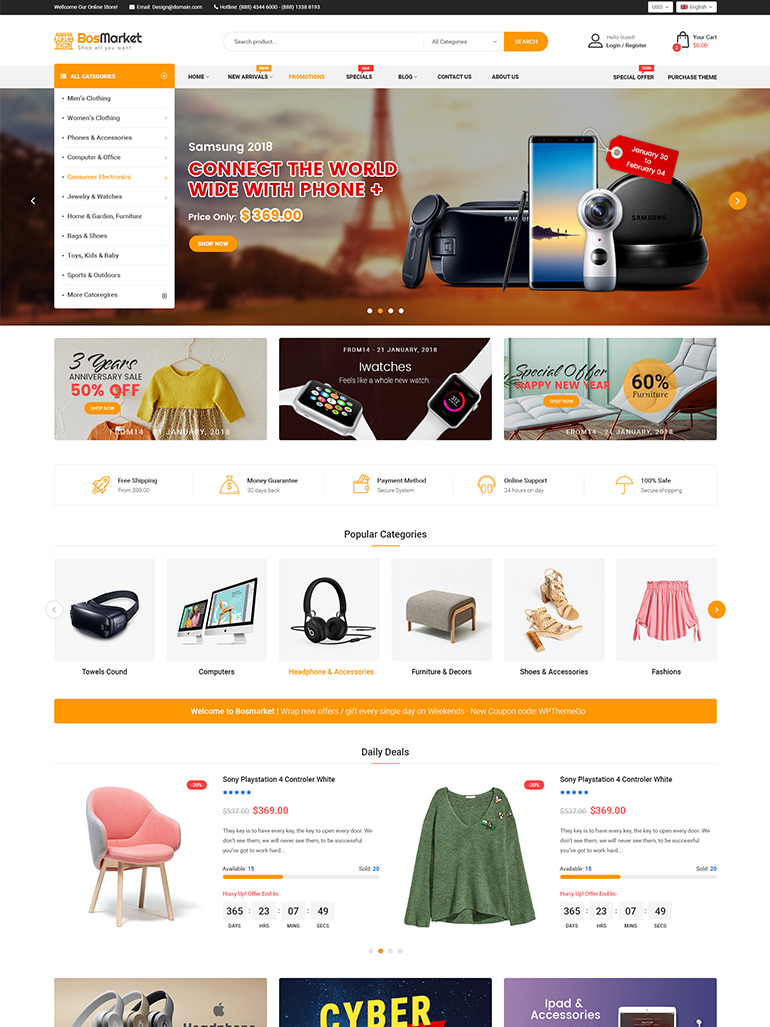
Credit: wpthemego.com
Marketing Strategies
Creating WordPress themes involves understanding design and coding basics. Focus on user-friendly designs and responsive layouts. Integrate essential features like SEO optimization and customization options. These steps can attract buyers and boost sales in the WordPress theme market.
Building A Brand
Creating a unique identity is crucial. Choose a name that stands out. Design a memorable logo. Ensure your theme has a distinct style. Consistency is key. Use similar colors and fonts. This helps people remember your brand. It builds trust.
Social Media Promotion
Share your theme on social media. Post pictures and videos. Show how your theme works. Engage with followers. Answer their questions. Encourage them to share your posts. This increases visibility. More people will see your theme.
Pricing Models
Offer fair prices for your themes. Consider different models. Sell one theme at a fixed price. Offer a subscription for access to many themes. Think about discounts. Attract more buyers. Make sure your prices reflect the quality of your work.
Selling Platforms
Theme marketplaces can help reach more buyers. These platforms are popular for theme sellers. Places like ThemeForest and Mojo Marketplace are top choices. They offer a big audience of potential buyers. Listing on these sites can boost your sales. But, they charge a fee on every sale. It’s important to read their terms before signing up. Different sites have different rules.
Selling themes on your own site gives more control. You keep all the profit. No middleman means more money for you. Use a simple checkout system. Make sure your site is easy to use. Good marketing is needed to drive traffic. A strong online presence helps sell more themes.
Partnering with affiliates can increase theme sales. Affiliates promote your themes for a commission. They help reach new audiences. Choose partners who share your target market. It’s a win-win situation for both parties. Clear terms are essential for smooth operations. This method can expand your reach quickly.
Future Trends
New tools are changing WordPress themes. AI helps make better designs. Voice search is growing fast. Themes need to work with smart speakers. VR and AR are becoming popular. Themes should support these technologies.
Green themes are important. They use less energy. People want themes that save power. Eco-friendly design matters. Themes should be easy to update. Minimal design uses fewer resources.
Users want simple themes. They should be easy to use. Fast loading is important. Mobile-friendly themes are a must. Customization is key. People love changing colors and fonts. Security is crucial. Themes must be safe from hackers.
Frequently Asked Questions
How To Start Building WordPress Themes?
Begin by understanding HTML, CSS, and PHP basics. Use WordPress Codex as a guide. Familiarize yourself with theme files and structure. Start with a simple theme. Experiment with templates, styles, and functions. Test your theme on different devices and browsers.
Enhance your skills by exploring advanced WordPress features.
What Tools Are Needed To Design Themes?
Essential tools include a code editor like Visual Studio Code, and design software like Adobe XD or Sketch. Use WordPress local development environments like MAMP or WAMP. Browser developer tools help test your design. Git for version control is crucial.
Familiarize yourself with WordPress theme frameworks and starter themes.
How To Ensure Theme Compatibility?
Ensure your theme is responsive and works across all devices. Test it on various browsers for compatibility. Follow WordPress coding standards. Use valid HTML, CSS, and PHP. Check for accessibility compliance. Regularly update your theme to match WordPress updates. Use plugins like Theme Check for further validation.
What Are Best Practices For Theme Design?
Prioritize a clean, user-friendly design. Use minimalistic layouts for better performance. Optimize images and scripts to reduce load times. Ensure your theme is SEO-friendly with proper headings and meta tags. Provide customizable options for users. Regularly update to fix bugs and add features.
Keep security in mind.
Conclusion
Creating WordPress themes to sell can be rewarding. Focus on quality design. Ensure the theme is user-friendly. Easy navigation is key. Test your theme thoroughly. Gather feedback from users. Regular updates keep themes fresh. Marketing your theme is essential. Use social media and forums.
Keep SEO strategies in mind. Engage with your audience. Respond to their needs promptly. Building a reputation takes time. Patience and persistence pay off. Stay current with design trends. Keep learning and evolving your skills. Your creativity and effort will shine.
Success comes with dedication and hard work.


