
Creating your own WordPress theme can be a game-changer for your website. Imagine having the power to tailor every detail to match your vision perfectly.
It’s not just about aesthetics; it’s about crafting a unique online identity that truly represents you and your brand. You’ll have complete control over design, functionality, and user experience. This means no more settling for generic themes that don’t quite fit.
In this guide, you’ll discover the simple steps to transform your ideas into a stunning, custom WordPress theme. Whether you’re a beginner or have some coding experience, you’ll find the process exciting and rewarding. By the end, you won’t just have a website; you’ll have a masterpiece that captures your essence. Ready to unleash your creativity? Let’s dive in!

Credit: www.youtube.com
Getting Started With WordPress Themes
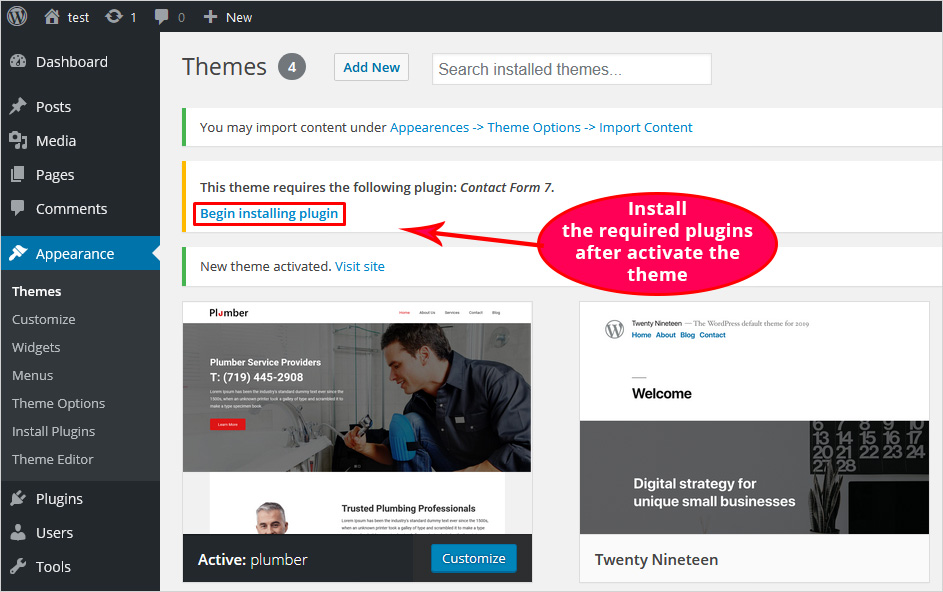
Creating your own WordPress theme is exciting. First, you need a good idea. Think about the colors and layout. Your theme should be unique. Use a computer with an internet connection. Download WordPress onto your computer. You will also need a text editor. This helps you write code. HTML, CSS, and PHP are important. Study them well. They help build themes.
Start with a basic theme. Modify it to learn. Change colors and fonts. Add images to make it pretty. Check your work often. Mistakes happen. Fixing them is part of learning. Keep your code clean. It helps others understand it. Share your theme with friends. Get feedback. Improve based on suggestions. Enjoy the process. Have fun!
Credit: blog.templatetoaster.com
Setting Up A Local Development Environment
To start, you need WordPress on your computer. First, download the WordPress package from the official site. Next, install XAMPP or MAMP. These tools help run WordPress on your computer. After installing, open the tool and start Apache and MySQL. Create a new database. Name it anything you like. Finally, unzip the WordPress package. Place it in the htdocs folder. Open your browser and go to localhost/your-folder-name. Follow the steps to set up WordPress.
A code editor helps you write your theme. Visual Studio Code is a good choice. Easy to use. Free to download. Open the editor and start a new project. Save your files in the WordPress theme folder. Use the editor to change colors, fonts, and layouts. It makes coding easier. You can see changes quickly. You can try Atom or Sublime Text too. They work well with WordPress.
Understanding The Theme Structure
The WordPress theme has many core files. These are essential for your theme. The main files include style.css and index.php. Style.css controls the theme’s appearance. Index.php is the main template file.
Other important files include functions.php and header.php. Functions.php adds extra features to your theme. Header.php creates the top part of your pages. You will also find footer.php. This file creates the bottom part of your pages.
Directories are like folders. They help organize your theme files. The template-parts directory holds parts of your pages. The assets directory keeps images and scripts. Knowing these files and directories is key. It helps you build a great theme.
Template hierarchy is a system. It decides which template file to use. WordPress checks files in a specific order. The system starts with the most specific file. Then it moves to less specific files.
For example, WordPress looks for single-post.php for single posts. If it’s missing, it checks single.php. Finally, it uses index.php if others aren’t found. This order helps display pages correctly. Understanding this helps you customize pages easily.
Creating Basic Theme Files
Crafting basic theme files for WordPress begins with understanding HTML, CSS, and PHP. Start by structuring essential files like style. css and index. php. These form the backbone of your theme, dictating its appearance and functionality.
Index.php And Style.css
Every WordPress theme needs an index.php file. It helps display the main content. Think of it as the main page. The style.css file is also crucial. This file controls how your theme looks. It sets the colors, fonts, and layout. Include your theme’s name and author in the style.css file. This helps identify your theme.
Creating The Functions.php File
The functions.php file is like a toolbox. It allows you to add features to your theme. You can include custom widgets or menus. This file enhances your theme’s abilities. Use simple PHP functions to make changes. Always ensure your code is clean and organized. This keeps your theme running smoothly.
Designing The Layout
HTML is like the building blocks for your website. It helps create the structure. CSS makes it look pretty. With CSS, colors and fonts can change. You can make the text big or small. Borders and spaces can be added. These tools are important for web design. They help make your theme unique.
Responsive design makes sites look good on phones and computers. It adjusts the layout based on screen size. Text and images resize to fit the device. This means users can easily see and read your site. It’s very important in today’s world. Many people use phones to browse the web. Making your site responsive is a key step.
Adding Dynamic Content
WordPress loops help show posts on your site. They are easy to use. You can display posts by date or category. Customize them to fit your needs. WordPress loops are powerful tools. They make your site dynamic and engaging.
Custom post types allow more control over content. You can create posts for different purposes. This feature helps organize content better. It is great for adding variety. You can enhance your site’s functionality.
Taxonomies help classify content. They organize posts into groups. You can create custom taxonomies. This makes searching easier for users. Taxonomies improve navigation on your site. They help users find relevant content fast.
Creating your own theme involves using these elements. Dynamic content makes your site lively. Custom post types offer flexibility. Taxonomies improve organization. Your WordPress site becomes unique. It stands out among others.
Customizing With Javascript
Creating your own WordPress theme with JavaScript allows for unique customization. This process involves modifying templates and styles to suit your preferences. With basic JavaScript knowledge, you can enhance your website’s functionality and design, making it stand out from others.
Enhancing User Experience
JavaScript makes web pages interactive. It adds motion and effects. Simple actions can make websites lively. Users love to see changes on clicks. A button can change colors with JavaScript. This keeps users engaged.
Using Jquery And Other Libraries
jQuery is a popular tool for developers. It makes coding faster. With jQuery, tasks are easy. Libraries offer ready-made functions. They save time and effort. Many developers use them to improve sites. Features can be added with little code.
Scripts can help show slides. They can hide and show content. Libraries can create animations. This makes the browsing fun. Users enjoy the smooth transitions. A well-designed site attracts more visitors.
Incorporating WordPress Hooks
WordPress hooks are like magic spells. They make themes flexible. Two main types exist: actions and filters. Actions are commands. They run at specific times. Filters change data as it moves. Both are important. They help add features. They also modify existing ones. Learning hooks is crucial. It improves your theme skills. Start with simple hooks. Then try complex ones. Practice makes perfect.
Custom hooks are unique. They let you create special actions. Define them in your theme files. Use the do_action() function. This creates an action hook. Use apply_filters() for filter hooks. Name them clearly. They should reflect their purpose. Others will understand them easily. Custom hooks make themes special. They allow you to add personal touches.
Testing And Debugging
Creating a WordPress theme involves testing and debugging to ensure functionality. Identify errors by inspecting code and using debugging tools. Fix issues promptly to enhance user experience and maintain site performance.
Using Developer Tools
Developer tools help find problems in your theme. They are built into browsers. Use these tools to check your code. Look for errors in HTML, CSS, and JavaScript. You can see how your theme looks on different screens. Check if everything fits and works well. It helps make sure your site is fast and smooth. Find slow parts and fix them. It makes your site better for visitors. Keep testing until everything works right.
Common Debugging Practices
Always check your changes after editing. Use a staging site to test first. It keeps your main site safe. Log errors to find out what went wrong. It helps fix issues faster. Try using the WordPress debug mode. It shows warnings and errors. This mode is helpful for finding problems. Keep your code clean and organized. It makes debugging easier. Regular checks help keep your theme in top shape.
Optimizing For Performance
Reducing file size makes websites load faster. This process is called minifying. It removes unnecessary spaces and comments in CSS and JavaScript. Small files mean quick loading. Fast websites keep users happy. Tools can help with this task. Online services or plugins do the job well.
Caching saves data for quick access. It boosts site speed. Users get a smoother experience. Use plugins to set up caching. They store site data locally. This makes loading faster. Choose a plugin that’s easy to use. Always check compatibility with your theme. Keep the cache updated for best performance.
Preparing For Launch
Themes must look good on all devices. Test on phones, tablets, and computers. Check if images and text are clear. Ensure buttons are easy to click. Fonts should be readable. Use tools to test on many screens. This helps find any problems.
Check the theme settings before launch. Adjust colors and fonts to fit your style. Ensure the layout is neat and simple. Add a logo for a personal touch. Test the navigation menu. It should be easy to use. Fix any broken links. Double-check all elements. Make sure everything works perfectly.
Credit: smashballoon.com
Submitting To The WordPress Theme Directory
WordPress has rules for themes. Themes must be safe and work well. Code must be clean. No errors are allowed. A theme must look good on all devices. Easy navigation is important. Themes should not slow down the site. Fast loading is a must. WordPress checks for these things. You need to follow them. Themes must have a unique name. No copies. Original themes are needed. WordPress will not accept copied themes.
To submit your theme, first make sure it meets all rules. Check everything twice. Themes must be uploaded to the WordPress site. Follow upload steps carefully. Fill in all required fields. Add a good description. Clear details help users. Themes will be reviewed. Wait for approval. Be patient during this time. Once approved, themes are live. Users can download them. Keep updating your theme. Fix bugs quickly. Users like updated themes.
Frequently Asked Questions
What Tools Are Needed To Create A WordPress Theme?
To create a WordPress theme, you’ll need a code editor, like Visual Studio Code, and FTP client for file transfer. Understanding HTML, CSS, and PHP is essential. Familiarity with WordPress functions and hooks will aid theme development. Testing tools like Theme Check ensure theme compatibility and quality.
How Do I Start Theme Development?
Begin theme development by setting up a local environment with WordPress installed. Create essential theme files like style. css and index. php. Use WordPress Codex for guidance on theme structure. Design layouts using HTML and CSS, and implement PHP functions to integrate dynamic content.
Can I Customize My Theme Further?
Yes, you can customize your theme further by editing theme files. Use WordPress hooks and filters to modify functionality. Add custom CSS for style changes. Create child themes to safely update designs without affecting the main theme. Plugins also offer additional customization options for your theme.
What Are WordPress Theme Best Practices?
WordPress theme best practices include using clean, commented code and following WordPress coding standards. Ensure your theme is responsive and mobile-friendly. Optimize for speed and SEO by minimizing code and using efficient queries. Regularly update your theme to maintain security and compatibility.
Conclusion
Creating your own WordPress theme is truly rewarding. It offers unique design freedom. Start with a clear vision. Use simple coding steps. Customize to match your brand’s essence. Remember to test for mobile compatibility. Ensure your design is user-friendly. Keep learning and experimenting.
This keeps your site fresh. Enjoy the creative process. Share your theme with the world. Engage with feedback from users. This will help improve your skills. Building a theme is a journey. Embrace every step. Your unique style adds value.
Make your WordPress site stand out.


