
Are you looking to enhance your WordPress theme without the hassle of creating content from scratch? Adding dummy data can be your secret weapon to visualize your website’s potential and make informed design decisions.
Imagine having a fully populated site in just a few clicks, allowing you to see how your layout, typography, and colors will truly look. This isn’t just about aesthetics; it’s about empowering you to create a user-friendly and engaging website.
Dive into this guide to discover simple steps that will make your WordPress design process smoother and more efficient. Unlock the true potential of your theme by learning how to seamlessly add dummy data today.
Benefits Of Dummy Data
Dummy data helps to see how a theme looks. It fills the pages with text and images. This makes the site look real. Testing becomes easy. You can check if everything works well. Dummy data makes designs more lively. It helps in spotting errors early. Adjustments can be made before going live.
Clients can see the full potential of the theme. It improves understanding of the layout. Navigation becomes clear. The site structure is more visible. This makes setting up the site faster. No need to start from scratch. Saves time and effort.
Credit: www.wpbeginner.com
Choosing A Suitable Theme
Selecting the right theme is crucial for your site. Themes dictate how your site looks. They also affect how your site works. Some themes offer more features. Others are simple and easy to use. Choosing a theme depends on your needs.
Consider themes with dummy data options. These themes help you test your site. Dummy data fills your site with sample content. This content shows you how your site will look. It helps you see what works and what doesn’t. This makes your site setup easier.
Many themes provide import options. This feature lets you add dummy data quickly. It’s a handy tool for new users. Test different themes to find the best fit. Remember, the right theme can make your site shine.
Downloading Dummy Data Files
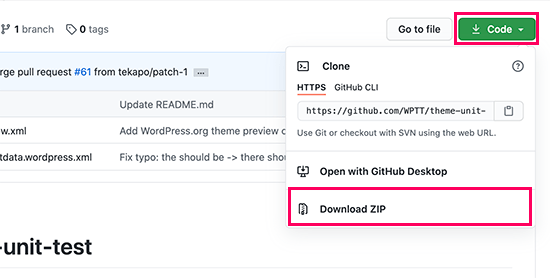
Many websites offer free dummy data for WordPress. WordPress.org is one source. It provides sample content. Another source is ThemeIsle. They offer a variety of formats. You can also find data on GitHub. Many developers share data sets there.
Dummy data comes in different formats. XML is a common format. It is easy to import into WordPress. Another format is CSV. This is used for spreadsheets. Some sites offer JSON files. These are useful for developers. Choose the format that suits your needs best.
Importing Data Via WordPress Importer
Easily add dummy data to your WordPress theme using the WordPress Importer. This tool helps you import demo content, including posts and pages, to enhance your theme’s appearance. Perfect for testing layouts and functionalities before going live with your website.
Installing WordPress Importer Plugin
The WordPress Importer plugin is easy to install. Go to your WordPress dashboard. Click on “Plugins” and then “Add New”. Search for “WordPress Importer” in the search bar. You will see the plugin appear. Click on “Install Now” and wait for it to install. After installation, click “Activate” to enable the plugin. This will prepare your site to import data.
Uploading Dummy Data
To upload dummy data, use the WordPress Importer. First, download a sample data file. Go to “Tools” in your WordPress dashboard. Select “Import” from the list. Choose WordPress from the options. You will see an option to upload your file. Click “Choose File” and select your sample data file. Click “Upload file and import”. Follow the steps on the screen to finish. Your dummy data is now ready to use.
Using Theme-specific Import Options
Many WordPress themes offer built-in import features. These features allow users to easily add dummy data. This is useful for testing and development. Look for an “Import Demo Data” option in your theme settings. Click on it to start the import process. Some themes provide a list of available demo content. Choose the content you want to import. Follow the on-screen instructions carefully. The process is usually quick and simple.
Manual import is an alternative method. You can add dummy data without built-in features. First, download the sample data file from the theme’s website. Next, go to the WordPress dashboard. Navigate to Tools > Import. Select the appropriate option for your file type. Import the data by following the prompts. This method requires more steps but is effective.
Customizing Imported Content
First, open the WordPress dashboard. Go to the Posts section. Find the sample post you want to edit. Click on the Edit button. Change the title and content as needed. Make sure to save changes by clicking Update. This way, sample posts can fit your theme.
Navigate to the Media Library in the dashboard. Look for images or files that came with the theme. Click on each file to view details. Use the Edit button to change the file name or description. You can also replace images with your own. Always remember to click Update to save any changes. This ensures that media files suit your theme better.
Troubleshooting Common Issues
Adding dummy data to a WordPress theme can often lead to confusion. First, ensure the theme supports sample data imports. Use the WordPress importer tool to seamlessly upload XML files containing dummy data for testing and design purposes.
Resolving Import Errors
Import errors can stop your data flow. Check your file format first. Use XML or CSV files. Make sure your file is complete. Missing parts can cause failures. Try re-importing data if errors appear. Check server settings. Sometimes settings block imports. Adjust them if needed. Always keep backups ready. Backups help in restoring data.
Handling Missing Media
Missing media can be frustrating. Start by checking media paths. Paths must be correct. Wrong paths lead to missing files. Try re-uploading media. This can solve path issues. Check your theme settings. Themes sometimes hide media. Adjust settings to show all media. Use WordPress plugins to check files. Plugins help find missing media. Always update your media library. Updates can fix missing file errors.

Credit: www.wpbeginner.com
Best Practices For Using Dummy Data
Dummy data helps in designing a website. It fills in the gaps. Always use data that looks real. This helps in testing your theme. Avoid using sensitive information. Data like names and numbers should be fake. It keeps your work safe. Use placeholders for images. This saves time and space.
Organize data in a clear way. Use tables for structured data. It makes reading easy. Keep text short and simple. This makes it easy to replace later. Check for broken links. It ensures everything works fine. Always backup your data. It prevents loss during testing.

Credit: themehunk.com
Frequently Asked Questions
How To Import Dummy Data In WordPress?
To import dummy data, use the WordPress Importer plugin. Download your theme’s sample data file, usually an XML file. Then, go to Tools > Import in your WordPress dashboard. Choose WordPress, upload the XML file, and follow the prompts to complete the import process.
Why Use Dummy Data In WordPress Themes?
Dummy data helps you visualize your theme’s design and layout. It fills your site with placeholder content, allowing you to see how text, images, and other elements appear. This aids in theme customization and ensures your site looks appealing before adding real content.
Where To Find WordPress Dummy Data?
Most theme developers offer a sample data file, usually within the theme package. You can also find dummy data from WordPress theme marketplaces or repositories. These files typically contain posts, pages, menus, and widgets, giving you a comprehensive view of the theme’s layout and functionality.
Can Dummy Data Affect Website Seo?
Dummy data itself doesn’t affect SEO, but leaving it on your live site might. Search engines crawl content, so ensure dummy data is removed before launching. Replace placeholders with relevant, optimized content to enhance SEO performance and provide a better user experience.
Conclusion
Adding dummy data to your WordPress theme is easy. It helps you visualize your design. You see how content appears in real life. Dummy data aids in testing functionality. You can identify issues before launching. It’s essential for a smooth user experience.
Practice regularly to improve your skills. Tweak settings to fit your needs. Experiment with different content types. Your site will look more professional. Users will engage better. You avoid surprises after going live. Dive in and start exploring today. Your theme will thank you for it.


