
Have you ever wondered how to set up your own web hosting server? Maybe you’re tired of relying on third-party services or you’re looking to enhance your technical skills.
Whatever your reason, creating your own web hosting server can provide you with greater control, customization, and potentially cost savings. Imagine the power of hosting your websites exactly the way you want, with complete autonomy over every detail. In this guide, you’ll discover step-by-step instructions that will make the process straightforward, even if you’re not a tech wizard.
By the end of this article, you’ll be equipped with the knowledge to confidently set up your own web hosting server, turning your vision into reality. Stick around—your digital independence is just a few steps away!

Credit: www.youtube.com
Choosing The Right Hardware
Picking the right hardware is key. CPU power is very important. Look for a multi-core processor. This helps in handling many tasks. RAM is also crucial. It helps in speeding up processes. Aim for at least 8GB of RAM. This ensures smooth operation.
Storage is where all data is kept. SSD drives are fast and reliable. They are better than regular hard drives. Consider at least 500GB of space. This is usually enough for small to medium websites.
A good network connection is vital. It affects how fast users access your site. High bandwidth is needed for handling many visitors. Look for at least 1Gbps speed. This helps in smooth data transfer.

Credit: www.siteuptime.com
Selecting The Operating System
Linux is often free and open source. It is popular for servers. Many people like it because it is stable and secure. Windows, on the other hand, is not free. It is user-friendly and works well with Microsoft products. Many users choose Windows for its interface. Both have their own strengths. Your choice depends on your needs and skills.
Ubuntu and CentOS are popular Linux options. They are known for their reliability. Windows Server is a common choice for those who prefer Windows. It offers a familiar interface and strong support. Each option has its own community and resources. Always consider what fits best for you.
Installing Server Software
Choosing the right web server is key. Apache and Nginx are popular. Apache is easy to use. Nginx is fast and light. Both have many features. Beginners like Apache for its support. Advanced users pick Nginx for speed. Think about your needs. Then, make a choice.
Databases hold your data. MySQL and PostgreSQL are top picks. MySQL is easy for new users. PostgreSQL offers more features. Both work well with web servers. Choose MySQL for ease. Pick PostgreSQL for advanced tasks.
Control panels make tasks simple. cPanel and Plesk are popular. cPanel is user-friendly. Plesk supports many systems. Both help manage servers. New users enjoy cPanel’s interface. Plesk is good for diverse needs. Choose based on your comfort.
Configuring Network Settings
DNS changes domain names to IP addresses. This helps computers find each other. Set up a DNS server on your hosting server. This will allow domain names to connect to your server. Use a reliable DNS service for better results.
Each server needs a unique IP address. This is like a house address. Assign a static IP to your server. A static IP doesn’t change. It helps users find your server easily. Ensure the IP is public for wider access.
Port forwarding allows data to reach your server. It directs traffic through specific ports. Open necessary ports for web hosting. Common ports are 80 for HTTP and 443 for HTTPS. This ensures users access your website smoothly.
Securing Your Server
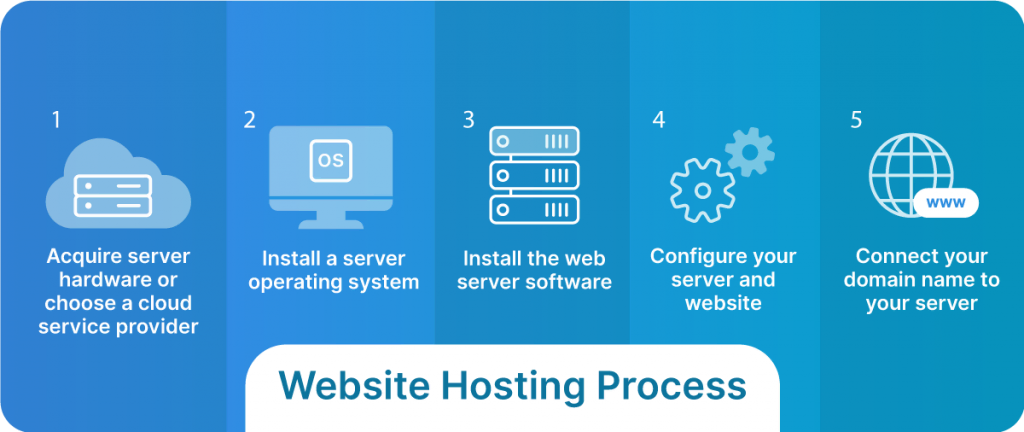
Set up your own web hosting server to gain control over your data and enhance security. Begin by choosing reliable hardware and installing server software like Apache or Nginx. Ensure regular updates and backups to protect against potential threats.
Firewall Setup
A firewall protects your server from bad traffic. It stops harmful data from reaching your server. Setting up a firewall is easy. Choose a reliable software. Configure the settings to block unknown sources. Keep the firewall updated. This makes it strong.
Ssl Certificates
SSL certificates keep data safe. They encrypt information between the server and users. Get an SSL certificate from a trusted provider. Install it on your server. It protects passwords and personal details. Users trust websites with SSL. Their data stays safe.
Regular Security Updates
Security updates are vital. They fix bugs and vulnerabilities. Always update your server software. Updates keep hackers away. Check for updates regularly. Apply them immediately. They strengthen your server’s defense.
Credit: www.liquidweb.com
Testing Server Performance
Load testing checks if the server handles many users. It’s like a big party. Everyone wants to come in. Tools help see if the server can handle the crowd. JMeter and LoadRunner are popular tools. They simulate many users visiting the site. This helps find weak spots. Weak spots slow down the server. Fixing them makes the server faster. Testing is important. It keeps the server strong.
Monitoring tools watch the server. They check speed and health. Nagios and Zabbix are common choices. They alert you if there is a problem. Problems can be small or big. Small problems may not hurt much. Big problems can crash the server. Tools help find issues early. Early fixes keep the server safe. Safety is key for good performance.
Optimization techniques make servers better. They reduce load and increase speed. Caching is one method. It stores copies of web pages. This speeds up loading times. Compression reduces file sizes. Smaller files load faster. Database optimization improves data retrieval. Faster data means a quicker server. Using these techniques is smart. A smart server serves users well.
Managing And Maintaining Your Server
Backups keep your data safe. Always make copies of your files. Use automatic systems for backups. They save time and effort. Test backups often. Ensure they work when needed. Store them in secure places. Like cloud or external hard drives. Avoid losing important data. Regular backups prevent headaches.
Update software for better security. New updates fix bugs. They improve performance. Check for updates weekly. Install them promptly. Use reliable sources for updates. Fake ones harm your server. Avoid delayed updates. Keep your server safe and fast.
Problems arise sometimes. Servers can slow down. Find the root cause quickly. Check your internet connection first. Look for error messages. They guide you to solutions. Restart the server if needed. Use online forums for help. Many experts offer advice there. Troubleshoot problems calmly. Avoid stress and confusion.
Frequently Asked Questions
How Do I Create My Own Hosting Server?
Set up a computer with a stable internet connection. Install server software like Apache or Nginx. Configure DNS settings for domain mapping. Ensure security measures such as firewalls and SSL. Regularly update and maintain the server for optimal performance.
Can I Host My Website By Myself?
Yes, you can host your website yourself using a dedicated server. Ensure you have technical skills and a reliable internet connection. Self-hosting offers control but requires maintenance and security management. Consider costs and time involved before deciding.
Can You Host A Server Yourself?
Yes, you can host a server yourself. Ensure you have the necessary hardware, software, and internet connection. Consider security measures and ongoing maintenance for optimal performance.
Can You Do Web Hosting Yourself?
Yes, you can host a website yourself. It requires a reliable server, technical skills, and internet connectivity. This approach offers control but demands time, effort, and security knowledge. Consider professional hosting if resources are limited.
Conclusion
Setting up your own web hosting server is a rewarding task. You gain control and flexibility over your website. It’s essential to follow each step carefully. Troubleshooting is part of the process. Stay patient and focused. Learning takes time, but the benefits are worth it.
With effort, you achieve independence and security. Make sure to keep your server updated. Regular maintenance ensures smooth operation. Enjoy the journey of managing your server. It’s a skill that grows with practice. Embrace the challenge and watch your expertise expand.
Your web hosting server becomes a valuable asset.


