
Are you looking to spruce up your WordPress theme with some eye-catching icons? If so, you’re in the right place.
Fa Fa Icons, part of the popular Font Awesome library, can transform your website’s appearance from ordinary to extraordinary. Adding these icons is a simple yet powerful way to enhance your site’s design and user experience. In this guide, you’ll discover how to seamlessly integrate more Fa Fa Icons into your WordPress theme, even if you’re not a coding expert.
Imagine the possibilities: a more engaging design, improved navigation, and a professional edge that sets your site apart. Let’s dive in and unlock the potential of your WordPress theme with the magic of Fa Fa Icons!
Importance Of Icons In WordPress
Icons help people understand content quickly. They are like little pictures. Icons make your site look nice and clean. People like sites that look nice. They stay longer on these sites. This is good for your site.
Icons save space on a page. Words can be long. Icons say a lot without using words. This helps when there is not much space. People can find what they need fast. Icons guide them easily.
Fa Fa icons are very popular. Many sites use them. They are easy to add to your WordPress theme. They look good on all screens. Small or big screens show them well. This keeps your site looking sharp.
Fa Fa icons are simple to use. They have many styles. You can find an icon for almost anything. This makes it fun to design your site. Your site becomes unique and special.
Understanding Fa Fa Icons
Fa Fa icons are small images. They make web pages look nice. These icons are part of Font Awesome. Many websites use them. They are easy to add. You can find these icons in many styles. Some are solid. Others are outlined. Icons are useful for buttons. They help people understand quickly. Adding new icons is simple. You need the right code. Put it in your theme file. Then, icons will appear. Make sure you have the latest version. It helps with new icons. Always check your theme’s support. Some themes may not have it. Testing is important. It shows if icons work well.
Preparing Your WordPress Theme
Enhance your WordPress theme by adding more Fa Fa icons effortlessly. Install the Font Awesome plugin, update the theme’s CSS, and utilize shortcodes to display icons. This simple process improves visual appeal and user experience.
Checking Theme Compatibility
First, check if your WordPress theme supports Font Awesome. This will help to add fa fa icons. Go to your theme’s documentation. Look for any mention of Font Awesome. If it’s not supported, you may need to manually add it. Ensure your theme is up-to-date. This can prevent compatibility issues.
Backing Up Your Site
Always back up your site before making changes. Use a backup plugin to save your data. This ensures your site can be restored if needed. Store your backup files safely. Consider using cloud storage. Backing up protects your work and data.

Credit: metabox.io
Integrating Font Awesome
Install the Font Awesome plugin from the WordPress library. This plugin adds many icons to your theme. Go to the WordPress dashboard. Click on “Plugins” and then “Add New”. Search for “Font Awesome”. Click “Install Now”. Then activate the plugin.
Now you can use more Fa Fa icons on your site. The plugin makes it easy. Choose icons from the Font Awesome library. Add them to your posts or pages. Customize your site with beautiful icons.
Add Font Awesome by coding. First, get the Font Awesome link. Visit the Font Awesome website. Copy the link for their CSS file. Go to your WordPress theme. Find the header file. Paste the link in the header. Save your changes.
Now use icons in your theme. Simply write the HTML for the icon. This method gives you more control. You can style the icons with CSS. Enjoy more icons without a plugin.
Adding New Icons
Font Awesome is a great library for icons. It offers many choices. To add more icons, first install the library. Use the Font Awesome CDN. This helps your website load icons fast. Find the CDN link on Font Awesome’s website. Add this link to your theme’s header. Now, you can use new icons in your theme. Just use the correct HTML class name. Check Font Awesome’s site for these names.
CSS helps make icons look special. You can change the size of icons. Use the font-size property for this. You can also change the color. Use the color property to do this. Make icons bigger or smaller. You can add borders around icons. Use border properties. This makes icons stand out. Try different styles and see what you like best.
Updating And Maintaining Icons
Enhancing your WordPress theme with more Fa Fa icons can boost website aesthetics. Incorporate new icons by updating the Font Awesome library in your theme’s code. Customize your site’s appearance effortlessly, making it visually appealing and user-friendly.
Keeping Font Awesome Updated
Always use the latest version of Font Awesome. It offers new icons and fixes. Check the Font Awesome website for updates.
Follow instructions to update. It is often easy. Add the new files to your theme folder. Replace old files.
Ensuring Consistent Icon Style
Use the same icon style throughout your site. This makes your site look nice. Choose either solid or regular icons.
Avoid mixing styles. It can make your site look messy. Stick to one style for all icons.
Troubleshooting Common Issues
Icons might not show up due to missing files or incorrect paths. Check if the font files are in the right folder. Ensure the CSS paths are correct. Sometimes, a cache can cause issues. Clear your browser cache to see changes. Theme updates might overwrite custom settings. Reapply customizations if needed.
Plugins can cause conflicts with font icons. Disable each plugin one by one. Check if the icons appear after disabling. Some plugins have settings that affect font loading. Review plugin settings for changes. Compatibility issues might arise after theme updates. Consider using plugins known for compatibility. Choose plugins with good reviews and support. Always keep both theme and plugins updated.
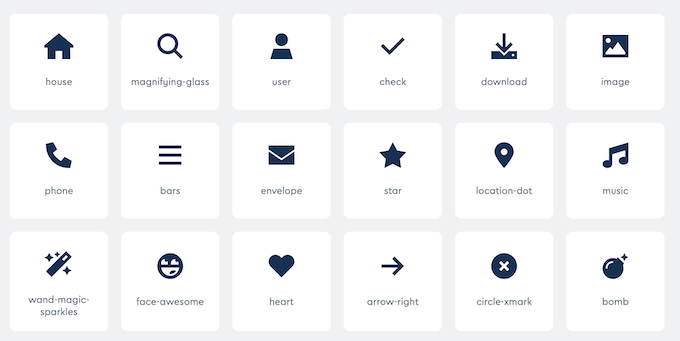
Credit: www.wpbeginner.com
Best Practices For Icon Use
Icons should be easy to understand. They must have alt text. This helps everyone know what the icon means. Use clear labels. They help people who use screen readers. Make sure icons have enough color contrast. This helps people see them well. Choose colors wisely. Test icons often. Ask others if they understand them.
Icons should load fast. Use vector formats like SVG. They are small and clear. Limit the number of icons on a page. Too many icons slow down the page. Compress icon files before uploading. This saves space and time. Use web-safe fonts for icons. They load faster. Always check page speed. A fast page is a happy page.

Credit: docs.fontawesome.com
Frequently Asked Questions
How Can I Add Fa Fa Icons In WordPress?
To add Fa Fa icons in WordPress, first install a Font Awesome plugin. Then, insert icon codes into your theme’s HTML. This enables the display of various icons, enhancing design flexibility. Ensure your theme supports Font Awesome for seamless integration.
Where To Find More Fa Fa Icons?
You can find more Fa Fa icons on the Font Awesome website. They offer a vast library of icons for different purposes. Browse their collection and copy the icon codes you need. This provides easy integration into your WordPress theme.
Are Fa Fa Icons Free To Use?
Yes, Font Awesome offers free icons for personal and commercial use. However, they also provide premium icons with advanced features. You can access their free library without any cost. Ensure to check their licensing terms for specific usage guidelines.
Can I Customize Fa Fa Icons?
Yes, you can customize Fa Fa icons using CSS. Change size, color, and style to match your theme design. Customization allows for tailored icon appearance in your WordPress site. This flexibility ensures your icons fit seamlessly with your website aesthetics.
Conclusion
Enhancing your WordPress site with Fa Fa icons boosts visual appeal. Icons make navigation easy and improve user experience. Adding icons is simple and quick. Choose the right icons to match your theme style. Ensure icons are responsive on all devices.
Remember, icons should complement content, not overshadow it. Regularly update and refresh your icon set. Keep your site looking modern and engaging. With careful selection, icons can enhance your brand’s identity. Experiment with different styles to find what works. Enjoy a visually appealing website with Fa Fa icons.


