
Are you looking to give your WordPress site a fresh new look? Applying a theme in WordPress is one of the simplest ways to transform your website’s appearance and functionality.
Whether you’re a beginner or an experienced user, the right theme can make your site stand out and improve user experience. Imagine your website not just as a digital space, but as an engaging environment that captivates your audience and keeps them coming back for more.
You’ll discover how easy it is to apply a theme to your WordPress site. We’ll guide you step-by-step, making sure you can follow along without any hassle. You’ll also learn some insider tips to ensure your theme choice aligns perfectly with your brand and goals. Let’s dive in and unlock the potential of your WordPress site with the perfect theme!

Credit: hostadvice.com
Choosing The Right Theme
Know why you need a website. Is it for a blog or a store? This helps in picking the right theme. Each theme serves a different purpose. Choose wisely to meet your goals. Understanding your needs is key. A clear purpose leads to a successful website.
Good design attracts visitors. Pick a theme that’s easy to navigate. Make sure it looks nice on phones and computers. Simple layouts work best. People like clear and clean designs. A well-planned layout makes users happy. Users stay longer when they like the design.
Check what features the theme offers. Look for customizable options. Themes with many features can be useful. They let you change colors and fonts. Some themes have built-in widgets. These can save you time. Make sure the theme supports plugins. Plugins add extra features to your site.
Credit: www.geeksforgeeks.org
Installing A Theme From WordPress Repository
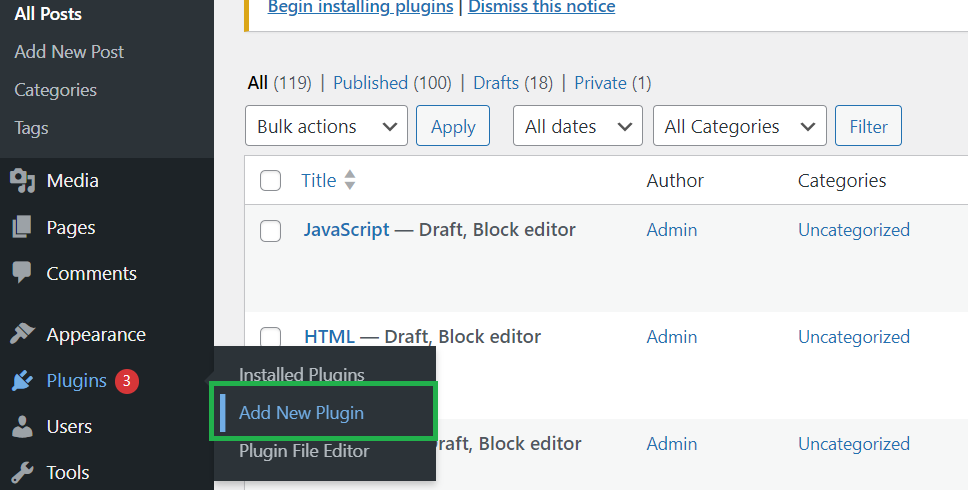
First, open your browser. Type your website’s URL. Add “/wp-admin” at the end. Press enter to visit the WordPress login page. Use your username and password to login. You will see the dashboard. This is where you can manage your website.
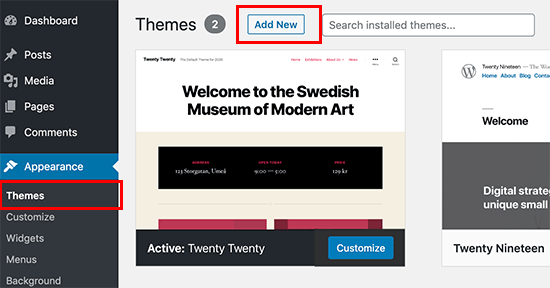
Look on the left side menu. Find “Appearance.” Click on it. Then, click “Themes.” You will see the themes page. This is where all your themes are listed. You can change or add themes here.
On the themes page, click “Add New.” A search box will appear. Type the theme name or keyword. Press enter. You will see many themes. Choose one you like. Click “Install” under the theme. Wait for it to finish. Finally, click “Activate” to use your theme.
Uploading A Theme From A Third-party
Find a theme you like. Click the download link. Save the theme files to your computer. These files are often in a zip format. Keep them in a place you can find easily.
Open your WordPress dashboard. Look for the Appearance tab. Click on Themes. Now, choose Add New. Then, pick the Upload Theme button. Use it to choose your downloaded zip file. Click Install Now. Wait until it’s done.
Once uploaded, you will see a success message. Click on Activate. This will make the theme live on your site. Check your site to see the new look. Make sure everything works well.
Customizing Your Theme
The WordPress Customizer helps change your theme easily. It lets you see changes live. You can adjust the look and feel. Choose colors and styles that suit your brand. Make your site unique and personal. This tool is user-friendly. Perfect for beginners and experts.
Your site’s identity is crucial. Add a site title and tagline. These tell visitors about your site. Choose colors that match your brand. Colors can set the mood of your site. Bright colors can be exciting. Soft colors can be calming. Test different colors to find the best fit.
Menus help users navigate your site. Create clear menus with main topics. Easy navigation keeps visitors happy. Widgets add extra features to your site. Use them for calendars, recent posts, or search bars. Arrange widgets in sidebars or footers. Make your site interactive and friendly.
Optimizing Theme Performance
Most people use phones to browse the web. Mobile responsiveness is crucial. Your theme should adjust to different screen sizes. Check if images and text fit well. Test buttons and links. They should be easy to click. If users struggle, they might leave.
Slow pages annoy visitors. Speed is important. Compress images to make them smaller. Reduce heavy scripts and plugins. Use a caching plugin. This helps your site load faster. Fast sites keep people happy. They stay longer and explore more.
SEO helps your site get noticed. Choose a theme with clean code. Use headings like H1, H2, for better structure. Add alt text to images for better search results. Use keywords in your titles and content. This helps search engines find your site. Good SEO brings more visitors.
Troubleshooting Common Issues
Some themes may not work well with your plugins. This can cause errors. Always check if the theme is compatible with your version of WordPress. Read the documentation carefully. It can help you understand if there are known issues. Deactivate plugins one by one. See if the theme works without them. This helps to find the problem plugin.
A broken layout looks messy. Check if the theme supports your content size. Some themes need specific settings. Go to the theme’s settings page. Adjust the width and height options. Use a responsive theme for better layout. This makes the site look good on all devices.
Updates can change your site’s look. Before updating, back up your website. This keeps your data safe. Check the theme’s changelog. It shows what changes are coming. Test the update on a staging site. This is a copy of your site. If it looks good, update the real site.
Utilizing Theme Support Resources
Theme documentation is very helpful. It gives you clear steps. You can find instructions on setting up the theme. The documentation explains features and customization options. Check for updates regularly. Updated guides help with new features.
Support forums are full of helpful people. Ask questions if you are stuck. Read other users’ questions and answers. Many problems have solutions there. It’s a good place to learn. Share your experiences too. It helps others.
Some problems need expert help. Hiring a professional can save time. Experts know the technical details. They can fix complex issues. Choose someone with good reviews. This ensures quality work. It might cost money, but it helps.
Credit: thimpress.com
Frequently Asked Questions
How Do I Install A WordPress Theme?
To install a WordPress theme, navigate to the admin dashboard. Click on “Appearance,” then “Themes,” and select “Add New. ” Browse or upload your theme file, and click “Install. ” Once installed, activate the theme to make it live on your site.
Ensure your theme is compatible with your WordPress version.
Can I Change My WordPress Theme Later?
Yes, you can change your WordPress theme anytime. Navigate to “Appearance” and “Themes” in the dashboard. Select your desired theme and click “Activate. ” Before switching, preview the theme to ensure it fits your content. Changing themes doesn’t affect your site’s content, but may alter layout and appearance.
Do WordPress Themes Affect Site Speed?
Yes, WordPress themes can impact site speed. A well-coded, lightweight theme enhances speed, while a bulky theme can slow it down. Opt for themes optimized for performance. Check reviews for speed-related feedback. Regular updates and proper configuration also help maintain optimal site speed.
Is It Safe To Use Free WordPress Themes?
Free WordPress themes are generally safe if downloaded from reputable sources like WordPress. org. They undergo strict reviews for quality and security. Avoid downloading from unknown sites to prevent security risks. Always check user reviews and ratings to ensure theme reliability and support.
Conclusion
Installing a WordPress theme is straightforward and rewarding. Themes enhance your website’s look. They offer customization options to fit your style. Always choose a theme that suits your content. Check reviews and ratings before downloading. Test the theme’s responsiveness on different devices.
Backup your site before making changes. A well-chosen theme boosts user engagement. It helps in creating a memorable online presence. Enjoy exploring different themes. Experiment until you find the perfect match. Your website deserves a unique touch. Stay creative and keep your audience engaged.
Happy theming!


