
Are you thinking about building a website but feeling overwhelmed by the idea of web hosting? You’re not alone.
Many people find the concept a bit daunting at first. But here’s the good news: web hosting doesn’t have to be complicated. In fact, once you understand the basics, you’ll wonder why you ever found it intimidating. Imagine having the power to launch your website, showcase your ideas, and reach people around the globe—all with just a few clicks.
Sounds exciting, right? This guide will show you exactly how to do web hosting in a simple, straightforward way. Get ready to unlock the secrets of the web and take control of your online presence!
Choosing The Right Hosting Type
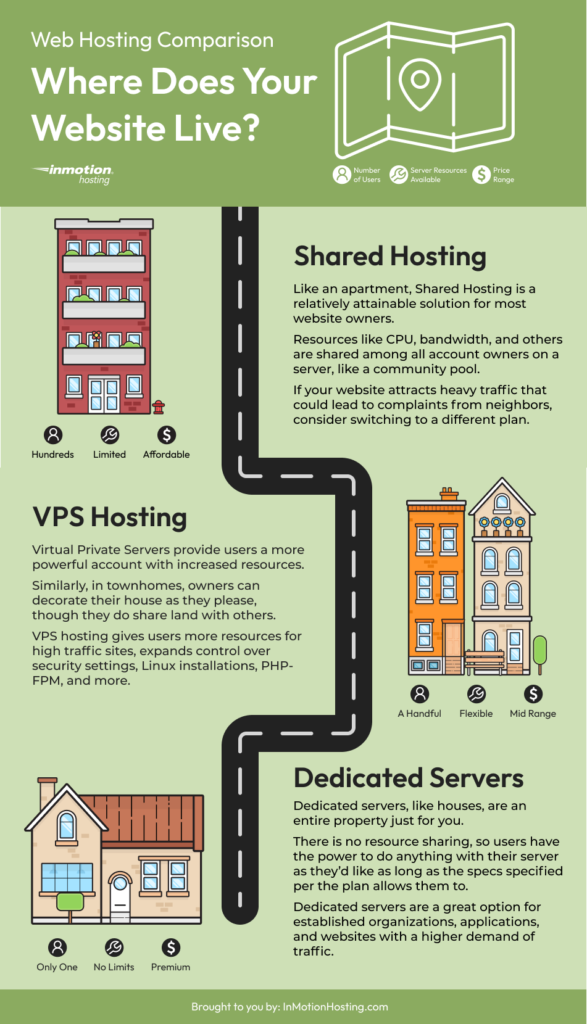
Shared hosting is like sharing a bus with many people. Your website shares a server with others. Costs are low, but resources are limited. If one site gets busy, others slow down. Good for small sites. Not for high traffic.
VPS stands for Virtual Private Server. It gives more control than shared hosting. Resources are shared, but in a better way. Each site has its own space. More secure than shared hosting. Best for growing sites.
Dedicated hosting means your own server. No sharing at all. Full control and high security. Perfect for big sites with heavy traffic. More costly than other types. Needs technical knowledge.
Cloud hosting uses many servers. If one fails, others help. Scalable and reliable. Pay for what you use. Great for unpredictable traffic. Suitable for modern businesses.
Selecting A Reliable Hosting Provider
Choosing a dependable hosting provider is crucial for successful web hosting. Assess features like uptime, support, and security to ensure reliability. Compare plans to find one that meets your site’s needs and budget.
Provider Reputation
Always check the reputation of the hosting provider. Read reviews from other users. Good reviews mean people trust the provider. Bad reviews can be a red flag. Look for consistent feedback about their services.
Customer Support
Customer support is very important. Problems can happen anytime. You need help fast. Check if the provider offers 24/7 support. Make sure they have different ways to contact them. Phone, chat, or email support are best.
Uptime Guarantee
Uptime guarantee shows how often the website stays online. A good provider offers at least 99% uptime. This means your site is online almost all the time. Downtime can hurt your visitors. So, choose wisely.
Pricing Plans
Look at the pricing plans carefully. Compare what each plan offers. Some plans are cheap but offer less. Others might cost more but give more features. Pick a plan that fits your needs and budget.
Registering A Domain Name
First, check if a domain name is free. Use tools to search for domain availability. A name should be short and easy to remember. Avoid using numbers and special characters. They can confuse people.
Choose the right domain extension. Popular choices are .com, .net, and .org. Each extension has its own purpose. .com is for commercial sites. .org is for organizations. Select one that fits your needs.
Protect your personal information. Use privacy protection services. They keep your details safe from the public. This is important to avoid spam and scams. It also gives you peace of mind.
Credit: www.inmotionhosting.com
Configuring Your Hosting Account
Start by logging into your hosting account. Find the Control Panel link. Click it to open. You will see many options. These options help manage your site. Look for settings you need. You can change them easily.
Email is important. Create your own email accounts. Go to the email section in the panel. Click on ‘Add New Email’. Fill in your details. Choose a strong password. Save it. Now you can send and receive emails.
Databases store your site data. Go to the database section. Click ‘Create New Database’. Name your database. Choose a username and password. Save the details. Use them to connect your site to the database. This keeps your data safe and organized.
Uploading Your Website
FTP clients help you upload files. You need to download one first. Popular choices include FileZilla and Cyberduck. Connect to your server by entering your username and password. Once connected, you can drag and drop your files. This makes transferring files easy and quick. Always check if your files are in the right folder.
File manager tools are found in hosting control panels. These tools let you upload files directly. No need for extra software. Navigate to the file manager section. Click the upload button. Choose the files you want to upload. Confirm the upload. Your website files will be on the server.
Website builders make uploading simple. They have built-in tools to publish sites. Just click the publish button. Your site goes live instantly. No need for technical skills. Easy for beginners. Builders like Wix and Squarespace are user-friendly. They guide you through every step.

Credit: www.youtube.com
Setting Up Security Measures
SSL certificates keep your data safe. They make sure your website is secure. No one can steal important info. Websites with SSL show a padlock icon. This icon is next to the URL. It means the site is safe. Google likes secure sites. Your website will rank better.
Firewalls block bad traffic. They keep hackers away. Your website is safer with a firewall. It acts like a guard. It checks all data coming in and out. If something looks bad, it blocks it. You can use software or hardware firewalls. Both are good for safety.
Always have backup solutions. They save your data if something goes wrong. You can use cloud backups. They store your data online. You can also use physical drives. They are like a hard copy of your data. Backups keep your website safe and secure.
Testing And Launching Your Website
Websites may look different on each browser. Test your website on Chrome, Firefox, and Safari. Check if all buttons and images work. Look for errors or missing parts. Fix any problems you find. Your site must work on all browsers.
Many people use phones to browse. Ensure your website adjusts to small screens. Content should be easy to read. Buttons must be easy to tap. Test your site on different phones. Make sure it looks good and works well.
Visitors leave slow sites quickly. Optimize your website for fast loading. Compress images to make them smaller. Use fewer plugins or scripts. Check your site speed using online tools. Aim for fast loading times. Speed keeps visitors happy.
Managing And Maintaining Your Site
Keep your site fresh with regular updates. Add new content often. This helps keep visitors interested. Check for software updates. These keep your site safe. Updated software means fewer bugs. Bugs make your site slow. Slow sites lose visitors.
Watch your site’s performance closely. Use tools to check speed. Fast sites keep users happy. Monitor traffic levels. Know when visitors come. Adjust your server to handle peak times. This keeps your site running smoothly.
Fix technical issues quickly. Broken links upset users. Check links often. Fix any broken ones. Use a backup plan. Save your work often. This helps if things go wrong. A backup can save your site.

Credit: wegic.ai
Frequently Asked Questions
How Can I Host My Own Website?
Purchase a domain name and choose a hosting provider. Install a content management system like WordPress. Upload your website files using FTP. Configure your domain settings to point to your hosting server. Test your website to ensure it functions correctly.
Regularly update and maintain your site for security and performance.
How Do I Get Started With Web Hosting?
Choose a reliable web hosting provider based on your needs. Select a hosting plan, register a domain, and set up your website using a CMS like WordPress. Ensure your site is optimized for speed and security. Begin by creating content and marketing your website to attract visitors.
Can I Host My Website For Free?
Yes, free website hosting is available through platforms like WordPress. com, Wix, and GitHub Pages. These services offer basic features without cost. However, free plans often have limitations on storage, bandwidth, and customization options. Consider your needs before choosing a free hosting plan.
How Much Does It Cost To Host A Website?
Website hosting costs range from $3 to $300 per month. Shared hosting is the cheapest option, starting around $3 to $10 monthly. VPS hosting costs between $20 and $80 per month. Dedicated hosting can go up to $300 per month.
Prices vary based on resources and features.
Conclusion
Choosing the right web hosting is crucial. It affects your site’s speed. Security matters too. Look for reliable hosts with good reviews. Compare prices and features. Check for easy-to-use interfaces. Consider customer support options. Make sure they offer scalability. Your website might grow over time.
An adaptable host will help. Start small, then upgrade as needed. Remember to back up your data regularly. It prevents loss during mishaps. Web hosting can seem complex. But with careful planning, it’s manageable. Your online presence depends on it.
Make informed decisions to succeed. Keep learning and adapting for the best results.


