
Are you ready to take control of your online presence? Setting up your own web hosting server is a powerful step toward achieving that goal.
Imagine having the freedom to manage your website exactly the way you want, without the limitations of standard hosting services. Whether you’re a budding entrepreneur, a seasoned developer, or someone curious about the tech world, understanding how to set up a web hosting server can open doors to endless possibilities.
In this guide, we’ll walk you through the process, breaking it down into simple steps that anyone can follow. You’ll discover how to choose the right hardware, select the best software, and configure everything to suit your needs. Don’t worry about getting lost in technical jargon—we’ll keep things straightforward. By the end of this article, you’ll not only know how to set up a web hosting server, but you’ll also feel confident in managing your online projects with ease. Curious to learn more and gain the skills to control your digital future? Keep reading, and let’s get started on this exciting journey together!
Credit: www.liquidweb.com
Choosing The Right Hosting Plan
Shared hosting is a common choice for beginners. You share server space with others. It’s cheaper but has limited resources. Good for small websites or blogs. Dedicated hosting offers a whole server to yourself. It’s more expensive but you get full control. Perfect for big businesses needing strong security. Consider the site size and budget before deciding. Shared hosting suits low traffic sites. Dedicated is best for high traffic and complex sites.
Cloud hosting is flexible and scalable. Your site uses many servers. This boosts reliability. If one server fails, others pick up. It’s great for growth. Costs vary based on usage, so it’s cost-effective for many. Cloud hosting suits sites with changing traffic. Many big companies choose cloud for its power. It’s ideal for sites needing strong performance and adaptability. Evaluate your site needs to pick the right option.
Selecting A Domain Name
Choosing a domain name is crucial for setting up a web hosting server. It should be easy to remember and reflect your brand. Ensure it’s unique and easy to spell, enhancing online visibility and searchability.
Domain Registration Process
Choosing a domain name is important. It should be easy to remember. Keep it short and simple. Avoid numbers and special characters. Check if the name is available. You can use domain search tools. Register the domain through a trusted registrar. This keeps your name safe. Renewal is needed each year. Don’t forget this step.
Tips For Choosing A Domain
Try using keywords in your domain name. This helps with search engines. Make sure the name reflects your brand. Use a .com extension if possible. People trust it more. Avoid names that are too similar to others. This can confuse visitors. Check for trademarks before choosing. This avoids legal issues.
Preparing Your Server
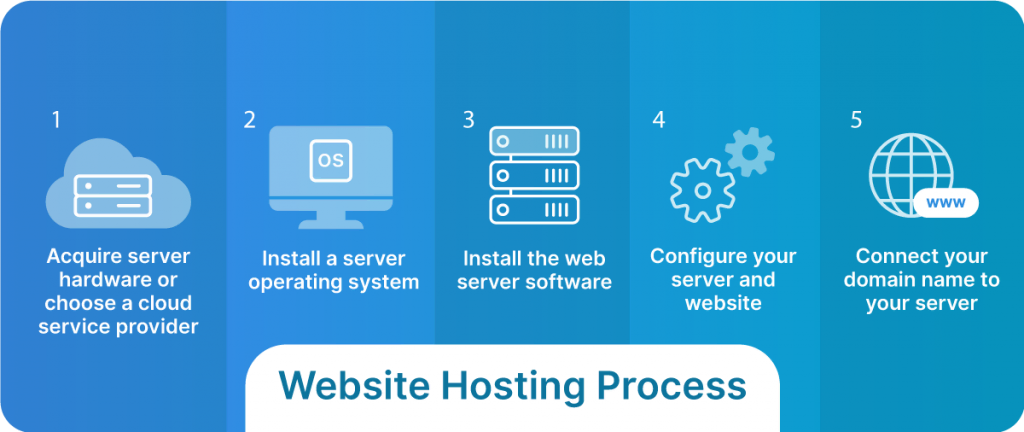
Choosing the right hardware is key. CPU speed should be fast. More RAM means better performance. Hard drive size matters too. Large sites need more space. SSD drives are faster than HDDs. Fast internet connection is important. It keeps your site running smoothly. Good cooling system prevents overheating. Hardware should be reliable and durable.
The Operating System (OS) is like the brain of your server. Linux is popular for web hosting. It’s free and stable. Windows is another option. It supports ASP.NET. Choose what suits your needs. Check for compatibility with your software. Also consider security features. A secure OS protects your data. Look for an OS with good support options.

Credit: wegic.ai
Installing Web Server Software
Apache and Nginx are both popular web servers. Apache is known for its flexibility. It supports a wide range of modules and configurations. Nginx is faster with static content. It handles more requests with less memory. Choose Apache for complex setups. Use Nginx for speed and efficiency. Both are reliable and well-supported.
MySQL is a database server. It stores and manages data. Install MySQL with simple commands. Create a database using the MySQL interface. Use SQL to add and retrieve data. MySQL works well with web applications. It’s fast and secure. Keep it updated for the best performance. Follow guides for detailed steps.
Configuring Server Security
Firewalls help keep your server safe. They block harmful traffic. First, choose a good firewall software. Make sure it is reliable. Next, set up rules to control traffic. Allow only trusted IP addresses. Block any unknown sources. Check your firewall logs often. This helps spot any problems. Updating the firewall is important. It keeps the server safe from new threats.
SSL certificates protect data on your site. They encrypt information. This makes it hard for hackers to steal data. First, buy an SSL certificate from a trusted provider. Install it on your server. This step makes your site more secure. Visitors will see a padlock icon. This shows your site is safe. Renew SSL certificates regularly. This keeps your security up-to-date.
Uploading Your Website
To upload your website, use an FTP client. It helps move files from your computer to the server. First, download an FTP client like FileZilla. Then, install it on your computer. Open the FTP client. Enter your server details. You need the host name, username, and password. After connecting, find your website files on your computer. Drag them to the server area in the FTP client. Wait for the files to upload. Your website is online now!
Permissions decide who can view or edit files. Some files need special permissions. Use your FTP client to set these permissions. Find the file or folder you want to change. Right-click and choose “Permissions” or “Attributes”. Set permissions using numbers like 755 or 644. These numbers control who can read, write, or execute files. Make sure permissions are correct. This keeps your website safe and running well.
Testing Your Setup
First, ensure your server is online. Use the ping command in your terminal. Type ping your-server-address and press enter. You should see response times. This means your server is reachable. If not, there might be a network issue. Check your cables or router settings.
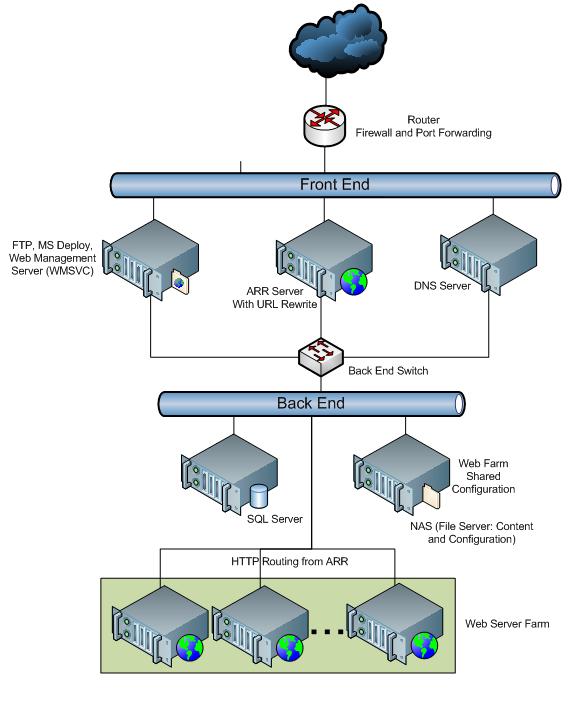
Sometimes, servers do not work as expected. Common issues include DNS problems or firewall blocks. Ensure your DNS settings are correct. Use online tools to verify. If your firewall is blocking access, adjust the rules. Allow necessary ports like port 80 for web traffic. Always save changes before testing again.
Credit: learn.microsoft.com
Managing And Monitoring
Setting up a web hosting server involves careful management and monitoring for optimal performance. Regular checks ensure server security, stability, and efficiency. Use tools to track server load and uptime for a seamless user experience.
Regular Backups
Backing up your server is crucial. Data can be lost easily. Use tools that automate backups. Choose a system that saves data daily. This ensures you have recent copies. Store backups in a safe location. Keep copies off-site if possible. Regular checks are important. Verify that backups are complete and usable. Consistent backups prevent data loss. Protect your server’s information.
Performance Monitoring Tools
Monitoring tools help track server performance. Use software that shows real-time stats. Look for CPU usage, memory load, and network speed. Alerts can warn about issues. Find tools that send notifications. This helps you fix problems quickly. Check logs often. Logs show past server activity. Proper monitoring ensures your server runs smoothly. Keeps your website fast and reliable.
Frequently Asked Questions
Can I Host My Website On My Home Server?
Yes, you can host a website on a home server. Ensure stable internet, proper hardware, and security measures. Consider power costs and potential ISP restrictions. Hosting at home offers control but may lack professional support.
How Do I Make My Computer A Web Hosting Server?
Install server software like Apache or Nginx. Configure your router to forward port 80. Ensure your ISP allows hosting. Use a static IP or dynamic DNS service. Secure your server with a firewall and updates.
Can You Do Web Hosting Yourself?
Yes, you can host a website yourself. You’ll need a server, stable internet connection, and technical skills. Ensure security measures are in place. Self-hosting offers control but requires maintenance and troubleshooting. For simplicity, many opt for third-party hosting providers.
Do I Need A Server To Host A Website?
Yes, a server is necessary to host a website. It stores your site’s files and makes them accessible online. You can choose between using a web hosting service or setting up your own server. Hosting services provide convenience and technical support, making them popular choices for most website owners.
Conclusion
Setting up a web hosting server can be simple. Start with choosing the right server. Follow each step carefully. Ensure your server is secure. Test your server regularly. Keep backups to prevent data loss. Stay updated with new technologies. Your website should be fast and reliable.
Remember, practice makes perfect. With patience, you can manage a server efficiently. This guide is just the beginning. Explore more to enhance your skills. Enjoy hosting your website!


