
Are you looking to monetize your WordPress site using the Divi theme? Adding Google AdSense can be a great way to generate passive income from your website.
However, integrating AdSense with Divi might seem a bit daunting at first. Don’t worry, you’re not alone! Many website owners like you want to make the most of their online presence, and learning how to smoothly add AdSense to your Divi theme can be a game-changer for your revenue stream.
In this guide, you’ll discover a simple, step-by-step process to seamlessly incorporate AdSense into your Divi-powered site. Imagine transforming your blog or business platform into a money-making machine with just a few clicks. By the end of this article, you’ll be equipped with the knowledge to do just that. So, if you’re ready to unlock the full potential of your website and start earning, keep reading. Your path to monetization is just a few paragraphs away!
Prerequisites For Adsense Integration
First, you need a Google Adsense account. Visit the Adsense website. Click on the “Sign Up” button. Fill in your details. Provide a valid website address. Verify your email address. Wait for the approval email. This may take a few days. Once approved, you can access your account. Generate your ad code from the Adsense dashboard. Save this code for later.
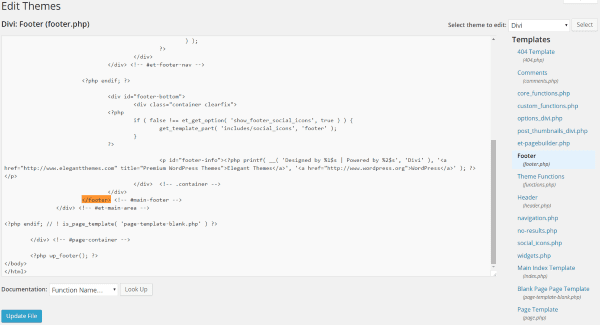
Ensure WordPress is installed on your site. Check for the latest version. Download the Divi Theme. Upload it to your WordPress site. Activate the theme. Go to “Appearance” and then “Themes”. Click “Add New”. Choose Divi and activate it. Your site is now ready for Adsense.
Credit: www.elegantthemes.com
Generate Adsense Code
Log into your Google Adsense account. Click on the “Ads” section. Choose “By ad unit“. Create a new ad unit. Select the ad type you prefer, like display ads. Name your ad unit. Set the size and format. Save the changes.
Find your new ad unit. Click on “Get code“. A code box appears. Copy the code. Keep it safe. You need it for your Divi theme. Use the code in WordPress. Paste it to the right place. Your ads will show up.
Insert Adsense Code Into Divi
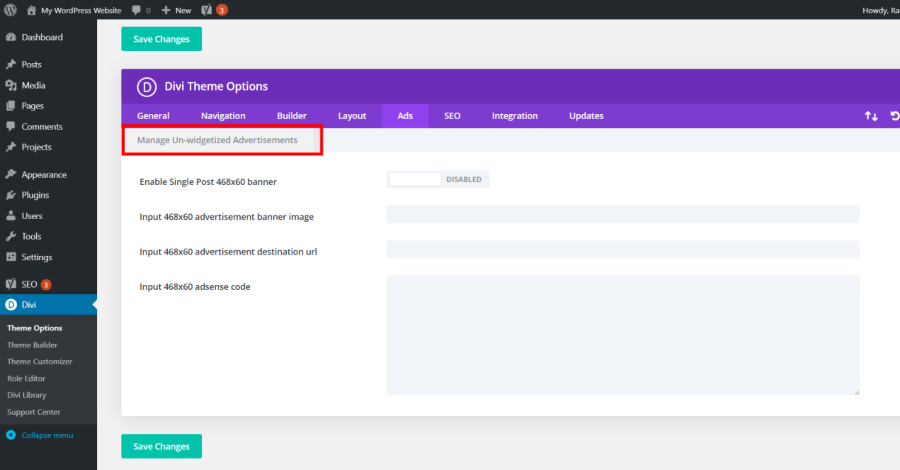
First, go to your WordPress dashboard. Find Divi on the left side. Click it. A menu will appear. Choose Theme Options. This is where you can put your Adsense code. Look for the Integration tab. Paste the code here. Save your changes.
Check your website. The ads should show now. Make sure they appear correctly. If not, try refreshing the page. This simple method lets you add ads easily.
Open the page you want to edit. Click on Enable Divi Builder. Add a new module. Choose Code Module. Paste your Adsense code here. Save your work. Preview the page. Ads should display now.
Ensure the ads fit well. Adjust if needed. This way, your site stays neat. Adding ads in Divi Builder is straightforward.
Credit: divicake.com
Optimize Ad Placement
Placing ads in the right spots is key. Above the fold is a prime location. This is the part users see without scrolling. Sidebar ads also catch attention. They are visible while reading. Inside content can boost visibility too. Ads between paragraphs work well.
Try different layouts to see what works best. A/B testing helps. It shows which ads get more clicks. Change one thing at a time. This makes it easy to see what works. Test different sizes too. Responsive ads fit all screens. They look good on phones and computers.
Troubleshooting Common Issues
Struggling to integrate Adsense with the Divi theme on WordPress? Ensure your Adsense code is correctly placed in the theme’s header or body section. Check for conflicting plugins that might block ads, and verify your Adsense account is active and approved.
Ads Not Displaying
Ads might not show due to wrong code placement. Double-check your AdSense code location. Ensure it’s in the right widget or page. Sometimes, ad blockers stop ads. Check your browser settings. Clear cache, and disable ad blockers. This can help ads display correctly.
Resolving Css Conflicts
CSS conflicts can hide ads. Inspect elements to find conflicting styles. Use browser developer tools for inspection. Locate CSS that affects ads. You might need to adjust or remove some styles. Sometimes, adding custom CSS can solve the problem. Ensure your CSS doesn’t override ad visibility.

Credit: wpadvancedads.com
Best Practices For Adsense
Integrating Adsense with the Divi theme in WordPress enhances your site’s monetization. Navigate to Divi’s theme settings. Insert your Adsense code in the designated script area. This setup ensures ads display seamlessly across your pages.
Ad Size And Format Recommendations
Choosing the right ad size is very important. Some sizes work better. The 728×90 and 300×250 sizes are popular. They fit well on most websites. Always test different sizes. Find what works best for your site. Ad formats matter too. Text and display ads can be used. Both are easy to set up.
Ensuring Compliance With Google Policies
Always follow Google’s rules for ads. This keeps your account safe. Avoid clicking your own ads. Place ads where users can see them. But don’t block content. Keep your site clean and simple. Check Google’s rules often. They can change.
Monitoring And Analytics
Tracking ad performance helps in understanding what works best. Use Google Analytics to check how ads are doing. Look at click-through rates and impressions. This tells which ads get attention. Find out which pages perform well. Some pages may attract more clicks. Focus on those pages. Check the time users spend on a page. Longer time might mean better engagement. Keep an eye on revenue changes. Sudden drops may need attention.
Adjusting strategies based on data is key. If an ad doesn’t work, change it. Try different sizes or positions. Test colors and styles too. Small changes can make a big difference. Compare with past data. See what improved and what didn’t. Make a plan to test new ideas. Track results to see what brings success. Always keep learning from the data.
Frequently Asked Questions
How To Integrate Adsense With Divi Theme?
To integrate Adsense with the Divi theme, first, obtain your Adsense code. Then, use Divi’s theme builder or widget areas to insert the code. This allows ads to display on your WordPress site seamlessly, enhancing monetization without compromising the design.
Can I Customize Adsense Ads In Divi?
Yes, you can customize Adsense ads in Divi. Use Divi’s modules and custom CSS to adjust ad placements and styles. This ensures ads blend with your site’s design, improving user experience and potentially increasing click-through rates.
Does Divi Support Adsense Auto Ads?
Divi supports Adsense auto ads effortlessly. Simply paste the auto ads code into the header or body of your site. This enables automatic ad placements across your pages, optimizing ad performance and user engagement without manual adjustments.
Why Use Adsense With Divi Theme?
Using Adsense with Divi theme enhances monetization opportunities. Divi’s flexible design and customization options allow seamless ad integration. This combination improves ad visibility, user experience, and maximizes revenue potential while maintaining a professional look.
Conclusion
Adding AdSense to the Divi Theme is straightforward. Follow the steps, and you’re set. Monetize your site effectively. Ensure compliance with AdSense policies. This helps avoid issues. Regularly check ad performance. Optimize if needed. Balancing ads enhances user experience. Too many ads might deter visitors.
Keep content engaging. This attracts more traffic and clicks. A well-placed ad can boost earnings. Remember, content comes first. Ads support it. Maintain a clean design. Users appreciate easy navigation. Happy visitors are more likely to return. And that’s crucial for success.


