
Are you looking to enhance your WordPress site with unique features or interactive elements? Adding custom JavaScript to your WordPress theme is the perfect way to do just that.
It opens up a world of possibilities, from improving user experience to creating dynamic content that captivates your audience. But you might be wondering, how do you actually integrate this into your theme without disrupting its current functionality? The good news is, it’s simpler than you might think.
In this guide, you’ll discover straightforward steps to seamlessly add custom JS to your WordPress theme. Whether you’re a seasoned developer or just starting out, you’ll find valuable insights that make the process clear and easy to follow. Ready to transform your website into something truly remarkable? Let’s dive in!
Why Add Custom Javascript
Adding custom JavaScript can make your website look unique. It helps in enhancing user experience. You can add cool features to your site using JavaScript. It can help in making your site interactive. Custom JavaScript allows you to tailor functions to your needs. It is good for adding animations and dynamic elements. JavaScript can improve your site’s performance. It can help in tracking user behavior. Custom scripts can also help in improving site navigation. It gives you control over site functions.
Sometimes, themes do not have all the features you need. Custom JavaScript fills these gaps. It allows you to add extra features. You can improve your site’s functionality with it. JavaScript is essential for modern websites. It keeps your site up-to-date. It makes your site exciting and lively. Custom scripts can be a powerful tool for your site.
Preparing Your WordPress Environment
Always make a backup before changes. Use a plugin for backups. Popular ones work well. Backups save your site. Mistakes happen. Backup prevents loss. Backup is easy. Click a button and wait. Save your data safely.
Creating a child theme protects your work. It saves changes from updates. Parent themes update often. Updates remove custom code. Child themes keep code safe. Make a child theme first. Name it well. Link it to parent theme. Use it for custom JS. It’s simple and smart.
Using The Theme Editor
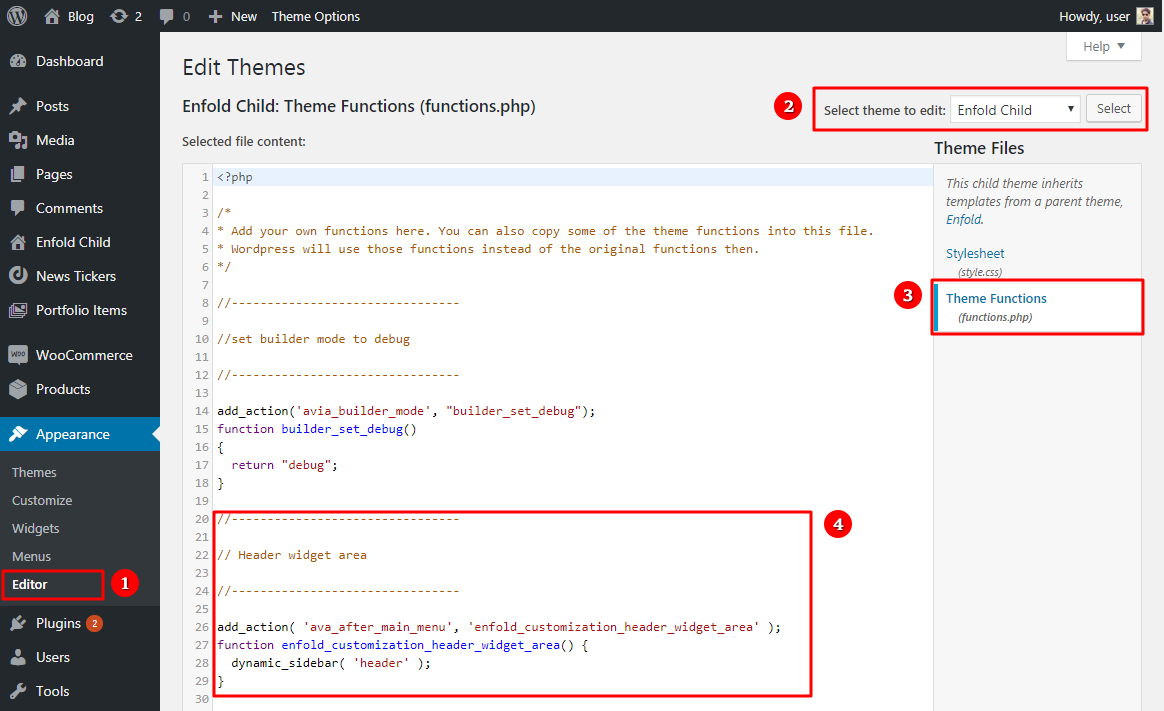
Start by logging into your WordPress dashboard. Look for the Appearance option on the left side. Click on it. You will see the Theme Editor option. Click it to open. A warning message might appear. It will remind you about editing files. Proceed carefully.
Once inside, you can see your theme files. These files include header.php and footer.php. Choose the file you want to edit. This step is very important for adding JavaScript.
JavaScript can be added to header.php or footer.php. It’s better to add scripts in footer.php. This makes your site load faster. Find the closing tag in footer.php. Place your JavaScript code just before this tag. Save your changes after adding the code. This ensures the script works properly on your site.
Using Wp_enqueue_script
wp_enqueue_script is a WordPress function. It helps you add JavaScript to your theme. This function is important. It manages the scripts in WordPress. Without it, scripts can load wrong. Loading order is crucial. It can affect how your website works. Use wp_enqueue_script to ensure scripts load correctly.
Open your theme’s functions.php file. Add your script code inside. Use wp_enqueue_script to add scripts. First, give your script a name. Next, provide the path to the file. Set any dependencies if needed. Finally, decide if the script should load in the footer. This step is vital for efficiency.
Using WordPress Plugins
Choosing the correct plugin is crucial. Not all plugins support custom JS. Some plugins offer better features. Others might be easier to use. Read reviews before picking one. User feedback can be helpful. Look for plugins with high ratings. Popular plugins often have more support.
Installation is usually simple. Follow instructions provided by the plugin. After installing, configuring is next. Adjust settings to fit your needs. Some plugins have many options. Explore the settings for best results. Ensure the plugin is active. Check compatibility with your theme. Sometimes plugins may conflict. Be cautious and test thoroughly.

Credit: www.youtube.com
Testing And Troubleshooting
Easily enhance your WordPress site by adding custom JavaScript. Begin by accessing your theme’s functions. php file. Then, insert your script correctly to ensure smooth functionality.
Testing Javascript Functionality
Ensure your JavaScript works correctly on the site. Open your website in a browser. Press F12 to open developer tools. Go to the “Console” tab. Look for any error messages. Errors will help fix bugs. Test your site on different devices. Use phones, tablets, and computers. Check if buttons and links work. Ensure animations play smoothly. Refresh the page to see changes. Verify functionality after updates. Keep testing regularly.
Common Issues And Fixes
- JavaScript not loading: Check file paths. Ensure scripts are enqueued properly.
- Errors in console: Read error messages carefully. Correct syntax and logic errors.
- Slow performance: Minimize script size. Reduce unnecessary code.
- Conflicting scripts: Deactivate plugins one by one. Identify and resolve conflicts.
Best Practices For Custom Scripts
Adding custom JavaScript to a WordPress theme enhances functionality. Use the wp_enqueue_script function to safely integrate scripts. This method prevents conflicts and ensures your scripts load efficiently.
Maintaining Code Quality
Keeping code clean is very important. Use comments to explain tricky parts. This helps others understand your work. Indent code properly. It makes it easy to read. Use descriptive names for variables and functions. This helps in understanding what they do. Check your code for errors before adding it. Testing helps find bugs early. Always try to make your code simple and clear. This makes it easier to maintain.
Optimizing Script Performance
Fast scripts are good for websites. Minify your scripts to make them smaller. This helps them load faster. Combine scripts when possible. Fewer files mean quicker loading. Use asynchronous loading. This helps pages load without waiting for scripts. Cache scripts to save loading time. This stores them locally. Remember to test your website’s speed. Tools like PageSpeed Insights can help. Aim for quick and smooth performance.
Credit: kriesi.at

Credit: webdesign.tutsplus.com
Frequently Asked Questions
How Can I Add Custom Js In WordPress?
To add custom JavaScript to your WordPress theme, use the `wp_enqueue_script` function in your theme’s `functions. php` file. Create a new script file, upload it to your theme directory, and register it with `wp_enqueue_script`. This ensures your script loads properly without interfering with other theme functions.
Is It Safe To Add Custom Js In WordPress?
Adding custom JavaScript is safe if done correctly. Always test your scripts in a staging environment before applying them to your live site. Use proper syntax and avoid conflicting with existing scripts to ensure your site remains functional and secure.
Can I Use Plugins For Custom Js?
Yes, you can use plugins like “Custom JavaScript” to add custom JS to your WordPress site. These plugins provide an easy interface for adding, editing, and managing scripts without modifying theme files. This is ideal for users unfamiliar with coding.
What Is The Best Way To Test Custom Js?
The best way to test custom JavaScript is by using a staging site. It replicates your live site without affecting its functionality. Check browser console for errors and ensure your scripts work correctly across different devices and browsers before deploying them.
Conclusion
Adding custom JavaScript enriches your WordPress theme. It lets you enhance features and improve user experience. You can tailor functionalities to suit your needs. Remember to test your scripts thoroughly. This ensures smooth operation and prevents errors. Backup your site before major changes.
It’s crucial for safety. Start small and gradually expand your customizations. Understanding the basics makes it easier. Don’t hesitate to explore new possibilities. It’s all about making your site work better. Keep learning and experimenting. Your WordPress theme can become more dynamic.
With practice, customizing gets easier and more rewarding.


