
Are you looking to give your WordPress site a unique touch? Adding custom functions to your WordPress theme can be the perfect way to stand out.
Imagine having features that cater specifically to your needs or your audience’s desires. It’s not just about making your site look good; it’s about enhancing functionality and user experience. But where do you start? You might feel overwhelmed by the technical aspects, but don’t worry—this guide is crafted just for you.
By the end, you’ll feel confident in customizing your theme, transforming your website into a powerful tool that serves your goals perfectly. Dive in, and discover how easy it can be to add a personal flair to your WordPress site.
Understanding WordPress Themes
WordPress themes are like clothes for your website. They decide how your site looks. Every theme has its own style. Some are simple; others are fancy. Themes help you change colors and fonts. You can also adjust layout and design. Choosing the right theme is important. It makes your site look good. It also makes it easy to use.
Customization makes your site unique. You can add special features. This helps meet your needs. You can change buttons and menus. Users enjoy a better experience. Custom sites stand out more. They show your style. You can also improve your site’s speed. Fast sites keep visitors happy. Customization also helps with branding. It shows what your site is about.
Credit: support.reytheme.com
Benefits Of Custom Functions
Custom functions can boost your website’s power. They let you add unique features. Like a special button or a cool slider. These functions make your site do things other sites can’t. Adding them is like giving your site a magic touch. It makes your site stand out.
Custom functions make your site easy to use. Visitors like sites that are simple. They enjoy sites that work smoothly. Custom functions can help with this. They can make menus easier to find. Buttons more fun to click. User experience gets better. Visitors stay longer. They come back often.
Creating A Child Theme
Crafting a child theme in WordPress enables adding custom functions effortlessly. This approach preserves your main theme’s integrity. By using a child theme, updates won’t overwrite your personalized changes, ensuring a seamless and tailored website experience.
Why Use A Child Theme?
A child theme lets you make changes without losing them. Updates to the main theme won’t erase your work. It’s a safe way to add custom functions. You keep the original theme intact. This is helpful if the theme updates often. Using a child theme is a smart choice for any WordPress user. It helps keep your site stable.
Steps To Create A Child Theme
First, create a new folder for your child theme. This folder sits in the themes directory. Next, make a style.css file. This file needs special header information. The header tells WordPress about your child theme. After that, create a functions.php file. This file adds custom code to your theme. Finally, activate your child theme in the WordPress dashboard. Your child theme is now ready to use.
Credit: wpastra.com
Locating Theme Functions File
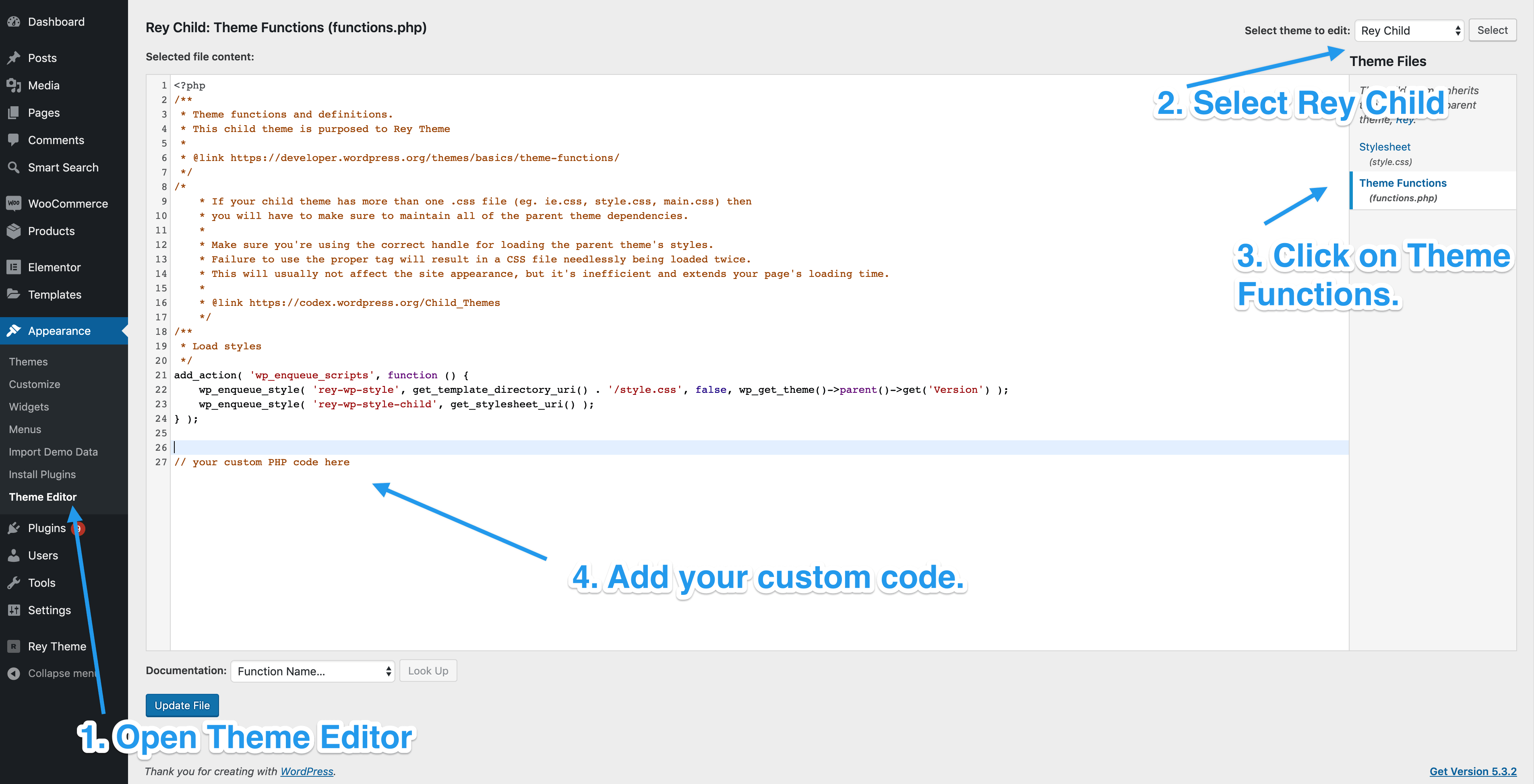
The functions.php file is like a toolbox. It helps your WordPress theme do more things. This file is inside your theme folder. Think of it as a place to add new tricks. These tricks make your website special. You can add custom code here. Make sure not to delete anything important. Always keep a backup. This way, your site stays safe.
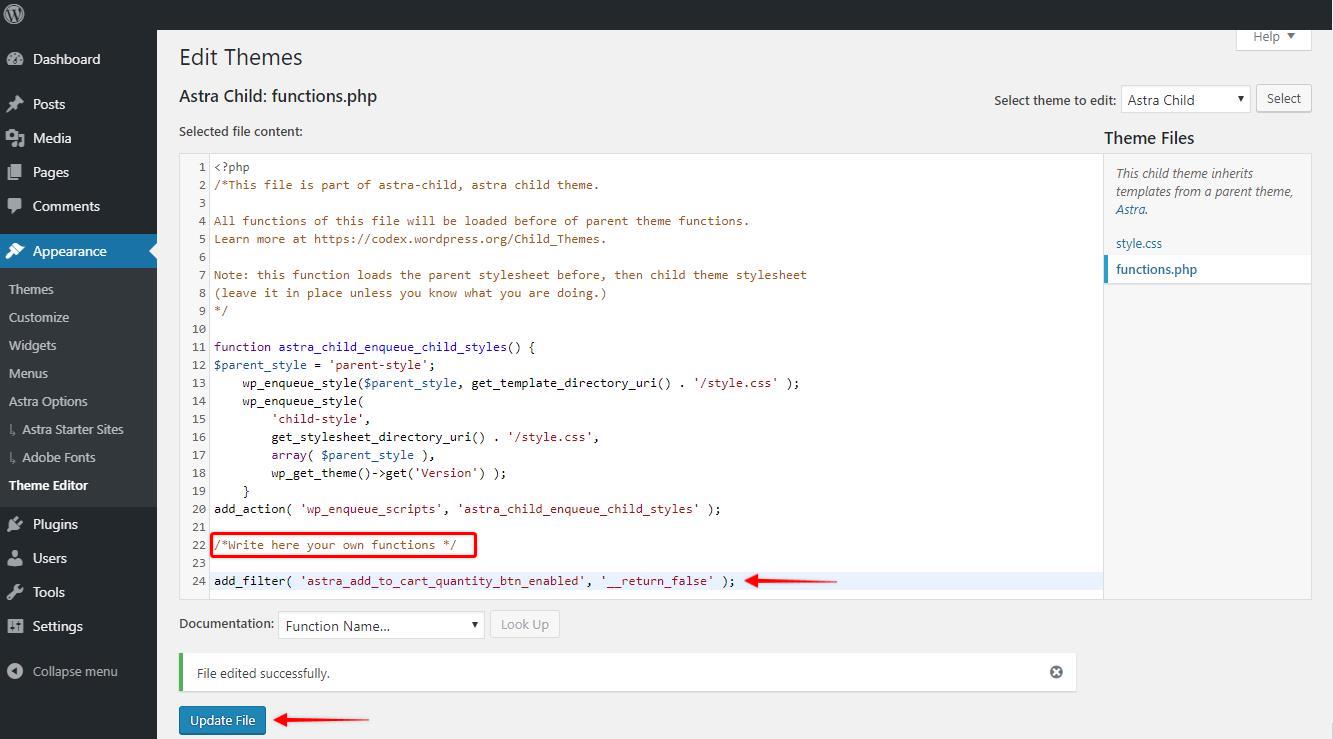
Accessing the Theme Editor is easy. Go to your WordPress dashboard. Find the “Appearance” tab on the left. Click it. Then, choose “Theme Editor.” You will see a list of files on the right. Look for functions.php. Click on it to open. Now, you can add or change code. Always save your changes. Check your site to see if it works well.
Adding Custom Functions
PHP code starts with <?php and ends with ?>. Inside, you write your function. Use function keyword and name it. Next, add curly braces { }. Write code between them. This makes your custom function work.
First, open your theme folder. Look for functions.php file. Open it. Paste your function code inside. Save the file. Your custom function is now part of your theme. Test it to see if it works. Fix any errors you find. Always keep a backup of your file.
Best Practices For Custom Code
Optimize code to make it run faster. Keep it clean and simple. Use fewer lines for better performance. Remove unnecessary code to keep the theme light. Comments help understand the code later. Use functions wisely to repeat actions without repeating code. This saves time. A well-organized code is easy to read. Use indentation for clarity. Avoid long lines; they make code confusing. Testing after writing code helps spot mistakes. Always test in a safe environment.
Compatibility matters for theme success. Check code works on all browsers. Make sure it fits with other plugins. Update regularly to stay compatible. Avoid using outdated functions. Backup code before changes to prevent loss. Document changes for future reference. Testing on different devices helps find bugs. Always keep user experience in mind when coding.
Testing And Troubleshooting
Testing your function is crucial. Activate the function in your theme. Check its effect on the site. Visit different pages. Ensure each page works as expected. Look for any errors or issues. Use the WordPress debug mode. It helps find problems. Test on various browsers. This ensures compatibility. Don’t forget mobile devices. They need testing too. If something breaks, you know where to fix it.
Common Issues And Solutions
Functions can cause errors. Syntax errors are common. Double-check your code. Look for missing semicolons. Incorrect function names also cause trouble. Ensure names match exactly. Sometimes, functions conflict with plugins. Disable plugins one by one. This helps find the conflict. Browser caching can hide changes. Clear cache regularly. If problems persist, ask for help. The WordPress community is vast. They offer great support.
Backup And Restore Procedures
Adding custom functions to a WordPress theme enhances functionality and personalizes your site. Always back up your theme files before making changes. Restore procedures ensure you can revert to the original if needed, safeguarding your website’s integrity.
Importance Of Backups
Backups are very important for your WordPress site. They keep your data safe. In case of problems, you can get your site back. Without backups, you could lose everything. Always have a recent backup ready. This is a smart way to protect your work. Regular backups help avoid panic later.
How To Restore From A Backup
Restoring a backup is simple. First, find your saved backup file. Next, go to your WordPress dashboard. Click on the restore option. Follow the steps on the screen. Wait as your site gets back to normal. Make sure everything works fine. If not, try restoring again. Always check your site after restoring. This ensures everything is in place.
Resources For Further Learning
Explore online tutorials to learn how to add custom functions to your WordPress theme. Books and forums offer valuable insights, while video courses provide step-by-step guidance. Expand your skills with expert blogs discussing the best practices and techniques.
Recommended Tutorials
There are many tutorials online. Start with the basics of WordPress. Learn how to add custom functions. Some websites offer step-by-step guides. These can be very helpful for beginners. Video tutorials are great too. They show the process clearly. Look for tutorials with good reviews. This ensures they are helpful and accurate. Remember to practice as you learn.
Community Support Forums
Forums are a good place to ask questions. Many users share their knowledge there. You can find answers to common problems. Some forums are specific to WordPress themes. Look for active communities. These are more likely to have quick responses. It’s also a good place to share your experiences. Helping others can improve your skills too. Always be polite and thankful when receiving help.

Credit: wpmayor.com
Frequently Asked Questions
How Do I Add A Custom Function?
To add a custom function in WordPress, use the `functions. php` file in your theme. Simply open the file, then write your function code within it. Always back up your theme before making changes to avoid losing customizations.
Is It Safe To Modify `functions.php`?
Modifying `functions. php` is generally safe if done correctly. Always backup your theme before editing. Use child themes to prevent losing changes during updates. Test new functions on a staging site to ensure they don’t cause errors.
Can Custom Functions Affect My Website Performance?
Custom functions can affect performance if they are poorly coded. Efficiently written functions typically have minimal impact. Always optimize and test functions to ensure they don’t slow down your site or cause compatibility issues.
What Happens After Theme Updates?
Theme updates can overwrite `functions. php`, removing custom functions. To prevent loss, use a child theme for customizations. This keeps changes intact during updates, ensuring your custom functions remain unaffected.
Conclusion
Adding custom functions to a WordPress theme enhances flexibility. It allows for unique features tailored to your needs. This process can seem technical but is manageable. Start by identifying the specific functions you want. Use the WordPress theme editor for changes.
Always back up files before editing. Mistakes can be costly without backups. Test each function thoroughly after adding it. Ensure compatibility with existing theme elements. Custom functions elevate your site’s functionality. They offer a personalized touch that standard themes may lack.
With patience and practice, anyone can customize their WordPress theme successfully.


