
Are you looking to elevate your website’s performance while cutting down on hosting costs? Amazon AWS might just be your golden ticket.
Imagine having the power to scale your web hosting needs up or down with just a few clicks, all while ensuring top-notch security and reliability. Sounds appealing, right? With AWS, you can transform your web hosting experience into a streamlined and efficient process.
By the end of this guide, you’ll discover the secrets to leveraging AWS for your web hosting needs, allowing you to focus more on what truly matters—growing your online presence. Dive in and unlock the potential of AWS for your website today!
Choosing The Right Aws Service
Use EC2 for hosting virtual servers. It gives control over the server. Scalability is easy with EC2. You can choose different types of instances. Security features protect your data. You can run different applications. EC2 is flexible and reliable for businesses.
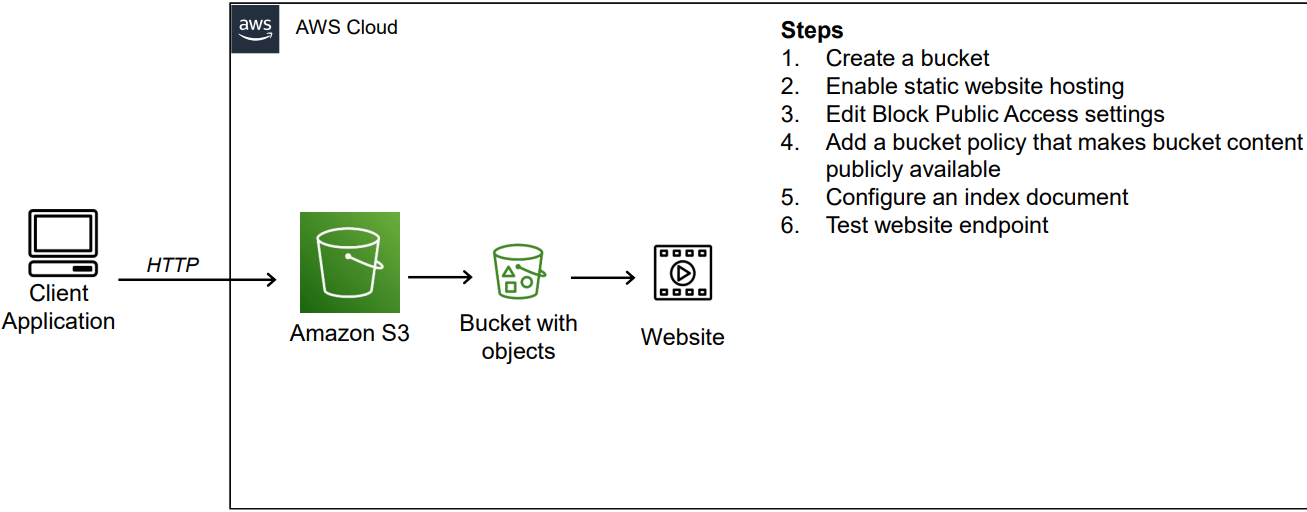
S3 stores website files. It’s great for static sites. You only pay for what you use. S3 is cost-effective for simple sites. It offers high availability. Easy to upload and manage files. Fast delivery of web content. No need for a server.
Elastic Beanstalk handles server management. You focus on code, not infrastructure. Automatic scaling is included. Deploy applications with ease. Supports many programming languages. Monitoring and updates are automatic. Simplifies web hosting for developers.

Credit: www.mgt-commerce.com
Setting Up An Aws Account
Creating an AWS Account is simple. Visit the AWS website. Click on “Create an AWS Account.” Fill in your details like name, email, and password. You will need to provide a credit card. This is for verification purposes. After verification, your account is ready. Now you can explore AWS services.
Understanding the Free Tier Options helps you save money. AWS offers a free tier for new users. It includes many services at no cost. This lasts for 12 months. Check which services are free. This helps in planning your usage. Always monitor your usage. Avoid unexpected charges.
Launching An Ec2 Instance
Choose an Amazon Machine Image (AMI) to start. AMIs are like computer templates. Some are free, others cost money. Find one that fits your needs. Ubuntu and Amazon Linux are popular choices. Each AMI has its own software and settings.
Security groups keep your server safe. They act like a firewall. Allow SSH for remote access. Open ports for web traffic, like HTTP or HTTPS. Be careful with rules, safety is key. Only allow trusted IPs to connect.
Use SSH to connect to your instance. SSH lets you control your server. You need a key pair to login. Amazon provides a key file. Keep it safe. Never share your key file. Use a tool like PuTTY to connect if using Windows.
Credit: medium.com
Deploying A Website On S3
Create a new bucket in the S3 console. Choose a unique name for the bucket. Select a region closest to your users. This helps with faster loading times. After creating, upload your website files to the bucket. Make sure all files are uploaded correctly.
Enable static website hosting in the bucket settings. Choose the index document for your site, usually “index.html”. You can also set an error document. This page shows if something goes wrong. Remember to save these settings.
Set permissions to allow public access. This lets everyone view your website. Update the bucket policy to make it accessible. You may need to adjust CORS settings too. This allows resources to be shared with other sites.
Using Elastic Beanstalk
Elastic Beanstalk makes deploying applications easy. Choose your application code and upload it. Elastic Beanstalk handles the rest. It sets up the environment for you. You don’t need to worry about complex configurations. It’s as simple as clicking a button. Your application is live in minutes. This helps save time.
Setting up the environment is crucial. Elastic Beanstalk lets you configure it easily. Choose the right settings for your app. Adjust memory and CPU needs. You can select the type of instances. This helps the application run smoothly. A well-configured environment boosts performance. Ensure settings match your app needs.
Keep an eye on your application’s health. Elastic Beanstalk provides tools for monitoring. Check performance regularly. This helps identify issues early. Scaling is automatic with Elastic Beanstalk. It adjusts resources based on traffic. This ensures your application runs well. Scaling helps handle more users. It makes your app reliable.
Managing Domain Names With Route 53
Amazon Route 53 helps you register domains easily. It offers many popular domain extensions. After choosing a name, just follow the steps on the screen. Payment is simple and secure. Your domain will be ready quickly.
Route 53 makes DNS management easy. You can create and update DNS records with a few clicks. It supports various types of records like A, AAAA, and CNAME. DNS management keeps your website online and reachable.
Route 53 works well with other AWS services. It connects easily with EC2 and S3. This integration helps in running your website smoothly. It ensures better performance and reliability.
Enhancing Security
IAM roles help manage who can access your Amazon AWS resources. Assign roles to users based on their needs. Roles limit access to only what’s needed. This keeps your data safe and secure. IAM roles are like keys. They open only the right doors.
Security groups act as firewalls for your server. They control incoming and outgoing traffic. Set rules to allow or block specific traffic. NACLs work at the subnet level. They provide an extra layer of security. Use both for better protection.
SSL/TLS encryption keeps data private and safe. It encrypts information sent between servers and browsers. This makes it hard for others to read or steal. Get a certificate from a trusted source. Install it on your server. This way, visitors see a secure connection.
Monitoring And Logging
Amazon AWS provides tools for monitoring and logging in web hosting. With services like CloudWatch, users can track performance and receive alerts. Logs can be stored and analyzed using AWS CloudTrail, helping to ensure smooth and secure operations.
Using Cloudwatch
CloudWatch helps you track your web services. It shows you how they perform. You can see metrics like CPU usage and network traffic. It’s easy to set up. Start by opening the CloudWatch console. Then, create a dashboard. You can add widgets to it. These widgets show different metrics. Watching these helps you keep your web services healthy.
Setting Up Alarms
Alarms are alerts for your web services. They tell you if something goes wrong. You can set alarms for many things. For example, high CPU usage. First, choose a metric in CloudWatch. Next, create an alarm for it. Set the conditions for the alarm. Finally, decide how you want to be notified. You can get alerts by email or SMS.
Analyzing Logs With Cloudtrail
CloudTrail records your AWS activities. It keeps logs of what happens. These logs help you see who did what. Look at the logs to find issues. You can search the logs by date or event. This helps in troubleshooting problems. It’s like a history book for your AWS account. Use it to understand and improve your web services.
Cost Management
AWS pricing can be tricky. AWS offers many services with different prices. Each service has its own cost. You pay for what you use. It’s called pay-as-you-go. This means you only pay for resources you use.
The AWS Calculator helps you know costs. You can see how much services will cost you. Enter details about your needs. The calculator shows a price. This helps in planning your budget.
Billing alerts keep you informed. You can set them up in AWS. Alerts tell you when costs are high. This helps control spending. You can act quickly and manage your budget well.

Credit: www.geeksforgeeks.org
Frequently Asked Questions
Can I Use Aws To Host My Website?
Yes, you can host your website on AWS. AWS offers scalable and reliable hosting solutions. Services like Amazon EC2, S3, and Lightsail are popular for web hosting. These services provide flexibility, security, and performance for your website. AWS ensures high availability and global reach for your web content.
Is Aws Good For Web Hosting?
Yes, AWS is excellent for web hosting. It offers scalability, reliability, and flexible pricing. AWS provides robust security features and global reach. Users can efficiently manage resources with a user-friendly interface. Its extensive service options cater to various web hosting needs, making it a popular choice.
Is Aws Free For Web Hosting?
AWS offers a free tier for web hosting with limited resources. You get 12 months of access to certain services. Charges apply for exceeding the free limits. Always check the latest pricing details on the AWS website to avoid unexpected costs.
How To Create A Web Server In Aws?
Log into AWS. Launch EC2 instance. Select Amazon Machine Image. Choose instance type. Configure instance details. Add storage. Configure security group. Review and launch your instance. Access the server using SSH.
Conclusion
Amazon AWS simplifies web hosting for everyone. It offers reliable, scalable services. Hosting your website becomes stress-free with AWS tools. Customize your setup to fit your needs. Pay only for what you use, saving money. AWS’s global infrastructure ensures fast access for users worldwide.
Security features protect your website from threats. With AWS, you manage resources efficiently. Support and documentation guide you through every step. Start hosting with confidence today. AWS is a powerful solution for web hosting needs. Explore its features to enhance your online presence.
Your website deserves the best. AWS delivers it effectively.


