
Are you setting up your WordPress site and feeling a bit overwhelmed by the sheer number of settings and options? One of the decisions you might be grappling with is choosing the default post category for your blog posts.
This choice might seem trivial at first, but it can significantly impact your site’s organization, SEO, and even how your audience engages with your content. Imagine effortlessly guiding your readers through a seamless content journey, where everything is just a click away.
In this post, we’ll dive into the importance of selecting the right default post category, helping you streamline your content strategy and enhance your site’s usability. Get ready to unlock the potential of your WordPress site with this simple yet powerful setting!
Importance Of Default Post Category
Choosing a default post category helps keep your blog organized. It ensures every new post has a place. Readers find content easily. Search engines index your posts better. This boosts your site visibility.
Default categories guide authors. They remind you what to write about. They streamline content creation. Categorizing posts saves time. It avoids confusion.
Customizing default categories is easy. It suits your blog’s needs. Tailor it to your audience. Make it simple yet effective. Engage readers with relevant categories.
Role In Content Organization
A default post category helps keep posts organized. It acts like a folder for your blog posts. Without it, posts might seem messy. Selecting the right category is important. It makes your site easy to navigate. Readers find posts faster. They enjoy their time more. Categories can be changed later if needed. But having a good start helps. Always choose a category that fits the post. This makes reading easier. Your blog looks clean and tidy.
Impact On Seo
Choosing a default post category in WordPress can affect SEO performance. A clear category helps search engines know what your content is about. This can improve your site’s ranking.
Consistent categories keep your site organized. This makes it easier for visitors to find what they need. It also helps search engines index your site better.
Avoid using “Uncategorized” as it tells nothing about your content. Instead, pick a category that reflects your site’s main topic. This small change can lead to better traffic and visitor engagement.
Factors To Consider
Choose categories that fit the content. A blog about cooking should not have tech as a default. This keeps posts organized. Readers find what they need quickly. It helps in keeping the site tidy and user-friendly.
People visit sites with certain expectations. A travel blog should focus on places. If the default category is not related, visitors might leave. Understand what readers want. This builds trust and keeps them coming back.
Every website has a niche. It is what the site is about. A fashion blog should have fashion as the main category. This helps in targeting the right audience. Keeps the blog focused and relevant.
Common Default Categories
New blogs often use Uncategorized as the default. It means a post has no specific category. It can be confusing for readers. Assign a clear category to each post. This helps with organization. Readers find what they need quickly.
The General category suits many topics. Use it for diverse content. It’s a flexible choice. Posts here cover a wide range. But, avoid making it a dumping ground. Always keep posts organized.
The News category is for updates and events. Share current affairs here. It keeps readers informed. Many websites have a News section. It signals important updates. Always keep it relevant and fresh.
A Blog category is for personal stories or opinions. It is informal. Writers share thoughts and experiences. Readers like personal touches. It builds connections with the audience. Always keep it engaging and honest.

Credit: www.youtube.com
Custom Default Categories
Choosing a default post category is important. It helps organize your blog. Brand-Specific Options can reflect your business. Use categories that match your brand’s style. For example, a fashion blog might use “Trendy Styles”. A tech blog could use “Latest Gadgets”. This makes your blog unique.
Brand-specific Options
Different brands have different needs. A food blog may have “Delicious Recipes”. A travel blog might use “Adventure Spots”. These categories tell the reader what to expect. Choose wisely to attract your audience. Make sure it fits your brand image. It should be easy to understand. Readers should find content quickly.
Niche-specific Options
Niche categories focus on specific topics. These are great for specialized blogs. A health blog might use “Fitness Tips”. A gaming blog could use “Game Reviews”. This helps target your audience well. Ensure categories are clear and simple. Readers should know what each category means. Keep it straightforward for easy navigation.
How To Set Default Category
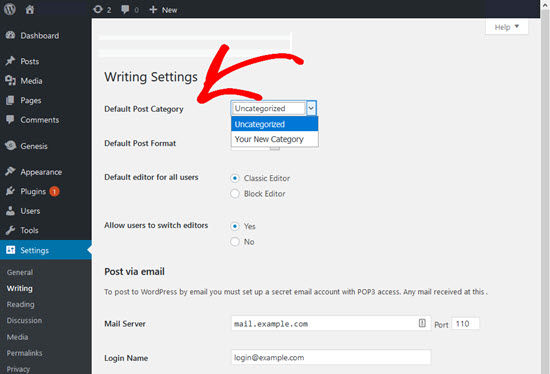
Go to your WordPress dashboard. Click on Settings. Next, choose Writing. Look for Default Post Category. Click the dropdown to see options. Select your desired category. Save changes. Now, new posts will use this category.
Plugins can help change default categories. First, install a plugin from the WordPress Plugin Directory. Activate the plugin once installed. Go to the plugin settings. Choose the category you want as default. Plugins make this task easier. Some plugins offer more features. Explore them to find the best fit for you. Always check plugin reviews before installing.
Mistakes To Avoid
Choosing the right default post category in WordPress is crucial. Avoid generic labels like “Uncategorized” as they confuse readers. Instead, select a meaningful category that reflects your content’s focus. This enhances your site’s organization and improves user experience.
Ignoring Seo Best Practices
Many people forget about SEO when setting up categories. This is a big mistake. Choosing the right category helps with search. It makes it easier for people to find your post. Using only “Uncategorized” is not helpful. It’s better to use specific names. It helps with your site’s ranking.
Overusing ‘uncategorized’
Many sites use “Uncategorized” too much. This makes it hard to sort posts. Readers get confused. They can’t find what they need easily. Always choose a proper category. It helps in organizing content better. Specific categories also help readers. They can find related posts quickly.
Future-proofing Your Choice
Choosing a default post category is important. It helps in keeping the blog organized. As the blog grows, so does the number of posts. A well-chosen category should handle this growth easily. This is scalability. Think about future needs. Will this category still fit? The answer should be yes.
A flexible category is useful. It allows easy changes to content. New topics might come up. A good category should adapt. It shouldn’t limit your options. Flexibility means you can change things without much trouble. Keep your blog open to new ideas. This way, it stays fresh and relevant.
Credit: www.wpbeginner.com

Credit: wpshout.com
Frequently Asked Questions
What Is A Default Post Category In WordPress?
A default post category in WordPress is the category assigned to posts when no specific category is chosen. It helps organize content and improve site navigation. By default, WordPress uses “Uncategorized” as the default category. You can change it to better suit your site’s content and SEO strategy.
How Do I Change The Default Category?
To change the default category, go to WordPress Dashboard > Settings > Writing. Under “Default Post Category,” select your preferred category from the dropdown menu. Click “Save Changes” to apply. It’s important to choose a relevant category to improve your site’s SEO and content organization.
Why Is Choosing A Default Category Important?
Choosing a relevant default category is important for better content organization and SEO. It ensures posts are categorized even if no specific category is selected. This helps users find related content easily and search engines index your site more effectively, improving user experience and search rankings.
Can I Create A New Default Category?
Yes, you can create a new default category in WordPress. Go to Dashboard > Posts > Categories. Add a new category by filling in the name and slug fields. Once created, go to Settings > Writing and select the new category as the default.
This helps tailor content organization to your needs.
Conclusion
Choosing the right default post category in WordPress is crucial. It helps organize your content effectively. Your readers find relevant posts more easily. This improves user experience on your site. A well-defined category boosts SEO. It signals search engines about your content focus.
Start by analyzing your content themes. Identify the most common topics. Then, select a category that aligns with your goals. Keep it simple and relevant. Avoid broad or vague categories. This ensures your posts are categorized correctly. With thoughtful planning, your WordPress site will be more organized and user-friendly.



