
Are you new to WordPress or looking to enhance your website’s design? Understanding the default template layout is the first step to creating a site that truly stands out.
Imagine having a clear blueprint that guides how your content is displayed, making it easier for your audience to engage with your brand. The default template layout in WordPress does just that, providing a foundation that balances aesthetics with functionality.
But what exactly is this default layout, and how can it benefit you? You’ll discover everything you need to know about WordPress’s default template layout, unlocking the potential to transform your site with ease. Stay with us, and let’s dive into the essentials that could redefine your online presence.

Credit: wordpress.com
Default Template Layout In WordPress
WordPress offers a default template layout for every theme. This layout usually includes a header, footer, and a sidebar. The header is where the site title or logo appears. The footer has links and copyright information. The sidebar can hold widgets like recent posts or calendars.
Most themes have a content area. This is where the main content shows. Pages and posts are displayed here. Layouts can be changed by using different themes. Each theme has its own style. They use CSS for design. Users can tweak settings to suit their needs.

Credit: codex.wordpress.org
Components Of The Default Template
The header is at the top of every page. It shows the site name and logo. Many sites have a navigation bar here. This helps people find pages. Links like Home, About, and Contact are common.
The content area is the main part of a page. This is where articles and posts appear. Images and videos can be here too. It is the biggest space on a page.
Most sites have a sidebar. It is on the side of the page. This area often has widgets. These can be search bars, ads, or social media links. It helps with extra info or tools.
The footer is at the bottom of a page. It usually has copyright info. Many sites add links here. These can be privacy policies or terms of service. Some footers have contact info too.
Role Of Themes In Layout
Themes make your website look good. They give it style. You can change colors and fonts. You can add pictures. This is called customization. Themes have many options. Some themes let you change almost everything. Others have fewer choices. Customization helps you create a unique site. It can make your website stand out. You don’t need to know much coding. Themes make it easy for you.
Themes change the default layout. The layout is how things are arranged. It is the website’s structure. Some themes have a simple layout. Others have a complex layout. The default layout can be changed. Themes let you move things around. You can decide where things go. A good layout helps people find things easily. It makes the website user-friendly. The layout affects how your website feels. It can make your site look professional.
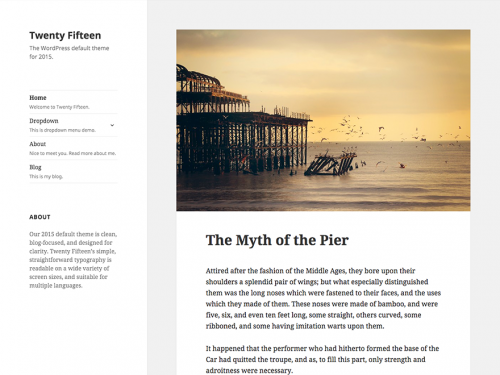
Credit: codex.wordpress.org
Customization Of Default Layout
The WordPress Customizer is easy to use. It helps in changing the default layout of your site. You can adjust colors, fonts, and more. This tool is built-in. No extra downloads are needed. Make your site look special with a few clicks. Explore the options available to see changes in real-time.
Plugins are like special helpers for your site. They add new features. Some plugins help change the layout easily. Install them from the WordPress plugin store. Use them to add columns, sliders, or galleries. Plugins make your site more functional. They are simple to use and can change the look of your site fast.
CSS is a style language for websites. It helps change the look of your site. Use custom CSS to change the default layout. You can make your site unique. Add CSS in the WordPress Customizer. This tool lets you see changes instantly. It’s a great way to have more control over your site’s style.
Responsive Design In Default Layout
Mobile Responsiveness is crucial for all websites. The default WordPress template layout handles it well. Phones and tablets show the site clearly. No squished text or images. Users can read and interact easily.
Adapting to Different Screen Sizes is essential. The template adjusts automatically. Small screens or large, it fits perfectly. This keeps the site’s look consistent. Everything stays organized and neat.
Visitors enjoy a smooth experience. They don’t struggle to find information. The layout keeps everything accessible. This boosts user satisfaction.
Visitors come back when sites are easy to use. A responsive site helps in achieving that. It is vital for keeping users engaged.
Common Challenges With Default Layout
Many users face compatibility problems with the default layout. Some plugins might not work well. Updates can also cause conflicts. Themes may not match the layout. This makes the site look odd. Sometimes, changes break the site. Fixing these issues can take time. Users need to check every update carefully.
The default layout often has design limits. It may not have many features. Users may want more custom options. But, the default layout offers few. This can make the site look plain. Adding new styles can be hard. It may need coding skills. This frustrates many users. They want easy design tools.
Tips For Enhancing Default Layout
Explore ways to enhance WordPress’s default template layout by customizing colors, fonts, and widget placements. Small changes can make your website stand out. Improve user experience with a clean and organized design.
Incorporating Custom Widgets
Custom widgets make your site special. They help add unique features. Use them to show important info. Add a calendar for events. Include a social media feed. Use widgets for quick links. Widgets can change how the layout looks. They provide extra functions. Choose ones that fit your site’s theme. They should match your content style. Place them carefully on the page. This keeps your layout clean and tidy.
Optimizing Layout For Seo
SEO helps people find your site. Use keywords in the text. Place them in headers. This improves search rankings. Keep the layout simple. Easy navigation is important. People should find things quickly. Use fast loading images. They make the site load quicker. Ensure your site works on phones. Mobile-friendly sites rank better. Use headings wisely. They guide readers and search engines. Clean layouts help with SEO.
Frequently Asked Questions
What Is The Default WordPress Template Layout?
The default WordPress template layout is a basic structure. It typically includes a header, footer, sidebar, and content area. This layout provides a foundation for customizing your website’s appearance. You can modify it using themes and plugins to suit your specific needs and preferences.
How Do I Customize The Default Layout?
You can customize the default layout by using the WordPress Customizer. It allows you to change themes, adjust settings, and preview changes. Additionally, plugins can extend functionality, while custom CSS can tweak styles. Always ensure backups before making significant changes to your site.
Are There Alternatives To The Default Layout?
Yes, there are alternatives to the default layout. WordPress offers numerous themes and page builders. These tools provide varied layouts and design options. Popular page builders include Elementor and Beaver Builder. They allow you to create custom layouts without coding knowledge.
Why Is The Default Layout Important?
The default layout is important because it provides a starting point. It ensures consistency across different WordPress installations. This layout helps beginners understand structure and customization. It also supports essential functionalities, making it easier to manage and update content.
Conclusion
Understanding WordPress’s default template layout is crucial. It helps create a consistent look for your site. This layout acts as a solid foundation. You can customize it to fit your needs. Choose themes wisely to enhance your site’s appearance. A well-structured layout improves user experience.
It also boosts your site’s performance. Make sure your layout matches your content. This keeps visitors engaged and satisfied. Knowing the default layout is just the beginning. Experiment with different styles. Aim for a site that is both functional and appealing.
Your website deserves attention and care.



