
Are you a WordPress user curious about the elusive “Dashboard_Browser_Nag”? If you’ve ever been puzzled by this term or wondered why it keeps popping up on your screen, you’re not alone.
This intriguing feature can leave many users scratching their heads. But don’t worry, you’re in the right place. We will unravel the mystery behind the Dashboard_Browser_Nag, explaining what it is, why it appears, and how it impacts your WordPress experience.
Understanding this will not only enhance your WordPress skills but also streamline your workflow, saving you time and potential headaches. So, let’s dive in and decode this WordPress feature together, ensuring you get the most out of your website management experience.

Credit: developer.wordpress.org
WordPress Dashboard Basics
The WordPress Dashboard is the first screen after login. It is like a control center. You can manage posts and pages here. Change settings easily. All important tools are in one place.
Check the Activity Box for recent updates. The Quick Draft section lets you write fast notes. WordPress Events show nearby meetups and news. The Welcome Screen provides helpful links.
Use the Menu on the left side. It helps to navigate. You can find tools for plugins and themes there. Update WordPress and plugins from the dashboard. Keep your site secure.
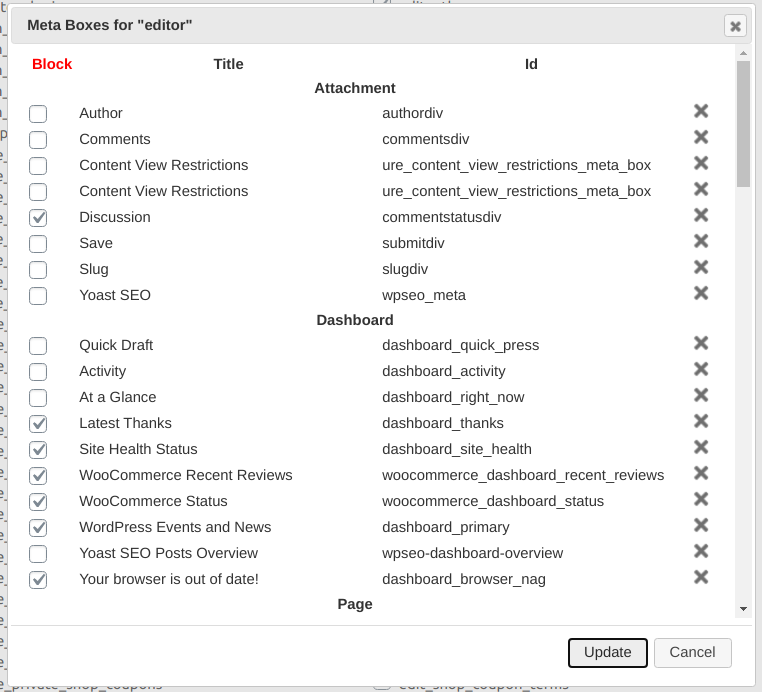
Credit: www.role-editor.com
Understanding Browser Nag
The Browser Nag in WordPress is a helpful tool. It reminds users to update their browsers. This keeps websites running smoothly. Old browsers can cause problems. They might not show sites correctly. They can also be less secure. So, keeping browsers updated is important. This ensures better security and performance. Users get a better experience online.
Browser Nag checks the browser version. It compares it with the latest version. If the browser is old, it shows a message. This message asks the user to update. It is a simple reminder. It helps keep everything up to date. Users can then enjoy a better web experience. It’s easy and useful.
Common Browser Nag Messages
Browsers often ask users to update. These messages are called update notifications. They appear when a new browser version is out. Updating ensures safety and better performance. Outdated browsers may not support new features. This can cause websites to break. So, updating is important for smooth browsing.
Some websites give compatibility warnings. This happens when the browser is old. The site may not display right. Some features might not work. These warnings help users know about issues. Upgrading the browser can fix these problems. It also helps websites look and work better.
Managing Browser Nag
A browser nag can be annoying. It keeps reminding you to update. Updating browsers is important. New versions have better security. They fix bugs and improve performance. Always use the latest version. This helps your WordPress site run smoothly. Check browser settings to allow automatic updates. This reduces nags. Automatic updates save time. They keep you secure without effort.
Notifications can distract. They pop up often. You can disable notifications to stop them. Open browser settings. Look for notification options. Turn off the ones you don’t need. This can help focus better. Less interruptions. Some notifications are useful. Choose wisely what to keep. Only allow important ones. Disable others. This gives more control over your browsing experience.
Impact On User Experience
Regular updates keep your site safe. They fix bugs and problems. New features come with each update. These make your site better. Faster too. Updated sites work well with new tech. Visitors find your site easy to use. They stay longer. Happy visitors return. They tell others about your site. Your site grows.
Updates can cause problems sometimes. Plugins might stop working. Themes might break. This needs fixing. Fixing takes time. Sometimes, updates are big. They change many things. You might need help. Help costs money. Updates need planning. Plan well. Your site stays good.
Best Practices For WordPress Users
Regular updates keep your browser safe. They fix bugs and improve speed. Updates protect you from online threats. Browsers change often. Old versions can be slow or unsafe. Updating helps WordPress work better. It ensures you see sites correctly. This makes editing easier. Updates support new features. They keep tools fresh and useful. Regular checks for updates are wise. This ensures your browser is at its best.
Compatibility is key for WordPress users. Different browsers may display pages differently. Ensuring all tools work well is crucial. Check plugins and themes regularly. Make sure they fit the latest browser versions. Updates help maintain compatibility. Testing helps ensure everything runs smoothly. A compatible setup avoids glitches. It helps the site load faster. This improves user experience greatly. Always aim for compatibility. It makes managing WordPress simpler.

Credit: andriy.space
Frequently Asked Questions
What Is The WordPress Dashboard?
The WordPress dashboard is the main control panel. It provides access to site management tools. Users can edit posts, manage plugins, and customize themes. It’s designed to be user-friendly and intuitive. The dashboard helps streamline website administration tasks efficiently.
Why Does The Browser Nag Appear?
The browser nag appears due to outdated plugins or themes. It prompts users to update for security reasons. Keeping WordPress components up-to-date ensures optimal performance. It protects against vulnerabilities and enhances site functionality. Regular updates are crucial for a secure website environment.
How To Disable Browser Nag In WordPress?
To disable browser nag, update plugins and themes. You can also adjust settings in the admin panel. Ensure your WordPress version is current. Sometimes, custom code may be used for disabling. Regular maintenance prevents nagging alerts effectively.
Is The Dashboard Customizable?
Yes, the WordPress dashboard is highly customizable. Users can add or remove widgets as needed. You can rearrange elements for better workflow. Customization enhances user experience and efficiency. Plugins offer additional customization options to suit your needs.
Conclusion
Understanding the Dashboard_Browser_Nag is crucial for WordPress users. It helps manage important updates and alerts. Ignoring these can lead to security issues. Regularly checking your dashboard ensures a smooth website experience. Stay informed about necessary updates. This helps maintain optimal website performance.
A well-managed dashboard also boosts site security. So, keep an eye on those notifications. They are there to help you. Prioritize checking your dashboard regularly. Your website will thank you. Implementing this simple habit can save you time and trouble.
Stay proactive and enjoy a seamless WordPress experience.



