
Are you navigating the vast world of WordPress and stumbled upon the term “permalink”? You’re not alone.
Understanding permalinks is crucial for your website’s success, and it might be easier than you think. Imagine this: you’ve crafted a stellar blog post or page, and you want to ensure your audience can find it effortlessly. That’s where permalinks come in.
They are the permanent URLs to your individual WordPress posts, pages, and other content. But why should you care? A well-structured permalink not only helps your visitors but also boosts your site’s visibility on search engines. Curious to learn more? Stick around as we delve into the essentials of WordPress permalinks and how they can elevate your digital presence.
Credit: www.isitwp.com
Permalink Basics
A permalink is a URL link for a specific page or post. It stays the same even if you update your content. This helps users find and return to your content easily.
Permalinks are important for website navigation. They make your site organized. A clear permalink tells users what the page is about before they click. This boosts user experience.
SEO uses permalinks to help search engines understand your site. A good permalink can improve your site’s ranking. It should include keywords related to your content.
Permalinks are part of SEO strategy. They help search engines crawl your site better. This can lead to more visitors and higher visibility.
Types Of Permalinks
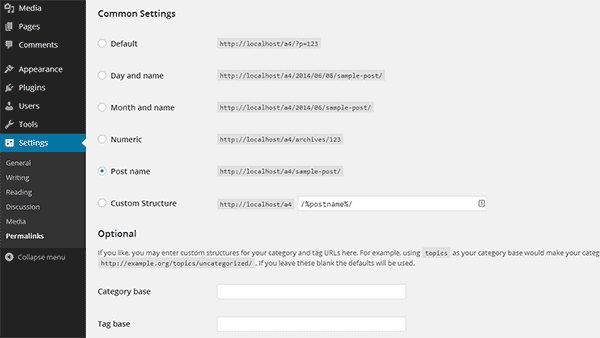
WordPress uses a simple link at first. This is called the default structure. It looks like this: yourwebsite.com/?p=123. The numbers are the post ID. They are not easy to remember. But, they work for small sites. This structure is not good for SEO.
Many choose a custom structure. This makes links easy to read. A common format is: yourwebsite.com/category/post-name. This structure helps search engines. It also helps users understand the link. You can add dates or categories. This way, your site looks neat and organized.
Setting Up Permalinks
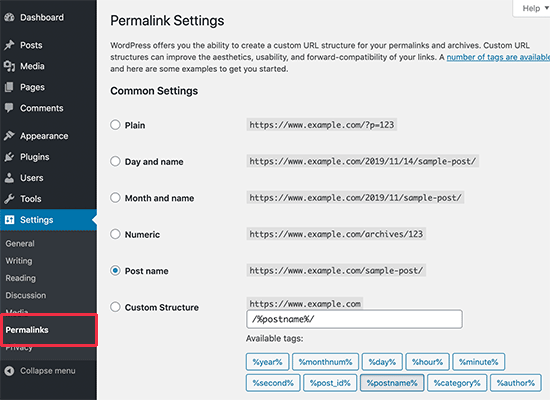
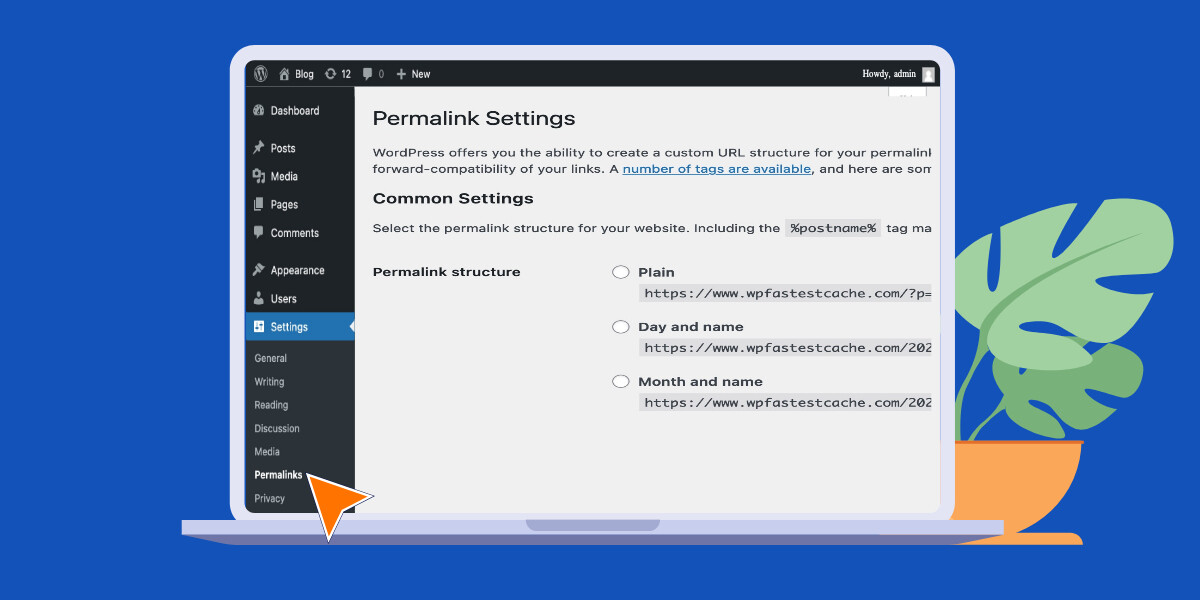
Permalinks are important for your website’s URLs. They help in making links easy to read. To access the settings, go to your WordPress dashboard. Click on Settings and then select Permalinks. This will open the permalink settings page. Here, you can change how your URLs look. Choose a structure that fits your needs.
The structure of your permalinks can affect your site. A good structure helps with SEO. Common options include plain, day and name, month and name, and post name. Post name is often the best choice. It is simple and clean. A clear URL structure makes your site easy to navigate. Choose wisely to benefit your users and search engines.
Credit: www.24x7serversupport.com
Best Practices
Using clear and simple URLs helps search engines. Keep permalinks short. Avoid unnecessary words. Always use lowercase letters. Dashes are better than underscores. Choose words that describe the content.
Your permalink should match the title. This helps both readers and search engines. It makes your content easy to find. Remember to update permalinks if you change the title.
Never use random numbers in URLs. These confuse readers. Avoid special characters like %, &, and @. These can break links.
Change permalinks carefully. Broken links can lose visitors. Always check links after changes. Make sure they work. This keeps your site friendly and easy to use.
Troubleshooting
Permalinks in WordPress are the URLs for your posts and pages. They play a critical role in SEO and user navigation. Troubleshooting permalink issues involves checking settings and regenerating rules.
Common Issues
Broken links make users frustrated. They harm website credibility. Links can break due to changes in URLs. Sometimes, plugins can cause issues. Poorly managed updates also break links. Check links regularly.
How To Fix Broken Links
Use tools to find broken links. Google Search Console is helpful. Fix links by updating URLs. Redirect old links to new ones. Use 301 redirects for permanent changes. Plugins like Redirection make this easy. Keep your site well-maintained.
Impact On User Experience
Permalinks help users find content easily. They make links short and clear. A good permalink tells users what the page is about. It should be simple to read. It helps even people who speak English as a second language. Better readability improves user experience. Users feel comfortable when links are easy to understand.
Accessibility means everyone can use the links. Permalinks should work for all users. Links should be clickable and visible. This helps people with different needs. Clear links help users navigate your site. They should be easy to use on phones and computers. Consistency makes websites more friendly.
Permalinks should look the same everywhere. This includes phones, tablets, and computers. Consistency makes users trust your site. It shows your site is professional. Users feel safe when links are the same on all devices. Links should not change. They should stay stable over time.
When links are consistent, users come back. They know what to expect. Stable links help search engines find your content. Search engines like sites with good permalinks. This helps your site appear in search results. Consistent permalinks are key for a good site.
Tools And Plugins
Permalinks are important for your website. They help users find pages easily. Many plugins can help manage permalinks. Yoast SEO is a popular choice. It makes permalinks clean and simple. Redirection helps fix broken links. It keeps your site healthy. Pretty Links shortens links. This makes them look neat.
Some plugins offer more choices. Custom Permalinks allows full control. You can change links as needed. Permalink Manager Lite offers detailed settings. You can manage many links at once. These tools help make your site unique.
Credit: www.wpfastestcache.com
Frequently Asked Questions
What Is A Permalink In WordPress?
A permalink is a permanent URL to a specific blog post or page on your WordPress site. It helps users and search engines find your content easily. A well-structured permalink improves SEO and enhances user experience.
How Do Permalinks Affect Seo?
Permalinks play a vital role in SEO by making URLs readable and keyword-rich. Search engines use permalinks to understand page content. A clean, descriptive permalink boosts your search engine rankings.
How Can I Customize WordPress Permalinks?
You can customize permalinks in WordPress via the Settings > Permalinks menu. Choose from common structures or create a custom one. A custom structure often includes keywords for better SEO.
What Is The Default Permalink Structure?
WordPress’s default permalink structure is “Plain,” which uses a query string format. It looks like “http://example. com/? p=123”. However, this is not SEO-friendly, so customizing it is recommended.
Conclusion
Permalinks are vital for a WordPress site. They help with navigation and SEO. A clear permalink structure boosts your site’s visibility. Users find content easily with descriptive links. Search engines rank your site better with optimized permalinks. Simple changes in your WordPress settings can improve these links.
Regular updates keep your permalinks effective. Avoid complex URLs for better user experience. Always check links after changes to prevent errors. Keep your URLs short and meaningful. With the right permalinks, your site becomes more accessible and organized. Enhance your WordPress site today.



