Ever stumbled upon the term “microformat” while navigating the world of WordPress? If you’re scratching your head, you’re not alone.
Many WordPress users encounter this buzzword and wonder what it means for their website. Microformats might sound technical, but they hold the key to making your site more search engine-friendly and user-centric. Imagine making your content more visible and accessible without having to overhaul your entire site design.
Intrigued? This guide will break down microformats in simple terms, showing you how they can enhance your WordPress site’s potential. Stay with us, and you’ll discover how these tiny tweaks can lead to big impacts, making your online presence not just visible, but also irresistible.
Introduction To Microformats
Microformats are small bits of code. They help web pages talk to each other. They make data easy to share. Websites use them to show important info. Like dates or addresses.
Search engines love microformats. They make info clear and easy to find. This helps pages rank better. Users see rich snippets in search results. More info means more clicks.
WordPress supports microformats. Many themes have them built-in. Adding them can improve a site. Makes data more readable. Easy to add and use.
History And Evolution
Microformats started with a simple idea. The web should be easy for both humans and machines. In early years, people used HTML to display information. But, machines struggled to understand it. Microformats were born to fix this. They added extra meaning to plain text. This helped search engines and other tools.
Over time, more people used microformats. They became a standard for adding small bits of information. Today, many websites use them. They help make web pages smarter. This makes them important for WordPress users. It’s a small change with big impact.
Key Features
Microformats are small pieces of code that enhance web content. They help search engines understand and display information better. WordPress supports these formats to improve site visibility.
Microformat Basics
Microformats are small, simple data formats. They help machines understand web content. These formats are part of the HTML code. Using microformats improves SEO. Search engines read them easily. This helps in better ranking.
Integration With WordPress
WordPress themes often support microformats. This makes it easy to use them. No extra coding is needed. Users can add microformats to blog posts. It enhances the visibility of content.
Benefits Of Microformats
Microformats make web pages smarter. They give extra information to search engines. This helps in more precise search results. Websites become more user-friendly. Visitors find the information they need quickly.

Credit: wpsites.net
Benefits For Seo
Microformats help search engines understand your content better. This can improve your website’s visibility. More visibility means more visitors. More visitors can lead to more sales.
Microformats make your content stand out in search results. People might see ratings or prices. This extra information can attract clicks. Clicks are good for your site.
Using microformats shows you care about your website. It makes your site look professional. A professional site can gain trust. Trust brings more visitors and customers.
Implementing In WordPress
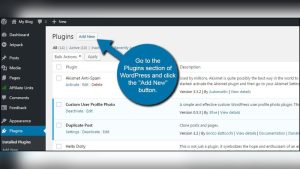
Microformats are small pieces of code. They make web pages easier to read. Many plugins help add microformats to WordPress. Some plugins are free. Others cost money. Popular plugins include Schema and Microdata. They add microformats to blog posts. This helps search engines. It makes your site rank better. Plugins are easy to use. Install them from the plugin store. They save time. They also save effort.
Adding microformats manually takes patience. It requires some coding skills. First, learn basic HTML. Next, understand microformats. Then, add code to your site. Use and tags. Place them around your content. Mark up names, dates, and events. This helps search engines. They understand your site better. Changes need testing. Check if they work well. Manual methods take time. They require effort. But they offer control. Full control over the code.
Common Use Cases
Microformats help search engines understand your content better. They show important details about your post. Blog posts can use microformats for dates and author info. Websites can use them for reviews. A star rating can be added to show how good a product is. These details can appear in search results.
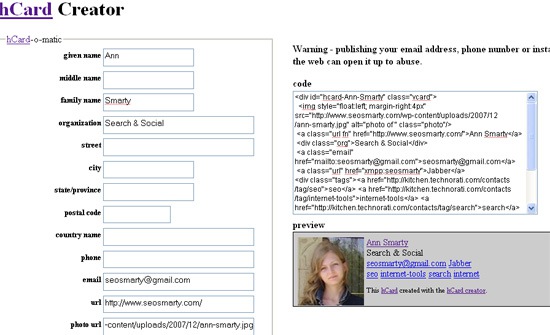
Microformats also help with events. They can list the date and place of an event. This helps people find events easily. Businesses can use microformats for their contact info. This includes address, phone number, and email. This helps customers reach out quickly.
Recipes can use microformats too. They can show cooking time and ingredients. This makes recipes easy to find and follow. Using microformats can make your website user-friendly and easy to navigate.
Challenges And Limitations
Microformats can be hard to use with complex websites. They need special coding. This makes it tough for beginners. Many people find it confusing. Some themes do not support microformats well. This causes problems on your site. Plugins might help, but not always. Sometimes, they make things even more complex.
Search engines may not always recognize microformats. This can affect how your site shows up. Limited support can lead to poor user experience. Regular updates are needed to keep things smooth. Compatibility issues with older versions may occur. Keeping track of these can be challenging.

Credit: microformats.org
Future Of Microformats
Microformats help websites talk better with search engines. They make information clear. Search engines like clear information. It helps them show the right results. Microformats can make your site more popular. They are small but powerful. Many websites use them. They help with local searches. This means more people can find a local shop or service. Microformats are not hard to use. Even small websites can use them. They are part of a big change in the web. This change is about better understanding. Understanding between websites and search engines. Many experts see microformats as the future. They are simple. They are useful. They can make a big difference.
Credit: www.searchenginejournal.com
Frequently Asked Questions
What Are Microformats In WordPress?
Microformats are small pieces of code that help search engines understand content. They provide additional context to your website’s HTML. This makes it easier for search engines to index your content. In WordPress, microformats can enhance visibility and improve search rankings.
They are crucial for structured data representation.
How Do Microformats Improve Seo?
Microformats improve SEO by providing structured data to search engines. They help search engines understand content context, enhancing search visibility. This increased visibility can lead to higher click-through rates. By using microformats, your WordPress site can achieve better search engine rankings.
This results in more organic traffic.
Can Microformats Be Added In WordPress?
Yes, microformats can be added in WordPress. They can be implemented through themes or plugins. Some WordPress themes come with built-in support for microformats. Alternatively, plugins can be used to add microformats. Implementing them requires minimal technical knowledge and can significantly enhance your site’s SEO.
Are Microformats And Schema Markup The Same?
Microformats and schema markup are not the same. Both provide structured data, but differ in usage and syntax. Microformats are simpler and use HTML attributes. Schema markup, however, is more comprehensive and uses JSON-LD. Both can improve SEO, but schema offers more detailed data representation.
Conclusion
Microformats enhance WordPress by improving search engine visibility. They make your content more understandable. This leads to better search rankings. Users find information faster. Your website becomes user-friendly and efficient. Implementing microformats is simple. It requires basic HTML knowledge. Benefits are worth the effort.
Start small, and gradually integrate more. Watch your site’s performance improve. Search engines and users will thank you. Embrace microformats for a smarter WordPress experience. They are a valuable tool for any website owner. Try them today and see the difference.
Your site deserves the boost.