
Have you ever wondered what your website visitors are really doing? Imagine having a tool that gives you insights into their behavior, showing you exactly how they navigate your site.
That’s where Hotjar comes in. If you’re using WordPress, understanding Hotjar can completely transform how you optimize your site. This powerful tool provides heatmaps, session recordings, and feedback polls that reveal what’s working and what’s not on your website. Do you want to boost engagement, improve user experience, and ultimately increase conversions?
By the end of this article, you’ll discover how integrating Hotjar with WordPress can become a game-changer for your online presence. Ready to dive in? Let’s explore how you can leverage Hotjar to elevate your WordPress site to new heights.
What Is Hotjar?
Hotjar is a tool used to understand how people use websites. It provides insights into user behavior with heatmaps. Heatmaps show where users click and scroll. This helps identify which parts of a site are popular. Hotjar also offers session recordings. These recordings show user interactions step by step. Watching these helps to see where users face problems.
Surveys and feedback tools are part of Hotjar too. They allow site owners to ask questions directly to users. Answers reveal what users think about the site. This feedback is vital for making improvements. By using Hotjar, website owners can make their sites better and more user-friendly.
Hotjar Features
Heatmaps show where users click on a site. This helps to see which parts are popular. Cold areas mean little interest. Colors tell a story. Red areas are hot, blue are cold. Understand user behavior easily.
Watch how users scroll and click. Each session is recorded. Replay their journey. Learn why users leave or stay. Get clues to improve the site. See what users see.
Users can give opinions through polls. Feedback is gold. Know what users love or hate. Simple questions get answers. Use this to make changes. Happy users mean more success.
See where users drop out in a buying process. Each step is key. Find the problem spots. Fix them to improve sales. Understand the user path. Make changes for better results.
Benefits Of Using Hotjar
Hotjar makes websites better for users. It shows how users click and scroll. Understanding user actions helps improve site design. A better design means happy visitors. Happy visitors stay longer and explore more.
More visitors become customers with Hotjar. It finds where users get stuck. Fixing these spots helps users move forward. When users move forward, they buy more often.
Hotjar gives valuable data. This data shows what users like. It also shows what they do not like. Making choices based on data is smart. Smart choices make websites grow.
Integrating Hotjar With WordPress
Start by creating a Hotjar account. Then, login to your WordPress dashboard. Go to the plugins section. Click on “Add New”. Search for the Hotjar plugin. Click “Install Now”. After installation, activate the plugin. Your WordPress is now ready for Hotjar.
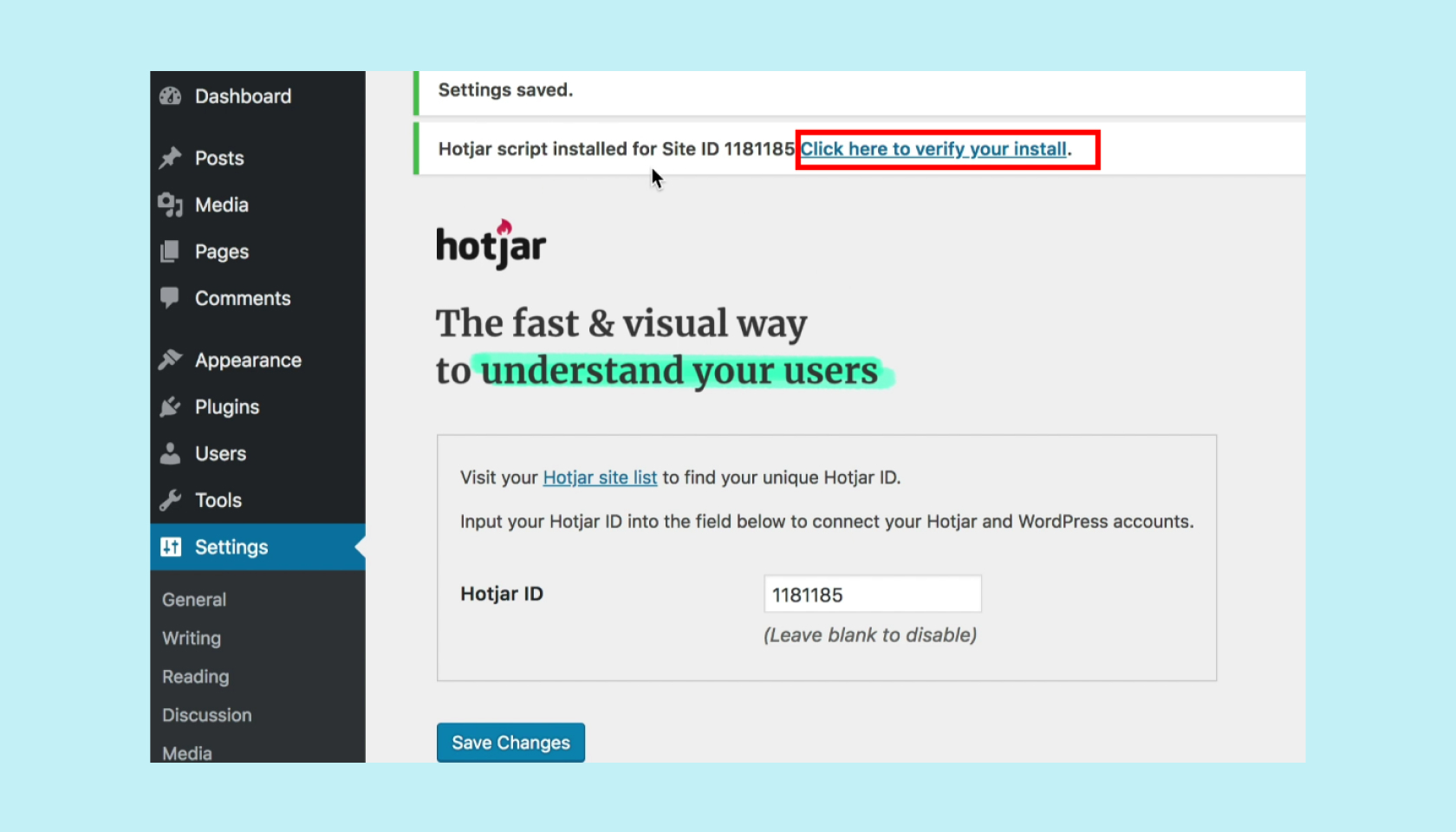
Once the plugin is active, find Hotjar settings in your dashboard. You will need your unique Hotjar ID. Enter the ID in the provided field. Save your changes. Hotjar will now begin to track data from your site.
If you prefer manual setup, copy your Hotjar tracking code. Then, paste this code into your theme’s header. This is found under “Appearance” in “Editor”. Ensure the code is placed before the closing tag. Save your changes. Your site is now being tracked.
Best Practices For Hotjar On WordPress
Protecting user data is crucial. Ensure compliance with privacy laws like GDPR. Always inform users about data collection. Use consent forms before tracking. Limit data to essential insights. Avoid collecting sensitive information. Review Hotjar’s privacy settings regularly. Keep your privacy policy updated. Users must feel safe on your site.
Hotjar can affect site speed. Optimize Hotjar settings to reduce load times. Use sampling to track fewer users. Avoid tracking every page. Monitor site speed after installing Hotjar. Ensure Hotjar scripts load asynchronously. Regularly check for updates to improve performance. Fast sites provide better user experiences.
Insights help improve user experience. Analyze heatmaps to see user focus. Use session recordings to track user journeys. Identify drop-off points in funnels. Adjust site based on findings. Regularly review Hotjar data. Make changes to enhance user interaction. Test adjustments to see impacts. Better insights lead to better sites.
Credit: www.hotjar.com
Common Challenges
Too much data can be a problem. Hotjar shows lots of information. It might feel like a flood. Sorting data is important. Focus on what matters. Look for patterns. Ignore what is not useful. This helps to find clear insights.
Heatmaps show where users click. Colors show where users focus. Bright colors mean more clicks. Dark colors mean fewer clicks. Understanding these maps helps. It shows what users like. It also shows what confuses them. Use this to make better decisions.
User feedback is valuable. It can guide improvements. But too much feedback can be confusing. Not all feedback is useful. Pick the most common points. Focus on those. Balance is key. Use feedback to make the website better.
Case Studies
Hotjar offers powerful insights into user behavior on WordPress sites. Understand heatmaps, recordings, and surveys to enhance user experience. Boost engagement and make data-driven decisions effortlessly.
Successful Implementations
Many businesses use Hotjar to improve their websites. One company used it to see how users interact. They found out where users clicked the most. This helped them make better design decisions. Another company watched user recordings. They learned why some users left the site early. With this, they made changes to keep users longer.
Lessons Learned
Businesses found that small changes can have big impacts. By understanding user behavior, they saved money on big redesigns. They also learned that users sometimes get confused. This insight helped them make navigation simpler. User feedback is very important. It shows what users like or dislike. Listening to users helps in building a better site.

Credit: www.hotjar.com

Credit: help.hotjar.com
Frequently Asked Questions
What Is Hotjar In WordPress?
Hotjar is a powerful tool that integrates with WordPress. It provides insights into user behavior through heatmaps and session recordings. These features help website owners understand how visitors interact with their site. This information can be used to improve user experience and increase conversions.
How To Install Hotjar On WordPress?
To install Hotjar on WordPress, first sign up on Hotjar’s website. After that, you’ll receive a tracking code. Add this code to your WordPress theme’s header. Alternatively, use a plugin like “Insert Headers and Footers” to add the code. Once installed, you can start collecting data.
Why Use Hotjar On Your WordPress Site?
Hotjar offers valuable insights into visitor behavior. It helps identify user engagement and areas for improvement. Using heatmaps and recordings, you can see where users click and scroll. This data helps optimize your site for better user experience and higher conversion rates.
Is Hotjar Free For WordPress Users?
Hotjar offers a free plan for basic usage, suitable for small sites. It includes heatmaps and session recordings with limited features. For more advanced features and higher data limits, consider their paid plans. These plans provide deeper insights and additional tools for larger websites.
Conclusion
Hotjar enhances your WordPress site by understanding user behavior. This tool offers valuable insights through heatmaps and recordings. You can easily see what users like or ignore. It helps improve user experience effectively. With clear data, you make informed decisions.
Hotjar is simple to install and use. Improve website performance with its features. It’s a useful tool for website owners and marketers. Your website can become more user-friendly. Start exploring Hotjar today for better engagement. Your audience will thank you.



