
Have you ever wondered how some websites seamlessly connect multiple domains to a single WordPress site? This magic trick is called domain mapping.
Understanding domain mapping can elevate your website’s professionalism and functionality, but what exactly is it, and how can it benefit you? In this post, we’ll break down domain mapping in simple terms. We’ll explore how it can enhance your online presence, making your site more accessible and recognizable to your audience.
Stick around, and you’ll discover how mastering domain mapping could be the key to unlocking your WordPress site’s full potential.
Domain Mapping Basics
Domain Mapping lets you connect a domain to a website. This means your site can have a custom name. The domain name is like the name of your house. It tells people where to find your site. With domain mapping, a blog can have its own special name. It won’t use the default WordPress name. This makes your site look more professional. It’s a simple way to make your website stand out. Everyone can remember a unique domain name easily. It helps your site grow.
WordPress benefits greatly from domain mapping. It helps users have their own web address. This feature is important for branding. A unique domain name makes a site special. Visitors find it easier to remember your site. This builds trust. Businesses need this feature for a good image. It shows your site is serious. WordPress lets you set up domain mapping easily. Users love having control over their site name. It’s a key feature for WordPress success.

Credit: wordpress.org
How Domain Mapping Works
Domain mapping links a domain to a WordPress site. This process makes your site visible online. First, change the DNS configuration of your domain. Point the domain to WordPress servers. This tells browsers where to find your site. You need the IP address of WordPress servers. Enter it in your domain settings. This step is important for mapping.
Next, adjust settings in WordPress. Go to the WordPress dashboard. Find the domain settings section. Enter your custom domain here. Save the changes. Now, your domain points to the WordPress site. Test the domain. Open your browser. Type your domain name. Your WordPress site should appear.
Check everything works fine. If it doesn’t, review steps again. Ensure DNS settings are correct. Fix any errors. Domain mapping helps your site look professional. It is easy to manage from WordPress.
Benefits Of Domain Mapping
Domain mapping helps your brand appear more professional. Using your own domain makes your site look serious. Visitors trust sites with custom domains more. It shows you care about your online presence. Using a unique domain can improve your brand image. People remember custom domains better. It helps build a strong identity online. Your business looks more credible and established.
Domain mapping brings SEO benefits. Your own domain improves search engine ranking. Search engines prefer custom domains. It makes your site more visible online. Custom domains help with keyword optimization. You can choose keywords that match your business. This boosts your site’s relevance. Better SEO means more visitors. More visitors can lead to more customers.
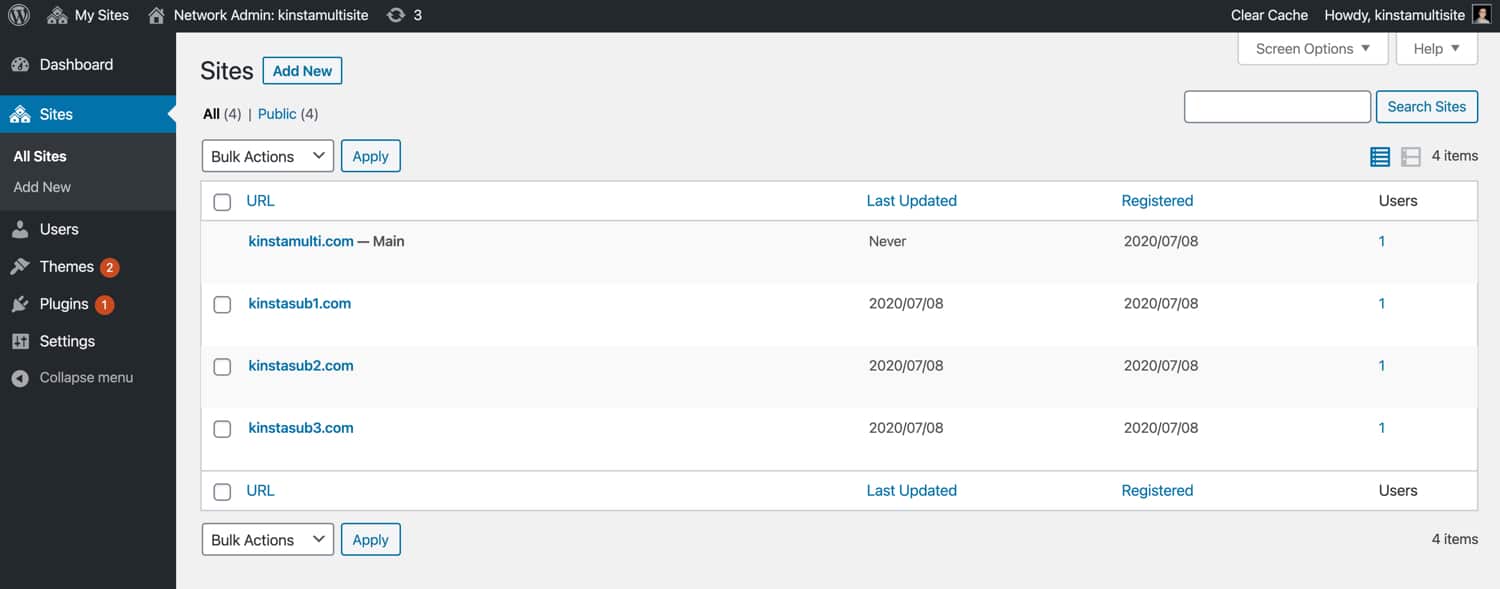
Credit: kinsta.com
Domain Mapping With WordPress.com
First, log into your WordPress.com account. Go to the “My Site” section. Find the “Domains” option. Click on “Add Domain”. Enter the domain name you want to map. Confirm your selection. Follow on-screen instructions. Update the domain’s DNS settings. Use WordPress.com name servers. These are required for mapping. Wait for the changes to take effect. It might take some time. Once done, your domain is mapped.
Many face issues with DNS settings. Incorrect settings cause problems. Ensure name servers are correct. Double-check your entries. Wait time can be long. Patience is key. Sometimes, the domain doesn’t map immediately. Check if settings are saved. Review WordPress.com support. They provide helpful guides. Another issue is expired domains. Ensure your domain is active. Renew if necessary. Keep all details accurate.
Domain Mapping With WordPress.org
Plugins are tools that help with domain mapping. They make it easy. You can map a domain without coding. Some popular plugins are WordPress MU Domain Mapping and Mercator. These plugins guide you step by step. They help connect your domain to your site. You can find them in the WordPress plugin directory. Make sure to keep them updated. This ensures they work well with your site.
Manual configuration needs more steps. It is more complex than plugins. First, log into your hosting account. Next, find the DNS settings. You need to change the CNAME or A record. This points your domain to your WordPress site. After that, go to your WordPress dashboard. Add the new domain under settings. This connects your domain to your WordPress site. Follow each step carefully for success.
Troubleshooting Domain Mapping Issues
Domain mapping in WordPress connects your site to a custom domain. Troubleshoot issues by checking DNS settings and ensuring domain registration is current. Verify name server configurations to resolve common mapping problems effectively.
Common Errors
Domain mapping can be tricky. Many face common errors. A frequent issue is incorrect DNS settings. Ensure your DNS points to the right IP address. Another issue is SSL certificate errors. Check if your certificate is active and valid. Sometimes, the domain does not show the correct site. This may be due to cache problems. Clear your browser and site cache to fix this.
Solutions And Resources
Use online tools to check DNS settings. Websites like DNS Checker can help. For SSL issues, visit Let’s Encrypt. They offer free SSL certificates. Also, seek help from your hosting provider. They can assist with domain mapping. Many hosting sites have support articles. These can guide you step-by-step. Remember, patience is key. Troubleshooting takes time.
Best Practices For Domain Mapping
Domain mapping in WordPress connects a custom domain to your site. Use consistent URLs for better SEO. Ensure DNS settings are correct for smooth access.
Security Considerations
Keeping your domain safe is very important. Use SSL certificates to protect data. They keep information safe from hackers. Regularly update your WordPress plugins. Updates fix security holes. Choose a strong password for your admin panel. It should be hard to guess. Enable two-factor authentication for extra security. This adds another layer of protection. Always backup your site. Backups help recover data if something goes wrong. Avoid using public Wi-Fi when managing your site. Public networks can be risky. Secure your site by using strong firewalls. They block unwanted access.
Maintenance Tips
Regular maintenance keeps your domain running well. Check for updates often. Update themes and plugins regularly. They improve your site’s performance. Clean your database to remove junk data. This helps your site run faster. Monitor your site’s uptime. It ensures your site is always available. Check for broken links on your site. Fix them to improve user experience. Optimize images to load faster. This saves bandwidth and improves speed. Consider using a content delivery network (CDN). A CDN boosts your site’s performance worldwide.
%20(2).jpg?width=650&name=wordpress-multisite-domain-mapping-6-network-site-details%20(1)%20(2).jpg)
Credit: blog.hubspot.com
Frequently Asked Questions
What Is Domain Mapping In WordPress?
Domain mapping in WordPress allows you to link multiple domains to a single website. This means you can have different domain names pointing to your WordPress site, making it easier to manage. It’s useful for businesses wanting to use different domains for branding or targeting different markets.
How Does Domain Mapping Benefit My Site?
Domain mapping benefits your site by enhancing brand recognition and improving SEO. It allows you to manage multiple domains from a single dashboard. This helps in targeting diverse audiences, improving user experience, and boosting search engine rankings through strategic domain usage.
Is Domain Mapping Difficult To Set Up?
Domain mapping is relatively easy to set up in WordPress. Most hosting providers offer straightforward tools for domain mapping. You typically need to update domain settings and configure them in WordPress. With step-by-step instructions, even beginners can accomplish it without much hassle.
Does Domain Mapping Affect Seo?
Domain mapping can positively affect SEO by consolidating traffic to a single site. It ensures all linked domains point to your main site, avoiding duplicate content issues. Properly configured, it boosts your site’s visibility and search engine ranking by centralizing authority and relevance.
Conclusion
Domain mapping enhances your WordPress site’s flexibility and branding. It lets you use custom domains, improving your site’s professionalism. Visitors find it easier to remember your website address. This can increase your site’s traffic and engagement. Setting up domain mapping might seem complex.
But with clear steps, it’s manageable for anyone. Check your hosting provider’s support for guidance. A well-mapped domain can make a big difference. Your online presence will look more cohesive and trustworthy. Explore domain mapping benefits and give your WordPress site a polished edge.



