
Ever found yourself lost in a maze of website menus? You’re not alone.
Navigating complex websites can be a headache, especially when you’re searching for something specific. But what if there was a solution that could make your website easier to explore and even boost your user engagement? Enter the Mega Menu in WordPress.
Imagine a navigation tool that not only organizes your content seamlessly but also enhances the overall user experience. It’s like giving your website visitors a GPS to find exactly what they need, without the frustration. Curious about how this can transform your site and keep your audience glued? Let’s dive into the world of Mega Menus and discover why they might just be the secret ingredient your website needs.
Mega Menu Basics
Mega menus are large, dropdown menus. They offer more options. Users can see many links at once. These menus help organize complex websites. They show categories and subcategories. This makes it easy to find pages. Mega menus improve navigation. Users get a clear overview. They save time, finding info fast.
Traditional menus have simple lists. They show fewer links. Mega menus provide more links in one view. They use columns and rows. Traditional menus need more clicks to explore. Mega menus show more info without extra clicks. Mega menus are better for large sites. They make browsing easy. Users like fewer clicks. They find what they need quickly.

Credit: wordpress.org
Benefits Of Mega Menus
Mega menus make websites more user-friendly. They show many options at once. Users find what they need quickly. This stops confusion and keeps visitors happy. Websites look neat and tidy with mega menus. A good design helps users feel comfortable. They will want to stay longer. Happy users come back again and again.
Mega menus offer clear paths to all pages. They group links in smart ways. Users can see everything at a glance. No need to search everywhere. Visitors find what they need fast. This saves time and energy. Websites become easy to explore. Easy navigation means visitors stay longer.
Mega menus help with SEO. They make pages easy to find. Search engines love well-structured sites. Mega menus organize links well. This helps search engines index pages better. Better indexing leads to higher rankings. More visitors come when sites rank high. More traffic means more success.
Designing Mega Menus
Mega menus in WordPress organize many links in a single dropdown. They enhance user experience by grouping related items. Designing them requires simple layout and clear categories for easy navigation.
Layout Considerations
Mega menus should have a clear structure. Each section should be easy to find. Group similar items together. This helps users find what they need quickly. Use columns for organizing large lists. Columns make menus neat and tidy. Keep the design simple. Avoid cluttering with too many options. A clean layout makes navigation smooth.
Content Organization
Organize content in a logical way. Place popular items at the top. Highlight important categories. Use headings to separate sections. This guides users to the right place. Limit the number of items in each section. Too many choices can confuse users. Aim for a balance between detail and simplicity.
Visual Elements
Visuals can enhance mega menus. Use images to represent categories. Pictures help users understand options better. Icons can also be effective. They save space and look nice. Ensure text is easy to read. Choose clear fonts and colors. Consistent styling across the menu is important. Visual harmony improves user experience.
Implementing Mega Menus In WordPress
Mega menus in WordPress offer a structured navigation tool. They organize multiple links under one menu, enhancing user experience. Users find it easier to explore sites with categorized content.
Choosing The Right Plugin
A good plugin makes mega menus easy. Many plugins are available. Choose the one that fits your needs. Look for easy setup and customization. Some popular choices include Max Mega Menu and WP Mega Menu. Check reviews for each plugin. This helps in making the right choice.
Step-by-step Setup
First, install the chosen plugin. Next, go to your WordPress dashboard. Find the plugin settings. Now, create a new menu. Add your desired items to the menu. Finally, save your changes. Test the menu on your website. Ensure it works as expected.
Customization Tips
Use colors that match your website theme. Add images for a visual appeal. Arrange items in logical groups. Keep the menu simple and easy to navigate. Test on both desktop and mobile. This ensures a good user experience.
Best Practices For Mega Menus
Mega menus should adapt to different screen sizes. Use flexible layouts that look good on phones and computers. Test menus on various devices. Make sure links are easy to tap. Use CSS media queries to adjust styles. Keep mobile users in mind. Simple design works best.
Design menus that everyone can use. Add keyboard navigation for easy access. Ensure that screen readers can read menu items. Use high contrast colors for better visibility. Label links clearly. Avoid complex animations. Focus on user-friendly design. Accessibility is crucial.
Optimize menu loading times. Use clean code to speed up pages. Limit large images. Compress files to reduce size. Test loading speed regularly. Improve server response times. Keep menus lightweight. Fast menus enhance user experience. Good performance matters.

Credit: jetpack.com
Common Challenges
Mega menus can get very complex. They need special care. Too many options can confuse users. Keeping the menu simple helps visitors. Each item should be clear. Use short and easy words. This helps in better user navigation.
Mega menus can make users stay longer. They find what they need fast. A good menu boosts user interest. It makes the website look smart. Every click should be easy. This keeps users happy. Happy users come back often. A good design is key.
Case Studies
Big websites like Amazon use mega menus. They organize lots of items. This makes finding things easy. Visitors enjoy a clear layout. They see what they need fast. This keeps people on the site longer.
A study showed a 20% increase in user engagement. Websites had better navigation. More people clicked on different pages. This means they explored more. Businesses saw an uptick in sales. Better user experience led to happier customers.
Simple designs work best. Too many options confuse visitors. Keep categories clear and neat. This helps users find products quickly. Test layouts often. See what works and what doesn’t. Gather feedback from users. Make changes as needed.
Ensure mobile compatibility. Phones are used a lot now. Menus should look good on small screens. Easy to tap and scroll. This improves access for all users. More people can shop easily.
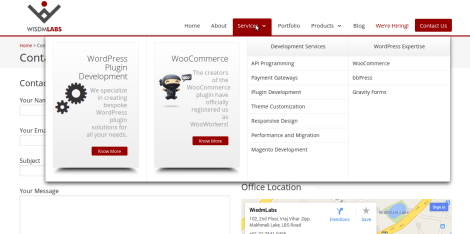
Credit: wisdmlabs.com
Frequently Asked Questions
What Is A Mega Menu In WordPress?
A Mega Menu in WordPress is an advanced navigation feature. It allows you to display multiple columns of links. This enhances user experience by organizing content efficiently. Mega Menus are typically used in websites with extensive content. They improve site navigation and user engagement.
How Do Mega Menus Improve Site Navigation?
Mega Menus improve site navigation by offering a structured layout. Users can find information quickly with minimal clicks. They reduce clutter by grouping related links together. This organized approach enhances user experience. It makes complex websites easier to navigate.
Are Mega Menus Mobile-friendly?
Mega Menus can be mobile-friendly if designed properly. Responsive design ensures they adapt to different screen sizes. Mobile-friendly Mega Menus enhance usability on smartphones. They provide a seamless browsing experience across all devices. Proper implementation is crucial for mobile compatibility.
Can I Customize Mega Menus In WordPress?
Yes, you can customize Mega Menus in WordPress. Many themes and plugins offer customization options. You can adjust colors, fonts, and layout. Customization allows you to match the menu with your site’s branding. It enhances the overall aesthetic and functionality.
Conclusion
Mega menus in WordPress offer a practical solution for organizing complex sites. They simplify navigation, helping users find content quickly. With drag-and-drop features, creating a mega menu becomes hassle-free. Designers love the flexibility. Users appreciate easy access to information. Mega menus enhance user experience by reducing clicks.
They make websites look professional and well-structured. Whether running a blog or business site, a mega menu can be a valuable addition. Explore different plugins to find one that fits your needs. Start building more intuitive and user-friendly menus today.
Your visitors will thank you.



