
Struggling to find the right image size for your WordPress site? You’re not alone.
Choosing the perfect image dimensions can make or break your website’s appeal. Too large, and your site slows down; too small, and your visuals lose impact. Your visitors deserve a seamless experience, and you deserve a site that shines. By understanding the ideal image sizes for WordPress, you can enhance your site’s aesthetics and performance.
Ready to captivate your audience and boost your site’s efficiency? Let’s dive into how you can achieve just that, ensuring every image you upload is spot on.
Importance Of Image Size In WordPress
Images make websites look good and attract visitors. But if images are too big, they slow down the site. Slow sites make visitors unhappy. They might leave and never come back. Smaller image sizes help your site load faster.
Images should be clear, not blurry. Blurry images look bad and can confuse people. High-quality images make your site look professional. But they should still be small enough to load quickly. Find the balance between quality and size.
WordPress has tools to help resize images. Use these tools to make sure images fit well. This way, your site looks good and works fast. Keep images neat and organized. This helps your site look clean and easy to read.

Credit: www.vendasta.com
Standard WordPress Image Sizes
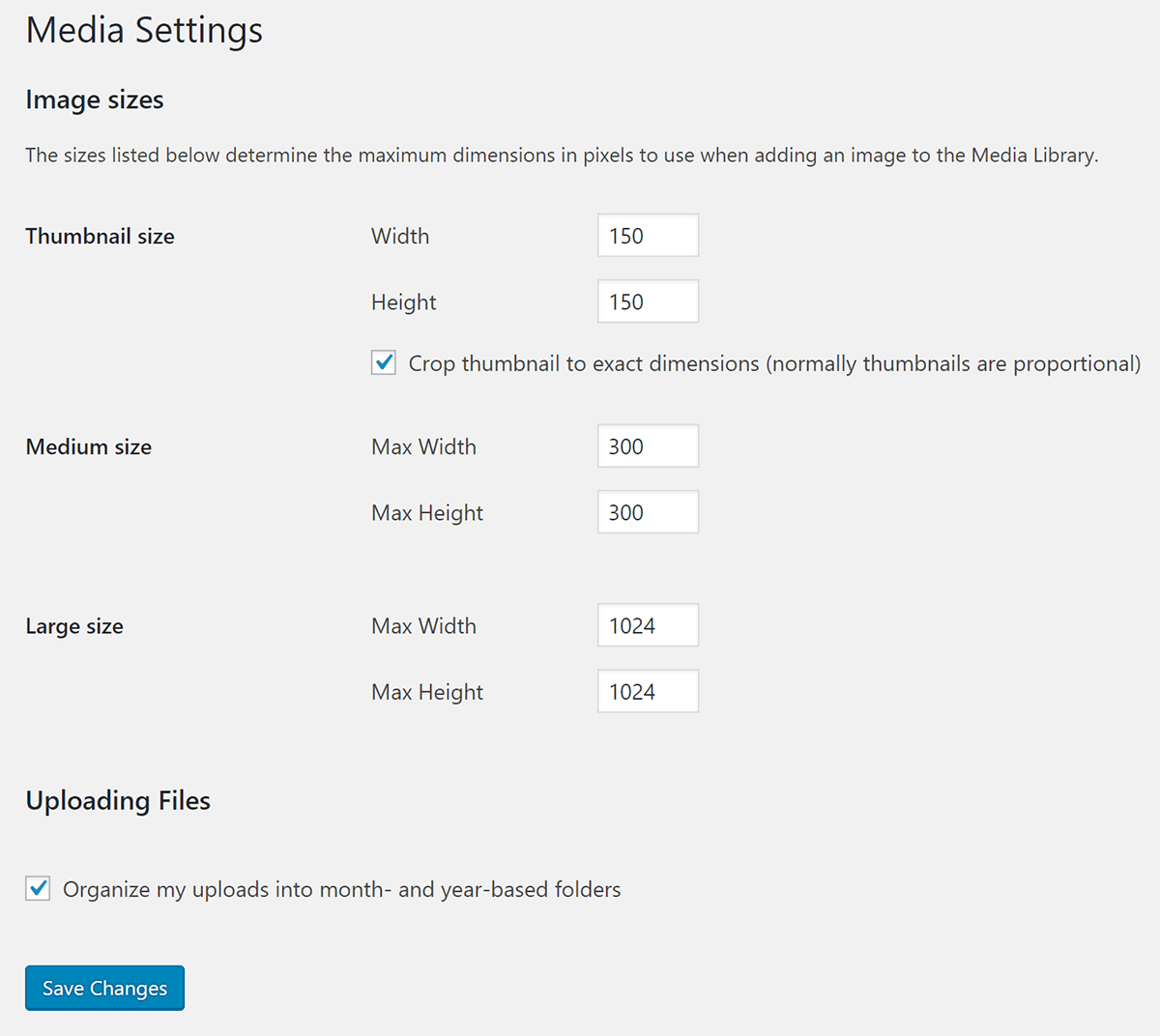
Thumbnails are small. They are usually 150×150 pixels. These are square images. Thumbnails help in faster loading. They are perfect for galleries. Use them for previews. They save space and look neat.
Medium images are bigger. They usually have a size of 300×300 pixels. Use them for blog posts. They balance quality and size. Large images are larger. Their size is often 1024×1024 pixels. Use these for detailed views. They show more details. They are great for featured images.
Full-size images are the biggest. They use the original size. These images show every detail. They take more space. Use them sparingly. They are best for high-quality visuals. Make sure they load fast. Compress them if needed.
Custom Image Sizes
Choosing the right image sizes for WordPress is crucial for website performance. Use 1200×628 pixels for featured images. For thumbnails, 150×150 pixels works best, while 300×300 pixels suits medium-sized images.
Creating Custom Sizes
Use custom sizes to make your website unique. They help fit images perfectly. This makes your site look neat and tidy. To create a custom size, go to your WordPress settings. There, you can add a new size. Name it and choose the width and height.
After setting it up, you can select this size when uploading images. This saves time and keeps all images the same size. It’s easy and fun!
When To Use Custom Sizes
Custom sizes are great for special needs. Use them for different sections of your site. Like banners, thumbnails, or featured images. They make your content pop and stand out. Your site will look more professional and organized. Custom sizes help images load faster. This keeps visitors happy.
Impact On Website Performance
Images must be the right size to keep the website fast. If images are too big, websites load slowly. Slow load times make users unhappy. They may leave the site. To keep users happy, use smaller images. Smaller images load quickly and improve user experience. They also save data for users on mobile.
Search engines like fast websites. Small images help with SEO. They help your site rank higher in search results. Proper image size also helps with image search results. Use alt text for all images. Alt text helps search engines understand images. Good image practices improve site visibility.
Optimizing Images For Web
Reducing file size is key for web images. Smaller images load faster. Use compression tools to make files smaller. Tools like TinyPNG and JPEGmini help a lot. They remove extra data. But, they keep image quality good. Choose the right level of compression. Too much can make images look bad. Test different settings. Find the best balance.
Different formats suit different needs. JPEG is great for photos. It compresses well. But, it might lose some details. PNG is better for graphics with clear lines. It keeps all details. But, it makes larger files. Use GIF for small animations. It supports simple animations. Always pick the right format for your image type.

Credit: wp-techsupport.com
Responsive Design And Image Scaling
Adaptive images fit screens well. A phone screen is small. A computer screen is bigger. Images must change size. This keeps them clear. This helps users see them well.
Phones and tablets use smaller images. Desktops use larger images. Make sure images are optimized for each device. This saves space. This saves load time. Users see images fast.
Retina screens need high-quality images. They need more pixels. Regular images can look blurry. Use images with double pixels. This keeps them sharp. This keeps them bright. Users enjoy clear views.
Tools And Plugins For Image Management
Ensuring optimal image sizes for WordPress enhances site speed and user experience. Popular tools offer easy resizing and compression. Plugins simplify management, keeping your images crisp and page loading fast.
Popular Image Optimization Plugins
WordPress has many plugins to help with image sizes. Some are very popular. Smush is one of them. It makes images smaller but keeps them clear. Another is ShortPixel. It works fast and saves space. Then, there’s Imagify. This one is easy to use and quick.
All these plugins help your website load fast. A fast site is good for visitors. It also helps with search engines. Search engines like fast websites. Using these plugins can make a difference. They are helpful tools for many users.
Managing Image Sizes With WordPress Tools
WordPress also has built-in tools for images. You can choose image sizes when uploading. This helps keep your site neat. WordPress can crop images too. It makes them fit better. Using the right size is important. It keeps your site looking nice and clean.
Credit: wpmudev.com
Frequently Asked Questions
What Is The Ideal Image Size For WordPress?
The ideal image size for WordPress depends on your theme and usage. Typically, featured images are 1200 x 628 pixels. For thumbnails, use 150 x 150 pixels. Large images can be 1024 x 1024 pixels. Always optimize images for faster loading times.
How Do I Optimize Images For WordPress?
To optimize images for WordPress, compress them without losing quality using tools like TinyPNG or ShortPixel. Choose the right format—JPEG for photos, PNG for graphics. Use plugins like Smush or Imagify to automate optimization. This improves site speed and user experience.
Can I Use High-resolution Images On WordPress?
Yes, you can use high-resolution images on WordPress, but they should be optimized. Large files slow down your website. Reduce file size without losing quality. Use responsive images that adapt to different screen sizes. This ensures faster loading and better performance.
What Image Formats Are Best For WordPress?
The best image formats for WordPress are JPEG, PNG, and GIF. JPEG is ideal for photos due to its compressed size. PNG is perfect for graphics with transparency. GIFs are great for animations. Choose the format based on your content needs and site speed optimization.
Conclusion
Choosing the right image size for WordPress is crucial. It affects website speed. It impacts user experience. Smaller images load faster. This keeps visitors happy. Use recommended dimensions for best results. Thumbnail size is usually 150×150 pixels. Medium size often 300×300 pixels.
Large size can be 1024×1024 pixels. Always check theme guidelines. They provide specific size needs. Resize images before uploading. This saves time and storage. Optimized images improve site performance. Keep your audience in mind. Make sure images are clear and relevant.
Your website will benefit greatly.



