
Have you ever wondered what kind of database powers your WordPress website? Understanding the foundation of WordPress tables can unlock a world of possibilities for improving your site’s performance and functionality.
Imagine having the insight to optimize your website’s speed, manage data more efficiently, and enhance the overall user experience. These database secrets could be the key to elevating your online presence. Picture this: You’re navigating a seamless, fast-loading website, effortlessly managing content, and delivering a top-notch experience to your visitors.
That’s the potential impact of mastering WordPress tables. By understanding the type of database at the heart of WordPress, you can harness its full potential, ensuring your website runs like a well-oiled machine. Curiosity piqued? You’re not alone. Many website owners like you are eager to uncover the mysteries behind WordPress tables. Dive in with us to explore what kind of database these tables are and how they can make a difference in your digital journey. Let’s turn your curiosity into clarity, empowering you to make informed decisions for your website’s success.
WordPress Database Structure
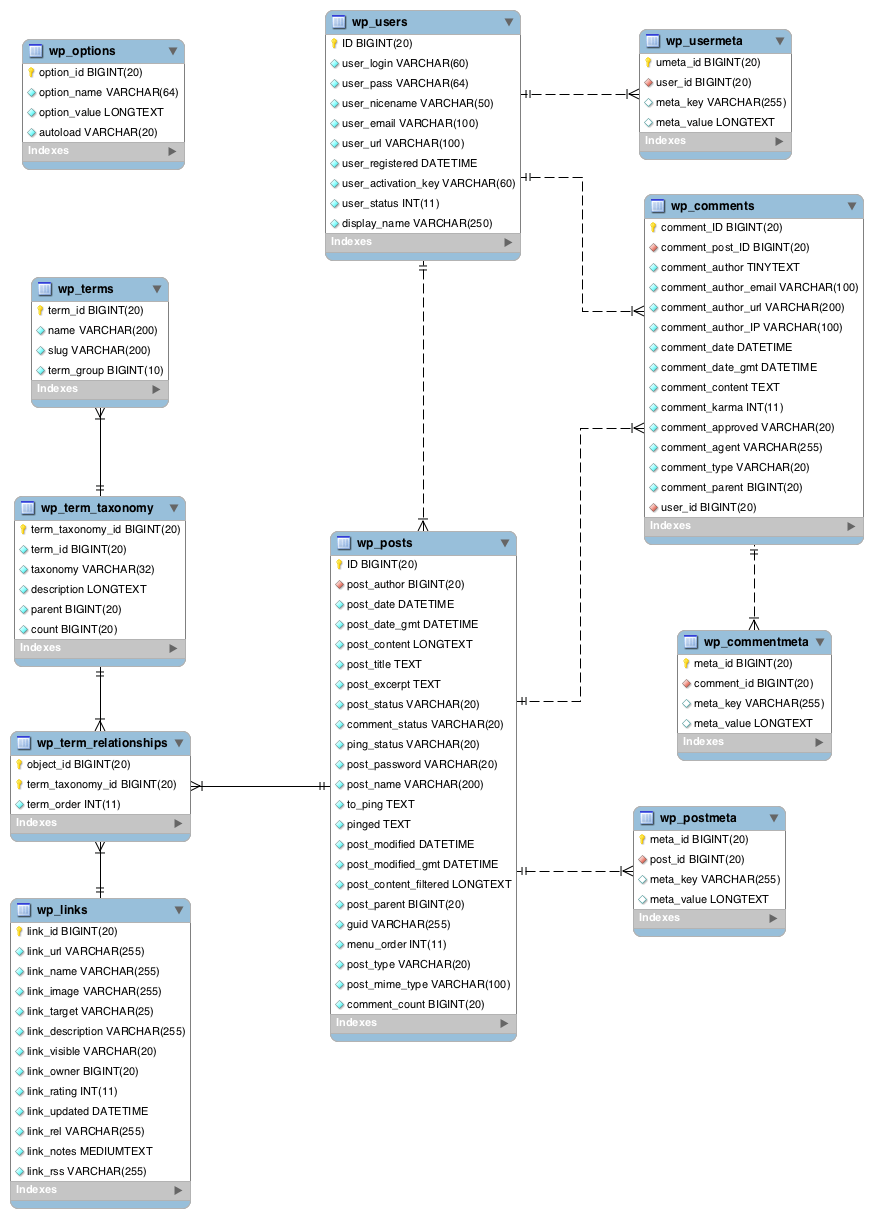
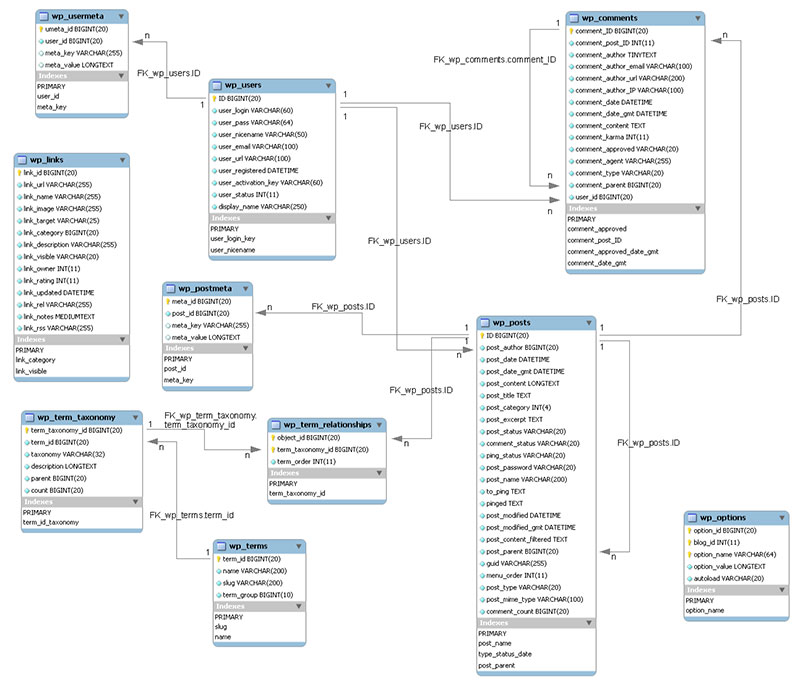
The WordPress database has many parts. The most important is the wp_posts table. It saves all posts and pages. Another key table is wp_users. This keeps user details like names and passwords. wp_comments stores all comments on posts. Each table is linked to make WordPress work smoothly. These tables help manage content. They ensure everything is organized well.
WordPress tables connect to each other. Foreign keys link tables. The wp_postmeta table connects with wp_posts. It adds extra info to posts. wp_usermeta links with wp_users. It stores extra user info. These links create a web of data. They make WordPress flexible. This structure helps in building better sites. It makes site management easy.
Types Of WordPress Tables
WordPress uses default tables for storing data. These tables are part of the MySQL database. There are 12 main tables. Each table has a special job. The wp_posts table stores blog posts. The wp_users table holds user data. Comments go into the wp_comments table. These tables help WordPress run smoothly. They are created when you install WordPress.
Sometimes, extra tables are needed. These are called custom tables. They store special data. Plugins might need them. For example, a store plugin might need a table for orders. Custom tables are not part of the default setup. Developers create them as needed. This helps keep data organized. Custom tables make WordPress more flexible. They allow for special features.
Role Of Mysql In WordPress
WordPress uses MySQL to store all its data. This includes posts, pages, and user info. MySQL is a powerful database system. It helps WordPress run smoothly. It keeps track of everything. Without MySQL, WordPress wouldn’t work well.
PHP is a coding language. It talks to MySQL. When you create a post, PHP sends info to MySQL. MySQL saves this info in tables. PHP then shows the post on your site. This process is fast. It makes your site dynamic. PHP and MySQL work together. They make WordPress efficient.
Credit: wp-staging.com
Data Storage And Retrieval
WordPress uses MySQL for storing data. It is a relational database. This means data is stored in tables. Each table has rows and columns. You can use queries to find data in these tables. Queries are like questions. They help get data from the database. They use SQL language. SQL is easy to learn. It helps find data fast. Understanding queries is useful. It makes managing data easier.
Indexes help find data quickly. They act like a book index. WordPress uses indexes in its database. This makes searching fast. They are important for big websites. Indexes can be on one or more columns. They speed up data access. This helps with performance. Without indexes, searches are slow. Always keep indexes updated. This ensures quick data retrieval.
Scalability And Performance
WordPress tables use the MySQL database to store data. This setup ensures efficient performance and good scalability. As your site grows, MySQL handles increased data without compromising speed.
Optimizing Table Performance
WordPress tables can be slow sometimes. Speed is important for users. Optimize tables to make them faster. Use indexes to speed up data search. This helps the database find things quickly. Caching is another way to speed up tables. It stores data temporarily for quick access.
Keep tables organized. Clean up unused data often. This improves performance. Use efficient queries. They fetch data without slowing down the system. Adjust the table settings for better speed. Test changes to see what works best.
Handling Large Datasets
Large datasets need special care. They can slow down WordPress. Divide big tables into smaller parts. This makes managing data easier. Use pagination to load data in parts. It reduces load time for users.
Store data in multiple tables. It helps in managing large datasets. Regular backups keep data safe. They protect against data loss. Use cloud storage for extra space. It handles large datasets well.
Credit: wpdatatables.com
Security Considerations
SQL injections are serious threats. Hackers can steal data from databases. Use prepared statements to stop this. They keep your database safe. Always sanitize user input. This removes harmful code. Limit database permissions to users. This blocks unwanted access. Security plugins can help too. They watch for threats. Keep them up-to-date. Regular checks are important. They find weak spots early.
Encryption keeps data safe. It turns data into secret code. Use SSL certificates for websites. They protect data during transfer. Database encryption is key. It secures stored data. AES encryption is popular. It is strong and trusted. Always use strong passwords. Change them often. Two-factor authentication adds extra security. It checks user identity twice. Backup data regularly. This saves information if lost. Encryption ensures privacy and security.
Future Of WordPress Databases
New technologies are shaping WordPress databases. Cloud computing is growing fast. Databases can now store more data. This makes WordPress more powerful. Machine learning helps in predicting database needs. It can also improve data security. Another trend is NoSQL databases. These databases are flexible. They can handle different types of data. This is useful for complex websites. Graph databases are also gaining interest. They help in connecting data easily. This improves search functions on websites. Blockchain technology is also being explored. It can make databases more secure.
WordPress databases can be improved in many ways. Speed is very important. Faster databases make websites load quickly. Security is another big area. Strong security measures are needed. This keeps data safe from hackers. Scalability helps when websites grow. Databases should handle more users easily. User interface can be improved. This makes it easier for people to manage data. Integration with other systems is useful. It helps in sharing data across platforms.
Credit: wp-staging.com
Frequently Asked Questions
What Type Of Database Does WordPress Use?
WordPress uses a MySQL or MariaDB database. These databases are relational and store data in tables. They are widely used due to their speed and reliability. WordPress tables hold site content, user information, and settings. This structure helps in efficient data retrieval and management.
How Are WordPress Tables Structured?
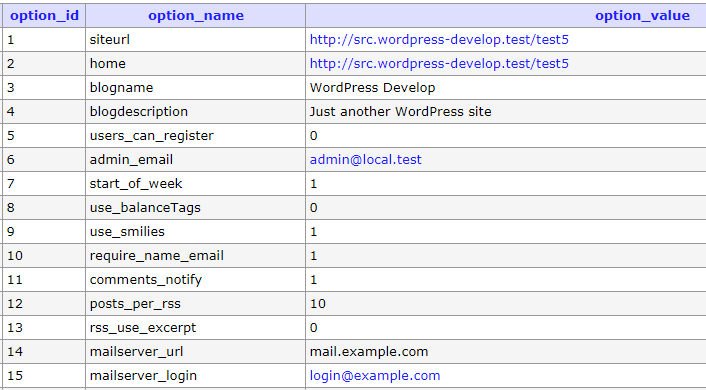
WordPress tables are organized in a structured manner with predefined columns. Each table has rows for different data entries. The database includes tables for posts, users, and site options. This structured approach aids in managing and retrieving data efficiently. It ensures seamless website functionality.
Why Does WordPress Use A Relational Database?
WordPress uses a relational database for its efficiency and reliability. Relational databases store data in structured tables. This structure allows for quick data access and management. It also supports complex queries and relationships between data. This makes it ideal for dynamic websites like WordPress.
Can WordPress Work With Databases Other Than Mysql?
WordPress primarily supports MySQL and MariaDB. However, with plugins and custom development, it can work with other databases. These alternative databases might require additional configuration. MySQL is preferred due to its compatibility, support, and performance with WordPress. It’s the default choice for most WordPress installations.
Conclusion
WordPress tables are structured using a MySQL database. They store essential site data efficiently. Understanding this structure can enhance your WordPress experience. It aids in better site management. Knowing your database type empowers you. You can troubleshoot issues faster. This knowledge helps in optimizing site performance.
It enhances security measures too. Regular updates keep the database healthy. A well-maintained database supports smoother site operations. Dive deeper into WordPress tables. Discover their role in your website. Your site runs more smoothly with this insight. Embrace the power of informed management.
Keep your WordPress site thriving.



