
Are you looking to speed up your WordPress website and improve its performance? You might be missing out on the power of the WordPress Hummingbird Plugin.
Imagine a tool that not only boosts your site’s speed but also enhances its overall efficiency, leading to better user experiences and higher search engine rankings. Sounds intriguing, right? As a website owner, you know that every second counts. The Hummingbird Plugin could be the secret ingredient to keeping your visitors engaged and satisfied.
Dive into this article to discover how this plugin can transform your site into a fast, responsive powerhouse. Your website’s future might just depend on it.

Credit: wordpress.org
WordPress Hummingbird Plugin Basics
The Hummingbird Plugin is a tool for WordPress sites. It helps make your site faster. Speed is important for users. Slow sites can make users leave. This plugin works to improve speed. It does this by caching. Caching means saving data for quick access. Hummingbird also compresses files. Smaller files load faster. It checks for errors, too. Errors can slow down your site. Fixing them helps improve speed.
Hummingbird shows you which files are slow. You can choose to fix them. It offers suggestions. The plugin is easy to use. You don’t need special skills. Just install it. Follow the steps given. Your site will get better. Faster sites make users happy. Happy users visit more often. This is good for your site’s success.
Key Features
Hummingbird Plugin boosts site speed. It makes pages load faster. Fast sites keep visitors happy. They stay longer. Speed improves user experience. Better experience means more visits.
Hummingbird offers caching tools. It stores data for quick access. Caching reduces server load. It saves time for users. Quick access improves site efficiency. Efficient sites run smoothly. Smooth sites attract more users.
Assets like images and scripts slow down sites. Hummingbird optimizes these assets. Optimization makes assets smaller. Smaller assets load faster. Fast loading enhances performance. Enhanced performance pleases users. Happy users return often.
Installation Guide
Start by logging into your WordPress dashboard. Find the Plugins menu on the left. Click on it. Choose Add New. In the search box, type Hummingbird. Hit enter. You will see the plugin in search results. Click Install Now. Wait for the installation to finish.
After installation, click Activate. This step is crucial. Your plugin is now active. Go to the plugin settings. Find the settings under the Hummingbird menu.
Follow the setup wizard. It helps with optimization. Choose your settings carefully. Optimize your site’s speed. Check your website after setup.

Credit: wpmudev.com
Configuration Steps
Hummingbird is a WordPress plugin designed to boost website performance. It optimizes speed by compressing files and improving caching. This tool helps enhance user experience and site ranking.
Dashboard Overview
The WordPress Hummingbird Plugin has an easy dashboard. The dashboard shows important site data. Check your site’s speed here. Performance scores and issues are visible. Optimization suggestions help improve your site. The dashboard is user-friendly. It guides you step by step. It helps keep your site fast.
Setting Up Caching
Caching is important for speed. It saves time by storing data. The plugin has a caching feature. Go to the caching settings. Enable caching to make your site faster. It reduces server load. This helps improve user experience. Follow the instructions carefully. You can always change settings later.
Minification And Compression
Minification makes files smaller. Smaller files load faster. CSS and JavaScript files can be minified. The plugin does this easily. Compression reduces file size further. Smaller files use less bandwidth. This helps your site load quickly. Enable both features in settings. Watch your site speed improve.
Performance Analysis Tools
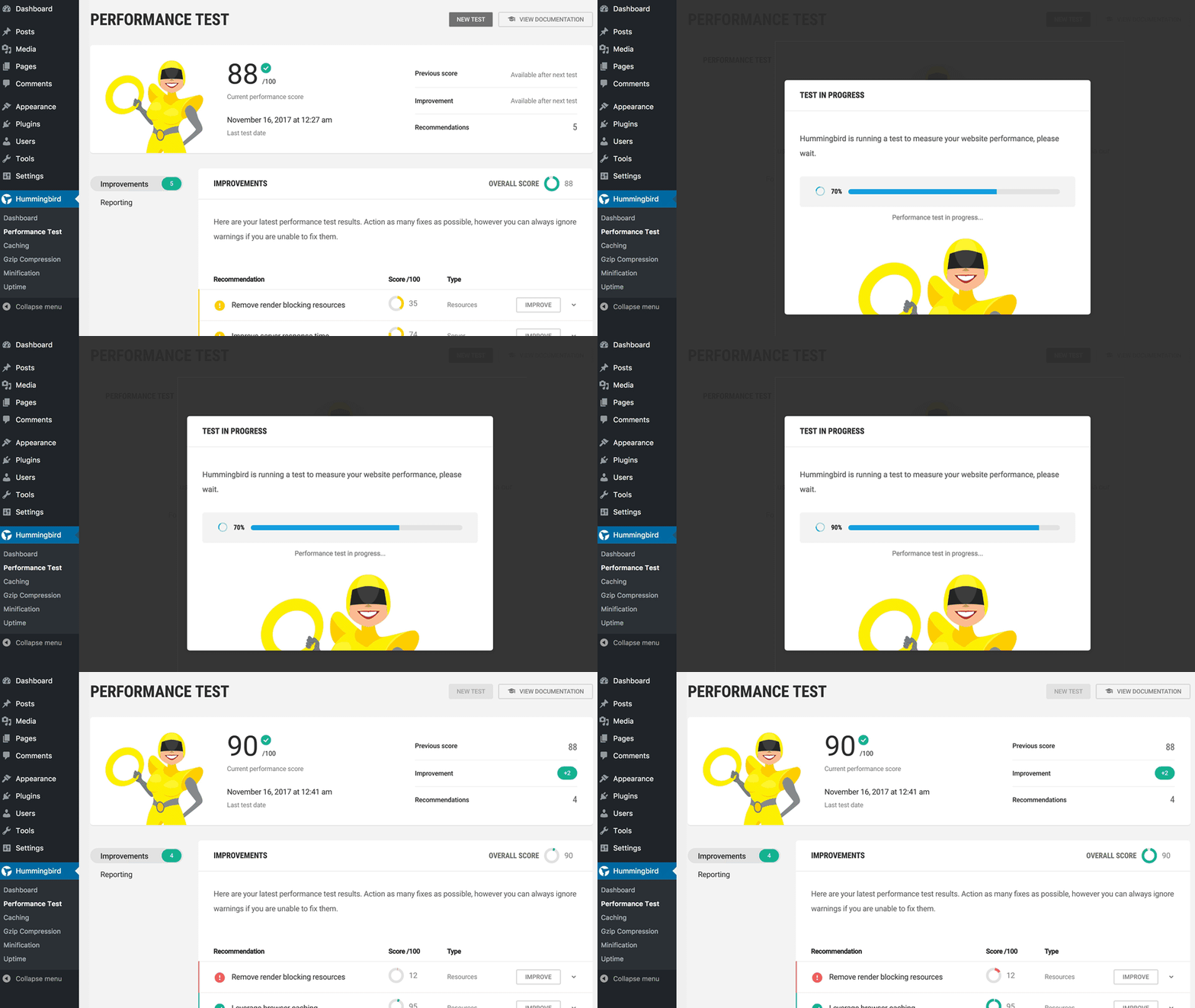
WordPress Hummingbird Plugin helps websites run faster. It uses performance tests to check speed. These tests show how quickly pages load. Slow pages can make visitors leave. Fast pages keep them happy. Hummingbird checks many things. It checks images, scripts, and code. It finds what slows down a site. Then, it gives tips to fix these problems.
Audit reports tell what needs fixing. They show where a site can improve. Reports are easy to read. They use simple numbers and charts. This helps to understand problems quickly. Reports show bad and good parts of a website. They help site owners know what to do next. Fixing issues can make a site faster. Faster sites bring more visitors.
Integration With Other Plugins
Hummingbird Plugin works well with other plugins. It is friendly with WordPress SEO tools. It helps make your website faster. A faster site is better for users. It can also work with caching plugins. This makes loading pages even quicker. Integrating with security plugins is easy too. This keeps your site safe. You can use it with image optimization tools. This makes pictures load faster. All these make a better user experience.
Some plugins may not fit well. Check before adding new ones. Always test your site. Make sure everything works smoothly. This way, you avoid problems. A working site keeps visitors happy. Happy visitors stay longer. They might return often. This is good for your website.
Troubleshooting Common Issues
The WordPress Hummingbird Plugin optimizes site speed, enhancing performance and user experience. It scans for issues, fixes slowdowns, and improves loading times. Troubleshooting common problems with Hummingbird helps maintain a fast, efficient website.
Cache Clearing
Clearing the cache can solve many problems. Hummingbird Plugin stores data for faster page loads. Sometimes, this data gets old. Old data can cause display errors. It is important to clear the cache regularly. Regular cache clearing ensures updated content. Check plugin settings for cache options. Choose to clear cache manually or automatically. Manual clearing allows more control. Automatic clearing saves time.
Conflict Resolution
Plugins may conflict with each other. Conflicts cause errors or slow down your site. It’s crucial to identify conflicting plugins. First, disable all plugins. Then, enable them one by one. Check your site after each plugin is enabled. Identify which plugin causes problems. Once found, update or replace the conflicting plugin. Ensure all plugins are compatible. Regular updates can prevent conflicts. Check plugin descriptions for compatibility information.
Benefits For Website Speed
The WordPress Hummingbird Plugin makes websites load faster. This plugin helps by improving the site’s performance. It reduces the time it takes for pages to load. By optimizing files, websites can handle more traffic. Users will experience quick page loads. Faster websites mean happier visitors. The plugin also helps save bandwidth. This makes it a great tool for websites with many pages. It compresses files to make them smaller. Smaller files load quickly. This plugin is useful for websites that want to improve their speed.
Hummingbird also offers tools for cache management. Caching stores website data for quick access. This means less load time for repeat visitors. Websites can perform better with effective caching. Hummingbird makes it easy to manage these settings. It provides options for monitoring performance. The plugin ensures your site runs smoothly. It is easy to use and offers helpful features. Many websites benefit from using Hummingbird. Faster sites improve the user experience.
User Reviews And Feedback
People say the Hummingbird plugin makes websites faster. Many users find it easy to use. It helps in improving website speed with simple steps. Some users like its simple interface. Others find the features very useful. The plugin helps in monitoring website performance.
Some users feel it needs more options. They want better customer support. But many users are happy with the speed boost. The plugin helps websites load faster. It makes a big difference for sites with many visitors. Users recommend it for quick speed improvements.
Credit: divimode.com
Frequently Asked Questions
What Is The Hummingbird Plugin For WordPress?
The Hummingbird Plugin is a performance optimization tool for WordPress. It helps speed up your website by improving load times. It offers features like caching, minification, and lazy loading. Hummingbird aims to enhance user experience and improve search engine rankings.
How Does Hummingbird Improve Website Speed?
Hummingbird improves speed by optimizing various elements of your site. It uses caching to store data temporarily, reducing load times. Minification decreases file sizes by removing unnecessary characters. Lazy loading ensures images load only when needed, enhancing performance.
Is Hummingbird Plugin Suitable For Beginners?
Yes, Hummingbird is beginner-friendly with an intuitive interface. It offers easy setup and clear instructions. With its user-friendly dashboard, beginners can optimize their website without technical expertise. Hummingbird provides detailed insights and recommendations, making performance optimization accessible to all users.
Does Hummingbird Offer A Free Version?
Yes, Hummingbird offers a free version with essential features. The free version includes caching, minification, and performance reports. For advanced features, users can upgrade to the premium version. The premium version offers enhanced optimization and additional tools for better performance.
Conclusion
The WordPress Hummingbird Plugin boosts your website’s speed effectively. It optimizes performance, enhancing user experience. Installation is simple, with no complex steps required. The plugin’s features help improve loading times. Faster pages can lead to better search rankings. It is a valuable tool for any website owner.
Keeping visitors engaged is crucial, and Hummingbird assists with that. Regular updates ensure it stays effective. This plugin offers a practical solution for speed issues. Anyone managing a website should consider its benefits. Give your site the speed boost it needs today.



