
Imagine you’re building a beautiful house online, brick by brick, with WordPress as your trusted tool. You want every part of it to be perfect, right?
One crucial element is often overlooked – the slug. If you’re wondering what a slug is and why it matters, you’re not alone. This tiny piece of your URL holds the power to boost your website’s visibility, attract more visitors, and even enhance user experience.
Curious about how something so small can make such a big impact? Understanding slugs could be the missing piece in your WordPress puzzle. Stick around, and you’ll discover how to make your site shine brighter than ever.
Slug Definition
A slug is the part of a URL that comes after the domain name. It helps identify a page or post on a website. In WordPress, the slug is created from the title of the post or page. For example, if the title is “Best Chocolate Cake Recipe,” the slug might be “best-chocolate-cake-recipe.”
Slugs are important for search engines and visitors. They should be short and clear. A good slug helps users find content easily. It also helps search engines understand what the page is about. This can help your page rank higher in search results.
Slugs should not have spaces. Use hyphens instead. They should be in lower case. Avoid special characters. Keep it simple and relevant to the content. This makes the slug more effective.
Credit: www.wpexplorer.com
Importance In Seo
The slug of a WordPress page is crucial for SEO. It is the part of the URL that comes after the domain name. A clear slug helps search engines understand your page. It should be short and descriptive. Use keywords in your slug to improve search ranking. A good slug can make your page more visible. Avoid using unnecessary words in the slug. This keeps it simple and easy to read. Remember, a well-crafted slug can boost your site’s SEO. It makes your content easier to find. A good slug also helps users understand your page.
Creating A Slug
WordPress slug is the part of a URL that comes after the domain name. It helps identify a specific page or post. Creating a slug involves choosing words that are short, descriptive, and easy to remember. This enhances SEO by making URLs more understandable for search engines and users.
Best Practices
A good slug is short and clear. It should tell readers what the page is about. Use simple words that are easy to understand. Avoid special characters like # or @. These can confuse people and search engines. Separate words with hyphens, not underscores. This helps search engines read them better. Make slugs readable and use lowercase letters. Keep slugs relevant to the content. This improves SEO. Use keywords in slugs to boost search ranking. Remember, a good slug is both user-friendly and SEO-friendly.
Common Mistakes
Long slugs can be hard to read and understand. Avoid using too many words. Using numbers in slugs can confuse visitors. They may wonder what they mean. Ignoring keywords is a big mistake. They help in search rankings. Using uppercase letters in slugs can cause errors. Always use lowercase. Special characters can break links. Do not use them. Missing hyphens between words can make slugs unclear. Keep slugs simple and direct.
Editing A Slug
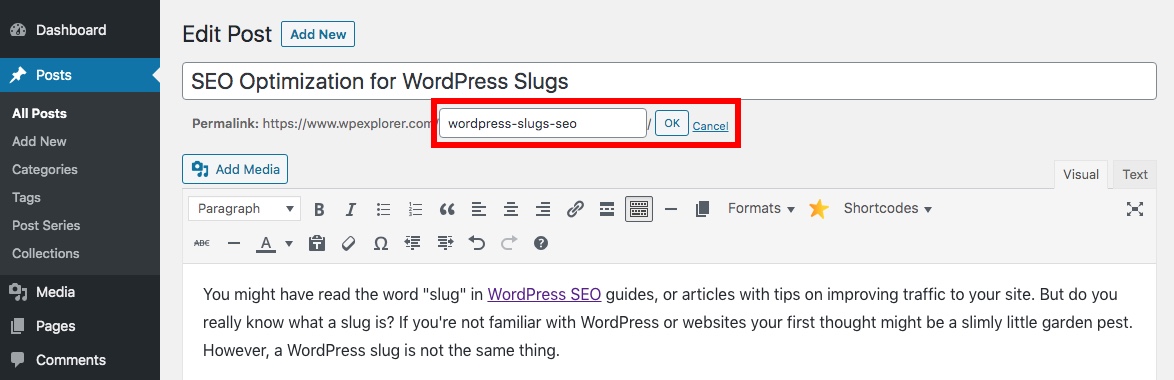
To edit a WordPress slug, start by logging into your dashboard. Go to the Posts section and choose the post you want. Click Edit to open the post editor. Locate the Permalink box, usually below the title. Here, you can modify the slug. Make sure it’s simple and includes keywords. Short slugs are better. Click Save or Update to apply changes.
Impact of Changes can be significant. Search engines use slugs to understand page content. A clear slug helps your site rank better. Visitors also find it easier to read and remember. Always check if the slug fits the post topic. Incorrect slugs can confuse users. Ensure consistency across your site for best results.
Slug In Different Content Types
A slug is part of a URL. It appears after the domain name. In posts, slugs help identify the content. They should be short and clear. Use keywords in your slug. This helps people find your post. Avoid using special characters. They make slugs confusing. Keep slugs readable. This makes links easy to understand.
Pages also have slugs. They work like post slugs. Pages should have descriptive slugs. This tells people what the page is about. Use simple words. Avoid long phrases. Pages usually have static content. So, slugs don’t change often. Keep slugs consistent. This helps with site navigation. A good slug makes pages easy to find.
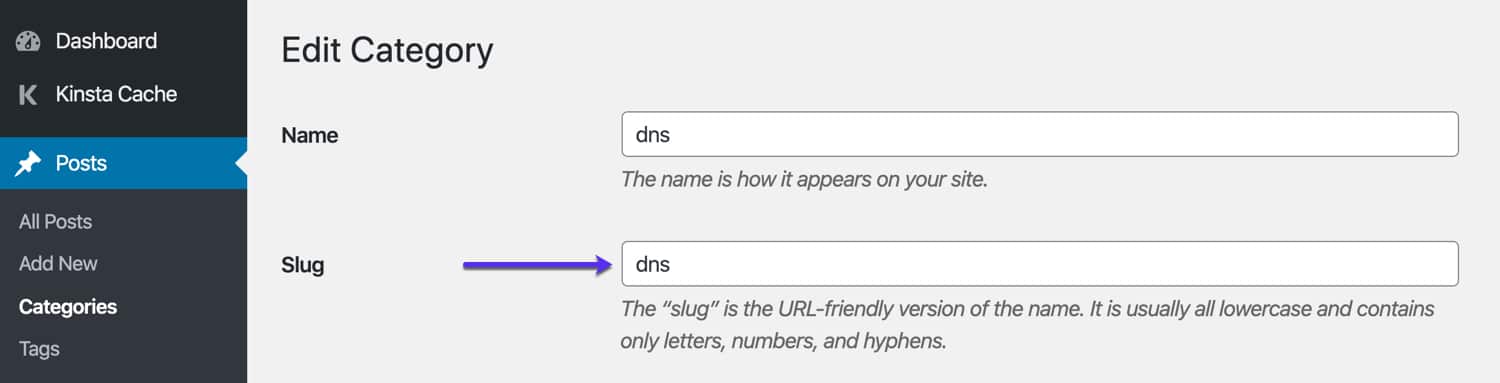
Categories and tags use slugs too. They help group posts. Use short slugs for categories. Tags can have more words. But don’t make them too long. Slugs for tags and categories must be unique. This prevents confusion. Choose slugs that match the topic. This helps users find related posts. Good slugs improve site organization.

Credit: ezseonews.com
Slug Customization Tools
WordPress plugins make slug customization easy. They offer many features for users. Popular plugins like Yoast SEO help manage slugs. They suggest optimal slug lengths. All in One SEO also aids in slug editing. These plugins provide user-friendly interfaces. Slug changes become simple with them. They help improve search engine optimization. Users can choose the best plugin for their needs.
WordPress has built-in tools for slug editing. Users can change slugs while creating posts. The permalink settings allow slug adjustments. This feature is accessible from the dashboard. Users can see slug options under settings. Changing slugs is straightforward. A few clicks make slugs better. Built-in tools help keep slugs neat and clear. Easy slug editing improves site appearance.
Common Slug Issues
Duplicate slugs can create confusion. They may lead users to the wrong page. WordPress handles duplicates by adding a number. For example, “post-2” if “post” exists. This is automatic. But it can hurt SEO. It is better to have unique slugs. They make links clear and easy to understand.
Slugs should be short. Long slugs look messy. They are hard to read. Aim for simple words. This helps in better search results. A short slug is quick to type. It saves time for users. Keep it under 5 words. Short slugs are also mobile-friendly.
Case Studies
The slug in WordPress is the user-friendly part of a URL. It helps visitors understand the content of the page. Slugs are created from the title and can be edited for clarity.
Successful Slug Strategies
Slugs help users find your content easily. A good slug is short. It tells what the page is about. Many sites use short slugs. These slugs have keywords. Keywords make it easy to find the page. A clear slug helps search engines. They show your page to more people.
Lessons From Mistakes
Some sites use slugs that are too long. Long slugs confuse users. They are hard to remember. Some slugs have no keywords. This makes them hard to find. It’s good to check slugs often. Fix slugs that are not working well. Keep slugs simple and clear. This helps both users and search engines.
Credit: kinsta.com
Frequently Asked Questions
What Is A WordPress Slug?
A WordPress slug is the URL-friendly version of a post or page title. It helps in identifying content and is used in SEO. Slugs are typically lowercase and contain only letters, numbers, and hyphens.
How To Edit A WordPress Slug?
To edit a slug, navigate to the post or page editor. Look for the permalink section under the title. Click “Edit” and change the slug as desired. Ensure it’s descriptive and includes keywords for better SEO.
Why Are WordPress Slugs Important?
WordPress slugs are important for SEO and user experience. They make URLs readable and help search engines understand content. A clear slug can improve click-through rates and search rankings.
Can WordPress Slugs Be Changed?
Yes, WordPress slugs can be changed anytime. However, be cautious as changing a slug affects the URL. Use redirects to avoid broken links and maintain SEO value.
Conclusion
Understanding the slug in WordPress is crucial for effective SEO. It helps create easy-to-read URLs. These URLs improve user experience and boost search engine rankings. Always keep slugs simple and relevant to your content. This makes it easier for readers to find your site.
A well-structured slug sets a clear path for visitors. It also signals search engines about your page’s content. Remember, an effective slug enhances visibility. It can significantly impact your site’s traffic. So, focus on crafting meaningful and concise slugs. Your WordPress site will thank you for it.



