
Have you ever wondered how to effortlessly keep your audience updated with your latest blog posts on WordPress? Imagine a tool that automatically shares your new content with readers.
That’s what an RSS feed does for your WordPress blog. It’s like a magic pipeline directly connecting your words to eager eyes, ensuring no article goes unnoticed. By understanding the simple yet powerful mechanism of RSS feeds, you can enhance your blog’s visibility and reach.
Picture your readers receiving instant updates every time you publish, keeping them engaged and eager for more. Discover how you can leverage this tool to transform your blogging experience. Dive into the details and learn how an RSS feed can become your new best friend in the blogging world.
Credit: wordpress.org
Understanding Rss Feeds
RSS stands for Really Simple Syndication. It is like a magic way to get updates. You can read new blog posts without visiting the site. RSS uses XML format to share content. This helps you see all new updates in one place. It is like having a special mailbox for your favorite websites.
RSS started in the late 1990s. It was invented to help share news. Over time, it became popular for blogs. Many people use RSS to follow updates on the web. Today, it is used for sharing podcasts and videos too. RSS helps keep you connected with the latest content. It is still important for bloggers and content creators.
Benefits Of Using Rss Feeds
RSS feeds bring all blog updates in one place. Readers don’t need to visit each blog separately. They can easily scan new posts. This saves time and effort. A simple way to stay updated.
RSS feeds can boost blog visits. More visibility means more readers. Sharing posts becomes easy. Readers can share with others too. This can grow the blog audience.
RSS feeds help in automatic content sharing. New posts go to readers right away. No manual work needed. This makes content sharing smooth and quick. Less effort, more reach.
Locating Your WordPress Rss Feed
The default RSS feed URL is easy to find. It usually ends with “/feed/”. Just add “/feed/” to your blog’s URL. For example, if your blog is www.myblog.com, your RSS feed URL is www.myblog.com/feed/. This URL helps share your blog posts easily. RSS feeds keep your readers updated with new posts. They don’t need to visit your site every day.
RSS feeds are in your WordPress dashboard. Log into your WordPress account. Go to “Settings”. Click “Reading”. Here, you’ll find RSS feed options. WordPress makes it simple to locate your RSS feed. This ensures easy access for readers. They get updates without extra work. It’s part of WordPress’s built-in features. Your feed is ready to use!
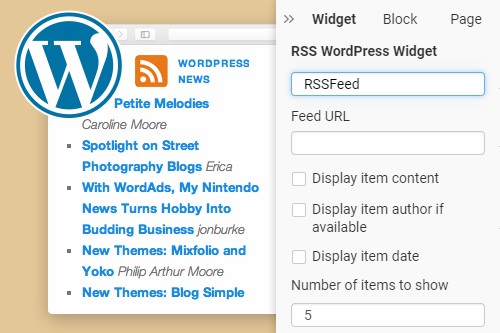
Plugins help manage RSS feeds. They offer more options. Popular plugins include RSS Aggregator and Feedzy. These plugins make RSS feeds more powerful. They add features like customizing feeds. Plugins make feeds more user-friendly. It’s simple to install and use them. Just search for plugins in WordPress. Choose one and activate it. Your feeds become better with plugins.
Credit: nicepage.com
Customizing Your Rss Feed
Edit feed settings to match your needs. Use WordPress dashboard for this task. Go to Settings then Reading. You can adjust the number of posts. Choose whether to show full text or summary. This helps with feed clarity.
Adding custom post types gives your feed more variety. Include posts, pages, or products. Open your functions.php file. Add code to register custom post types. This code tells WordPress what to display. Make your blog unique and informative.
Incorporate featured images for a visual touch. Images make feeds attractive. Use plugins like Featured Image in RSS or RSS with Images. These tools help add images automatically. Readers like seeing images with text.
Troubleshooting Rss Feed Issues
Discovering the RSS feed for your WordPress blog can streamline content delivery. Navigate to your site’s URL and add “/feed” at the end. This simple step grants access to your blog’s RSS feed, ensuring readers receive updates effortlessly.
Common Problems And Solutions
RSS feeds sometimes stop working. This can confuse readers. Common issues include broken links and wrong URLs. Sometimes, plugins cause trouble. Updating plugins can solve the issue. Always check for outdated themes. They might cause RSS problems. Fixing these can help your feed work again.
Validating Your Rss Feed
Validation checks your feed for errors. Use online tools for this. These tools find issues. Validating helps keep your feed clean. A clean feed works better. Always keep your feed valid. This ensures smooth functioning.
Dealing With Feed Errors
Feed errors can be confusing. They stop your feed from working. Error messages can help you fix issues. Look for these messages in your feed. They guide you to the problem. Follow steps to fix errors. This helps keep your feed running smoothly.
Promoting Your Rss Feed
Tell your readers about the RSS feed. Make it easy to find. Place the link in visible spots on your site. People love easy access. Offer a guide on how to subscribe. Show them step-by-step. Help them understand the benefits. They can get updates without visiting. Explain the simplicity and ease.
Share your RSS feed link on social media. Use platforms like Facebook and Twitter. These places have millions of users. Add the link to your bio or posts. Encourage people to click. They can see your latest posts. Social media is a great way to reach many. Your followers can subscribe easily.
Include your RSS feed in emails. Add it to newsletters or campaigns. Tell subscribers how it works. They can get updates directly. Explain why it’s useful for them. Make it simple and clear. Use images to show what they get. Email is a direct way to reach many.
Tools And Resources For Rss Feeds
WordPress offers many plugins for RSS feeds. WP RSS Aggregator is popular. It helps manage multiple feeds. RSSImport is another plugin. It displays feeds on your site. Easy to use. Both plugins are free. Premium versions offer more features.
Feedly is a top choice for online feed readers. Simple and easy. You can organize content. Inoreader is another option. Good for power users. Provides advanced features. The Old Reader is user-friendly. It resembles Google Reader.
Google Analytics tracks your RSS feed traffic. It helps understand your audience. FeedBurner offers analytics too. See subscription numbers. WordPress plugins can provide insights. MonsterInsights is a great tool. Easy to install. Helps monitor feed activity.

Credit: www.wikihow.tech
Frequently Asked Questions
How Do I Find My WordPress Rss Feed Url?
To find your WordPress RSS feed URL, simply add `/feed/` to your blog’s main URL. For example, if your blog is `www. example. com`, the RSS feed will be `www. example. com/feed/`. This URL can be shared or used with RSS readers to distribute your content.
Why Is Rss Feed Important For My Blog?
RSS feeds are crucial because they automatically update subscribers about new content. This increases your blog’s visibility and engagement. Subscribers can conveniently access your posts without visiting your site. Using RSS feeds enhances user experience and helps retain a loyal audience.
Can I Customize My WordPress Rss Feed?
Yes, you can customize your WordPress RSS feed. Use plugins like “RSS Customizer” to add or remove content elements. You can also modify the feed’s appearance and include additional metadata. Customization helps tailor the feed to better meet your audience’s preferences and needs.
Is Rss Feed Still Relevant In 2023?
Yes, RSS feeds remain relevant in 2023 for content distribution. They streamline the content consumption process, ensuring subscribers receive updates promptly. Despite the rise of social media, RSS feeds are valued for their simplicity and efficiency in delivering content directly to readers.
Conclusion
Rss feeds simplify content distribution for your WordPress blog. They help readers stay updated with your latest posts. Easy to set up, they improve engagement and visibility. Consistent updates maintain interest and boost traffic. Readers appreciate the convenience of automatic updates.
Using Rss feeds, your blog becomes more accessible. More readers discover your content effortlessly. With this tool, your blog grows steadily. It’s a straightforward way to expand your audience. Embrace the benefits of Rss feeds today. Your blog deserves wider reach and recognition.
Keep your audience engaged with fresh content regularly.



