
Have you ever found yourself tangled in the web of WordPress page attributes, trying to figure out what the “Parent” option means? You’re not alone!
Understanding WordPress can sometimes feel like unraveling a mystery. But here’s the good news: once you grasp the concept of a parent page, managing your site becomes a breeze. Imagine having a clear, organized structure that enhances your user experience and boosts your SEO.
Sounds appealing, right? This article will demystify the parent attribute in WordPress, making it crystal clear and easy to manage. Stick around, because mastering this feature could be the game-changer for your website’s navigation. Ready to dive in and transform your site into a well-structured masterpiece? Let’s get started!
Credit: avada.io
WordPress Page Attributes
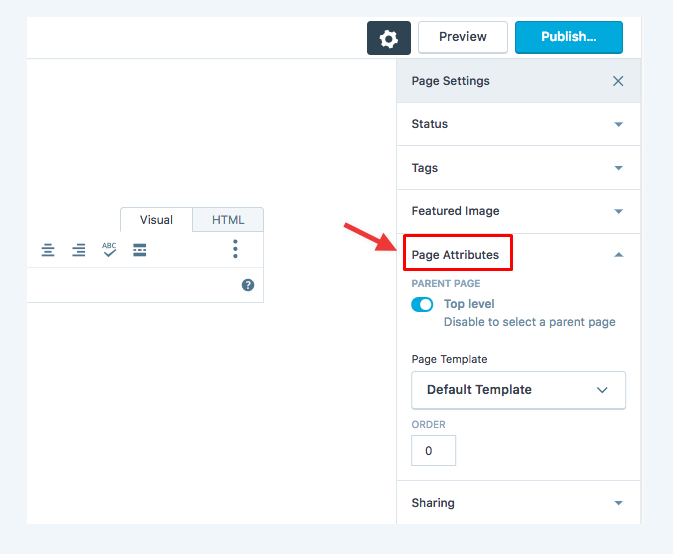
WordPress offers a feature called Page Attributes to organize pages. One key attribute is the Parent. It helps you create a hierarchy of pages. Imagine a tree. The main page is the trunk. Other pages are like branches. The main page is the Parent Page. Other pages are Child Pages. This setup makes your site look organized. It improves navigation for visitors.
Selecting a parent page is simple. Go to the Page Attributes section. Choose the parent from the dropdown menu. This helps in making a clear structure for your website. Visitors find information easily. This feature is very useful for larger websites.

Credit: make.wordpress.org
Role Of Parent Attribute
The Parent Attribute helps organize pages in WordPress. It connects pages to each other. A page can have a parent and child relation. This is like a family tree. The parent page is at the top. Child pages come under it. This structure makes your website neat. It helps users find information easily. Each child page belongs to a parent. This makes navigation smooth. A clear structure is important for visitors. They can find what they need fast. This also helps search engines understand your site. It improves your site’s SEO performance. A well-structured site is user-friendly.
Creating A Hierarchical Structure
Pages in WordPress can be arranged like a family. Parent pages hold child pages. This makes a site neat. Imagine a book with chapters. The book is the parent, chapters are the children. This helps users find stuff faster.
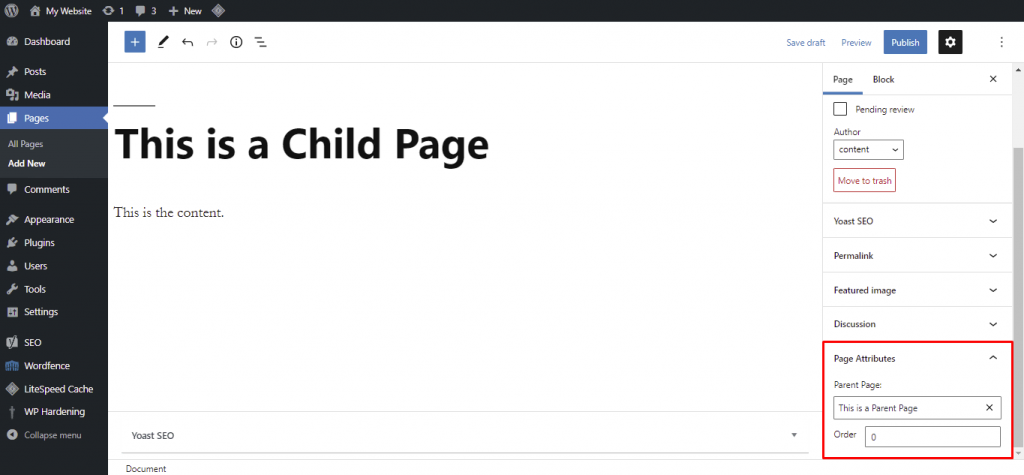
Choosing a parent page is easy. Go to the page editor. Find the Page Attributes box. Select a parent from the dropdown. Now, your page is part of a bigger group. This keeps the site organized.
Parents are important. They guide the structure. Child pages support them. Together, they make browsing smooth. This way, visitors enjoy the site more. It’s like building a big puzzle. Every piece fits in the right spot.
Credit: www.hostinger.com
Benefits Of Using Parent Pages
Parent pages help visitors find information faster. They create a clear structure in your site. Users can see how pages connect to each other. This makes browsing simple. With parent pages, users can quickly return to main topics. This keeps them happy and engaged.
Parent pages keep your site tidy. They group similar pages under one main page. This helps you manage your content better. Your site looks more professional. It’s also easier to update and maintain. With good organization, visitors spend more time on your site.
Setting Up Parent Pages
To begin, log into your WordPress dashboard. Click on Pages in the left menu. You will see a list of all pages. Click on the title of the page you want to edit. On the right side, find the Page Attributes section. This section allows you to organize your pages.
In the Page Attributes section, look for the Parent dropdown. Click the dropdown to see a list of existing pages. Choose a page to be the parent. This will make your current page a sub-page. Sub-pages help with organizing content. They create a clear structure on your site.
Common Use Cases
In WordPress, the “Parent” attribute organizes pages hierarchically, enhancing navigation. This feature creates subpages under a main page, improving site structure and user experience. It helps manage content effectively, especially for websites with multiple related pages.
Business Websites
Business websites use Parent Page Attributes to organize pages. This helps create a clear structure. For example, a product page can be under a main “Products” page. This makes navigation easy for users. It also helps search engines understand the website. Businesses often have many pages. A good structure helps visitors find information quickly. Parent page attributes are important for large websites. They keep everything neat and tidy.
Educational Platforms
Educational platforms benefit from Parent Page Attributes. Teachers can organize lessons under subjects. Students find lessons easily. It helps in creating a learning path. Parents can track progress through organized pages. Each subject can have many topics. Parent pages help group these topics. This makes the platform user-friendly. It aids in seamless navigation. Educational platforms often have vast content. Parent attributes bring order to this content.
Troubleshooting Issues
Sometimes pages don’t show up right. This can be confusing. Hierarchy errors might be the reason. A page set as a child needs a proper parent. Check if the parent page is correct. A wrong setup will cause display problems. Adjusting the page hierarchy can fix this.
Errors in page order can confuse users. A child page should follow a parent page. If not, users may get lost. Double-check the parent-child settings. Make sure each page has the right parent. This keeps the site organized. A well-ordered site is easy to navigate.
Tips For Effective Page Management
Keep your pages fresh with regular updates. New information helps your site stay relevant. Check your content often. Make changes when needed. This shows visitors that you care. Updated pages can also improve search rankings.
Use consistent naming conventions for your pages. This makes it easy to find and manage them. Choose a simple style. Use the same format for every page. This helps maintain order on your site. Visitors will find what they need faster. It also helps you keep track of all your pages.
Frequently Asked Questions
What Is A Page Parent In WordPress?
A page parent in WordPress is a hierarchical feature. It allows you to organize pages under a main page. This helps in creating a structured site layout. Parent pages act as a top-level category. Child pages are grouped under them for better navigation.
How Do I Set A Parent Page?
To set a parent page, go to the ‘Page Attributes’ section. In the editor, choose a parent from the dropdown menu. Select the desired parent page and update. This organizes your page within the site’s hierarchy. It improves navigation and user experience.
Why Use Parent Pages In WordPress?
Using parent pages enhances site organization. It creates a clear hierarchy for better navigation. Parent pages help manage content efficiently. They improve user experience by guiding visitors through related topics. This structured approach also benefits SEO by organizing content logically.
Can Parent Pages Affect Seo?
Yes, parent pages can positively impact SEO. They create a logical site structure, improving navigation. This helps search engines understand content relationships. A well-structured site enhances user experience and boosts SEO rankings. Organizing pages under parents can improve visibility and searchability.
Conclusion
Understanding the Parent attribute in WordPress simplifies page organization. It helps create a clear site structure. This improves user navigation on your website. Setting parent pages creates a logical hierarchy. Visitors find related content easily. This enhances their browsing experience.
Organizing pages efficiently supports SEO efforts. It helps search engines understand your site better. Use the Parent attribute to manage content. Keep your WordPress site neat and structured. This feature is straightforward but powerful. Leverage it for a more navigable website.
A well-structured site benefits both users and search engines. Embrace this tool for improved website management.



