
Are you diving into the world of WordPress and wondering what the name of its database is? You’ve come to the right place.
Understanding the backbone of WordPress can unlock new possibilities for your website management skills and enhance your user experience. When you’re equipped with this knowledge, you’ll find navigating and customizing your site much easier. Don’t let technical jargon intimidate you; we’re here to break it down into simple terms that you can easily grasp and apply.
Keep reading to discover how this crucial component of WordPress operates and why knowing its name can empower you to take control of your website like never before.
WordPress Database Basics
The WordPress database is a key part of your site. It stores all your site’s data. This includes posts, pages, and user information. The default name for the WordPress database is often “wordpress”. But, during setup, you can choose a different name. This database uses MySQL technology to store data. MySQL is a popular database system. It is known for being fast and reliable.
To access the database, you need a tool like phpMyAdmin. This tool lets you see and manage your data. Remember, always back up your database. Data is important and backups keep it safe. In case of errors, backups are very helpful. Keep your database secure and up-to-date.
Default Database Name
The default database name in WordPress is often ‘wordpress’. This name can be changed during setup. Changing the name helps improve security. Many people do not change it. Hackers target default names.
WordPress uses a database to store posts, pages, and settings. This database is important for the site. It helps in managing data easily. Without it, WordPress cannot function.
Some hosting services allow custom names. It is better to choose unique names. Unique names make it harder for hackers. Always remember your database name. You need it for backups and troubleshooting.
Customizing The Database Name
Picking a unique database name is important. It makes your site more secure. Start this task during WordPress installation. Use a name that is easy to remember but hard to guess. This helps to keep unwanted users away. A good name should not include common words. Avoid using “WordPress” or “database” in it. Keep it short, yet different. This makes managing the database easier later.
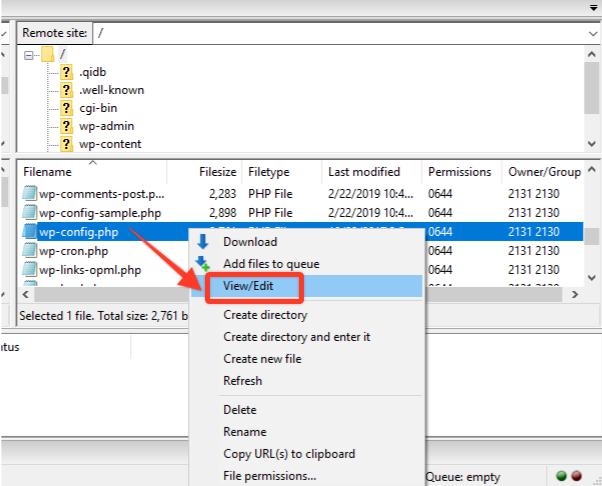
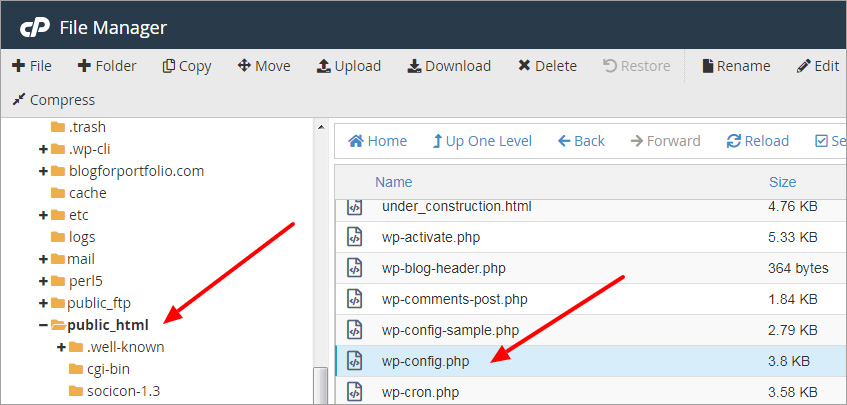
Changing the database name after setup is possible. First, back up your data. Then, access the wp-config.php file. Find the database name line. You can change the name there. Save and close the file. Next, update the database name in your hosting panel. Check if everything works. It is key to ensure all links are correct. This prevents errors on your site. Always test changes carefully.
Credit: www.wpdownloadmanager.com
Database Naming Best Practices
Security is important when choosing a database name. Use a unique name for each database. This makes it harder for hackers to guess. Do not use common words like “wordpress” or “database”. These are easy to guess. Using numbers or special characters can help. Keep your database name secret. Do not share it with others.
Good naming makes your database easy to manage. Use clear and simple names. This helps in understanding. Avoid long names. They are hard to read. Use lowercase letters for consistency. Separate words with underscores. For example, “my_database”. Keep names short but descriptive. This helps in identifying the database.
Impact Of Database Name On Site Functionality
The database name is very important. It helps in accessing the data. If the name is wrong, the website may not work. Users need the correct name to get permissions. This ensures that only the right people can see the data. A simple, clear name is best. It makes managing permissions easier. Always keep the database name secret for security.
Backups are copies of the database. They help when something breaks. Using the right database name is key for backups. Without it, restoring data can be hard. A wrong name can lead to lost data. Always check the name before restoring. This ensures everything is back to normal quickly. A clear name makes this process smooth.
Credit: blog.templatetoaster.com
Troubleshooting Common Issues
Identifying the WordPress database name is crucial for troubleshooting. It is usually found in the wp-config. php file. This file contains essential settings, including the database name, helping you resolve common WordPress issues efficiently.
Connection Errors
Connection errors can be frustrating. Check your database settings first. Ensure your username and password are correct. Verify your host name matches your server. Mistakes here can cause connection problems. If everything seems right, check your server status. Sometimes servers are down. Updating WordPress can also fix issues.
Database Not Found
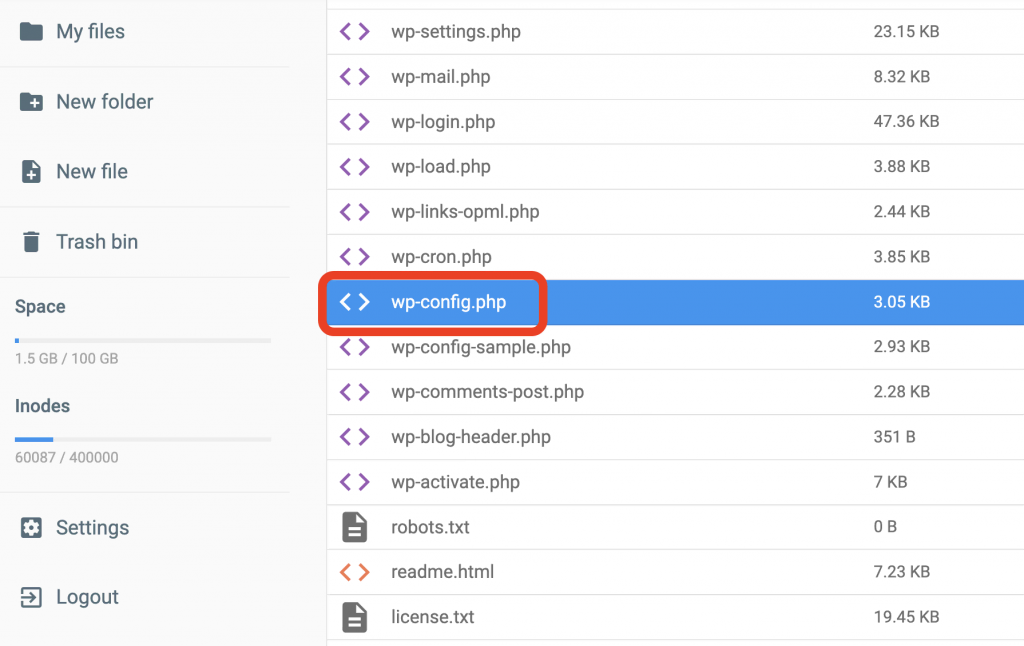
Can’t find your database? Check your wp-config.php file. This file holds your database name. Make sure the name is correct. Look for typos. They often cause problems. If your database name is right, check if your database exists. Use your hosting panel to verify. Create a new database if necessary. Ensure your user has access to this database.
Credit: www.hostinger.com
Frequently Asked Questions
What Is The Default Name Of WordPress Database?
The default database name for WordPress is typically “wordpress. ” However, during installation, you can choose a custom name. It’s crucial to use a unique name for security reasons. This helps prevent unauthorized access and makes it harder for hackers to target your database.
Can I Change My WordPress Database Name?
Yes, you can change your WordPress database name. First, rename the database in your hosting panel. Then, update the “wp-config. php” file with the new database name. Ensure you back up your database before making changes to avoid data loss.
How To Find My WordPress Database Name?
To find your WordPress database name, access the “wp-config. php” file in your WordPress root directory. Look for the line that defines “DB_NAME. ” This line will show the current database name used by your WordPress site.
Why Is WordPress Database Name Important?
The WordPress database name is crucial for connecting your site to its data. It stores all your site’s content, settings, and user information. A unique database name enhances security by making it harder for attackers to guess your database details.
Conclusion
Understanding the WordPress database name is crucial for managing your site. It helps in troubleshooting and optimizing performance. Always remember to keep your database secure and backed up. This protects your valuable data from loss. A well-maintained database ensures a smoother WordPress experience.
Take time to explore and learn about your database. It empowers you to handle website issues confidently. Whether you are a beginner or expert, knowing your database name is key. Keep your knowledge growing, and your WordPress journey will be more rewarding.



