
Have you ever stumbled upon the term “Allow Pings” while working on your WordPress site and wondered what it really means? You’re not alone.
This seemingly small setting can have a big impact on how your website interacts with the online world. Imagine boosting your site’s visibility and engagement without much effort; that’s the power of understanding and properly using pings in WordPress. You might be asking yourself, why should this matter to me?
Well, if you’re looking to enhance your website’s reach and connect with others in your niche, knowing how to utilize pings effectively can be a game-changer. It’s not just about tweaking a setting; it’s about unlocking a tool that can elevate your online presence. Stick around, because by the end of this article, you’ll have a clear grasp of how pings work and how they can be leveraged to benefit your site.

Credit: themeisle.com
Allow Pings Explained
Allow Pings is a feature in WordPress. It lets other websites know about your new post. This is done through a pingback. When a website links to your post, you get a pingback. It’s like a notification. This helps in connecting different blogs. It can also help in building backlinks.
Pings can be useful for your blog’s SEO. They help search engines find your content. Search engines see that other sites link to you. This can improve your site’s rank. But too many pings can be spammy. Be careful to control spammy links. Use this feature wisely for your blog.
Functionality Of Pings
Pingbacks help blogs talk to each other. If someone links to your blog, you’ll get a pingback. It is like saying, “Hey, I mentioned you!” This is helpful. You can see who is talking about your blog. It makes connecting with others easy. It is automatic and quick. No need to do anything extra. This feature is part of WordPress.
Trackbacks are different. They help you reach out. When you mention another blog, you can send a trackback. It is a friendly nudge. You say, “I talked about you.” The other blog gets a note. This is not automatic. You need to do it yourself. Trackbacks help build relationships. They are a bit old now. But some people still use them.
Benefits Of Enabling Pings
Pings help websites connect. They let bloggers link to each other. This builds a network of friends online. Sharing ideas becomes easy. This boosts visibility for everyone. Small blogs can be seen by big ones. Collaboration grows with pings.
Search engines notice pings. They see links between websites. This helps sites rank better. Pings show search engines what is important. They make websites appear more active. This attracts more visitors.
Readers love interactive blogs. Pings allow comments and replies. This keeps the conversation going. Engaged readers return often. They feel part of the community. Pings make blogs lively and fun.

Credit: themeisle.com
How To Enable Or Disable Pings
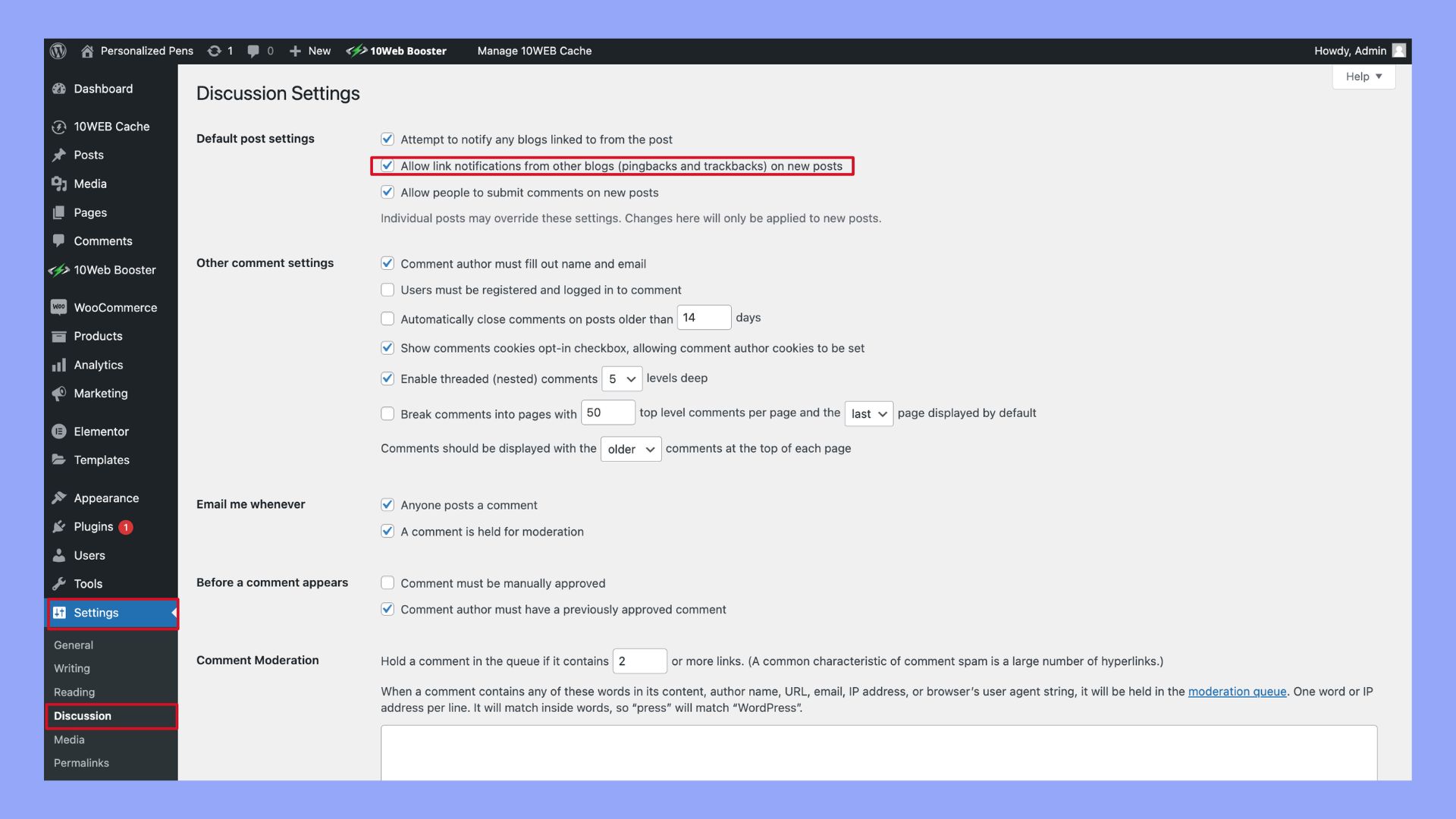
Open the WordPress Dashboard. Look for Settings in the menu. Click on Discussion. Here, you find an option called Allow link notifications from other blogs. This is what controls pings. Check the box to enable pings. Uncheck it to disable them. Changes save automatically.
Settings In WordPress Dashboard
In the dashboard, options are simple. Under Settings, find Discussion. This is where you control pings. It’s easy and quick. Just a click away.
Customizing For Individual Posts
Sometimes, you want different settings for each post. Open the post editor. Look for the Discussion box. Here, you find the option to allow or disallow pings. This helps to customize each post. It’s very flexible.
Potential Drawbacks Of Pings
Allowing pings in WordPress can increase spam comments and trackbacks. This might clutter your site with irrelevant notifications. Managing excessive pingbacks may require additional time and effort.
Spam Concerns
Pings can attract unwanted spam to your site. Some sites send fake pings. They aim to promote themselves. This clutters your comment section. It can confuse visitors. Site owners must stay alert. Filtering tools can help manage spam. Regular checks are necessary. Always update your spam filters. This keeps your site clean.
Server Load Issues
Pings increase server load. More pings mean more data. Servers work harder to process them. This can slow your site down. Visitors dislike slow websites. It harms user experience. Monitoring server load is crucial. Adjust settings if needed. Limit pings to reduce load. Keep your site running smoothly.
Best Practices For Managing Pings
Understanding “Allow Pings” in WordPress is key to managing interactions. Pings notify when other websites link to your content. This feature helps track backlinks and engage with the blogging community. Properly managing pings enhances site connectivity and visibility.
Using Plugins
Plugins help manage pings effectively. They offer control over incoming pings. Some plugins block spam pings. Others allow only trusted sources. Search for plugins with good reviews. Ensure they update regularly. Some plugins have settings for pingbacks. Adjust these settings as needed. Explore plugins like Akismet or Jetpack. They help filter unwanted pings. Try different plugins to find the best fit. Read user reviews for insights. Check compatibility with your WordPress version. Install plugins easily from your dashboard. Plugins make managing pings simple and efficient.
Regular Monitoring
Monitoring pings is crucial. Check ping activity weekly. Use WordPress dashboard for updates. Look for unusual ping patterns. Be alert to spam pings. Review settings regularly. Adjust if needed. Track sources of pings carefully. Identify trusted sources. Block unwanted pings promptly. Update plugins and themes regularly. Keep your site secure. Regular checks help manage pings better. Protect your site from spam attacks. Monitoring ensures optimal performance. Stay informed about ping activity. Monitoring is key to managing pings effectively.
Credit: 10web.io
Frequently Asked Questions
What Does “allow Pings” Mean In WordPress?
“Allow Pings” in WordPress lets other blogs notify you when they link to your content. It helps track backlinks and encourages interaction. This setting can enhance your site’s visibility and engagement by fostering connections with other bloggers and websites.
How Do Pings Work In WordPress?
Pings notify other sites when you link to their content. When enabled, WordPress sends a pingback to the linked site. This allows the linked site to acknowledge your mention and potentially link back, promoting cross-site interaction.
Should I Enable Pings On My WordPress Site?
Enabling pings can increase engagement and backlinks. However, it might also attract spam. Consider your site’s goals and monitor spam levels. If interaction and backlinks are important, enabling pings might be beneficial.
Can Pings Improve My Site’s Seo?
Pings can enhance SEO by encouraging backlinks from other sites. They notify others of your content, potentially increasing your site’s visibility. However, they should be combined with other SEO strategies for effective results.
Conclusion
Understanding pings in WordPress is essential for bloggers. It helps in connecting with other blogs. This feature allows notifications between websites. A simple way to improve interaction. By enabling pings, you foster community growth. It also increases your blog’s visibility.
Consider your audience’s needs before enabling pings. Balance is key. Too many pings can be overwhelming. But with moderation, they are beneficial. They keep your content in the loop. Connect with other creators easily. Use pings wisely to enhance your blog experience.
They are a small yet impactful tool.



