
Have you ever noticed that column on the side of your WordPress site? It’s called the “main sidebar,” and it’s more important than you might think.
This little space is a powerhouse for enhancing your website’s functionality and user experience. Curious about how to make the most of it? You’re in the right place. Imagine the sidebar as your website’s right-hand tool, offering your visitors quick access to essential information and engaging content.
Whether you’re looking to boost engagement, improve navigation, or increase conversions, understanding the main sidebar is key. So, why is this sidebar so crucial, and how can you leverage it to its full potential? Stick around, and you’ll discover everything you need to know.
Main Sidebar Basics
The Main Sidebar is a part of a website. It is like a small box. This box is on the side of your page. It shows different items. These items can be links, text, or pictures. It helps users find what they need quickly.
In WordPress, the Main Sidebar is very useful. It holds widgets. Widgets are small tools. They add features to your site. You can add a search bar or a list of recent posts. It helps make your site easy to use. Visitors can find things faster.

Credit: themegrill.com
Components Of The Main Sidebar
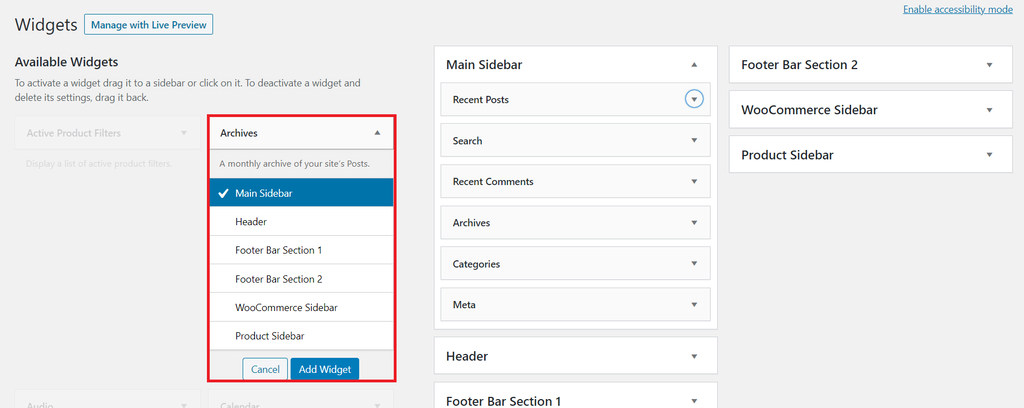
Widgets are small tools in the sidebar. They show information or features. You can add a search bar or a calendar. They help users find things quickly. Widgets are easy to set up. Just drag and drop them in place. They make your site more useful.
Links and Menus help users navigate. They lead to important pages. You can add menu items like Home, About, or Contact. This keeps your site organized. Users find what they need faster. Easy to use and manage. Menus keep your content structured.
Advertisements can appear in the sidebar. They help you earn money. You can show banners or text ads. Ads fit well in this space. They are easy to update. Just paste the ad code. Keep ads relevant to your audience. This ensures they are effective.
Customization Options
The WordPress Customizer is a simple tool. It helps you change the sidebar. You can add widgets like recent posts or a calendar. It’s easy to use. Just drag and drop the widgets. Changes appear live on your site. This way, you see what it looks like instantly.
Plugins offer more features for your sidebar. Some plugins let you add social media links. Others allow you to show ads or a search bar. Many are free in the plugin store. You install them in a few clicks. Always read reviews before you choose a plugin.
Custom code changes are for advanced users. They let you design the sidebar your way. You can use HTML, CSS, or PHP. This requires some coding skills. You might need a developer for help. Always back up your site before making changes. This keeps your site safe.

Credit: m.youtube.com
Best Practices
Ensure the sidebar shows useful content. Visitors should find related links or resources. Help them explore your site more. Avoid clutter. Too much text can be confusing. Keep it clean and simple. Use images wisely. They should match the content.
A good sidebar improves user experience. Make sure it is easy to navigate. Add shortcuts to important pages. The design should be simple. Avoid too many colors. They can be distracting. Use large fonts for easy reading. Keep the layout consistent.
Sidebars should work well on all devices. Test them on phones and tablets. Use a responsive design. This means the sidebar adjusts to screen size. Avoid fixed widths. They can break the layout. Make sure buttons are easy to tap.
Common Mistakes
Many misunderstand the purpose of the main sidebar in WordPress. It often leads to cluttered layouts. Efficient use enhances navigation and user experience.
Overloading With Widgets
Adding too many widgets can confuse readers. Too much information makes it hard to find what you need. Keep it simple. Choose the most important widgets only. This keeps the sidebar clean and easy to use.
Ignoring Mobile Optimization
Many people use phones to browse. Mobile-friendly design is crucial. A non-optimized sidebar looks bad on small screens. Ensure widgets fit well on all devices. This helps users have a good experience.
Inconsistent Styling
Different styles can look messy. Consistency in design is key. Match colors and fonts with your site. This makes the sidebar look part of the whole site. A uniform look helps users feel comfortable.
Credit: www.hostinger.com
Examples Of Effective Sidebars
Popular blogs often use sidebars to engage readers. These sidebars show recent posts and top articles. They help readers find interesting content quickly. Many blogs add social media links. This lets readers share articles easily. Some blogs use sidebars for subscription forms. This helps them grow their email list.
E-commerce sites use sidebars to help shoppers. Sidebars can show product categories. This makes it easy to find items. They also highlight special offers and discounts. Some sites add customer reviews in the sidebar. This helps shoppers decide on purchases. Search bars in sidebars are also common. They help find products faster.
News websites use sidebars to keep visitors informed. They display breaking news and top stories. This helps readers stay updated. Sidebars often show weather updates. Some news sites add live scores for sports. This is great for sports fans. Advertisement spaces are also common in sidebars. They generate revenue for the site.
Future Trends
The main sidebar in WordPress is a crucial element for website navigation. It displays widgets like recent posts and categories. This feature enhances user experience by organizing content efficiently.
Minimalist Designs
Minimalist designs are becoming popular. They use fewer elements. This makes websites look clean and fresh. Users find it easy to read. It helps them focus on content. Less clutter means faster load times. Fast websites keep users happy. A clean sidebar can enhance this effect. Designers aim for simplicity and efficiency.
Interactive Elements
Interactive elements engage visitors. They include buttons, sliders, and videos. Users enjoy interacting with these features. It makes browsing fun and interesting. Clickable elements can guide users. They help users explore more content. Designing interactive sidebars can boost user experience. This keeps visitors on the site longer.
Ai-driven Personalization
AI-driven personalization tailors content for users. It understands preferences and behaviors. AI can suggest related articles. This makes browsing feel personal. Users see what they like. Personalized sidebars boost engagement. They keep users coming back. AI helps create a unique user journey. This makes each visit special.
Frequently Asked Questions
What Is The Main Sidebar In WordPress?
The main sidebar in WordPress is a widget-ready area. It is usually found on the right or left side of a webpage. Users can add various widgets, such as search bars, recent posts, or social media links. This enhances site navigation and user engagement.
How Do I Customize The WordPress Sidebar?
To customize the WordPress sidebar, access the WordPress dashboard. Navigate to Appearance > Widgets. Drag and drop widgets into the sidebar area. Customize settings for each widget to suit your needs. This allows you to tailor the sidebar’s functionality and appearance.
Can I Add Images To The WordPress Sidebar?
Yes, you can add images to the WordPress sidebar. Use the Image widget available in the Widgets section. Upload your desired image or select from the media library. Customize the image size and alignment. This adds visual interest and enhances the sidebar’s appeal.
How Does The Sidebar Affect Website Design?
The sidebar greatly impacts website design. It provides a space for additional content, improving user navigation. Well-placed widgets enhance user experience and engagement. A cluttered sidebar can distract users, so ensure it complements your site’s overall design.
Conclusion
The main sidebar in WordPress enhances user experience. It organizes content efficiently. Visitors find information easily. Customizing the sidebar is simple. Widgets add functionality and style. Themes often include sidebar options. Choosing the right widgets boosts engagement. Consider your audience’s needs.
Test different configurations. Monitor user interaction. Adjust as needed for better results. A well-designed sidebar improves site navigation. Keep it clean and uncluttered. Focus on user-friendly design. Make your site stand out. Optimize for mobile devices. Ensure quick loading times.
A great sidebar complements your site content. Prioritize user satisfaction. Enhance your WordPress experience today.



