
Imagine unlocking a world of possibilities right at your fingertips. That’s exactly what you’ll experience when you explore the Jetpack Menu in WordPress.
If you’ve ever wondered how to supercharge your website, make it more secure, or improve its functionality, you’re in the right place. The Jetpack Menu is your gateway to a suite of powerful tools and features that can transform your site from ordinary to extraordinary.
But what exactly is it, and how can it benefit you? You’ll discover the secrets behind the Jetpack Menu, how it can enhance your WordPress experience, and why it might just be the missing piece in your website puzzle. Ready to dive in and unlock the full potential of your site? Let’s get started!
Credit: www.hostpapa.com
Jetpack Plugin Overview
Jetpack is a plugin for WordPress. It adds many features to your site. You can use it for security. It helps protect your website from bad people. Jetpack also improves your site’s speed. A fast site makes visitors happy.
Jetpack has tools for design too. You can make your site look nice. It also offers marketing tools. These help you reach more people. The plugin is made by the creators of WordPress. This means it works very well with WordPress sites.
Accessing The Jetpack Menu
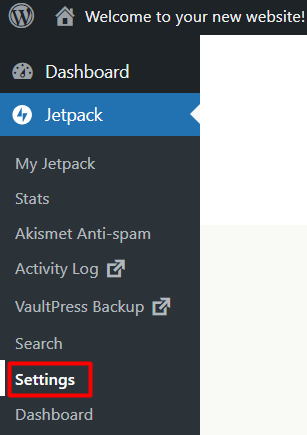
The Jetpack menu helps you manage your WordPress website. It’s found on the left side of your dashboard. First, log into your WordPress admin area. Look at the menu on the left. Find the Jetpack option. Click on it. The Jetpack menu will open. Here, you can see many tools and settings.
Each tool has a specific use. Some tools help with site security. Others improve website performance. Click any option to explore more. You can turn features on or off. This gives control over how your site works. Remember to save changes after adjusting settings.
Explore the Jetpack menu to learn more. It can make managing your site easier. New users might need time to understand it. But with practice, it gets simpler. The Jetpack menu is a helpful tool for every WordPress user.
Features In The Jetpack Menu
Site Stats helps you know who visits your site. It shows numbers of visitors and views. Graphs make it easy to see trends. You can check where visitors come from. Get info on which posts are liked more. Track your site’s growth with ease.
Keep your site safe with Security Options. It checks for harmful files. Protects your site from bad attacks. Block bad users from entering your site. Alerts warn you of any threats. Keep your site safe and sound.
Performance Tools keep your site fast. They improve loading speed. This makes visitors happy. Images load quickly and clearly. Tools help your site work better. Keep everything running smoothly.
Make your site look cool with Customization Features. Change colors and fonts. Add special widgets. Make your site unique. Design it how you like. Express yourself through your site design.
Using Site Stats
Site Stats in Jetpack help track your website’s traffic insights. You can see how many people visit your site each day. It shows which posts are the most popular. This helps you understand what content your audience likes. You can also see where your visitors come from. This includes countries and websites that send traffic to your site. Knowing visitor origins helps in planning future content. You can adjust your strategy based on the stats. This way, you can better meet your audience’s needs. Site Stats make it easier to grow your blog. Knowing what works best is always helpful.
Visitor Trends show patterns over time on your site. You can see which days get more visitors. This helps you post content on the best days. It also shows which seasons are busiest. This helps plan for peak times. Visitor Trends give clues about what interests your audience. You can adapt content to match these interests. This makes your blog more engaging. Understanding trends helps improve your site’s performance.
Enhancing Security
Brute force attacks are bad for websites. Hackers try many passwords. They want to break in. Jetpack helps stop this. It watches for strange actions. It blocks bad people. This keeps your site safe. Your information stays secure.
Websites can go down sometimes. This is called downtime. Jetpack can check your site. It looks every five minutes. If it finds a problem, it sends an email. This helps you fix problems quickly. Your visitors stay happy. Your site stays online.
Improving Performance
Images can slow down websites. Jetpack helps make images load faster. It uses a tool called Image Optimization. This tool makes pictures smaller. Smaller pictures load quickly. Faster images mean a better user experience. People stay longer on fast sites.
Lazy Loading is another feature. It helps speed up your site. Images load only when needed. This happens when users scroll. It saves data and time. This is good for mobile users. They have limited data plans. With Lazy Loading, pages load smoothly and quickly.
Customization Tools
Jetpack’s menu offers many theme enhancements for WordPress users. These tools help you make your site look unique. You can adjust colors, fonts, and layouts easily. This ensures your website matches your style. It’s like decorating a room with your favorite things. You can also add cool features like a slideshow or a carousel. These features make your site look modern and fun. Everyone wants their site to stand out. With Jetpack, you can do that without being a tech expert.
Widgets are small tools that help your site work better. Jetpack offers many widget options. You can add a search bar, social media icons, or even a calendar. These widgets make it easy for visitors to use your site. A well-placed search bar helps people find what they need. Social media icons connect your site to the world. A calendar shows important dates, like events or sales. With Jetpack, adding these widgets is simple and quick.

Credit: jetpack.com
Managing Jetpack Settings
The Jetpack Menu in WordPress offers many features. You can find settings for security, speed, and design. Each option helps improve your site. It is like a toolbox for your website. A user-friendly interface makes it easy to navigate.
Explore the menu to see different sections. Click on each to learn more. Adjust settings to fit your needs. This is important for keeping your site safe and fast.
Remember, changes can affect how your site works. Always double-check before saving new settings. With practice, managing these settings becomes simple.
Troubleshooting Common Issues
Discover the Jetpack Menu in WordPress, a tool for enhancing site performance and security. Easily navigate to optimize settings, monitor site stats, and manage site features. Troubleshoot common issues with intuitive options for a seamless WordPress experience.
Connection Problems
Connection problems can be frustrating. Jetpack needs a strong link to WordPress. Check your Internet is working well. Sometimes, a weak network can cause issues. Firewall settings might block the connection. Ensure they are correctly set. Update Jetpack often to fix bugs. Old versions might not work smoothly. Review your site’s URL settings. They should be accurate. Incorrect URLs can cause errors. SSL certificates must be valid. Outdated certificates can disrupt connections. Ensure WordPress.com servers can reach your site. Check server logs for any issues.
Feature Conflicts
Feature conflicts arise with plugin overlaps. Jetpack might clash with other plugins. Check the settings for each plugin. Some plugins do similar jobs. This can cause confusion. Disable one plugin and test again. Themes can also conflict with Jetpack. Ensure your theme is compatible. Some themes block Jetpack functions. Update themes regularly. Old themes might not support Jetpack. Review each feature before enabling. Conflicts can slow down your site. Test your site after changes.

Credit: wpmarmite.com
Frequently Asked Questions
What Is The Jetpack Menu In WordPress?
The Jetpack Menu in WordPress is a feature within the Jetpack plugin. It provides easy access to various tools and settings. These tools enhance your website’s functionality, security, and performance. The menu organizes features like site stats, backups, and customization options.
How Do I Access The Jetpack Menu?
To access the Jetpack Menu, first, install the Jetpack plugin. After activation, you can find it in your WordPress dashboard. Look for the Jetpack tab on the left sidebar. Click on it to explore various features and settings.
What Features Does The Jetpack Menu Offer?
The Jetpack Menu offers a wide range of features. These include site analytics, security enhancements, and performance optimization. It also provides tools for site customization and social media integration. Each feature aims to improve your WordPress site’s functionality and user experience.
Is The Jetpack Menu Free To Use?
The Jetpack Menu offers both free and premium features. Basic features like site stats and security are free. However, advanced features such as daily backups and SEO tools require a paid plan. You can choose a plan based on your needs and budget.
Conclusion
Exploring the Jetpack menu in WordPress enhances your site’s functionality. It offers many features to improve your site. From security tools to performance boosters, Jetpack has you covered. Easy to use and integrate with your WordPress site. Perfect for beginners and experienced users alike.
You can manage, customize, and optimize with ease. Stay organized and efficient with its user-friendly layout. The Jetpack menu simplifies website management. Start exploring its features today. Elevate your WordPress experience with Jetpack’s tools. A useful addition for any WordPress site owner.



