
When you dive into the world of WordPress, one of the first things you might wonder about is the header size. Your header is the first impression visitors get when they land on your website.
It’s crucial for setting the tone and showcasing your brand. A well-designed header can grab attention, while a poorly sized one might send people away. You want your header to be visually appealing, yet functional. But what is the perfect size?
How can you ensure it looks great on different devices? Stick around as we unravel the mystery of WordPress header sizes, ensuring your site stands out and keeps visitors engaged. You’ll discover practical tips and expert insights to make your header shine.
Credit: shortpixel.com
Header Size Basics
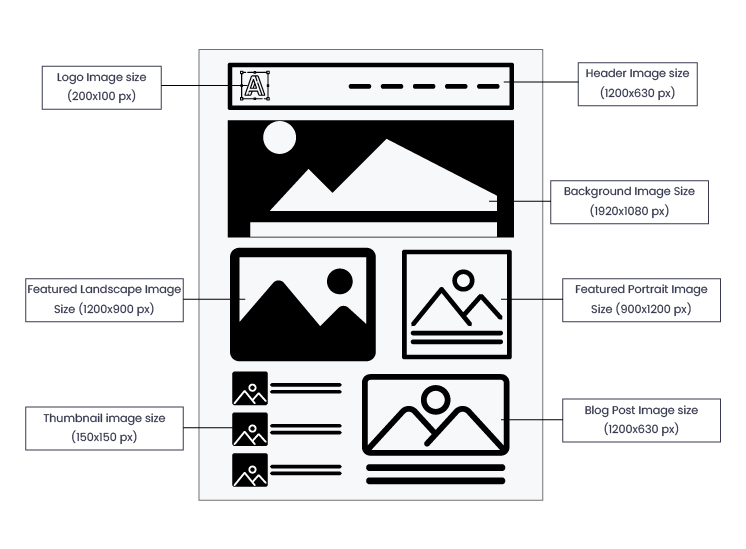
Choosing the right header size for WordPress is important. Most headers are between 1000 and 1200 pixels wide. This size fits most screens well. Height is usually 100 to 300 pixels. This size makes sure the header is clear. It also leaves room for other content. Smaller headers load faster. This is good for user experience.
Some themes have preset sizes. They help keep things looking neat. Custom sizes are possible. But they may require extra work. Always check how your header looks on different devices. Small screens may need adjustments. Good headers are clear and simple. They show the website’s name or logo. This helps visitors remember your site. Don’t make headers too busy. Simple designs work best.
Default Header Dimensions
WordPress headers often need specific sizes. The recommended size is 1048×250 pixels. This size fits most themes well. It keeps your site looking neat and clean. The header is like a banner on a webpage. It gives a first impression. A good header size ensures nothing gets cut off. It also helps with page loading speed. A large header can slow things down. That’s why it’s good to know the right size. This way, your site stays fast and looks great.
Customizing Header Size
The WordPress Customizer is a tool. It helps change your site’s look. You can adjust the header size here. It is simple and fast. Choose the header you like. Drag the slider to resize. It updates the size live. You see changes right away. No need to worry about coding.
Edit the CSS for more control. Find the style.css file in your theme. Look for the header section. Change the height or width values. Use pixels for precise sizing. Save your changes. Refresh your site to see the new header size. This method gives exact dimensions. It is useful for unique looks.
Impact Of Header Size On Design
The header size greatly affects a website’s visual aesthetics. A large header can grab attention. It makes a bold statement. A smaller header might look neat and simple. The choice depends on the site’s theme and goals. Colors and fonts also matter. They should match the header size. Balance is key for a pleasing look.
User experience is crucial. A well-sized header helps users. They find information easily. It should not cover too much content. Users might get frustrated. A header should be clear and functional. It guides users. It enhances navigation. The right size improves user satisfaction.
Responsive Header Design
Headers must change size based on the device screen. On big screens, headers can be larger. This makes them eye-catching. On small screens like phones, headers should be smaller. This saves space. Flexibility is key. Headers should adapt easily. This ensures a good experience for all users.
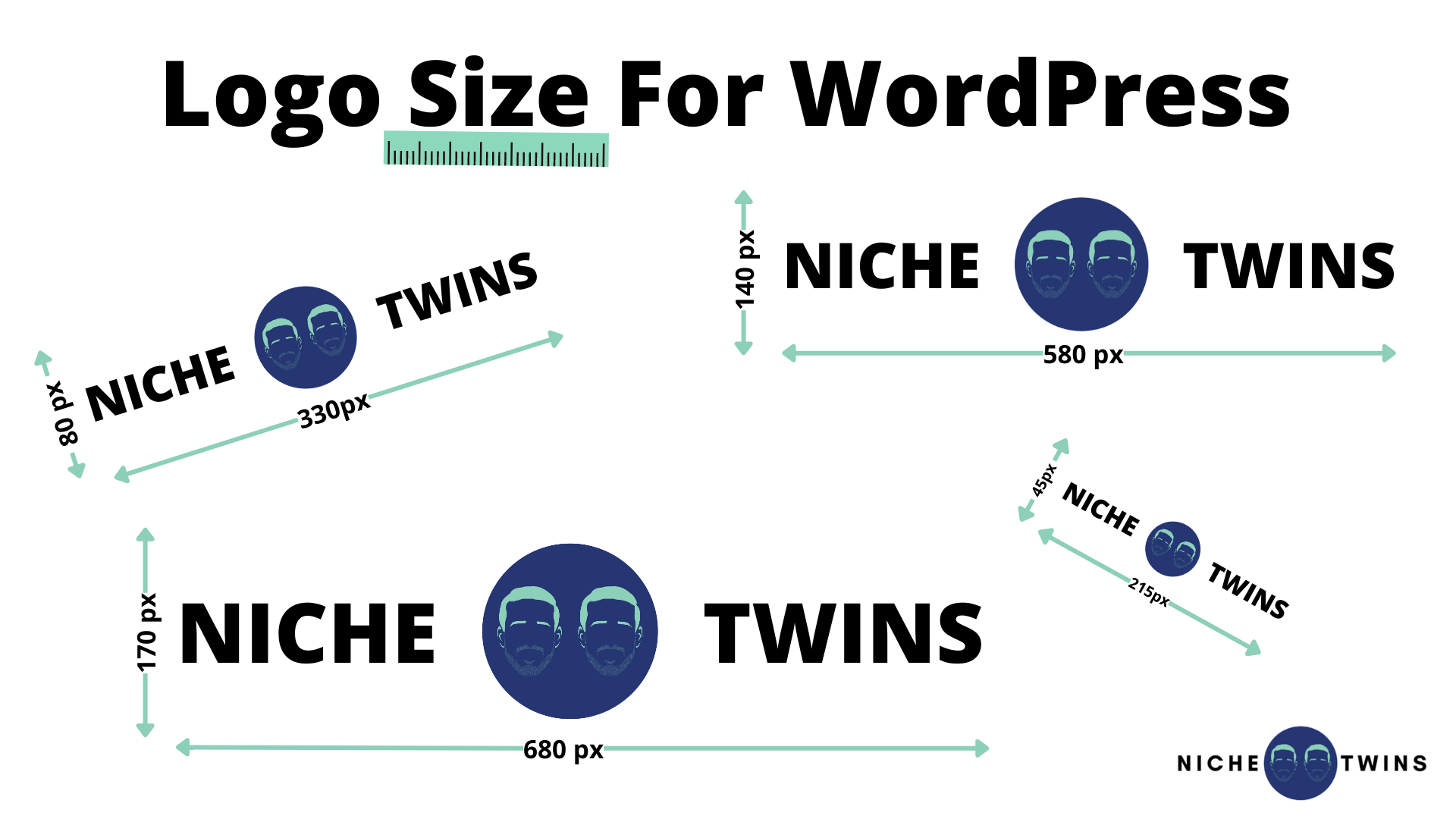
Make headers simple. Use short words. Avoid clutter. Readable fonts are important. Big enough to see. Not too big. Use a clear logo. It helps users know they are on the right site. Keep important info in the header. Contact info or menu links should be easy to find. Test headers on different devices. Ensure everything looks good everywhere.
Seo Considerations
Big headers can slow down your site. Site speed is important for SEO. Search engines like fast websites. Large images or graphics in headers can make pages load slowly. This affects the user experience. Choose the right size for your header. Make sure it loads quickly. A fast-loading header keeps users happy. It also helps your site’s SEO.
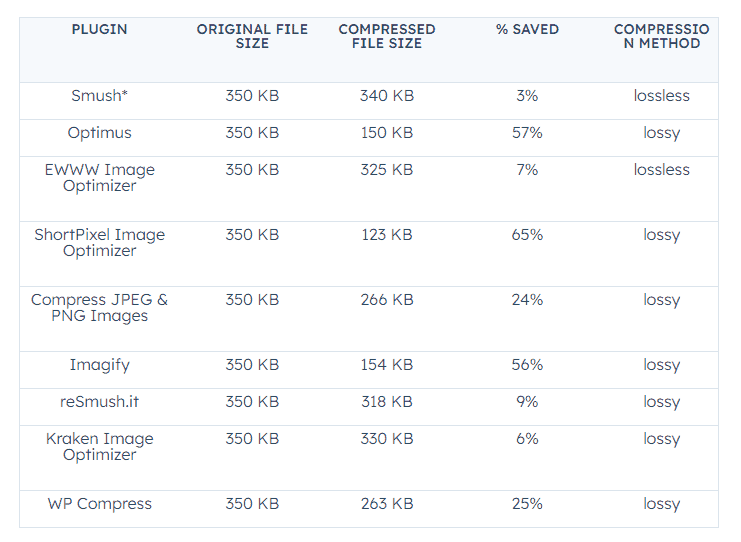
Images should be small in size. This helps your site load faster. Use image compression tools to reduce file size. Keep image quality good, but not too large. Name images with keywords. This helps search engines understand them. Add alt text to each image. This describes the image and helps with SEO. Smaller images improve speed. This is important for a better SEO performance.
Common Mistakes
Headers that are too big can be a problem. They take up too much space on the page. This can make the site hard to read. Big headers can slow down the site. Visitors might leave if the page is slow. It’s important to choose the right size for headers. Large headers can be pretty, but they need to be useful too.
Many people use phones to visit websites. If headers don’t fit on mobile screens, visitors get frustrated. They might not stay on the site. It’s key to test headers on different devices. This helps ensure everyone can see the site well. Mobile-friendly headers keep visitors happy. They can read and enjoy the content easily.
Credit: wpexperts.io
Tools For Designing Headers
WordPress has many plugins for designing headers. These plugins help make your header look unique. Some popular ones are Elementor and Beaver Builder. With these tools, you can change your header without coding. They have easy-to-use interfaces. You can add images and text. Many plugins offer pre-made templates. This saves time and effort. Choose a plugin that fits your needs.
Online design tools help make headers beautiful. Tools like Canva and Adobe Spark are popular. They have many designs to choose from. You can edit and save your work easily. These tools are great for beginners. They offer drag-and-drop features. You can add colors and shapes. These tools are free or have a low cost. They make designing fun and easy.
Examples Of Effective Headers
WordPress headers come in different sizes. Each size has its own use. Large headers grab attention. Medium headers guide users. Small headers organize content. Choosing the right size is important. It makes your site look good. It helps users find what they need.
Big headers stand out. They are good for titles. Medium headers are perfect for section titles. They are easy to spot. Small headers help in listing details. They are neat and tidy. Using the right header size helps with navigation. It keeps your site clean. It makes reading easy.
Credit: nichetwins.com
Frequently Asked Questions
What Is The Default Header Size In WordPress?
The default header size in WordPress is typically 1000 x 300 pixels. However, themes may have different recommended sizes. Always check the theme’s documentation for specific header dimensions to ensure optimal display.
Can I Customize The Header Size In WordPress?
Yes, you can customize the header size in WordPress. Use the Customizer tool to upload your preferred header image. Ensure your image fits the theme’s requirements for best visual results.
How Do I Change The Header Size In WordPress?
To change the header size, navigate to Appearance > Customize. Select Header Image and upload your image. Adjust the size according to the theme’s guidelines for proper alignment.
Does Header Size Affect Website Performance?
Header size can impact website performance. Larger images may slow down loading times. Optimize your header image for faster loading and improved user experience.
Conclusion
Choosing the right header size boosts your WordPress site’s appeal. It enhances readability and user experience. Remember, balance is key. Too large or too small can disrupt design harmony. Standard sizes like 1048×250 pixels often work well. Always test on different devices to ensure compatibility.
Tools like Adobe Photoshop or Canva help in creating perfect headers. Keep your audience in mind. Their preferences matter most. A well-designed header can make a big difference. It sets the tone for your content and draws in visitors. Keep experimenting until you find the ideal fit for your site.



