
Have you ever felt lost in the maze of web design jargon? When it comes to WordPress, the terms “themes” and “templates” can be particularly confusing.
You might be wondering why you need to know the difference, or how understanding these terms can benefit your website. Imagine the power of creating a site that perfectly aligns with your vision and engages your audience effectively. By the end of this article, you’ll have a clear understanding of how themes and templates differ, and how each can be used to enhance your website’s design and functionality.
Stick around to uncover the secrets that could transform your site from ordinary to extraordinary.

Credit: cyberchimps.com
WordPress Themes Overview
WordPress themes change how your website looks. They control colors, fonts, and layouts. Themes make your site unique. You can find many themes online. Some are free, others cost money. Choosing a theme is important. It affects your site’s design and style. A good theme makes your site look great. Some themes are simple. Others are complex with many features. Always pick a theme that suits your needs. Remember, themes are more than just looks. They also affect how your site works. Themes can add features to your site. Like galleries, sliders, and more.
WordPress Templates Overview
WordPress templates are like building blocks for your website. Each template controls a specific part of your site. For example, the header, footer, or a single post. Templates help your site look the same across all pages. They ensure consistency in design.
Different templates can be combined. This allows your site to have a unique look. Templates are part of a bigger theme. Themes use many templates to create the complete design. Templates make it easy to change parts of your site. Just edit one, and the change appears everywhere.
Key Features Of Themes
Themes change the overall look of a WordPress site. They control design elements like colors, fonts, and layouts. Users can pick from thousands of themes available online. These themes are easy to install. They are also customizable. Themes can be free or paid, offering different features.
Some themes offer responsive designs. This means they look good on phones and computers. Themes can have built-in widgets and menus. They help users navigate the site easily. Some themes have SEO tools for better search rankings. Users can change the theme anytime they want. The change is quick and simple.
Key Features Of Templates
Templates are like building blocks for websites. They help you create pages quickly. Each template has a specific layout and design. Templates can be used for different parts of a website. For example, the homepage or contact page. They make sure every page looks the same. This keeps the site consistent.
Templates are easy to use. Even beginners can understand them. They save time because you don’t start from scratch. You can change colors, fonts, and images. But the main structure stays the same. It’s like filling in the blanks. Templates are great for those who want a simple website.
Customization Options In Themes
Themes offer many options to change your website look. You can change colors, fonts, and layout. This makes your site unique. Some themes let you add a logo. Others let you change the header or footer. Premium themes may have more options. They often come with built-in drag-and-drop builders. These make changes easy for beginners. Remember, each theme is different. Some are simple, others complex. Choose one that fits your needs. It should match your style. Also, think about your site’s purpose. Is it a blog, store, or portfolio? The theme should support your goals. Always check theme reviews. They help you know if it’s good.
Customization Options In Templates
Templates offer various customization options for users. You can change colors and fonts easily. Images and layouts can be adjusted quickly. Templates provide preset designs that help with consistency. This makes the website look neat and organized.
Using templates, you can create a unique look. They allow personal touches without much effort. You can add logos and special features. Templates save time while making the site look professional.
Design changes are simple with templates. Users can switch between styles fast. Templates offer flexibility in design and appearance. This helps the website match your vision and style.
Use Cases For Themes
WordPress themes change the overall look of a website. They control how your website looks and feels. Many people use themes to set the style. They can make your site look modern or classic. Themes can have many different layouts. They change the position of menus and widgets. A theme can also decide how your content is shown. You might choose a theme for a blog or a business site.
Themes are great for users who want a complete design. You only need to pick one theme, and it will do most of the work. This can save a lot of time. They are perfect for beginners. You can change themes without losing your content. It’s like changing the outfit of your website.
Credit: appwrk.com
Use Cases For Templates
Templates are for specific parts of a website. They help in designing pages like homepages, contact pages, and about us pages. Every template follows a certain design style. This makes your website look consistent and uniform. Templates save time. You do not need to create new designs from scratch. Choose a template and fill in your content. This is great for beginners. They don’t need to know much about coding.
Businesses use templates for landing pages. These pages can attract customers. They are also used for email newsletters. Templates make these look professional. Bloggers also use templates. They can focus on writing. The design is already done.
In e-commerce, templates help in creating product pages. These pages need to look good. They need to show details clearly. Templates ensure this happens. They make websites look nice and work well.
Compatibility Considerations
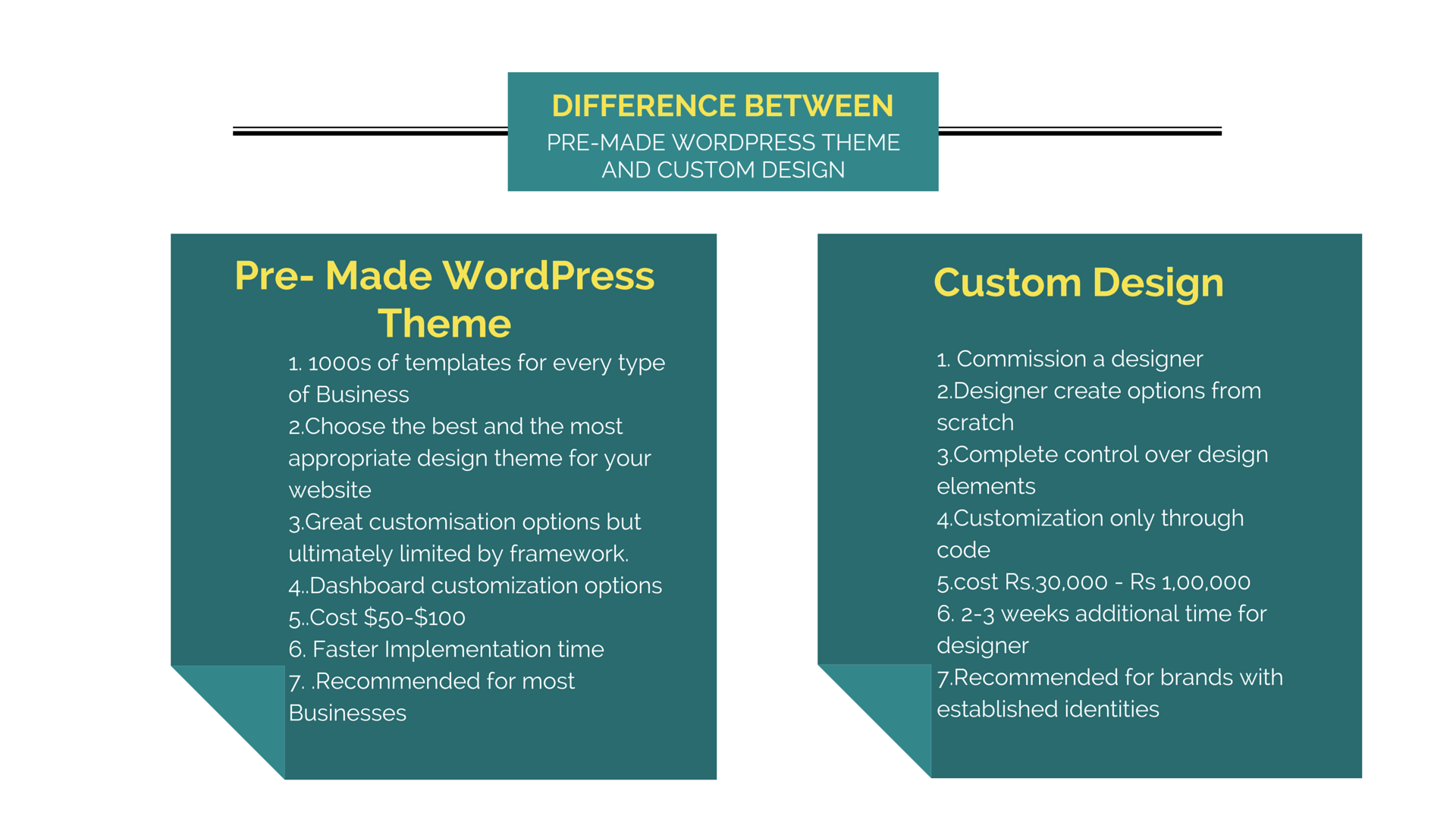
WordPress themes and templates differ in how they interact with plugins and systems. Themes offer full design elements for a website. They include colors, fonts, and layouts. Templates are specific page designs within a theme. They help create individual pages or posts. Compatibility is key when choosing between the two. Themes often need more updates to match new WordPress versions. Templates may work fine without frequent updates. Plugins might not work with some themes. Always check compatibility with your favorite plugins. Choose a theme compatible with the latest WordPress updates. Templates are usually less affected by updates, but checking is wise. Themes may offer more features but need careful checking for compatibility. Templates might offer less flexibility but are often easier to manage. Ensure your choice supports your website’s needs.
Credit: www.pixelmattic.com
Impact On Website Performance
Themes are like the big suit your website wears. They decide how your whole website looks. Templates are smaller outfits for one page only. Themes can slow down your website. They have lots of features. Many features can make it slow. Templates usually load faster. They are lighter and simpler. A slow website can make visitors leave. Speed is important. People like websites that load quickly. Choosing the right theme is important. Pick one that loads fast. Templates should be optimized too. A good balance keeps visitors happy and engaged. Fast loading keeps them coming back.
Choosing The Right Option
Themes are like clothes for your website. They control the overall look. This includes colors and fonts. Templates are like the pieces of a puzzle. They help in arranging content on a page. Picking the right one is important.
Themes offer a complete design. They change the whole site at once. Templates work on single pages. Change one page, not the whole site. This makes templates flexible.
Themes come with different designs. Choose one that fits your style. Templates help build pages. Use them to make each page special.
Both are needed for a great site. Themes give a base look. Templates make each page unique. Understand the difference to make the best choice.
Frequently Asked Questions
What Are WordPress Themes?
WordPress themes are collections of files that determine the design and functionality of your website. They include templates, stylesheets, and scripts. Themes control aspects like layout, color, and typography. They offer a comprehensive solution for website appearance and user experience.
How Do Templates Differ From Themes?
Templates are specific page layouts within a theme. They dictate the structure of individual pages. While themes cover the overall look of a site, templates focus on single-page design elements. Templates are part of the theme’s broader design system.
Can Themes Include Multiple Templates?
Yes, themes often include multiple templates to cater to different page needs. They offer flexibility for various content types. This allows for customized layouts for pages such as blogs, portfolios, or contact pages. Templates enhance a theme’s versatility.
Why Choose Themes Over Templates?
Choosing themes provides a complete design and functionality package. Themes offer consistency across the entire website. They simplify the process of maintaining a coherent look. Templates are useful for specific pages but lack the comprehensive features of themes.
Conclusion
Themes and templates both enhance your WordPress site. Themes change the entire look. They offer design layouts and styles. Templates customize specific pages or posts. They work within themes to tweak details. Understanding their roles helps you choose wisely. Themes provide a broad framework.
Templates offer precise control. Together, they create a cohesive website. Picking the right combination is key. It ensures your site looks great and functions well. Explore options to find what suits your needs best. With the right tools, your WordPress site can truly shine.



