
Have you ever found yourself tangled in the web of WordPress themes? If you’ve spent any time building or customizing your website, you’ve likely encountered the terms “WordPress Theme” and “Child Theme”.
At first glance, they might seem like tech jargon that only developers need to worry about. But understanding the difference between them is crucial for anyone looking to create a stunning, functional website. Imagine having the power to make your site look unique while also ensuring it’s secure and up-to-date.
Sounds appealing, right? You’ll discover what sets these two types of themes apart and why knowing this difference can be a game-changer for your website. Stick around, because unlocking this knowledge could save you time, money, and a lot of headaches in the future.
WordPress Theme Basics
A WordPress theme controls how your website looks. It provides the main design. Themes have built-in features. They help your site work better. Each theme offers different tools. Some themes are fast. Others might be slow. But all themes give your site a structure.
Themes come with design and layout features. They help your site look nice. You can choose colors and fonts. You can pick different layouts. Some themes have sliders. Others have galleries. You can even change the menu style. These features make your site unique.
Customization options let you change your site. You can add your logo. You can change the background. Some themes let you change more. You can add widgets. Widgets add special features. They make your site better. Customization makes your site yours.
Introduction To Child Themes
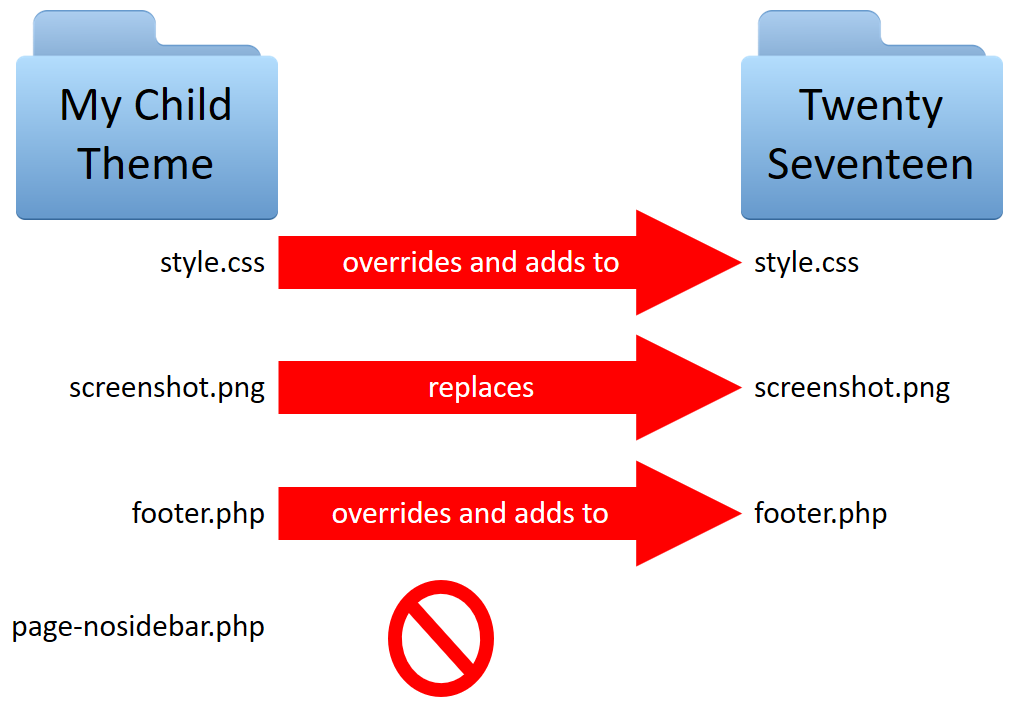
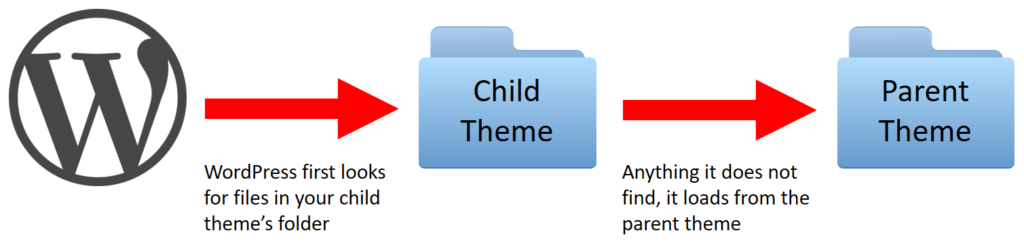
A child theme is a special theme in WordPress. It inherits all the features and styles of another theme. This other theme is called the parent theme.
Child themes help you make changes without touching the parent theme. This keeps your changes safe during updates. Updates can overwrite changes if not careful.
Child themes get all the functions and styles from the parent theme. You only need to change what you want to be different. This makes working with themes easier and faster.
Child themes offer great flexibility. They let you tweak only what you need. This adaptability helps in creating unique designs without losing the core features of the parent theme.
Key Differences
Distinguishing between a WordPress theme and a child theme is crucial for customization. A WordPress theme is a complete design package, while a child theme inherits its parent’s functionality, allowing tweaks without altering the core code. This ensures safe updates and personalized modifications.
Modification And Customization
WordPress themes change the look of your site. They offer designs and features. A child theme lets you tweak the parent theme. It helps keep changes safe. You can update the parent theme without losing edits. Child themes make custom work easy. They are great for minor adjustments. Use them to personalize your site. Keep your site looking fresh.
Updates And Maintenance
Themes need updates for security and new features. Child themes do not need frequent updates. They depend on the parent theme. Updating the parent theme is important. It keeps the site secure and fast. Maintenance is easy with child themes. They protect your custom work. Always check for updates. Keep your site running well.
Performance And Loading Times
Themes can affect site speed. Heavy themes slow loading times. Child themes do not add extra weight. They rely on the parent theme. A light parent theme boosts speed. Quick sites make users happy. Faster sites rank better on search engines. Child themes ensure performance stays optimal. Choose themes wisely for better speed.
Credit: learn.wordpress.org
Benefits Of Using Child Themes
A child theme keeps your changes safe. Updates won’t erase them. Your custom looks remain intact. This is a huge benefit for non-tech users. They can update without worries.
Child themes offer extra security. They separate your custom code from the main theme. This means fewer risks. Your site stays safer from unwanted changes.
Updates become easier with child themes. You can update the parent theme. Child themes ensure your changes stay. No need to redo edits. This saves time and effort.
Creating A Child Theme
WordPress themes define the overall look of a site. A child theme inherits its design but allows for safe customizations. This ensures updates to the parent theme won’t erase changes, maintaining a unique site appearance.
Setting Up The Directory
Start by creating a new folder. Name it after your desired child theme. This folder goes inside the wp-content/themes directory. Inside, create a file named style.css. This file holds the theme’s styles. Add a Theme Name, Template, and other details in the style.css.
Enqueuing Stylesheets
In the child theme folder, create a file called functions.php. Use this file to add or change features. To link the styles, use the wp_enqueue_style function. This links the parent theme’s styles to the child theme. Ensure the function is properly written. This step is crucial for appearance.
Modifying Functions And Templates
To change a function, copy it from the parent theme. Place it in the child theme’s functions.php. Modify it as needed. For template changes, copy the parent template file. Then, paste it into the child theme. Edit this copied file. This keeps the parent theme untouched. Always test your changes carefully.
Credit: www.hostitsmart.com
Common Misconceptions
Many think child themes always fit with parent themes. This is not true. Some parent themes don’t support child themes. Check compatibility before you choose. Parent themes often need updates. Child themes might break if parent themes change. This can be confusing. Always test changes on a backup site.
Child themes are often believed to slow websites down. They usually don’t. Child themes use parent theme code. So, they are fast like parent themes. Poor coding can make any theme slow. Good coding is important. Keep your site clean and tidy. Regular checks help find issues.
Some say child themes are hard to set up. They can be easy with guides. Basic coding skills help. Start small and learn. Many resources are online. You can find steps and tips. Practice makes it easier. Don’t fear mistakes. Learning is part of building websites.
Credit: www.codeable.io
Frequently Asked Questions
What Is A WordPress Theme?
A WordPress theme is a collection of files that define the visual appearance and layout of a WordPress site. It includes templates, stylesheets, and scripts. Themes allow users to customize the design of their site without altering the core WordPress software, enhancing user experience and functionality.
How Does A Child Theme Differ?
A child theme inherits the functionality of a parent theme but allows customization without changing the original theme files. This ensures updates to the parent theme don’t overwrite your changes. Child themes are ideal for users wanting specific design tweaks while maintaining the integrity of the parent theme.
Why Use A Child Theme?
Using a child theme is recommended for safe customization. It protects your changes during parent theme updates. This approach ensures your site’s design remains intact while benefiting from new features or security patches in the parent theme, offering a reliable and flexible design solution.
Can Themes Affect Website Performance?
Yes, themes impact website performance. Poorly coded themes can slow down loading times and affect user experience. Choosing a well-optimized theme enhances speed and SEO. It’s crucial to select themes with clean code and minimal bloat to ensure efficient site operation and improved search rankings.
Conclusion
Understanding the difference between WordPress themes and child themes is crucial. Themes define your website’s look and feel. Child themes let you customize without losing updates. Simple yet powerful. They preserve your hard work when themes update. Think of child themes as your safety net.
Perfect for tweaks and design changes. They offer flexibility. Freedom to experiment. Avoid starting from scratch. Ideal for non-tech users. Easy to manage. So, embrace child themes for a smoother WordPress experience. Keep your site fresh and secure.



