
Are you diving into the world of WordPress and feeling a bit overwhelmed by terms like “parent theme” and “child theme”? You’re not alone.
Many WordPress users find themselves puzzled by these concepts. Understanding the difference between parent and child themes is crucial for anyone looking to customize their WordPress site effectively. Imagine being able to tweak your website without fear of losing your changes every time your theme updates.
Intriguing, right? This article will unravel these terms and empower you with the knowledge to make the best choices for your site. Keep reading to discover how these themes can transform your WordPress experience.
Credit: www.hostitsmart.com
WordPress Themes Explained
Themes make your site look nice. They change colors, fonts, and layouts. A theme gives your website a unique style. Without a theme, your site looks plain. WordPress has many themes to choose from. Some themes are free, some cost money. Choose a theme that fits your needs. Themes help you attract visitors. A good theme keeps people interested. Your theme should be easy to use.
Customization makes your site stand out. Change colors to match your brand. Add a logo for a personal touch. Adjust layouts for a better user experience. Customization helps in making your site unique. Themes allow many changes. You can change fonts and add images. Custom themes can improve site speed. Faster sites keep visitors happy. Customization is a must for a unique site.
Parent Themes
Parent themes are the main design templates in WordPress. They give websites a basic look and function. Many websites use them to save time. They help developers with a ready-made structure. You can customize them, but changes might get lost in updates. So, they are great for starting a new site.
These themes often come with built-in features. They include sliders, menus, and widgets. Parent themes are usually fully responsive. This means they look good on phones and computers. They are often updated for security and bugs. These updates keep them working well.
| Theme Name | Description |
|---|---|
| Twenty Twenty-One | A simple and clean design. Perfect for blogs. |
| Astra | Fast and customizable. Good for all sites. |
| OceanWP | Feature-rich and flexible. Ideal for business sites. |
Child Themes
A child theme is a theme that inherits features from a parent theme. It allows you to change the design without losing the original settings. The main benefit is safety. You can update the parent theme without losing changes. Child themes also help in organizing custom code separately. This keeps your site clean and easy to manage. They are useful for beginners who want to customize their site. You can start small and learn as you go.
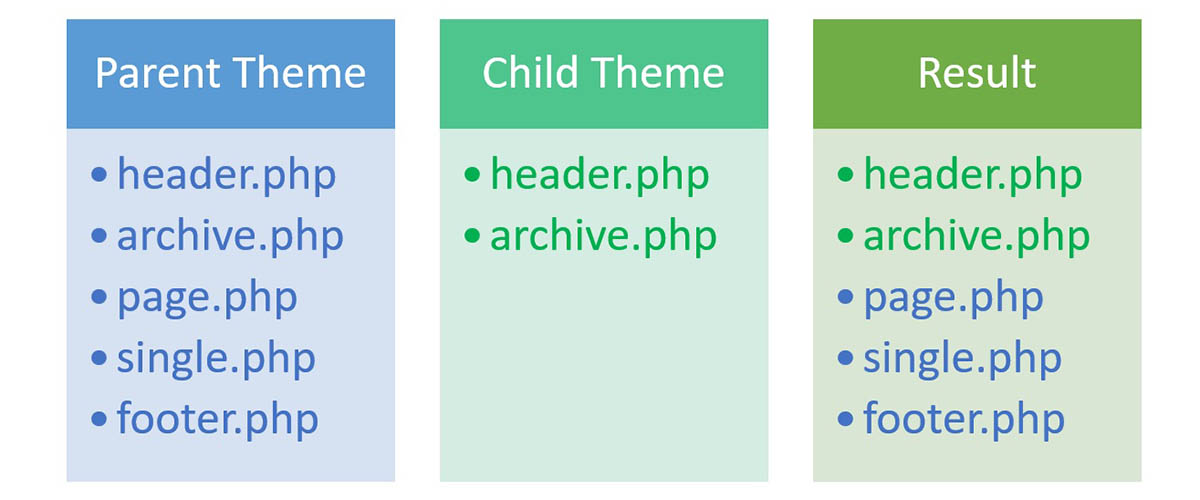
Child themes work by using two sets of files. The parent theme contains the main files. The child theme has its own files that override the parent theme’s files. This means you can make changes without affecting the original theme. When you activate the child theme, it uses both parent and child files. This keeps your site looking good and working well. It’s like having a backup plan for your design changes.
Many people use child themes for different reasons. They are great for testing new designs. If you want to try a new look, use a child theme. They are also helpful for adding custom features. You can add special code without touching the main theme. This is perfect for developers who need flexibility. Child themes are useful in creating unique layouts. You can design something new without losing old settings.
Differences Between Parent And Child Themes
Parent themes are like the main template. They hold all the basic design and code. Child themes rely on the parent. They make changes without touching the main code. This helps keep the main design safe. Changes in the child won’t affect the parent. You can update the parent without losing custom tweaks.
Child themes offer more customization options. You can add new features easily. Parent themes limit custom changes. They need more coding knowledge. With child themes, changes are simple. Just adjust the child, not the parent. This gives more freedom to design your site.
Using child themes can affect site speed. They may slow down the site a bit. Parent themes usually run faster. But, with proper tweaks, child themes work well. Keep the code clean. This helps maintain good performance. Always check speed after changes.
Creating A Child Theme
WordPress themes come in two types: Parent and Child. Parent themes provide the core design and functionality, while child themes allow customization without affecting the parent. Creating a child theme ensures safe updates, preserving modifications and custom designs. This separation protects your site from potential disruptions during updates.
Essential Files And Directories
The child theme needs a style.css file. This file tells WordPress about the theme. A functions.php file is also helpful. These files go in the child theme directory. This directory is inside the WordPress themes folder. Having these files makes the child theme work.
Modifying The Stylesheet
Start by copying the parent theme’s CSS. Add it to the child theme’s style.css. Make changes to this file. Use new styles to change the look. This keeps the original theme safe. Only the child theme shows these new styles.
Adding Custom Functions
Add new features with the functions.php file. Write code for special tasks here. This file is like a toolbox. It keeps the website’s functions organized. Adding custom code here is easy and safe.
When To Use A Child Theme
Child themes are great for small changes to your website. They let you change colors, fonts, and layout. Use them if you want to keep the original theme style. This way, you get updates without losing changes. Child themes are also useful for testing new features. You can try different layouts without affecting the main theme.
Never edit the parent theme files directly. Changes can be lost with updates. Always use a child theme for edits. This keeps your changes safe. Be careful with complex customizations. These can break the website. Test changes on a local server first. Check for any errors before going live.
Start with a simple child theme structure. Include style.css and functions.php. Use a clear naming convention. Name files and folders properly. Keep your code organized. Write comments to explain your code. This helps in future edits. Regularly update the parent theme. Ensure compatibility with the child theme.
Advantages Of Using Child Themes
Child themes help keep your customizations safe. If you update the parent theme, changes stay. Your unique design remains intact. This is very helpful for keeping your site’s look. No more worries about losing custom work.
Updating is easy with child themes. You can update the parent theme quickly. This does not affect the child theme. So, your custom features stay. Security and new features are easily added. This keeps your site up to date.
Developers find child themes very flexible. You can try new designs without fear. Change the layout or add features. Mistakes are easily fixed. This encourages learning and creativity. Developers can create unique site designs.
Credit: thimpress.com
Common Misconceptions
Many believe WordPress parent and child themes are the same. Parents provide the core design, while children modify without altering the original. This setup ensures updates don’t erase changes.
Myths About Parent Themes
People often think parent themes are hard to change. This is not true. Parent themes can be changed, but with care. They hold the main design and features. You must not change their core files. Many believe parent themes are not flexible. Again, this is a myth. With the right settings, they can be very flexible. Some worry about updates breaking parent themes. Updates are safe when done right.
Misunderstandings Regarding Child Themes
Many think child themes are just copies. This is false. Child themes hold changes and custom styles. They depend on parent themes for main design. Some say child themes are hard to make. In truth, they are easy with simple steps. People often think child themes slow websites. This is not correct. Child themes work fast when made properly. Others believe child themes are not needed. Yet, they are very useful. They protect changes during updates.

Credit: www.askdesign.biz
Frequently Asked Questions
What Is A WordPress Parent Theme?
A WordPress parent theme is the main theme that provides all functionality and styling. It acts as the foundation for your site. Developers use parent themes to build and customize websites. They offer essential features like layout, design, and code structure.
Why Use A Child Theme In WordPress?
A child theme allows customization without altering the parent theme’s code. It inherits features from the parent theme. Using a child theme helps maintain updates and compatibility. This ensures your changes remain intact even after parent theme updates.
How Do Parent And Child Themes Interact?
Parent themes provide core functionality, while child themes modify appearance or features. Child themes inherit parent theme files. Changes made in child themes override parent theme settings. This interaction ensures flexibility and easy customization.
Can Child Themes Affect Website Performance?
Child themes generally don’t affect performance negatively. They load after the parent theme, utilizing its resources. Properly coded child themes ensure optimized functionality. However, inefficient code in child themes can slow down your site.
Conclusion
Understanding WordPress parent and child themes is crucial. They offer flexibility. Parents provide the base structure. Child themes allow customization. This prevents future update issues. Choosing wisely can save time and effort. Beginners should start with a simple setup. Experimenting helps in learning.
Child themes are safe for changes. They ensure original designs stay intact. Dive in and explore the possibilities. WordPress themes can enhance your site. Make sure to back up your work. Enjoy the journey of creating and customizing!



