
Have you ever wondered why your WordPress dashboard has two different address settings? If you’re setting up a WordPress site, you might have come across the terms “WordPress Address” and “Site Address” and thought, “Aren’t they the same thing?”
It’s a common point of confusion, but understanding the difference is crucial for managing your site effectively. These settings play a significant role in how your website functions and appears to your audience. Grasping the distinction can impact your site’s performance, security, and user experience.
By the end of this article, you’ll have a clear understanding of these addresses and how to configure them properly. Let’s demystify these terms and ensure your WordPress site is set up just right!
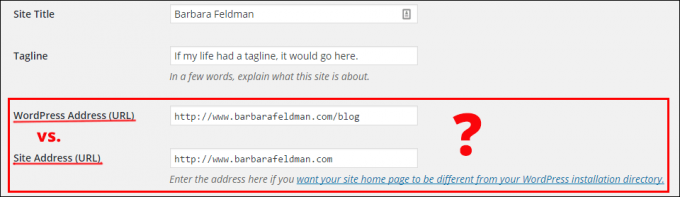
Credit: www.wordher.com
WordPress Address
The WordPress Address is where your WordPress files live. It’s the URL you see in the browser when you access the admin panel. This is very important for your website’s backend. It helps manage your website’s core settings and updates. People usually set it during installation. It’s crucial for keeping your website running smoothly.
The WordPress Address affects how your site functions. If it’s wrong, your site might not load. Changes to it can break links or images. Always ensure it points to the correct directory. It directly impacts admin access and updates. This is why it needs to be correct.
Some people change it for security reasons. Others use it for testing purposes. Developers may change it during staging. It’s also adjusted when moving a site. A wrong address can lead to errors. Always double-check it after making changes.
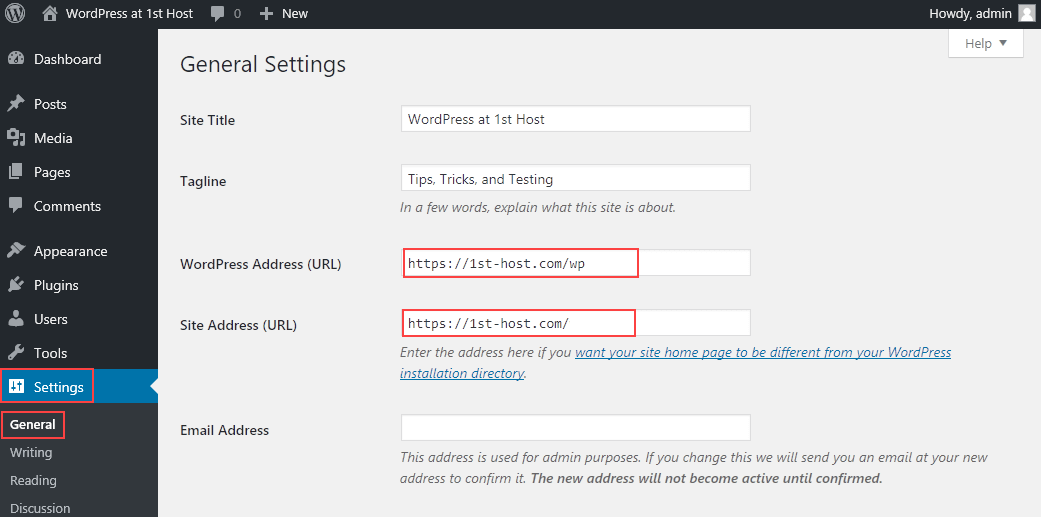
Credit: www.hostpapa.com
Site Address
The Site Address is the URL visitors see. It is the web address for your site. This is where your site’s content lives. It helps users find your site online.
A clear Site Address makes navigation easy. Users can remember it. A confusing address can cause frustration. It affects how users perceive your site. A good address improves trust. Users feel safe when the address is clear.
Businesses use the Site Address for their main site. Bloggers use it for their personal blogs. Online stores display it to sell products. Schools use it for educational purposes. Anyone who needs a website uses a site address. It is crucial for online presence.
Key Differences
The WordPress Address is where the WordPress files live. It is the place for your core files. The Site Address is where visitors find your site. It is the URL of your homepage. Both are URLs but serve different purposes. Changing them can break the site. Keep them correct and updated.
The WordPress Address manages the backend. It affects how the site works. The Site Address manages the frontend. It is how users see the site. Each plays a role in website management. Errors in these addresses can cause problems. They need careful management.
Both addresses affect SEO. The Site Address is more important. It influences search engine rankings. The WordPress Address has less impact. Correct setup is vital for good SEO. Mistakes can lower your ranking. Always check these settings for errors.
Common Misconceptions
Understanding WordPress Address vs Site Address can be confusing. WordPress Address refers to the URL where WordPress files are stored. Site Address is the URL visitors use to access your site.
Confusion Among Users
People often mix up the WordPress Address and Site Address. They sound similar but mean different things. The WordPress Address is where your files are. The Site Address is where visitors see your site. Changing one can break your site. It’s like moving your house without telling anyone. Always double-check before making changes.
Addressing Myths
Some think both addresses should always be the same. This is not true. They can be different for special setups. For example, you might want files in a subfolder. But users see the main URL. This setup helps keep things tidy. Always understand what each address does. This saves you from big problems.
Practical Implications
Understanding the difference between WordPress Address and Site Address is crucial for website functionality. WordPress Address is where your core files reside, while Site Address determines how users access your site. Proper configuration ensures seamless navigation and optimal user experience.
When To Change WordPress Address
Change the WordPress Address when you move your website to a new server. This helps your site find the right files. If your site’s URL changes, update it here. It keeps links working. Avoid broken links that can confuse visitors.
When To Change Site Address
Update the Site Address for a new domain name. It shows what users type in the browser. Make sure it matches your new domain. It helps visitors reach your site easily. Remember, the Site Address is for public view.
Potential Risks And Solutions
Changing addresses can break links or images. This might confuse users. To fix, always back up your site first. Use plugins to help with changes. They can update links safely. Always check the site after changes.
Tips For Managing Addresses
Always keep your WordPress Address and Site Address correct. This helps in avoiding login issues. Use a secure connection like HTTPS for safety. Regularly check your website’s links. This ensures they are working. Avoid using unnecessary plugins that change URLs. They can cause problems. Backup your site often. This keeps your data safe.
Use tools like WordPress Dashboard to change addresses. Online resources can guide you. Plugins like Better Search Replace help update links. Read guides from the official WordPress site. They offer useful tips. Forums and communities can provide support. They are great places to learn. Always stay updated with the latest WordPress news.
Check your settings if the site is not loading. Ensure both addresses are the same. Clear your browser cache often. This can fix loading issues. Look for errors in the WordPress Dashboard. Sometimes plugins can cause conflicts. Disable them one by one. Contact your hosting provider if the problem persists. They might have a solution. Always keep a backup before making changes.

Credit: www.greengeeks.com
Frequently Asked Questions
What Is The WordPress Address?
The WordPress Address is the URL where your WordPress files reside. It is crucial for accessing the WordPress admin area. This address points to the core WordPress installation files. Changing this URL can affect your website’s functionality and access, so handle it with care.
What Does Site Address Mean In WordPress?
The Site Address is the URL visitors use to access your website. It is the front-facing URL that displays your site content. This address is what users type in their browser to visit your homepage. Keeping it accurate ensures users reach your website without issues.
Can WordPress And Site Address Be Different?
Yes, WordPress and Site Address can be different. This setup is common when you want to have WordPress files in a subdirectory. It allows you to run WordPress from a different directory than the site’s homepage URL. This configuration needs careful setup to avoid errors.
How To Change WordPress Address And Site Address?
To change these addresses, go to Settings > General in your WordPress dashboard. Update the URLs in the WordPress Address (URL) and Site Address (URL) fields. Save changes carefully to avoid website access issues. Always back up your website before making changes.
Conclusion
Understanding WordPress and Site Address is key for setup. Each serves a unique purpose. WordPress Address helps access files. Site Address directs visitors to your site. Both need correct setting. Incorrect URLs can cause issues. Proper configuration ensures smooth operation.
Users find your site easily. Makes online presence strong. Always double-check settings for accuracy. This prevents potential problems. Knowing the difference aids in effective management. Boosts user experience and site functionality. Essentials for any WordPress user. Keep these tips handy for seamless site management.



