
Have you ever found yourself puzzled by the terms “Private” and “Draft” while working on your WordPress blog? You’re not alone.
These two options might seem similar at first glance, but they serve very different purposes. Understanding the distinction can be crucial for managing your content effectively. Imagine the difference between a secret diary and a rough sketch. Wouldn’t you want to know which one keeps your readers at bay and which one just needs a little more polish before going live?
Read on to unlock the secrets of these two vital WordPress settings, and discover how they can transform the way you manage your blog.
Private Posts
Private posts are only for certain people. The public cannot see them. Users need special permissions. These permissions are set by the site owner. Only selected users can view private posts. This keeps sensitive information safe. It’s like a secret club. Only members know about it.
Only users with editor or administrator roles can access private posts. These users have special rights. They can edit and manage content. Regular users cannot see these posts. They do not have the needed access. This limits who can view and change private content.
Private posts are useful for team collaboration. They help share updates with specific people. Businesses use them for internal communication. Sometimes, schools use them for teacher notes. They are perfect for sensitive information sharing. Only the right eyes can see the content.

Credit: publishpress.com
Draft Posts
Drafts are for ongoing work. You can make changes anytime. Writers use drafts to improve their content. They can update it often. Revisions help make the post better. Adding new ideas is easy. Keeping a post in draft lets you think more. It is a safe space to experiment. Mistakes can be fixed without stress.
A draft is not visible to others. Only you can see it. The post is not live yet. This gives time to perfect your writing. No one reads it till you publish. It is like a secret note. You have control over the timing. There’s no pressure to rush.
Use drafts for ideas not ready to share. Start a draft when you have new topics. It’s good for collecting thoughts. Save drafts when you need feedback. They help organize your writing. Use drafts to plan your content. They are helpful for long-term projects.
Comparison Of Private And Draft
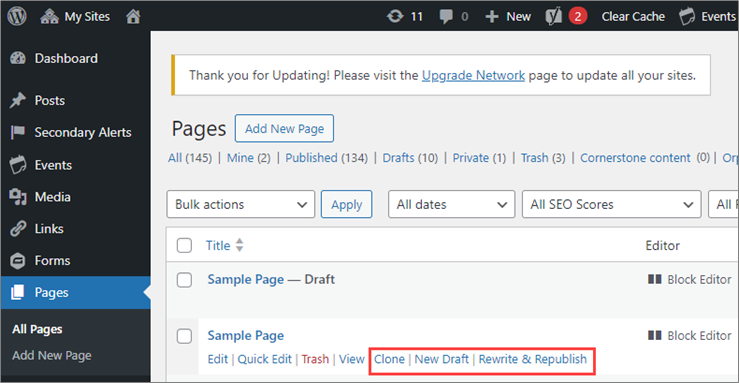
Private posts are only visible to admins and editors. Drafts are not published yet, and no one can see them. Private posts have a lock symbol. Drafts have a pencil symbol. Private posts can be shared with specific users. Drafts are kept hidden until published. Use private posts for sensitive content. Use drafts for work in progress.
Private posts need login to view. Drafts need editing before publishing. Private posts are published but hidden. Drafts are not published yet. Private posts have restricted access. Drafts await approval. Private posts can be unmarked to become public. Drafts need to be finalized before publishing.
Use private for team updates. Use drafts for unfinished ideas. Private is good for internal communication. Drafts help in brainstorming. Private is secure for sensitive topics. Drafts are flexible for edits. Private posts protect privacy. Drafts allow creativity.
Credit: www.boisestate.edu
Managing Content Privacy
WordPress has different user roles. Each role has its own permissions. Admins can do everything. Editors manage content. Authors write posts. Contributors can submit posts but not publish them. Subscribers only read content.
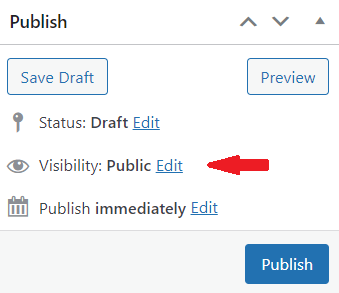
Drafts are not public. They are for your eyes only. Use drafts to edit before publishing. Private posts are live but hidden from public. Only users with the right role can see them. Choose wisely between draft and private for your content. This can impact your site’s privacy strategy.
Common Misconceptions
Many people mix up private and password protected posts. A private post is only seen by users with the right permission. They must log in to view it. Password protected posts need a password. Anyone with the password can see them.
So, private posts are for your eyes only or trusted users. Password protected posts can be shared with others. This means both have different uses. Know your need before choosing.
A draft is a work in progress. You can save it and come back later. It is not public until published. A scheduled post is ready to go live on a set date. You choose the time and date.
Drafts are perfect for ongoing work. Scheduled posts are good for planned releases. This way, you can manage your content easily. Always remember, drafts are hidden until ready. Scheduled posts work on your time.
Credit: passwordprotectwp.com
Best Practices
WordPress offers two post statuses: Private and Draft. Private posts are visible only to logged-in users with the correct permissions. Drafts, on the other hand, are incomplete posts saved for future editing and not visible to any site visitors.
Choosing Between Private And Draft
Private posts are hidden from public view. Only selected people can see them. Use private for sensitive content. This keeps important information safe.
Draft posts are not published yet. They are for editing and review. Drafts are great for unfinished work. You can save ideas without sharing them.
Choose private if you need privacy. Pick draft for editing. Each option serves a unique purpose. Select based on your content needs.
Ensuring Content Security
Content security is vital. Keep private posts secure. Limit access to trusted users. Use strong passwords. Protect your site from hacking.
Drafts are not visible to the public. They are safe from unwanted eyes. Keep drafts until ready to publish. This ensures content quality.
Security measures ensure privacy. Protect your content from threats. This keeps your site safe and reliable.
Frequently Asked Questions
What Does “private” Mean In WordPress?
In WordPress, “Private” content is visible only to the site administrators and editors. It ensures that sensitive information is not accessible to public viewers or search engines. This feature is useful for internal posts or drafts that need review before publication.
How Does “draft” Work In WordPress?
A “Draft” in WordPress is an unpublished post that is still in progress. It allows authors to save their work without making it public. Drafts can be edited and previewed anytime, making it easier to refine content before publishing.
Can Search Engines See Private Posts?
No, search engines cannot index or access Private posts in WordPress. These posts are restricted to site administrators and editors only. This ensures that sensitive or unfinished content remains hidden from public view and search engine crawlers.
Are Drafts Visible To Site Visitors?
Drafts are not visible to site visitors in WordPress. They are saved for authors to continue editing before publishing. Only users with proper permissions can view and edit draft posts, ensuring content is refined before going live.
Conclusion
Choosing between private and draft posts in WordPress is crucial. Private posts hide content from public view. Only selected users can see them. Draft posts are unfinished and not published yet. They allow editing before going live. Both options enhance content control.
Consider your needs when deciding. Private posts protect sensitive information. Drafts help refine your writing. Understanding these features empowers effective content management. Use them wisely for your blog’s success. Keep your audience engaged and informed. Happy blogging!



