
Are you tired of spending hours trying to style your WordPress posts and still not getting the look you want? You’re not alone.
Finding the right CSS class for all posts in WordPress can feel like searching for a needle in a haystack. But what if I told you that mastering this one simple thing could transform your blog’s appearance and boost reader engagement?
Imagine the satisfaction of crafting a visually appealing site that keeps visitors coming back for more. We’ll uncover the CSS class that can streamline your design process and empower you to create a cohesive, professional look across all your posts. Ready to take control of your WordPress styling game? Let’s dive in and unlock the secrets to a polished, attractive blog.
WordPress Css Basics
CSS classes are like tags for HTML. They help style the webpage. Each class has a name. This name starts with a dot. For example, .post can be a class name. In WordPress, you can use many classes. They change how parts of your page look.
Using classes, you can make text bold or change colors. You can even change the size of pictures. Each WordPress theme has its own set of classes. These classes help define the appearance and layout of posts. They are very important in designing a website.
CSS makes your WordPress theme look nice. It helps create a unique style. You can choose colors, fonts, and layouts with CSS. It makes your site stand out. CSS controls how your site looks on different devices. This includes phones and tablets. Without CSS, websites would look plain and boring.
Themes use CSS to make the site user-friendly. A well-designed theme attracts more visitors. Remember, CSS is key for customizing themes. It gives life to a WordPress site.
Credit: wcanvas.com
Identifying Post Css Classes
WordPress assigns default CSS classes to each post. These classes help in styling. The common class is post. Another class used is hentry. It stands for HTML entry. Each post also gets a unique class. This class is like post-123. It uses the post’s ID number. Using these classes, you can style posts easily. Make your posts look special with CSS.
Themes can add their own custom classes. These classes help in unique styling. They offer more control over design. Check your theme files. You might see classes like custom-post. Some themes allow adding classes in settings. This makes the design process simple. Using custom classes, change how posts look. Match them with your site’s style.
Locating Css Classes In WordPress
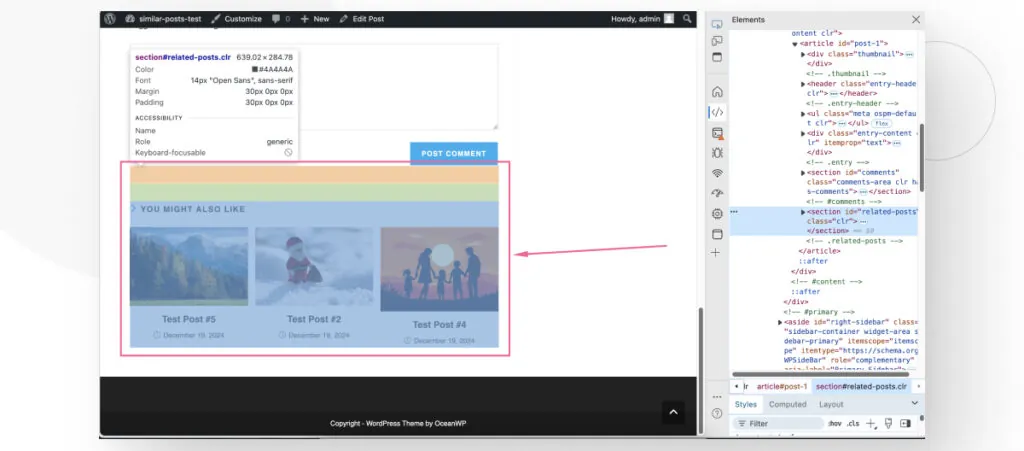
Browser tools help find CSS classes fast. Open the site in your browser. Right-click on any post. Select Inspect or Inspect Element. A new panel shows up. It reveals HTML and CSS code. Look for the class attribute. It shows the CSS class names. Scroll through the HTML tree. Spot the post container. Check its CSS classes. Note them down.
Every WordPress theme has style sheets. They contain CSS rules. Find them in the theme folder. Look for files ending in .css. Open these files in a text editor. Search for post-related classes. Use Ctrl + F to search. Look for keywords like post or entry. Read the rules. They define how posts look. Identify the main CSS class for posts.
Modifying Post Css Classes
Custom CSS can change the look of your WordPress site. Each post has a unique CSS class. This helps you style your posts differently. To add new styles, open your WordPress dashboard. Go to the Appearance tab. Click on Customize. Here, you will find an option for Additional CSS. You can type your CSS code here. It will change how posts appear. Make sure to save your changes. This way, your posts will look the way you want.
Utilizing Child Themes For Css Changes
Child themes are great for making CSS changes. They help you keep your changes when the theme updates. First, create a child theme folder. Add a style.css file inside. Write your CSS code in this file. Link the child theme to the main theme. This way, your changes will show on the site. Your posts will have the new styles you added. Always test your site after making changes.
Common Css Customizations For Posts
CSS helps make post titles look nice. Titles can be bold or colorful. You can also change the font size. This makes titles stand out. Content can have margins and padding. It creates space around text. Line height can be adjusted to make text easy to read. Colors can match your theme. You can use many styles. They help your posts look great.
Layouts help organize how posts appear. Use CSS to change the width of posts. This makes them fit better on the page. Align text to the left, right, or center. You can also change the background color. This helps posts look different from the rest of the page. Add borders for a neat look. Spacing between posts can be adjusted too. All these changes make your blog easy to read.
Credit: www.wpbeginner.com
Troubleshooting Css Issues
Discovering the CSS class for all posts in WordPress helps in customizing design. The common class often used is `. post`. This class allows you to apply uniform styles to all posts, ensuring a consistent look across your site.
Common Problems With Css In WordPress
Many people face CSS problems in WordPress. Styles might not show up. Sometimes, styles clash. The site looks strange. One reason is caching. Old styles stay in the cache. They do not update. Another reason is plugin conflicts. Some plugins change styles. They overwrite your CSS. Incorrect CSS selectors can cause issues. If the selector is wrong, styles will not apply. Also, themes may have built-in styles. They can be hard to change. Check for missing files. Sometimes, CSS files don’t load. This makes styles disappear.
Tools For Debugging Css
There are tools to fix CSS problems. The browser inspector is useful. You can see styles in action. It shows how CSS affects elements. Check the console for errors. It lists what went wrong. Online validators help too. They check for mistakes in your code. Stylelint is another tool. It finds bad code and suggests fixes. Use a CSS optimizer. It cleans your code. It removes useless parts. This makes your CSS work better.
Credit: www.wonderplugin.com
Frequently Asked Questions
What Is A Css Class In WordPress?
A CSS class in WordPress is used to style elements. It allows you to apply specific styles to content globally or individually. You can add or modify CSS classes to customize your site’s appearance. This helps in maintaining consistency and enhances the visual appeal across all posts.
How To Find Css Class For Posts?
To find the CSS class for posts, inspect the page using browser tools. Right-click on a post and select ‘Inspect’. Look for classes under HTML tags. Commonly, WordPress uses classes like `. post` or `. entry`. These classes can be customized in your theme’s stylesheet.
Can Css Class Affect Seo In WordPress?
Yes, CSS classes can indirectly affect SEO. Proper styling enhances user experience, which can lead to better engagement. Fast loading and mobile-friendly design are crucial. While CSS doesn’t directly impact SEO, it contributes to overall site performance, indirectly influencing rankings.
How To Add Custom Css In WordPress?
You can add custom CSS in WordPress through the Customizer. Navigate to Appearance > Customize > Additional CSS. Here, you can input your custom styles. Alternatively, use a child theme or plugins for more complex CSS modifications, ensuring your site remains visually appealing.
Conclusion
Finding the right CSS class for WordPress posts simplifies design. It helps maintain a consistent look across your site. You gain control over styling without complex coding. This enhances user experience and keeps your site appealing. Always test changes to ensure compatibility.
A little effort in CSS can make your site more professional. Remember to keep experimenting with styles. The right CSS class can improve your site’s functionality and appearance. This boosts user engagement and satisfaction. Keep learning and adapting for better results.
Your WordPress site deserves the best look.



